WhatsApp Business API for WooCommerce: What Store Owners Should Know
TL;DRWhatsApp Business API for WooCommerce can help a store send abandoned cart reminders, order updates, COD confirmations, review requests, and repeat-purchase messages. The important question is not whether WooCommerce can connect to WhatsApp. It can. The harder question is whether the setup gives your team reliable ecommerce workflows without creating another fragile plugin stack to maintain.
WooCommerce gives merchants a lot of control. That flexibility is useful, but it also means WhatsApp automation can depend on the checkout plugin, payment gateway, fulfillment plugin, abandoned cart plugin, consent setup, and hosting environment all behaving correctly together.
This guide explains what WooCommerce store owners should check before using the WhatsApp Business API, which workflows are worth launching first, and when a Shopify-first retention app such as Retentionly may be a cleaner path for stores that are already planning a platform move.
What WhatsApp Business API Means For WooCommerce
WhatsApp Business API usually refers to Meta's WhatsApp Business Platform. It lets a business send and receive WhatsApp messages through approved software, templates, webhooks, automations, and integrations. It is different from the free WhatsApp Business app, which is mostly for manual conversations.
For WooCommerce, the API becomes useful when messages are tied to store events.
| Store event | Useful WhatsApp job | Why it matters |
|---|---|---|
| Cart or checkout abandoned | Remind the shopper and send a return link | Recovers high-intent revenue |
| New COD order | Ask the buyer to confirm before fulfillment | Reduces fake orders and RTO risk |
| Order status changed | Send order, shipping, or delivery updates | Reduces "where is my order" questions |
| Delivery completed | Request a review after the customer has the product | Improves review collection timing |
| Customer inactive | Send a winback or reorder message | Creates repeat-purchase opportunities |
| Product interest or waitlist | Send back-in-stock or price-drop alerts | Converts existing demand |
The API is the messaging foundation. The ecommerce value comes from trigger quality, consent, template design, timing, stop rules, reply handling, and reporting.
WooCommerce Adds Flexibility And Operational Risk
WooCommerce is not one fixed commerce system. One store may use standard WooCommerce checkout, another may use a custom checkout builder, another may use a separate abandoned cart plugin, another may rely on a third-party shipping plugin, and another may have custom order statuses.
That matters because WhatsApp automation depends on event accuracy.
| WooCommerce layer | WhatsApp risk to check |
|---|---|
| Checkout plugin | Does the integration capture abandoned carts or only completed orders? |
| Payment gateway | Are pending, failed, COD, prepaid, refunded, and canceled states clearly separated? |
| Shipping plugin | Are tracking numbers and fulfillment updates available when the message sends? |
| Consent fields | Is WhatsApp opt-in captured separately from a phone number? |
| Customer account data | Are phone numbers stored in a consistent international format? |
| Hosting and cron | Are scheduled reminders delayed, duplicated, or missed under load? |
| Plugin updates | Could a WooCommerce, WordPress, or messaging-plugin update break the flow? |
This does not mean WooCommerce cannot support WhatsApp automation. It means the owner should test the real store journey instead of trusting a generic "integration available" claim.
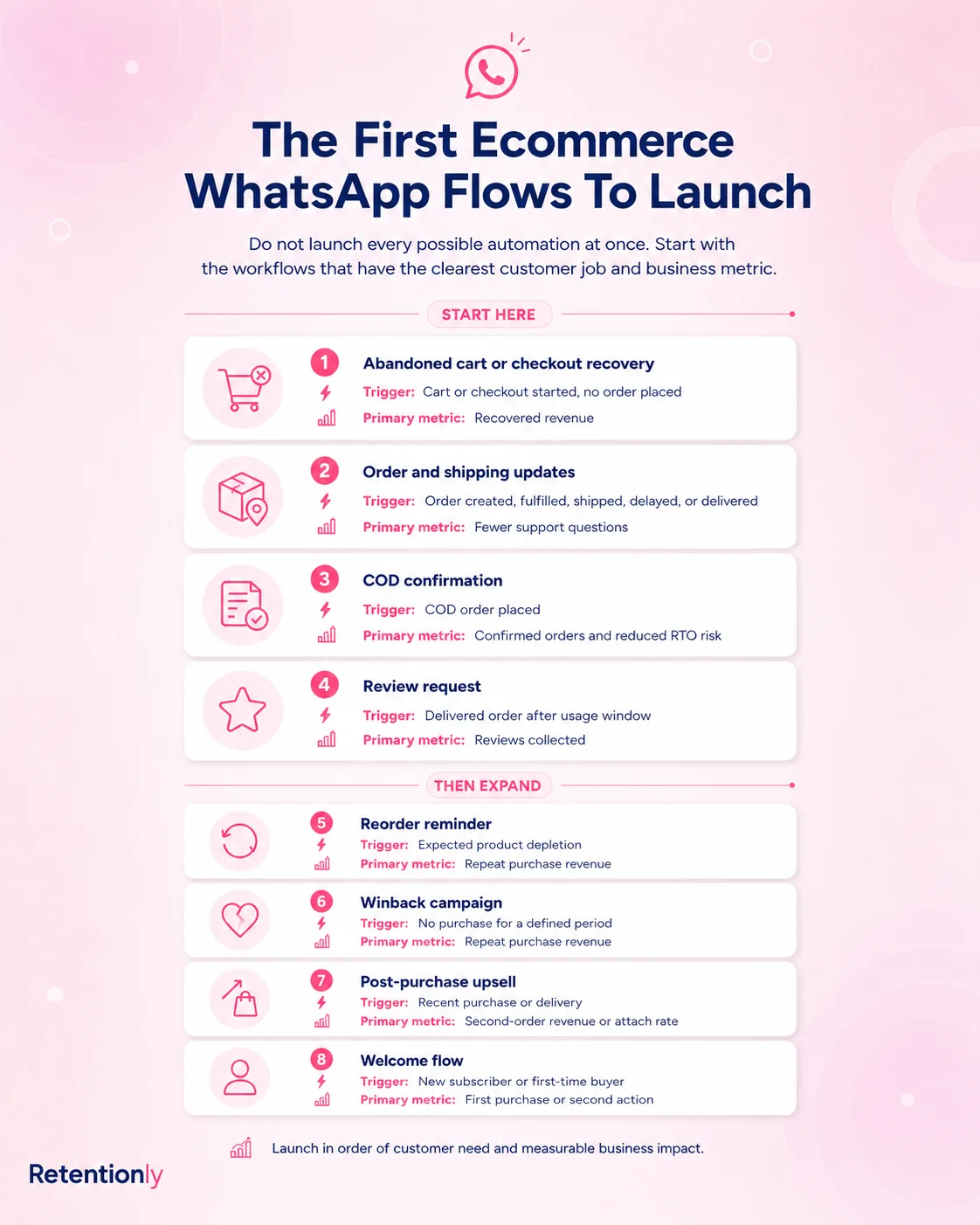
The Best WooCommerce WhatsApp Workflows To Start With
Do not start with broad broadcasts. Start with workflows where the customer understands why the message arrived.
| Priority | Workflow | Trigger | Primary metric |
|---|---|---|---|
| 1 | Abandoned cart or checkout recovery | Cart or checkout remains incomplete | Recovered revenue |
| 2 | COD confirmation | New cash-on-delivery order | Confirmed orders and reduced RTO |
| 3 | Order and shipping updates | Order status or shipment changes | Fewer support questions |
| 4 | Review request | Delivery completed plus waiting period | Review clicks and completed reviews |
| 5 | Reorder reminder | Product-specific repeat window | Repeat purchase rate |
| 6 | Winback campaign | Customer inactive beyond normal cycle | Reactivation revenue |
| 7 | Back-in-stock or price-drop alert | Customer subscribed to product alert | Conversion from interested shoppers |
These flows are easier to defend than generic WhatsApp blasts because they start from ecommerce behavior. The customer did something, the store has context, and the team can measure the result.
Abandoned Cart And Checkout Recovery
WooCommerce abandoned cart recovery can be powerful, but it has one common trap: the store may not capture enough usable data before the shopper leaves.
Before launching the WhatsApp flow, confirm:
When the cart or checkout is considered abandoned.
Whether the phone number is captured before abandonment.
Whether the shopper gave WhatsApp consent or only typed a checkout phone number.
Whether the return link restores the cart reliably.
Whether completed purchases remove the customer from the reminder sequence.
Whether discount logic is intentional instead of automatic.
| Flow element | Practical WooCommerce check |
|---|---|
| Trigger | Cart or checkout inactive after a chosen delay |
| Audience | Valid phone number plus relevant WhatsApp opt-in |
| Message | Saved cart reminder, product context, and return link |
| Stop rule | Stop after purchase, opt-out, reply, invalid link, or final reminder |
| Metric | Recovered revenue, click rate, conversion rate, opt-out rate |
Keep the first message helpful. A simple reminder with the saved cart link is often a cleaner first test than a discount-heavy message to every shopper.
For a broader ecommerce view of cart recovery, read the Abandoned Cart WhatsApp guide.
COD Confirmation For WooCommerce Orders
COD confirmation is one of the strongest WhatsApp use cases for stores that accept cash on delivery. The message is operational, timely, and easy for the customer to understand.
A good COD flow should:
Trigger only when the payment method is cash on delivery.
Send immediately after the order is placed.
Ask the customer to confirm, cancel, or request help.
Mark confirmed orders clearly for fulfillment.
Hold or review no-response orders before dispatch.
Stop any later confirmation reminders after the customer responds.
Do not mix COD confirmation with promotional offers. If the message's job is to verify order intent, keep it focused on that job.
| Metric | Why to track it |
|---|---|
| Confirmation rate | Shows how many COD orders are safe to move forward |
| Cancellation rate | Identifies orders that should not consume fulfillment cost |
| No-response rate | Helps set manual review rules |
| RTO rate after launch | Shows whether the flow protects margin |
WooCommerce stores should test this against real order statuses. If "pending payment," "processing," "on hold," "failed," and "canceled" are not handled correctly, the WhatsApp flow can create fulfillment confusion.
Order Updates And Shipping Notifications
Order updates are usually safer than promotions because customers expect them. They can also reduce repetitive support questions when the message has useful information.
Useful WooCommerce WhatsApp order updates include:
Order confirmation.
Payment confirmation when relevant.
Shipment dispatched.
Tracking link available.
Delivery delay.
Out for delivery.
Delivered.
The mistake is sending every status change. Customers need clarity, not noise.
| Message | Send when | Avoid |
|---|---|---|
| Order confirmation | The order is accepted and the status is reliable | Sending before payment state is clear |
| Shipping update | Tracking data is available | Sending a blank or broken tracking link |
| Delay notice | Delivery timing changes materially | Hiding the delay inside promotional copy |
| Delivery follow-up | Delivery is confirmed | Asking for reviews before product arrival |
If your store uses a shipping plugin, test the exact field that will appear in the template. A tracking URL that works in the admin screen may not be available to the WhatsApp integration at the moment the message sends.
Review Requests, Reorders, And Winback
Once operational flows are reliable, WooCommerce teams can expand into retention.
Review requests should wait until after delivery and should exclude refunds, failed deliveries, and active support issues. A customer who has not received the product should not be asked to review it.
Reorder reminders work best when the product has a predictable use cycle. Supplements, skincare, food, pet supplies, filters, personal care, and household consumables are better fits than one-time gift purchases.
Winback messages should be segmented by purchase history and inactivity timing. A lapsed VIP customer deserves a different message than a one-time discount buyer.
| Retention flow | Better trigger | Weak trigger |
|---|---|---|
| Review request | Delivered order plus product-use delay | Order created date only |
| Reorder reminder | Product-specific replenishment window | Same monthly blast to everyone |
| Winback | Customer inactive beyond normal repeat cycle | Every non-buyer from the last campaign |
| Upsell | Recent order plus relevant add-on | Generic "buy more" message |
Retention messages work because they are contextual. If they become generic broadcasts, the channel loses trust quickly.
Templates, Categories, And Consent
Many business-initiated WhatsApp API messages require approved templates. Ecommerce teams should design templates by job, not by generic campaign theme.
| Message job | Template thinking |
|---|---|
| Order confirmation, shipping update, delivery update | Keep it transactional and non-promotional |
| Abandoned cart, winback, product launch, back-in-stock, price drop | Treat it as marketing or revenue-driving intent |
| OTP or login verification | Keep it authentication-only |
| Reply to a customer who just messaged | Route the conversation inside the service window when available |
Do not hide a coupon inside an order update template and assume it will still behave like a clean utility message. Mixed-purpose copy creates approval, compliance, and customer-trust problems.
Consent also needs care. A phone number in WooCommerce checkout is not always permission for promotional WhatsApp messages. Use clear opt-in language for marketing, honor opt-outs, and suppress customers when the message no longer makes sense.
Build these suppression rules before increasing volume:
Stop abandoned cart reminders after purchase.
Stop COD confirmation after confirm, cancel, or manual review.
Stop marketing after opt-out.
Stop retention messages after refund, cancellation, or active support escalation.
Stop review requests when delivery failed or the issue is unresolved.
Frequency-cap promotional messages.
For template strategy, read WhatsApp Business API Templates Shopify Stores Should Start With. The examples are Shopify-oriented, but the template discipline applies to WooCommerce too.
Setup Paths For WooCommerce
There are four common ways WooCommerce stores approach WhatsApp Business API.
| Setup path | Best fit | Tradeoff |
|---|---|---|
| WooCommerce WhatsApp plugin | Store wants quick notifications or basic recovery flows | Quality depends on plugin depth, event coverage, and maintenance |
| Broad WhatsApp platform | Team needs inbox, support, campaigns, bots, and WhatsApp operations | Broader setup can add complexity and extra operating process |
| Direct Cloud API build | Engineering team wants full custom control | You own templates, webhooks, retries, security, hosting, and reporting |
| Platform migration plus Shopify app | Store is moving to Shopify and wants retention flows live faster | Requires commerce-platform decision, not just messaging setup |
The right path depends on what problem you are solving. A basic plugin may be enough for order notifications. A broader WhatsApp platform may be better for support-heavy teams. A direct API build may fit if WhatsApp is part of custom infrastructure.
If the main problem is ecommerce retention automation and the store is already considering Shopify, a Shopify-first app can remove a lot of plugin-layer uncertainty.
WooCommerce Plugin Evaluation Checklist
Before installing a WooCommerce WhatsApp plugin or connecting a platform, ask sharper questions than "Does it support WooCommerce?"
| Question | Why it matters |
|---|---|
| Which WooCommerce events trigger messages? | Abandoned cart, order created, status changed, fulfilled, delivered, refunded, and canceled are different events |
| Does it support official WhatsApp Business API templates? | Business-initiated messages need approved template handling |
| How does it capture WhatsApp consent? | Checkout phone numbers and marketing opt-ins are not the same thing |
| Can it restore abandoned carts reliably? | Recovery messages need a working return path |
| Does it stop messages after purchase or opt-out? | Prevents embarrassing duplicate sends |
| Can it map custom order statuses? | Many WooCommerce stores use non-standard fulfillment flows |
| Where do replies go? | Automation creates conversations that someone must own |
| What happens during plugin updates? | WordPress, WooCommerce, checkout, and messaging plugin changes can affect the flow |
| Can reporting connect to order revenue? | Delivery reports alone do not prove business impact |
| Are Meta message fees passed through or marked up? | Messaging economics change as volume grows |
Run this checklist on a staging store and one controlled live order before sending to customers.
When Shopify-First Retention Automation Is The Cleaner Path
This post is written for WooCommerce search intent, so the honest answer is not "install a Shopify app today." A WooCommerce store should use a WooCommerce-compatible setup when the store is staying on WooCommerce and the required workflows are covered reliably.
But some stores search for WooCommerce WhatsApp API guidance because they are already feeling the friction of a plugin-heavy commerce stack. If that is your situation, it is worth separating the messaging decision from the platform decision.
Shopify-first retention automation is usually cleaner when:
The business is already moving from WooCommerce to Shopify.
The team wants store-event automations without maintaining WordPress plugin dependencies.
Abandoned checkout, COD confirmation, order updates, reviews, winback, reorders, and upsells are the main jobs.
Revenue reporting and workflow ownership matter more than broad custom API control.
The team wants marketers and operators to manage flows instead of developers.
Retentionly is built for Shopify and D2C teams that want WhatsApp automation tied to revenue and retention workflows. It is not a WooCommerce plugin. It fits when the store is on Shopify, migrating to Shopify, or comparing whether a Shopify-first automation layer is simpler than maintaining custom WooCommerce messaging logic.
A Practical Launch Plan
Use this 30-day plan to avoid overbuilding.
| Week | Focus | Output |
|---|---|---|
| 1 | Setup readiness | Business account path, sender number, plugin or platform choice, first workflow selected |
| 2 | First workflow | Template approved, consent field checked, trigger and stop rule configured |
| 3 | Controlled launch | Test customers or small segment receives messages; replies are monitored |
| 4 | Review and expand | Revenue, replies, opt-outs, failures, and support impact are reviewed before adding the next flow |
Start with one revenue or operational workflow. Abandoned cart recovery is usually the best first revenue test. COD confirmation is best when fulfillment waste is a bigger problem. Order updates are best when support tickets are the pain.
Common Mistakes To Avoid
The first mistake is choosing a plugin only because it says "WhatsApp" and "WooCommerce." You need event coverage, template control, consent handling, stop rules, reply routing, and revenue reporting.
The second mistake is treating every phone number as WhatsApp marketing consent. Operational updates and promotional messages carry different customer expectations.
The third mistake is sending messages from unreliable store states. If order statuses, tracking links, and cart recovery links are inconsistent, WhatsApp will expose the problem directly to customers.
The fourth mistake is copying email campaigns into WhatsApp. WhatsApp should be shorter, more contextual, and more selective.
The fifth mistake is delaying the platform question. If WooCommerce maintenance is already blocking retention work, solving WhatsApp alone may not fix the operating issue.
Final Recommendation
Use WhatsApp Business API for WooCommerce when your store has clear ecommerce workflows that are worth automating and your WooCommerce stack can trigger those messages reliably.
Start with abandoned cart recovery, COD confirmation, or order updates. Test the exact event, template, link, reply path, stop rule, and metric before scaling. Expand into reviews, reorders, winback, and upsells only after the operational basics work.
If your store is staying on WooCommerce, choose a WooCommerce-compatible plugin, platform, or custom setup that can handle those details. If your team is moving to Shopify or wants a cleaner retention automation layer around store events, install Retentionly free on Shopify and use WhatsApp for the workflows that drive recovered revenue and repeat purchases.
Quick FAQs
Can WooCommerce use WhatsApp Business API?
Yes. WooCommerce stores can use WhatsApp Business API through plugins, business messaging platforms, or custom Cloud API integrations. The important check is whether the setup supports the exact store events, templates, consent rules, stop rules, replies, and reporting your workflow needs.
What is the best first WhatsApp API workflow for WooCommerce?
Abandoned cart or checkout recovery is often the best first revenue workflow. COD confirmation is better when fake orders and RTO are the bigger problem. Order updates are better when support questions are the main pain.
Do I need a developer to connect WhatsApp Business API to WooCommerce?
Not always. A plugin or WhatsApp platform can handle much of the setup. A developer is usually needed when the store has custom checkout logic, custom order statuses, unusual fulfillment rules, direct Cloud API infrastructure, or deeper reporting requirements.
Is Retentionly a WooCommerce WhatsApp plugin?
No. Retentionly is built for Shopify and D2C WhatsApp retention automation. It is relevant to WooCommerce store owners who are comparing platform paths, migrating to Shopify, or deciding whether Shopify-first retention workflows would be simpler than maintaining WooCommerce messaging plugins.
Are WooCommerce order updates utility messages?
Strict order, shipping, and delivery updates are usually treated as transactional or utility-style messages when they are non-promotional and tied to a customer action. If you add coupons, launches, or upsells, the message may become marketing in purpose.
What should I test before sending WooCommerce WhatsApp messages to customers?
Test one complete journey: trigger, customer eligibility, template variables, link, timing, reply route, opt-out handling, purchase or cancellation stop rule, delivery status, and revenue or support reporting.