WhatsApp Automation: Use Cases, Setup, and Best Practices
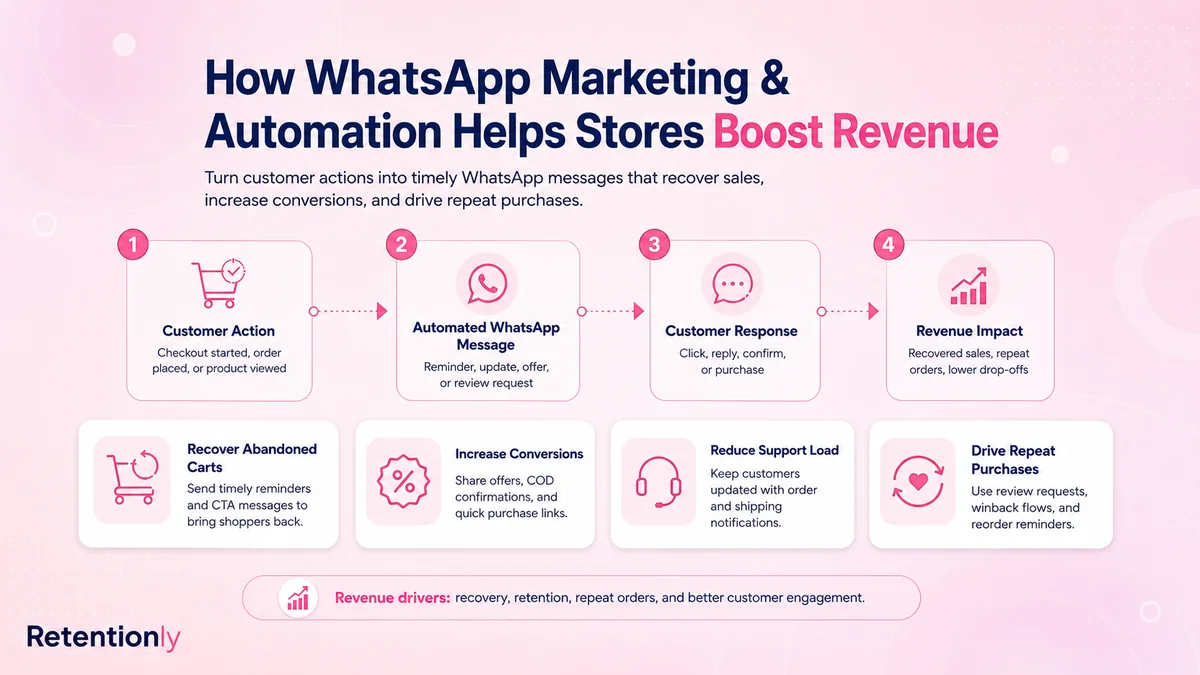
TL;DRWhatsApp automation helps a business send the right message at the right customer moment without depending on manual follow-up. For ecommerce teams, the value is not simply faster messaging. The value is turning store events into useful conversations: recovering abandoned checkouts, confirming COD orders, updating buyers, collecting reviews, and bringing customers back to buy again.
The risk is treating automation like a bulk sender. WhatsApp is personal, visible, and easy to overuse. A good automation setup starts with clear triggers, useful timing, approved templates, reply handling, stop rules, and business metrics.
This guide explains how WhatsApp automation works, which use cases matter most for ecommerce, and how Shopify stores should build a practical system before adding broader campaigns.
Quick Verdict
Use WhatsApp automation when the customer moment is clear and the next action is useful.
| If the customer just... | A useful automation can... | Main metric |
|---|---|---|
| Left checkout | Send a cart reminder and checkout link | Recovered revenue |
| Placed a COD order | Ask them to confirm or cancel before fulfillment | Confirmation rate and RTO reduction |
| Placed an order | Send confirmation and shipping updates | Support ticket reduction |
| Received the product | Ask for a review at the right time | Reviews collected |
| Has not bought again | Send a winback or reorder message | Repeat purchase revenue |
| Replied with a question | Route the reply to a bot, inbox, or human owner | Resolved replies and handoff rate |
The best first automation is usually not a campaign. It is a lifecycle workflow tied to a customer action that already happened.
What WhatsApp Automation Means
WhatsApp automation connects a trigger to a WhatsApp message or conversation. The trigger can come from a store event, customer segment, support status, order status, product restock, or campaign schedule.
A simple automation has six parts.
| Part | Question it answers | Ecommerce example |
|---|---|---|
| Trigger | What starts the workflow? | Checkout abandoned |
| Audience | Who should receive it? | Opted-in shoppers with a valid phone number |
| Timing | When should the message send? | 45 minutes after abandonment |
| Message | What should the customer do next? | Return to checkout |
| Stop rule | When should the flow end? | Customer buys, opts out, or replies with an issue |
| Metric | How will the team judge success? | Recovered revenue and conversion rate |
If a message idea does not have those pieces, it is not ready to automate. It may still be a useful one-off campaign, but it is not a controlled workflow yet.
Why Ecommerce Teams Use WhatsApp Automation
Ecommerce teams use WhatsApp automation because many customer moments lose value when the response is late.
An abandoned checkout is most valuable while the shopper still remembers the product. A COD order should be confirmed before the warehouse spends money shipping it. A delivery update should arrive before the customer opens a support ticket. A review request should be timed after the customer has actually used the product.
That is where WhatsApp is different from a generic broadcast channel. It works best when the message follows a real event and helps the customer take a clear next step.
For Shopify stores, that usually means connecting WhatsApp to lifecycle events instead of treating it as a standalone chat tool. The automation should know when an order was placed, whether a checkout recovered, whether a customer opted out, and whether a support issue is open.
The First Automations To Launch
Start with workflows that protect revenue, reduce operational waste, or improve retention. Do not start by building every possible chatbot branch or campaign calendar.
| Priority | Automation | Why it belongs early |
|---|---|---|
| 1 | Abandoned checkout recovery | It targets shoppers who already showed buying intent |
| 2 | COD confirmation | It prevents avoidable fulfillment waste and fake orders |
| 3 | Order and shipping updates | It reduces repeated "where is my order?" questions |
| 4 | Review requests | It turns delivered orders into social proof |
| 5 | Winback campaigns | It brings inactive customers back into the buying cycle |
| 6 | Reorder reminders | It helps consumable and repeat-use products drive repeat sales |
| 7 | Post-purchase upsells | It increases revenue from customers who already trust the store |
This order can change. A prepaid-only fashion store may not need COD confirmation. A skincare brand with predictable usage may move reorder reminders higher. A store drowning in delivery questions may start with order updates before marketing flows.
The point is to choose the workflow based on the bottleneck, not the longest feature list.
Abandoned Checkout Automation
Abandoned checkout automation should be direct, helpful, and limited. The shopper already showed intent. Your job is to make the return path easy.
| Setting | First version |
|---|---|
| Trigger | Checkout started but order not completed |
| Timing | 30 to 60 minutes after abandonment |
| Audience | Opted-in shoppers with valid WhatsApp numbers |
| Message | Short reminder with saved checkout link |
| Follow-up | One later nudge if no purchase happens |
| Stop rule | Stop after purchase, opt-out, or support escalation |
Example:
Hi [first_name], you left something in your cart at [store_name]. Your checkout is saved here: [checkout_link]. Reply if you need help choosing.
Do not make the first version discount-heavy by default. A discount can work, but it can also train customers to wait. Test the helpful reminder first, then reserve offers for specific segments such as first-time shoppers, high-value carts, or customers who ignored the first message.
For Shopify-specific details, read the Shopify Abandoned Cart WhatsApp Recovery Guide.
COD Confirmation Automation
COD confirmation is a high-impact WhatsApp workflow for stores that accept cash on delivery. It helps separate real buyers from weak, unreachable, or accidental orders before fulfillment cost is committed.
| Setting | First version |
|---|---|
| Trigger | COD order created |
| Timing | Immediately after order placement |
| Audience | COD orders only |
| Message | Ask the customer to confirm, cancel, or request help |
| Fallback | Hold or review unconfirmed orders |
| Metric | Confirmation rate, cancellations, and RTO reduction |
Example:
Hi [first_name], please confirm your COD order [order_number] from [store_name]. Reply 1 to confirm or 2 to cancel.
Keep the action simple. This is not the place for a long policy message. The automation exists to confirm intent and protect fulfillment decisions.
Order Update Automation
Order updates are not always direct revenue messages, but they improve customer experience and reduce support load. They also create trust after the purchase, which affects whether the customer buys again.
Useful update points include:
Order confirmation.
Shipping confirmation.
Out-for-delivery update.
Delivery confirmation.
Delay or exception alert.
The best order update flow is selective. Send messages when the customer would reasonably want the update. If every small carrier event becomes a WhatsApp message, the channel starts to feel noisy.
Example:
Your [store_name] order [order_number] has shipped. Track it here: [tracking_link]. We will let you know if anything changes.
Track support impact alongside delivery rates. If customers still ask the same questions, the wording, timing, or tracking link may need work.
Review, Winback, And Reorder Automation
Once the store has basic revenue and operational flows running, WhatsApp can become a retention channel.
| Workflow | Trigger | Message angle | What to watch |
|---|---|---|---|
| Review request | Order delivered, plus product-use delay | Ask for a quick review | Reviews collected and negative replies |
| Winback | No purchase for a set period | Reason to return or new collection | Repeat purchase revenue and opt-outs |
| Reorder reminder | Expected depletion date | Restock before running out | Reorder conversion |
| Post-purchase upsell | Recent order delivered | Complementary product or bundle | Repeat revenue and attach rate |
These flows need segmentation. A winback message to every inactive customer can feel lazy. A reorder message works best when the product has a realistic replenishment cycle. A review request should exclude refunded orders and unresolved support issues.
WhatsApp retention automation works because it feels timely and specific. The more generic the message, the more it behaves like another broadcast.
Automation, Chatbot, And Inbox Are Different Jobs
Many WhatsApp platforms bundle automation, chatbot, and inbox features together. That can be useful, but the jobs are different.
| Layer | What starts it | Best use |
|---|---|---|
| Automation | Store event, segment, or campaign rule | Lifecycle messages and scheduled workflows |
| Chatbot | Customer reply or selected option | FAQs, routing, reply classification, simple guidance |
| Inbox | Human-owned conversation | Complaints, exceptions, refunds, high-value customers |
A store needs all three eventually, but not always on day one.
For example, an abandoned checkout automation may send the reminder. A chatbot may answer a shipping question after the customer replies. A human may step in if the customer is angry, confused, or asking for a refund.
The mistake is asking one layer to do every job. Automation should not pretend to be support. A chatbot should not control revenue logic by itself. The inbox should not be forced to manually repeat the same answer hundreds of times.
WhatsApp Templates And Consent
Outbound WhatsApp automation usually depends on approved templates, customer consent, and platform rules. The details vary by country, message category, provider, and business setup, so treat compliance as part of the workflow design rather than a final checkbox.
At minimum, each automation should answer:
Did the customer give permission to receive WhatsApp messages?
Is the message useful and related to the customer journey?
Does the message use an approved template where required?
Can the customer opt out cleanly?
Will the flow stop after the goal is reached?
Consent is not only a compliance issue. It is a performance issue. Customers who expected the message are more likely to read, reply, and buy.
What To Measure
Do not judge WhatsApp automation only by sent messages or delivery rate. Those metrics are useful, but they do not prove business value.
Use workflow-specific metrics.
| Workflow | Primary metric | Secondary checks |
|---|---|---|
| Abandoned checkout | Recovered revenue | Conversion rate, opt-outs, reply reasons |
| COD confirmation | Confirmed orders | Cancellations, held orders, RTO rate |
| Order updates | Support tickets avoided | Reply volume and delivery issue detection |
| Review requests | Reviews collected | Rating quality and unhappy customer routing |
| Winback | Repeat purchase revenue | Revenue per recipient and opt-outs |
| Reorder reminders | Reorder conversion | Timing accuracy and repeat purchase interval |
Also track negative signals. If opt-outs, blocks, complaints, or unresolved replies rise, the automation may be too frequent, poorly timed, or too generic.
Common Mistakes
The most common mistake is launching WhatsApp automation as a message volume project. More messages do not automatically create more revenue.
Other mistakes include:
Sending before consent is clear.
Using discounts too early in cart recovery.
Forgetting to stop messages after a purchase.
Sending promotions during open support issues.
Building a chatbot before defining the lifecycle workflows.
Measuring campaign activity instead of recovered revenue or repeat purchases.
Treating every customer segment the same.
Good automation feels calm. It does not chase every possible touchpoint. It improves the moments that matter.
Where Retentionly Fits
Retentionly is built for Shopify and D2C teams that want WhatsApp automation tied to retention revenue, not just broad messaging operations.
Use Retentionly when you want to launch flows such as abandoned checkout recovery, COD confirmation, order updates, review requests, winback, reorders, and post-purchase upsells without building a custom WhatsApp API setup from scratch.
The clearest fit is a store that wants workflow ownership: trigger, timing, segment, message, stop rule, reply handling, and metric. That is the difference between "we sent WhatsApp messages" and "this workflow recovered revenue or improved retention."
Install Free on Shopify and start with the automation closest to your store's current revenue leak.
FAQs
What is WhatsApp automation?
WhatsApp automation is the use of triggers, templates, rules, and workflows to send WhatsApp messages or route replies without manual effort for every conversation.
Is WhatsApp automation only for marketing?
No. Ecommerce teams use WhatsApp automation for marketing, support, order updates, COD confirmation, reviews, winback, reorders, and post-purchase communication.
What is the best first WhatsApp automation for ecommerce?
For many stores, abandoned checkout recovery is the best first flow because it targets shoppers who already showed purchase intent. COD-heavy stores may start with COD confirmation instead.
Do I need a WhatsApp chatbot for automation?
Not always. Automation can send lifecycle messages without a complex chatbot. A chatbot becomes useful when customers reply and you need FAQ handling, reply classification, or routing.
How do Shopify stores use WhatsApp automation?
Shopify stores connect WhatsApp messages to store events such as checkout abandonment, order creation, fulfillment, delivery, review timing, customer inactivity, and expected reorder dates.