Shopify Abandoned Cart WhatsApp Recovery Guide
TL;DRShopify abandoned cart WhatsApp recovery works when the message is tied to real checkout intent. The customer already considered buying. Your job is not to send a louder promotion. Your job is to make it easy to return, answer the likely hesitation, and stop once the customer buys or opts out.
That makes abandoned cart recovery one of the first WhatsApp flows a Shopify store should test. It is close to revenue, easy to measure, and specific enough that your team can improve timing, copy, incentives, and segments without guessing.
This guide shows how to build a practical WhatsApp abandoned cart flow for Shopify stores that want recovered revenue without training customers to wait for discounts.
Why WhatsApp Works For Abandoned Carts
Abandoned cart recovery is a timing problem. A shopper starts checkout, gets distracted, compares prices, hesitates over shipping, or decides to come back later. If the reminder arrives too late, the buying moment is gone.
WhatsApp can help because it is immediate and conversational. The shopper does not need to find an email, remember the product, or start the checkout again. A good WhatsApp message brings them back to the saved checkout and gives them a way to ask a question.
For Shopify stores, the strongest reasons to use WhatsApp for cart recovery are:
The trigger is clear: checkout started but order not completed.
The customer context is recent: they were already considering the product.
The action is simple: return to checkout.
The metric is measurable: recovered orders and recovered revenue.
The conversation can continue if the customer has a real objection.
The channel is powerful, but it needs restraint. WhatsApp feels more personal than email, so irrelevant reminders, early discounts, and too many follow-ups can hurt trust quickly.
The Abandoned Cart Flow At A Glance
Start with a simple flow before adding complex branches.
| Flow component | Recommended starting point |
|---|---|
| Trigger | Customer starts checkout but does not complete purchase |
| Audience | Customers with WhatsApp consent and a valid phone number |
| First message | 30 to 60 minutes after abandonment |
| Second message | 20 to 24 hours later if no purchase |
| Third message | Optional, 48 to 72 hours later for selected segments |
| Stop condition | Stop after purchase, opt-out, invalid phone, or final reminder |
| Primary metric | Recovered revenue |
| Secondary metrics | Conversion rate, click rate, replies, opt-outs, blocks |
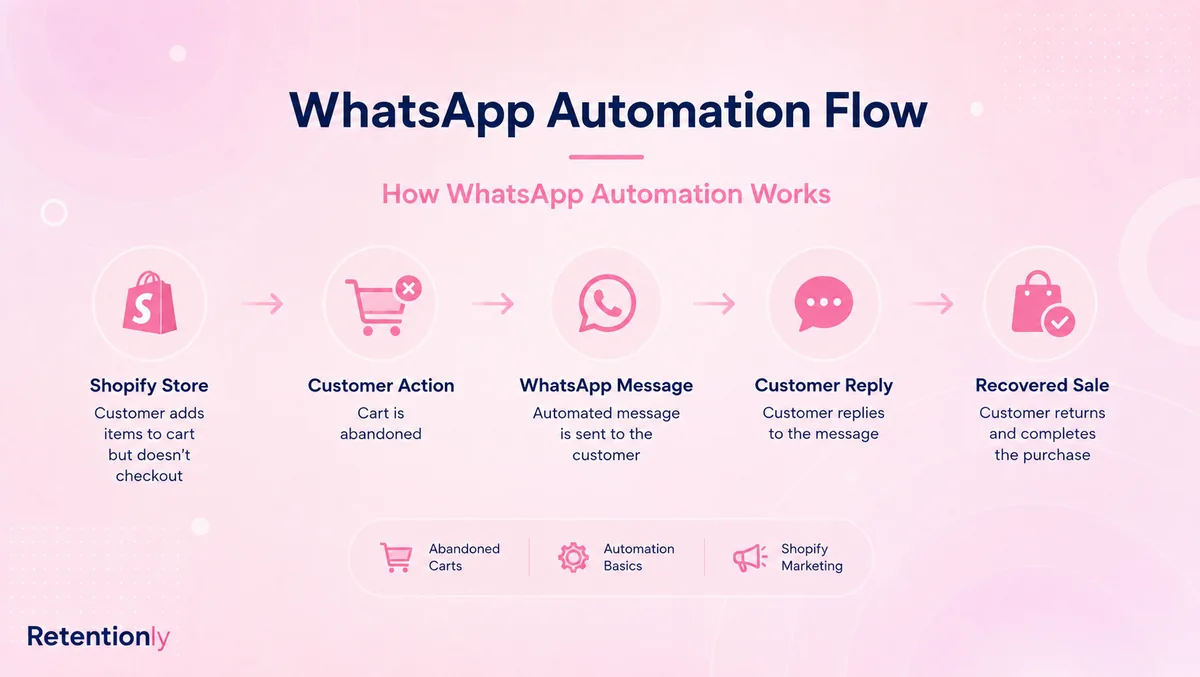
That structure is enough for most stores to launch. The improvement work comes after the first data: changing timing, segmenting by cart value, testing whether discounts are needed, and adjusting copy by product type.
If you need the broader setup path first, read the Shopify WhatsApp Automation Guide.
Step 1: Choose The Right Trigger
For Shopify, the abandoned cart trigger should be tied to checkout intent, not casual browsing. A shopper who viewed a product once is different from a shopper who entered checkout details and left.
Use a checkout-based trigger when possible:
Checkout started.
Phone number is available and valid.
Customer has given WhatsApp consent.
No order has been created after a set delay.
Checkout link can be included in the message.
Avoid sending recovery messages for weak intent events unless you have a separate strategy. A product view, add-to-cart, and abandoned checkout should not all receive the same message. Checkout abandonment is the cleanest first workflow because the customer is closest to purchase.
Step 2: Define Who Should Receive The Message
Do not send every possible cart reminder. Start with customers who are likely to value the nudge and exclude cases where the message may create friction.
Good starting audience:
Customers who opted in to WhatsApp messages.
Customers with a valid phone number.
Customers whose checkout is still recoverable.
Customers who have not completed the order.
Customers who have not opted out or blocked messages.
Useful exclusions:
Customers who already purchased.
Customers with refunded or canceled orders in the same session.
Customers with a recent complaint or unresolved support issue.
Customers who received another WhatsApp marketing message very recently.
Customers with very low cart value if message costs outweigh expected recovery.
Once the basic flow works, segment by cart value, customer type, product category, and discount sensitivity.
| Segment | How the message should change |
|---|---|
| First-time shopper | Reassurance, benefits, return-to-checkout link |
| Repeat customer | Familiar tone and saved checkout link |
| High-value cart | Extra support option or controlled incentive |
| Discount-sensitive segment | Offer only after the first reminder fails |
| COD-heavy store | Mention COD availability or confirmation if relevant |
| Size or fit-sensitive category | Invite replies for product questions |
Segmentation should improve relevance. If it only makes the workflow harder to manage, keep the first version simple.
Step 3: Get The Timing Right
The first message should arrive while the customer still remembers the cart. For most Shopify stores, 30 to 60 minutes after abandonment is a sensible starting point.
The second message should not feel like pressure. A follow-up 20 to 24 hours later gives the customer time while still keeping the purchase fresh.
Use this timing plan as a starting point:
| Message | Timing | Job |
|---|---|---|
| Reminder 1 | 30 to 60 minutes after checkout abandonment | Bring the shopper back while intent is fresh |
| Reminder 2 | 20 to 24 hours later | Add reassurance, answer friction, or test an offer |
| Reminder 3 | 48 to 72 hours later, optional | Use only for selected carts or high-intent segments |
Do not send all three messages by default on day one. Many stores should start with two reminders, then add a third only if the second message creates revenue without raising opt-outs.
Step 4: Write Messages That Help The Customer Return
An abandoned cart WhatsApp message should be short, specific, and easy to act on. The customer should immediately understand why they received it and what to do next.
Example first reminder:
Hi [first_name], you left something in your cart at [store_name]. Your checkout is saved here: [checkout_link]. Reply if you need help before ordering.
Example reassurance message:
Still thinking it over? Your [store_name] checkout is saved here: [checkout_link]. If you have a question about size, delivery, or payment, just reply to this message.
Example second reminder with a controlled offer:
Hi [first_name], your cart at [store_name] is still saved. Complete your order here: [checkout_link]. Use [discount_code] before midnight if you want to finish today.
Example high-value cart message:
Hi [first_name], your [store_name] cart is saved here: [checkout_link]. If you want help choosing the right option, reply and our team will help before you order.
Keep the link prominent. If you include too many claims, categories, or product recommendations, the customer has to work harder to finish the purchase.
Step 5: Decide When To Use Discounts
Discounts can recover some carts, but they can also teach shoppers to abandon checkout and wait. That is why the first reminder should usually be helpful, not discount-led.
Use this decision framework:
| Situation | Discount approach |
|---|---|
| First reminder | Avoid discount. Use saved checkout link and support option. |
| Second reminder | Test a small offer if the first reminder underperforms. |
| High-margin product | Discount can be tested more safely. |
| Low-margin product | Try free shipping, reassurance, or support before discounting. |
| Repeat discount users | Suppress or reduce offers to avoid training behavior. |
| High-value cart | Consider a controlled incentive or human support option. |
The point is not to avoid offers forever. The point is to use them deliberately. A store should know whether the discount increased incremental recovered revenue or simply gave margin away to shoppers who would have bought anyway.
Step 6: Add Stop Rules And Suppression Logic
Stop rules protect customer experience and attribution. Without them, a customer may buy and still receive a recovery message later, or receive a cart reminder too close to another campaign.
Minimum stop rules:
Stop when the customer completes the order.
Stop when the customer opts out.
Stop when the phone number is invalid or delivery fails repeatedly.
Stop after the final reminder.
Stop if the checkout link is no longer valid.
Useful suppression rules:
Do not send a broadcast shortly after a cart reminder.
Do not send a review request, upsell, and cart recovery message in the same short window.
Suppress customers with unresolved support issues.
Suppress customers who recently complained, blocked, or opted out.
Suppress repeat discount seekers from automatic offers.
Good WhatsApp recovery is not only about sending. It is also about knowing when to stay quiet.
Step 7: Measure The Flow By Revenue, Not Opens
Open rates can make WhatsApp look strong, but they do not prove the flow is profitable. The real question is whether the flow recovers orders without damaging margin or customer trust.
Track these metrics:
| Metric | Why it matters |
|---|---|
| Recovered revenue | Shows the total revenue attributed to the flow |
| Recovered orders | Shows how many purchases the flow influenced |
| Conversion rate | Shows how well recipients complete checkout |
| Revenue per recipient | Helps compare segments and timing |
| Click rate | Shows whether the message drives action |
| Reply rate | Shows whether customers need help before buying |
| Opt-outs and blocks | Shows whether the flow is too frequent or irrelevant |
| Discount cost | Shows whether recovered revenue is profitable |
Review the data by message number. If the first message drives most recovery and the third creates opt-outs, remove the third. If the second message works only when it includes a discount, test whether the discount should be limited to selected segments.
Common Mistakes To Avoid
The most common mistake is treating abandoned cart WhatsApp recovery like generic remarketing. The customer is not a cold audience. They are a shopper who left a specific checkout.
Avoid these mistakes:
Sending the first message too late.
Leading with a discount before testing a simple reminder.
Sending three reminders to every customer by default.
Using the same copy for first-time shoppers and repeat customers.
Sending messages without a valid checkout link.
Forgetting to stop the flow after purchase.
Mixing cart recovery with broad promotional copy.
Ignoring customer replies after inviting them to respond.
Measuring open rates instead of recovered revenue and opt-outs.
If the flow feels pushy, simplify it. One useful reminder can outperform three aggressive messages.
Where Retentionly Fits
Retentionly is built for Shopify stores that want WhatsApp automation connected to revenue workflows, not a generic messaging setup that your team has to reshape later.
Use Retentionly for abandoned cart WhatsApp recovery when you want to:
Trigger reminders from Shopify checkout behavior.
Send saved checkout links through WhatsApp.
Control timing and follow-ups.
Avoid over-messaging customers.
Measure recovered revenue by flow.
Build from cart recovery into COD confirmation, reviews, winback, reorders, and post-purchase upsells.
If you are still comparing app options, read the Shopify WhatsApp App Buyer Guide and the Best WhatsApp App for Shopify Guide.
Final Recommendation
Launch a simple two-message abandoned cart WhatsApp flow first: one reminder after 30 to 60 minutes, then one follow-up around 24 hours later. Start without an immediate discount. Measure recovered revenue, conversion rate, replies, opt-outs, and discount cost.
Once the baseline is clear, improve the flow by segmenting high-value carts, testing offer timing, adding better reassurance, and suppressing customers who should not receive another message.
That is how Shopify abandoned cart WhatsApp recovery becomes a controlled revenue workflow instead of another noisy campaign.
Install Retentionly free on Shopify to launch WhatsApp abandoned cart recovery, COD confirmation, order updates, reviews, winback, and repeat purchase automations from one Shopify-first workflow system.