WhatsApp Marketing Shopify Guide for Growing Stores
TL;DRWhatsApp marketing for Shopify should not start with the question, "What can we broadcast this week?" It should start with the customer moments your store already understands: checkout intent, purchase, delivery, product usage, repeat purchase timing, and inactivity.
That shift matters. WhatsApp is a high-attention channel, but that also makes irrelevant messages feel more intrusive. A Shopify store that treats WhatsApp like a louder email list can burn trust quickly. A store that connects WhatsApp to real lifecycle moments can recover orders, reduce uncertainty, collect reviews, and bring customers back without blasting everyone.
This guide shows how to build a Shopify WhatsApp marketing program around retention workflows first, then campaigns and broadcasts once the basics are working.
What WhatsApp Marketing Means For Shopify
For a Shopify store, WhatsApp marketing means using WhatsApp messages to move customers through the buying and post-purchase lifecycle.
That includes:
Abandoned checkout reminders.
COD confirmation messages.
Order, shipping, and delivery updates.
Review requests after delivery.
Welcome messages for new subscribers.
Winback campaigns for inactive customers.
Reorder reminders for consumable products.
Post-purchase upsells and cross-sells.
Product launch, back-in-stock, price-drop, and seasonal campaigns.
The difference between useful WhatsApp marketing and generic bulk sending is context. A good WhatsApp message answers a customer moment. It is not just another promotion sent to the entire list.
For example, a shopper who abandoned checkout should receive a saved checkout link. A customer whose order shipped should receive tracking context. A buyer who is likely running out of a consumable product should receive a reorder reminder. A VIP customer should receive a different product launch message than a first-time subscriber.
That is where Shopify data makes WhatsApp powerful.
When Shopify Stores Should Use WhatsApp
WhatsApp is best for messages that are timely, personal, and easy to act on. It is not the right channel for every update.
Use WhatsApp when the message has one of these jobs:
| Job | Shopify example | Why WhatsApp fits |
|---|---|---|
| Recover intent | Abandoned checkout reminder | The shopper recently showed buying intent |
| Confirm action | COD order confirmation | The store needs a quick response before fulfillment |
| Reduce uncertainty | Shipping or delivery update | The customer wants status without opening a support ticket |
| Create social proof | Review request after delivery | The customer has just experienced the product |
| Drive repeat purchase | Reorder or replenishment reminder | The customer may be ready to buy again |
| Reactivate demand | Winback campaign | The customer already knows the brand |
| Expand revenue | Post-purchase upsell | The offer can be tied to what they bought |
Avoid using WhatsApp for messages that are broad, vague, or disconnected from customer behavior. "Big sale today" can work for a well-segmented audience, but it should not be the foundation of the channel.
The Shopify WhatsApp Marketing Map
A practical WhatsApp program has three layers.
| Layer | Purpose | Examples |
|---|---|---|
| Lifecycle automations | Trigger messages from customer behavior | Abandoned checkout, COD confirmation, order updates, reviews, reorders |
| Retention campaigns | Bring known customers back with relevant reasons | Winback, VIP offer, replenishment, product education, loyalty nudges |
| Broadcast campaigns | Reach a segment for a planned promotion | Launch, sale, back-in-stock, seasonal campaign, limited drop |
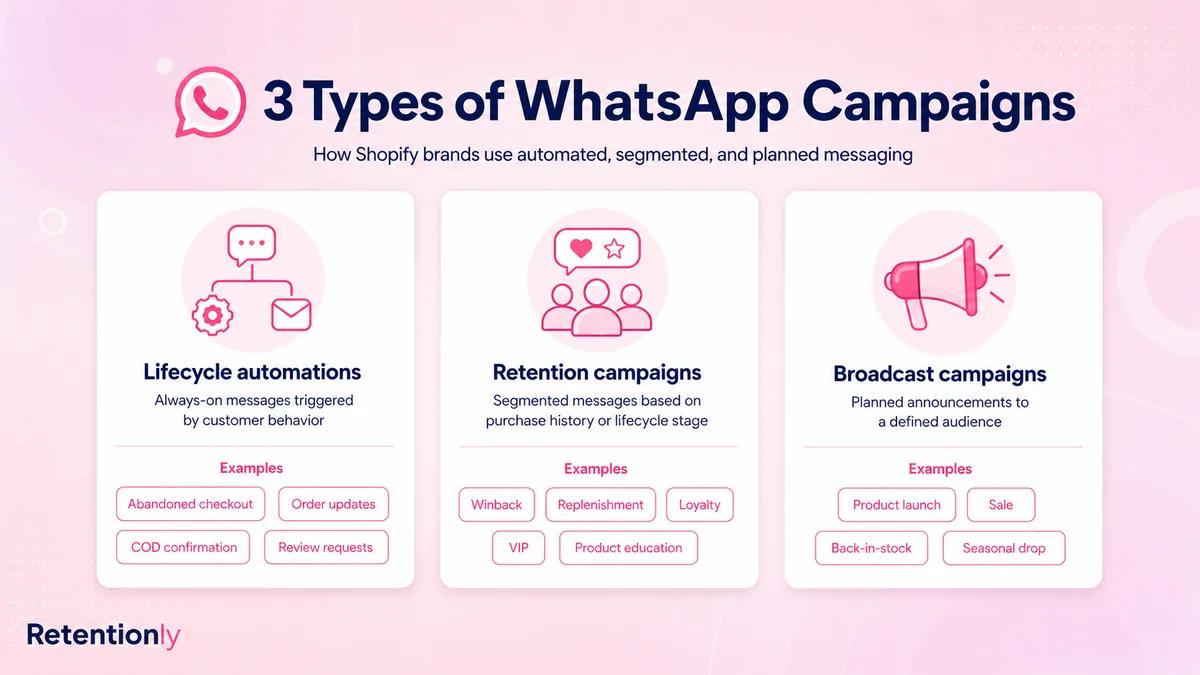
Most Shopify stores should build in that order.
Lifecycle automations come first because they are tied to clear customer intent. They are easier to measure and harder to misuse. Retention campaigns come next because they need clean segments and timing. Broadcasts come last because they can create revenue, but they also create the highest risk of over-messaging.
If you already have the technical setup in place, read the Shopify WhatsApp Automation Guide for the broader flow architecture.
The First WhatsApp Marketing Flows To Launch
Do not turn on every message at once. Start with the flows that are closest to revenue or customer experience.
| Priority | Flow | Trigger | Goal |
|---|---|---|---|
| 1 | Abandoned checkout recovery | Checkout started but order not completed | Recover lost revenue |
| 2 | COD confirmation | Cash-on-delivery order created | Reduce fake orders and fulfillment waste |
| 3 | Order and shipping updates | Order created, fulfilled, shipped, or delivered | Reduce support questions |
| 4 | Review request | Order delivered and usage window passed | Collect social proof |
| 5 | Winback | No purchase for a defined period | Bring inactive customers back |
| 6 | Reorder reminder | Expected replenishment window reached | Increase repeat purchases |
| 7 | Post-purchase upsell | Recent order delivered or used | Grow repeat revenue and AOV |
| 8 | Welcome flow | New subscriber or first purchase | Set expectations and guide the next action |
This sequence keeps WhatsApp grounded in real customer behavior. It also gives your team cleaner feedback. If one flow underperforms, you know which trigger, segment, timing, or message needs work.
Flow 1: Abandoned Checkout Recovery
Abandoned checkout recovery is usually the fastest WhatsApp marketing test for Shopify stores. The shopper has already shown intent, so the message does not need to persuade from zero. It needs to remove friction and make returning easy.
A simple flow:
| Component | Practical choice |
|---|---|
| Trigger | Checkout started but no order created |
| Audience | Opted-in customers with a valid phone number |
| Timing | First reminder after 30 to 60 minutes |
| Message | Product or cart reminder with checkout link |
| Follow-up | One second reminder after 20 to 24 hours if no purchase |
| Stop condition | Stop when the customer purchases, opts out, or receives the final reminder |
| Metric | Recovered revenue, conversion rate, opt-outs, and replies |
Example message:
Hi [first_name], you left items in your cart at [store_name]. Your checkout is saved here: [checkout_link]. Reply if you have a question before ordering.
Start without a discount. If the flow needs improvement, test timing, product context, reassurance, and then a selective offer. Discounting too early can train customers to abandon carts on purpose.
Flow 2: COD Confirmation
For stores that accept cash on delivery, WhatsApp marketing is not only about promotion. It can protect margin.
COD confirmation asks the customer to confirm or cancel before the order moves too far into fulfillment. The goal is to reduce fake orders, unreachable customers, and avoidable return-to-origin costs.
A practical COD flow:
| Component | Practical choice |
|---|---|
| Trigger | COD order created |
| Audience | COD orders only, optionally filtered by value or risk |
| Timing | Immediately after order creation |
| Message | Confirm or cancel request |
| Fallback | Tag unconfirmed orders for review |
| Metric | Confirmation rate, cancellation rate, RTO reduction, fulfillment savings |
Example message:
Hi [first_name], please confirm your COD order [order_number] from [store_name]. Reply 1 to confirm or 2 to cancel.
This is a strong WhatsApp use case because it asks for a small, clear action at the right moment.
Flow 3: Order And Shipping Updates
Order updates may not look like marketing at first, but they shape customer trust. A customer who knows what is happening is less likely to open a support ticket, cancel from uncertainty, or mistrust the store.
Useful updates include:
Order confirmation.
Payment confirmation where relevant.
Shipping confirmation.
Tracking link.
Out-for-delivery notice.
Delivery confirmation.
Delay update when needed.
The rule is simple: send the updates customers actually want. Do not turn every minor status change into a WhatsApp message.
Example message:
Your [store_name] order [order_number] has shipped. Track it here: [tracking_link]. We will update you if anything changes.
Keep promotional content out of utility updates. An order update should reassure the customer first. If you want to upsell, use a separate post-purchase flow with the right timing and consent.
Flow 4: Review Requests
WhatsApp can help Shopify stores collect more reviews because the request reaches the customer close to the product experience. Timing matters more than volume.
A better review flow:
| Component | Practical choice |
|---|---|
| Trigger | Order delivered |
| Timing | 2 to 7 days after delivery, depending on product type |
| Audience | Delivered orders, excluding refunds and unresolved support issues |
| Message | Short review ask with one clear link |
| Stop condition | Stop after one request or after review submitted |
| Metric | Reviews collected, review rate, rating quality, replies |
Example message:
Hi [first_name], hope you are enjoying your [product_name]. Could you leave a quick review for [store_name]? It helps other shoppers choose with confidence: [review_link]
For products that need longer use, wait longer. A snack, accessory, supplement, skincare product, and appliance should not all use the same review window.
Flow 5: Winback Campaigns
Winback campaigns work when they recognize the customer's history. A generic "we miss you" message is weak. A better winback message gives the customer a real reason to return.
Segment by:
Last purchase date.
Product category purchased.
Customer value.
Number of orders.
Discount sensitivity.
Seasonality or replenishment cycle.
Prior engagement with WhatsApp.
Example structure:
| Segment | Message angle |
|---|---|
| First-time buyer inactive for 45 days | Bestseller or next-product recommendation |
| Repeat buyer inactive for 60 days | New arrivals in their preferred category |
| VIP inactive for 90 days | Early access, limited offer, or concierge support |
| Discount-sensitive buyer | Controlled offer with expiry |
| Full-price buyer | Product story, bundle, or exclusive drop |
Example message:
Hi [first_name], we saved a few new picks from [store_name] based on your last order. You can see them here: [collection_link]
Winback is not only about discounts. For many brands, relevance and timing matter more.
Flow 6: Reorder Reminders
Reorder reminders are one of the cleanest WhatsApp retention flows for consumable products. They work because the customer has a practical need.
Good categories include:
Beauty and skincare.
Supplements.
Food and beverage.
Pet products.
Home care.
Personal care.
Subscription-like replenishment products.
The trigger should be based on likely product usage, not a random calendar date.
Example:
| Product cycle | Reminder timing |
|---|---|
| 30-day supply | Day 24 to 28 |
| 45-day supply | Day 38 to 42 |
| 60-day supply | Day 50 to 56 |
| Irregular purchase | Use customer history or skip the flow |
Example message:
Running low on [product_name]? You can reorder from [store_name] in one tap here: [reorder_link]
Reorder reminders should feel helpful. If the product is not naturally repeatable, use winback or cross-sell instead.
Flow 7: Post-Purchase Upsell And Cross-Sell
Post-purchase upsells work when the recommendation is genuinely connected to what the customer bought. WhatsApp is a poor place for random product pushes.
Use Shopify order data to match:
Refill after starter kit.
Accessory after core product.
Bundle after single-item purchase.
Complementary shade, size, flavor, or variant.
Care product after premium item.
Subscription after repeat purchase behavior.
Example message:
Your [product_name] is on the way. Many customers pair it with [recommended_product] for [specific_benefit]. See it here: [product_link]
The timing should respect the buying moment. Some upsells work immediately after purchase. Others work after delivery, once the customer has context.
Flow 8: Welcome Messages
A welcome message sets expectations for the channel. It should explain why the customer is receiving WhatsApp messages and give them a useful next step.
Use welcome flows for:
New WhatsApp subscribers.
First-time buyers.
Customers who opted in through a popup or campaign.
VIP or loyalty segments.
Example message:
Welcome to [store_name] on WhatsApp. We will send useful order updates, early access, and occasional offers. Start with our customer favorites here: [collection_link]
Do not overload the first message. The welcome flow should establish trust, not push every product line at once.
Lifecycle Campaigns Versus Broadcasts
Broadcasts are not bad. They are just easy to misuse.
| Type | Best use | Risk |
|---|---|---|
| Lifecycle automation | Behavior-triggered messages such as cart recovery, order updates, reviews, reorders | Needs clean setup and stop rules |
| Retention campaign | Segmented messages based on customer history | Can become irrelevant if segmentation is shallow |
| Broadcast campaign | Planned launches, sales, back-in-stock, seasonal drops | Highest risk of fatigue and opt-outs |
Use broadcasts when the audience is specific.
Good broadcast examples:
Back-in-stock alert for customers who viewed or requested that product.
New collection preview for repeat buyers in the category.
VIP early access for high-value customers.
Seasonal offer for customers who bought the same category last season.
Price-drop alert for customers who showed product interest.
Weak broadcast examples:
Sending every sale to every phone number.
Repeating the same discount every week.
Promoting products unrelated to past behavior.
Sending campaigns without reply ownership.
Ignoring opt-outs, blocks, and negative replies.
The more personal the channel feels, the more relevant the message must be.
Segmentation Rules For Shopify WhatsApp Marketing
Segmentation does not need to be complex at the start. It needs to be useful.
Start with these Shopify segments:
| Segment | Use case |
|---|---|
| New subscribers | Welcome flow and first-purchase offer |
| Abandoned checkout customers | Cart recovery |
| First-time buyers | Post-purchase education, review request, second-order nudge |
| Repeat buyers | Loyalty, VIP, replenishment, early access |
| High-value customers | VIP campaigns and premium drops |
| Inactive customers | Winback campaigns |
| Product-category buyers | Cross-sell and category launches |
| COD customers | Confirmation and payment-behavior campaigns |
| Delivered orders | Review requests and post-delivery upsells |
Every segment should answer two questions:
Why is this message relevant to this customer?
What should happen if they buy, reply, or opt out?
If you cannot answer those questions, the segment is not ready.
Opt-In, Templates, And Consent
WhatsApp marketing needs permission and clarity. Customers should know why they are sharing their phone number and what kind of messages they will receive.
Common opt-in points include:
Checkout consent.
Post-purchase opt-in.
Popup or embedded form.
Click-to-WhatsApp ad.
Back-in-stock or price-drop signup.
Loyalty or VIP signup.
Customer support conversation where consent is captured properly.
Keep the promise specific. "Get order updates and occasional offers on WhatsApp" is clearer than vague language about updates.
Business-initiated WhatsApp messages often use approved templates. Prepare templates for your first flows before launch:
Abandoned checkout.
COD confirmation.
Order confirmation.
Shipping update.
Delivery update.
Review request.
Winback.
Reorder reminder.
Product launch or back-in-stock campaign.
For setup details, read the Shopify WhatsApp Integration Guide.
Timing And Frequency Rules
WhatsApp timing should match customer intent.
| Flow | Sensible starting timing |
|---|---|
| Abandoned checkout | 30 to 60 minutes after abandonment |
| Second cart reminder | 20 to 24 hours later if no order |
| COD confirmation | Immediately after order placement |
| Shipping update | When fulfillment or tracking is available |
| Delivery follow-up | Same day or next day after delivery |
| Review request | 2 to 7 days after delivery, depending on product |
| Reorder reminder | Before expected depletion |
| Winback | 45, 60, or 90 days after last purchase |
| Post-purchase upsell | After purchase or delivery, depending on product fit |
Frequency should be controlled across flows. A customer should not receive a review request, upsell, and broadcast within the same short window unless there is a very good reason.
Use suppression rules:
Stop cart recovery after purchase.
Suppress campaigns after a recent complaint or support issue.
Pause promotional messages after an opt-out.
Avoid sending multiple marketing messages within a tight period.
Exclude refunded or canceled orders from review requests.
Suppress winback if the customer recently bought through another flow.
Good WhatsApp marketing is often quieter than teams expect.
What To Measure
Do not judge WhatsApp only by open rates. The business outcome depends on the flow.
| Flow | Primary metric | Secondary metrics |
|---|---|---|
| Abandoned checkout | Recovered revenue | Conversion rate, click rate, opt-outs |
| COD confirmation | Confirmed orders | Cancellations, unconfirmed orders, RTO reduction |
| Order updates | Support ticket reduction | Delivery success, replies, customer satisfaction |
| Review request | Reviews collected | Review rate, rating quality, negative replies |
| Winback | Repeat purchase revenue | Revenue per recipient, conversion rate |
| Reorder reminder | Reorder conversion | Time between purchases, revenue per recipient |
| Upsell | Repeat revenue or attach rate | AOV lift, click rate, unsubscribe rate |
| Broadcast | Campaign revenue | Revenue per recipient, opt-outs, blocks, replies |
Also watch negative signals:
Blocks.
Opt-outs.
Spam complaints.
Angry replies.
Low conversion with high send volume.
Support overload from unanswered responses.
If negative signals rise, reduce volume and improve relevance before sending more campaigns.
Common WhatsApp Marketing Mistakes
The biggest mistake is treating WhatsApp as a bulk campaign tool before the lifecycle foundation is ready.
Avoid these mistakes:
Sending broad promotions before abandoned checkout and order flows are working.
Using the same message for every customer.
Asking for reviews before the product has been delivered or used.
Sending discounts too early in abandoned checkout flows.
Ignoring COD confirmation for COD-heavy stores.
Mixing promotional copy into order updates.
Sending too many messages in the first week after purchase.
Measuring opens instead of revenue, repeat purchase, support impact, and opt-outs.
Forgetting that WhatsApp replies need an owner.
The better approach is deliberate: launch one flow, measure it, tighten timing and copy, then add the next flow.
Where Retentionly Fits
Retentionly is built for Shopify stores that want WhatsApp marketing tied to retention and repeat revenue.
Use Retentionly when your priority is to launch flows such as:
Abandoned checkout recovery.
COD confirmation.
Order and shipping updates.
Review requests.
Winback campaigns.
Reorder reminders.
Post-purchase upsells.
Welcome messages and lifecycle campaigns.
The benefit is focus. Instead of starting with a broad WhatsApp platform and then trying to shape it into Shopify retention workflows, you can start with the messages that map to revenue moments in your store.
If you are still comparing app types, read the Shopify WhatsApp App Buyer Guide and the Best WhatsApp App for Shopify Guide.
Final Recommendation
Build Shopify WhatsApp marketing in this order: lifecycle automations first, retention campaigns second, broadcasts third.
Start with abandoned checkout recovery if revenue recovery is the main goal. Start with COD confirmation if fake or low-intent COD orders are hurting margin. Start with order updates if support load is the biggest operational pain.
Once the first flow works, add review requests, winback, reorders, upsells, welcome messages, and segmented campaigns. Keep every message tied to a customer moment, measure the outcome by flow, and stop sending when the customer buys, opts out, or no longer fits the segment.
That is how WhatsApp becomes a Shopify retention channel instead of another place to shout promotions.
Install Retentionly free on Shopify to launch WhatsApp marketing automations for abandoned checkout recovery, COD confirmation, order updates, reviews, winback, reorders, post-purchase upsells, and repeat purchases.