Shopify WhatsApp Marketing: Campaigns, Automations, and Retention Flows
TL;DRShopify WhatsApp marketing works best when it is operated like a retention system, not a louder broadcast channel. The goal is not to message every customer more often. The goal is to send the right WhatsApp message when Shopify data shows a customer is ready to act, needs reassurance, or is likely to buy again.
That distinction changes the entire plan. A weak WhatsApp program starts with promotions. A stronger one starts with automations, segments, timing rules, reply ownership, and campaign measurement. Once those pieces are clear, WhatsApp can support abandoned checkout recovery, COD confirmation, post-purchase education, reviews, winback, replenishment, upsells, and carefully planned launches without overwhelming customers.
This guide shows how to plan Shopify WhatsApp marketing as a campaign system: what to launch first, how to segment customers, what each message should do, how to control frequency, and where Retentionly fits.
The Shopify WhatsApp Marketing Operating Model
A Shopify WhatsApp marketing program has five moving parts.
| Part | What it controls | Shopify example |
|---|---|---|
| Trigger or segment | Who receives the message | Checkout abandoned, order delivered, inactive for 60 days, VIP customer |
| Message job | Why the message exists | Recover order, confirm COD intent, collect review, drive reorder |
| Timing | When the message is sent | 45 minutes after checkout abandonment, 5 days after delivery |
| Stop rule | When the flow should end | Purchased, opted out, canceled, refunded, already reviewed |
| Metric | How the campaign is judged | Recovered revenue, confirmed COD orders, review rate, repeat revenue |
If one of those pieces is missing, the campaign is probably not ready.
For example, "send a discount to everyone on WhatsApp" has no clear customer moment. "Send a first reminder 45 minutes after checkout abandonment to opted-in shoppers, stop after purchase, and measure recovered revenue" is a real Shopify WhatsApp marketing flow.
If you are still deciding how WhatsApp should fit into your store, read the WhatsApp Marketing Shopify Guide. This article goes deeper into campaign planning and execution.
Automations, Campaigns, And Broadcasts Are Not The Same
Many stores use the word campaign for every WhatsApp message. That makes planning harder.
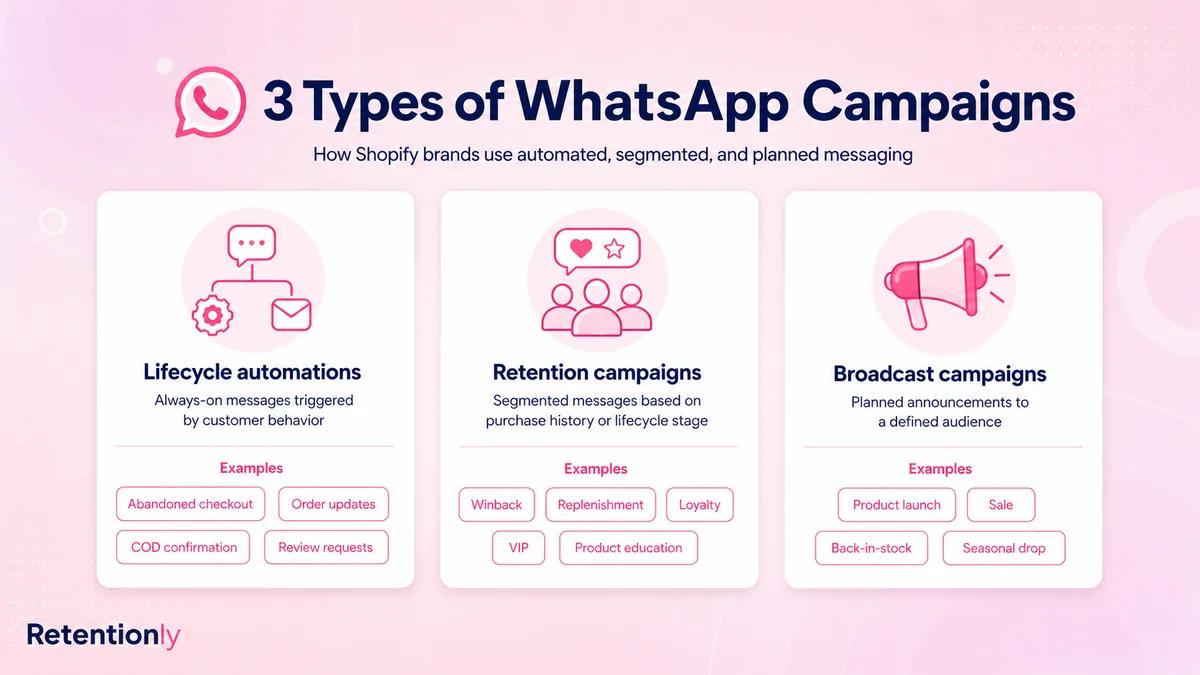
Use these definitions instead.
| Type | Best use | Example | Risk if misused |
|---|---|---|---|
| Lifecycle automation | Behavior-triggered messages that should run continuously | Abandoned checkout, order update, COD confirmation, review request | Poor stop rules can annoy customers |
| Retention campaign | Segmented pushes based on customer history | Winback, replenishment, VIP early access, category launch | Weak segmentation can feel irrelevant |
| Broadcast | One-time promotion sent to a planned audience | Flash sale, festive sale, back-in-stock drop | Overuse can increase opt-outs and blocks |
Most Shopify stores should launch in that order.
Lifecycle automations come first because they are tied to intent. Retention campaigns come next because they need clean segments. Broadcasts come last because they create the most volume and need the strongest controls.
The Right Launch Order For Shopify WhatsApp Marketing
Start where WhatsApp has the clearest job.
| Launch order | Flow | Why it comes here |
|---|---|---|
| 1 | Abandoned checkout recovery | Closest to immediate revenue recovery |
| 2 | COD confirmation | Protects margin when COD creates fake orders or RTO risk |
| 3 | Order and shipping updates | Reduces uncertainty and avoidable support replies |
| 4 | Review request | Turns delivery into social proof |
| 5 | Reorder reminder | Works well for consumable or replenishable products |
| 6 | Winback campaign | Brings known customers back with relevant timing |
| 7 | Post-purchase upsell | Uses order context to recommend the next product |
| 8 | Welcome flow | Sets expectations for new WhatsApp subscribers |
| 9 | Product launch or back-in-stock campaign | Uses segments after the lifecycle base is working |
| 10 | Flash sale or seasonal broadcast | Higher-volume campaign that needs frequency controls |
This order is not universal. A COD-heavy store may put COD confirmation first. A beauty brand with strong repeat cycles may launch reorder reminders earlier. A fashion store may prioritize back-in-stock and size-specific segments sooner.
The principle stays the same: start with the message that has the clearest trigger, customer benefit, and business metric.
A 90-Day Shopify WhatsApp Marketing Roadmap
Do not launch every flow in one week. The first 90 days should build a stable base.
| Timeframe | What to launch | What to learn |
|---|---|---|
| Days 1-15 | Abandoned checkout recovery and COD confirmation if relevant | Which timing and message structure recover revenue without high opt-outs |
| Days 16-30 | Order updates and delivery follow-up | Which updates reduce support replies and improve customer confidence |
| Days 31-45 | Review request flow | Which timing produces useful reviews without asking too early |
| Days 46-60 | Reorder or replenishment reminders | Which products have predictable repeat purchase windows |
| Days 61-75 | Winback campaign for inactive customers | Which segments respond to relevance versus discounting |
| Days 76-90 | Product launch, back-in-stock, or VIP campaign | Whether segmented campaigns can scale without hurting quality signals |
After 90 days, you should know which flows drive revenue, which create replies, which need better segmentation, and which customers should be suppressed from future campaigns.
Campaign Planning Template
Before sending any Shopify WhatsApp marketing campaign, fill out this simple plan.
| Question | Good answer |
|---|---|
| Who should receive it? | Customers who bought skincare refills 24 to 32 days ago |
| Why now? | They are likely close to running out |
| What should the message do? | Drive a one-tap reorder |
| What should the customer see? | Product name, reorder link, clear reason |
| When should it stop? | Stop after purchase, opt-out, or second reminder |
| Who handles replies? | Support owns product questions; marketing owns campaign reporting |
| What metric matters? | Reorder revenue and reorder conversion rate |
This level of planning feels basic, but it prevents most WhatsApp mistakes. It keeps the campaign tied to customer context instead of team excitement.
Core Shopify WhatsApp Marketing Campaigns
These are the highest-value campaign types for most Shopify stores.
| Campaign | Segment or trigger | Message job | Primary metric |
|---|---|---|---|
| Abandoned checkout | Checkout started, no order created | Bring the shopper back to saved checkout | Recovered revenue |
| COD confirmation | COD order created | Confirm or cancel before fulfillment | Confirmation rate and RTO reduction |
| Order update | Order created, fulfilled, shipped, or delivered | Reduce uncertainty | Support ticket reduction |
| Review request | Delivered order after usage window | Collect social proof | Reviews collected |
| Reorder reminder | Expected replenishment window | Drive repeat purchase | Reorder conversion |
| Winback | No purchase for 45, 60, or 90 days | Reactivate known customers | Repeat revenue |
| Post-purchase upsell | Recent order or delivery | Recommend a relevant next product | Attach rate or second-order revenue |
| VIP campaign | High-LTV or repeat buyers | Give early access or priority offer | Revenue per recipient |
| Back-in-stock | Viewed, requested, or bought related product | Convert existing demand | Campaign revenue |
| Product launch | Category buyers or engaged subscribers | Introduce a relevant new item | Clicks, replies, and orders |
If a campaign does not map to one of these jobs, pause before sending it. The message may still be useful, but the team should be clear about why WhatsApp is the right channel.
Segments To Build In Shopify
Good WhatsApp marketing depends on clean customer groups. You do not need complex segmentation at the start, but you do need useful segments.
| Segment | Campaign use |
|---|---|
| Abandoned checkout customers | Checkout recovery reminders |
| First-time buyers | Welcome, education, review, second-order campaigns |
| Repeat buyers | Loyalty, replenishment, VIP, early access |
| High-value customers | Premium launches, concierge offers, exclusive drops |
| Inactive customers | Winback campaigns |
| Product category buyers | Cross-sell, launch, replenishment, education |
| COD customers | COD confirmation and prepaid conversion nudges |
| Delivered orders | Review requests and post-delivery upsells |
| Recent support issue | Suppression from promotional campaigns |
| Recent purchaser | Suppression from aggressive discounts |
Segments should stay dynamic where possible. A customer who just purchased should leave an abandoned checkout audience. A customer who opted out should leave promotional campaigns. A customer with a recent complaint should not receive a cheerful sale message the next morning.
Message Examples For Shopify WhatsApp Campaigns
Keep messages short and tied to the campaign job.
Abandoned checkout
Hi [first_name], your [store_name] checkout is saved. You can complete your order here: [checkout_link]. Reply if you have a question before ordering.
Use a saved checkout link. Start without a discount unless the segment or margin supports one.
COD confirmation
Hi [first_name], please confirm your COD order [order_number] from [store_name]. Reply 1 to confirm or 2 to cancel.
The action should be simple. Do not mix a promotional offer into this message.
Review request
Hi [first_name], hope you are enjoying [product_name]. Could you leave a quick review for [store_name]? It helps other shoppers choose with confidence: [review_link]
Wait until the product has likely been delivered and used.
Reorder reminder
Running low on [product_name]? You can reorder from [store_name] here: [reorder_link].
This works best when the product has a real replenishment cycle.
Winback
Hi [first_name], we saved a few new picks from [store_name] based on your last order. See them here: [collection_link].
Avoid defaulting to discounts. Relevance should come first.
Product launch
[product_name] is now live for our [category] customers. See the new drop here: [product_link].
Send launches to customers with a reason to care: past buyers, waitlist subscribers, VIPs, category browsers, or engaged WhatsApp contacts.
Frequency And Suppression Rules
WhatsApp feels more personal than email. Frequency rules matter.
Start with these controls:
Do not send more than one promotional WhatsApp campaign to the same customer in a short window.
Stop abandoned checkout reminders after purchase.
Suppress customers who opted out, complained, or recently had a support issue.
Exclude refunded or canceled orders from review requests.
Pause winback campaigns for customers who recently purchased.
Avoid sending a review request, upsell, and broadcast in the same week unless there is a clear reason.
Give utility messages and customer service replies priority over promotional pushes.
The best Shopify WhatsApp marketing programs often send fewer messages than expected. They win because the messages are more relevant.
Opt-In, Templates, And Quality Signals
WhatsApp marketing needs explicit customer permission and strong relevance. Customers should know what they are signing up for, and every message should match that expectation.
Useful opt-in points include:
Checkout consent for order updates and offers.
Post-purchase opt-in for delivery updates, reviews, and reorders.
Popup or embedded form for launches and offers.
Back-in-stock or price-drop signup.
VIP or loyalty signup.
Click-to-WhatsApp ads where the customer starts the conversation.
For business-initiated messages, prepare templates around the actual jobs you need: cart recovery, COD confirmation, order update, review request, reorder reminder, winback, and product launch.
Watch quality signals after every campaign. Delivery, read rate, blocks, opt-outs, button clicks, replies, and negative responses tell you whether the audience expected the message and found it useful.
For setup details, read the Shopify WhatsApp Integration Guide.
How To Measure Shopify WhatsApp Marketing
Do not judge WhatsApp only by open rate. Measure the business result by campaign type.
| Campaign | Primary metric | Secondary checks |
|---|---|---|
| Abandoned checkout | Recovered revenue | Conversion rate, discount use, opt-outs |
| COD confirmation | Confirmed COD orders | Cancellations, unconfirmed orders, RTO impact |
| Order updates | Reduced support questions | Replies, delivery issues, customer satisfaction |
| Review request | Reviews collected | Review rate, rating quality, negative replies |
| Reorder reminder | Reorder revenue | Time between purchases, click rate, repeat rate |
| Winback | Repeat purchase revenue | Revenue per recipient, offer cost, opt-outs |
| Upsell | Second-order revenue or attach rate | AOV lift, conversion rate, customer replies |
| Product launch | Campaign revenue | Clicks, replies, sell-through, inventory issues |
| Broadcast | Revenue per recipient | Blocks, opt-outs, reply volume, support load |
Also measure operational cost. A campaign that creates many replies but no owner can hurt the customer experience. A flash sale that drives demand but causes fulfillment delays may not be a clean win.
Common Shopify WhatsApp Marketing Mistakes
The biggest mistake is treating WhatsApp like a bulk campaign tool before the lifecycle foundation is working.
Avoid these mistakes:
Sending broad promotions before abandoned checkout and order flows are live.
Using the same message for first-time buyers, VIPs, inactive customers, and recent purchasers.
Asking for reviews before delivery or product use.
Discounting every abandoned checkout automatically.
Sending product launches to customers with no category interest.
Ignoring replies after a campaign goes live.
Measuring only opens instead of revenue, repeat purchase, support impact, and opt-outs.
Running campaigns without suppression rules.
Sending more messages to fix weak relevance.
If a campaign underperforms, improve the segment, timing, offer, and message job before increasing volume.
Where Retentionly Fits
Retentionly is built for Shopify stores that want WhatsApp marketing tied to retention and repeat revenue.
Use Retentionly when your priority is to launch and manage flows such as:
Abandoned checkout recovery.
COD confirmation.
Order and shipping updates.
Review requests.
Winback campaigns.
Reorder reminders.
Post-purchase upsells.
Welcome messages and lifecycle campaigns.
The advantage is focus. Instead of starting with a broad WhatsApp platform and then trying to shape it into Shopify retention workflows, you can start with the campaigns that map to Shopify revenue moments.
If you are comparing app options, read the Shopify WhatsApp App Buyer Guide and the Best WhatsApp App for Shopify Guide.
Final Recommendation
Build Shopify WhatsApp marketing in this order: lifecycle automations first, retention campaigns second, broadcasts third.
Start with abandoned checkout recovery if revenue recovery is the main goal. Start with COD confirmation if fake orders or RTO are hurting margin. Start with order updates if support load is high. Then add reviews, reorders, winback, upsells, VIP campaigns, product launches, and broadcasts once segmentation and frequency controls are ready.
Every campaign should answer five questions: who receives it, why now, what should the message do, when should it stop, and what metric proves it worked.
Install Retentionly free on Shopify to launch WhatsApp marketing automations for abandoned checkout recovery, COD confirmation, order updates, reviews, winback, reorders, post-purchase upsells, and repeat purchases.