WhatsApp Shopify Integration: A Merchant Checklist
TL;DRA WhatsApp Shopify integration should do more than add a chat button to your storefront. It should connect Shopify events to useful WhatsApp messages that help a customer complete, confirm, track, review, or repeat an order.
The safest way to choose and launch an integration is to use a checklist. Not a feature list from a vendor page, but a merchant checklist that asks whether the integration can use the right Shopify data, send the right WhatsApp template, stop at the right time, and prove the result.
Use this guide before installing a Shopify WhatsApp app, moving to a WhatsApp Business Platform provider, or replacing a basic chat widget with real automation.
The Quick Integration Checklist
Start with these checks before comparing tools in detail.
| Checklist item | What good looks like |
|---|---|
| Business outcome | You know whether the first goal is abandoned checkout recovery, COD confirmation, order updates, reviews, winback, reorders, or upsells |
| Shopify data access | The integration can read the Shopify events and fields needed for that outcome |
| WhatsApp sender | The customer sees a recognizable business profile and phone number |
| Consent | Customers have a clear WhatsApp opt-in path and opt-out handling |
| Template readiness | The first templates are approved, correctly categorized, and usable with Shopify variables |
| Flow logic | Timing, audience, fallback, stop rules, and reply ownership are defined before launch |
| Reporting | The tool can show the metric that proves the flow worked |
| Team ownership | Someone owns copy, replies, testing, and optimization after setup |
If a tool looks strong on features but weak on these basics, the integration will be hard to operate. Shopify merchants do not need WhatsApp connected in the abstract. They need specific customer moments handled well.
For a deeper setup and cost explanation, read the Shopify WhatsApp Integration Guide. This article is the launch checklist version.
Decide What The Integration Must Do First
Do not start by asking which app has the longest feature list. Start by choosing the first Shopify workflow you want WhatsApp to improve.
Most stores should choose one of these first.
| First outcome | Best when | First metric |
|---|---|---|
| Abandoned checkout recovery | Many shoppers start checkout and leave | Recovered revenue |
| COD confirmation | Cash-on-delivery creates fake orders, cancellations, or return-to-origin risk | Confirmed orders and cancellation rate |
| Order and shipping updates | Support gets repeated order-status questions | Ticket reduction and reply quality |
| Review requests | Delivered orders are not turning into enough reviews | Reviews collected |
| Winback | First-time buyers are not returning | Repeat purchase revenue |
| Reorder reminders | Products have predictable replenishment timing | Reorder conversion |
| Post-purchase upsell | Recent purchases create obvious next-product opportunities | Attach rate and repeat revenue |
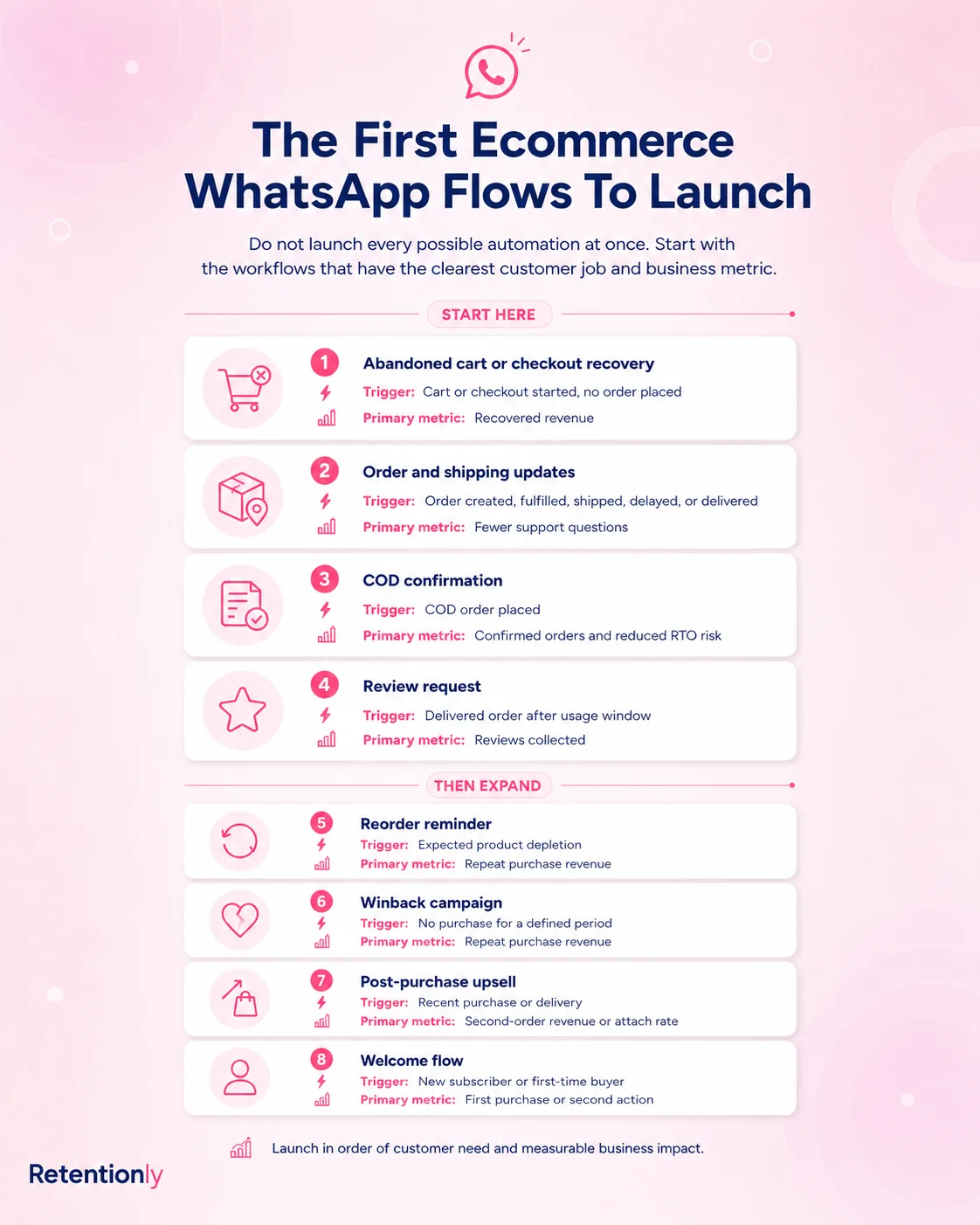
This decision shapes every other part of the integration. An abandoned checkout flow needs checkout links and stop rules after purchase. A COD confirmation flow needs order payment method, confirmation buttons, and fulfillment holds. A review request needs delivery status and enough delay for the customer to actually use the product.
If you cannot name the first workflow, wait before launching campaigns. A vague WhatsApp integration usually becomes a generic broadcast list.
Check The Shopify Events And Fields
The integration is only as useful as the Shopify data it can use.
For each flow, write down the trigger, variables, and stop event.
| Flow | Trigger to verify | Variables to verify | Stop event to verify |
|---|---|---|---|
| Abandoned checkout | Checkout started but order not completed | First name, product or cart context, checkout link | Order completed or customer opted out |
| COD confirmation | New order with COD payment method | First name, order number, order value | Customer confirms, cancels, or manual review starts |
| Order update | Order created, fulfilled, shipped, delivered, or delayed | Order number, tracking link, courier, support link | Final delivery or support handoff |
| Review request | Delivered order plus delay | Product name, review link | Review submitted, refund, support issue, or opt-out |
| Winback | No purchase after a defined inactivity window | First name, last purchase context, collection link | Purchase completed or opt-out |
| Reorder reminder | Product-specific expected reorder window | Product name, reorder link, quantity or variant | Purchase completed or reminder expires |
| Upsell | Delivered order or post-purchase delay | Purchased product, recommended product, product link | Purchase completed or frequency cap reached |
This is where many integrations fail quietly. The app may connect to Shopify, but the flow may not have the right field, the right event, or the right stop condition.
For example, abandoned checkout recovery is weak if the integration cannot include a checkout link. COD confirmation is risky if the order is still fulfilled before the customer confirms. Review requests are noisy if refunded or unresolved orders are not excluded.
Choose The Right Setup Path
There are three common ways to connect WhatsApp and Shopify.
| Setup path | When it fits | What to watch |
|---|---|---|
| Shopify WhatsApp app | You want fast setup and store-event automations | Confirm it supports the exact retention flows you need |
| WhatsApp Business Platform plus middleware | You have developers and custom routing needs | Maintenance, template handling, retries, reporting, and billing ownership |
| Helpdesk or shared inbox integration | WhatsApp is mainly a support channel | It may not be deep enough for lifecycle revenue automation |
A Shopify app is usually the best starting point for retention workflows because it already understands Shopify events. A custom API setup can be powerful, but it adds engineering and operational work. A helpdesk integration can be useful for support replies, but it may not recover carts, confirm COD orders, or drive repeat purchases by itself.
The right question is not "Can this connect WhatsApp to Shopify?" The better question is "Can this run the first flow we chose without custom work?"
Verify WhatsApp Consent And Opt-Outs
WhatsApp is a high-attention channel. That is why it works. It is also why poor consent creates problems quickly.
Before launch, decide where customers opt in and what they expect to receive.
Common opt-in points include:
Checkout or post-purchase consent.
Signup forms and popups.
Click-to-WhatsApp ads.
Back-in-stock, discount, or product-interest forms.
Customer support conversations where the user clearly initiates the chat.
The opt-in copy should be honest. If the customer opts in for order updates, do not immediately send unrelated promotions. If the customer opts in for a discount, do not assume they want every lifecycle campaign forever.
Also check opt-out handling. A useful integration should let customers stop receiving messages and should prevent future automations from ignoring that preference.
Prepare Templates By Flow, Not By Channel
Many business-initiated WhatsApp messages need approved templates. Prepare templates around the job of the message, not around a generic "WhatsApp campaign" label.
| Template | Purpose | Category consideration |
|---|---|---|
| Abandoned checkout reminder | Bring the shopper back to saved checkout | Usually marketing if it nudges purchase completion |
| COD confirmation | Confirm intent before fulfillment | Often utility when tied to a specific order and non-promotional |
| Order confirmation | Reassure customer after purchase | Usually utility when it is transactional |
| Shipping update | Share tracking or delivery progress | Usually utility when it is non-promotional |
| Review request | Ask after delivery | Often marketing or utility depending on content and platform classification |
| Winback | Re-engage inactive customer | Usually marketing |
| Reorder reminder | Remind customer to replenish | Often marketing if it promotes another purchase |
| Upsell or cross-sell | Recommend a related product | Usually marketing |
Meta's WhatsApp Business Platform pricing and policy model uses categories such as marketing, utility, authentication, and service. Do not force promotional copy into an order update just to make the message feel transactional. It can weaken trust and create approval or billing surprises.
Keep the first templates simple. Use only the variables the integration can reliably populate. If a variable fails, the message should still make sense or the flow should not send.
Define Timing And Stop Rules Before Launch
Good WhatsApp automation is controlled. The message should arrive when the customer context is fresh, and it should stop when the message is no longer useful.
Use this structure for each flow.
| Rule | Example |
|---|---|
| Timing | Send abandoned checkout reminder 45 minutes after checkout abandonment |
| Follow-up | Send one follow-up after 20 to 24 hours only if no order is completed |
| Frequency cap | Do not send more than one marketing flow to the same customer in a short window |
| Stop rule | Stop after purchase, confirmation, cancellation, refund, opt-out, or manual support handoff |
| Exclusion | Skip customers with open support issues, invalid phone numbers, or recent complaints |
Stop rules are not optional. A customer who already bought should not receive a cart reminder. A customer who canceled a COD order should not receive fulfillment updates. A customer with a delivery issue should not receive a cheerful review request.
This is the difference between a useful Shopify WhatsApp integration and a noisy one.
Test With Real Shopify Scenarios
Do not test only whether a message sends. Test whether the flow behaves correctly in real store conditions.
Run test scenarios for:
A customer abandons checkout and then purchases before the reminder.
A customer abandons checkout and does not purchase.
A COD order is confirmed.
A COD order is canceled or ignored.
An order is fulfilled and gets a tracking link.
A delivery event arrives late or not at all.
A customer opts out.
A variable such as first name, product name, or tracking link is missing.
A customer replies and needs a human response.
Document the expected result for each test. If a flow sends the right message in the happy path but fails on stop rules, it is not ready.
Confirm Reply Ownership
WhatsApp automations often create conversations. That is a strength, but only if someone owns the replies.
Before launch, define who answers:
Product questions from abandoned checkout messages.
COD confirmation replies that are not simple button clicks.
Delivery complaints after shipping updates.
Review request replies from unhappy customers.
Winback replies asking for a different product, size, or offer.
If the team does not have a reply process, start with fewer flows. Abandoned checkout and COD confirmation can produce urgent replies. Order updates can reduce support load, but they can also surface delivery exceptions. Review requests can reveal product or fulfillment problems.
The integration should make replies visible with enough Shopify context to act quickly.
Check Reporting By Workflow
A WhatsApp Shopify integration should show whether each flow worked. Delivery status is useful, but it is not the final metric.
| Flow | Primary metric | Secondary checks |
|---|---|---|
| Abandoned checkout | Recovered revenue | Conversion rate, opt-outs, discount use |
| COD confirmation | Confirmation rate and reduced fulfillment waste | Cancellation rate, unconfirmed order queue |
| Order updates | Support reduction | Replies, tracking clicks, delivery issue volume |
| Review request | Reviews collected | Rating quality, reply sentiment, exclusion accuracy |
| Winback | Repeat purchase revenue | Revenue per recipient, opt-outs, inactive-window quality |
| Reorder reminder | Reorder conversion | Timing accuracy, product-level performance |
| Upsell or cross-sell | Repeat revenue or attach rate | Recommendation relevance, opt-outs |
If a tool can show only sent, delivered, and read counts, it may be enough for basic messaging but weak for retention automation. Shopify merchants need flow-level revenue and operational metrics.
Integration Quality Scorecard
Use this scorecard when comparing apps or platforms.
| Question | Strong answer | Weak answer |
|---|---|---|
| Does it use Shopify events directly? | Yes, with clear triggers for checkout, order, fulfillment, delivery, and customer activity | Only imports contacts or adds a chat button |
| Can it stop messages after purchase or opt-out? | Yes, stop rules are built into flows | Manual cleanup or no clear suppression |
| Can it handle WhatsApp templates cleanly? | Templates, variables, categories, and approvals are visible | Templates are hard to map to Shopify data |
| Does it support retention flows? | Abandoned checkout, COD, updates, reviews, winback, reorders, and upsells | Mostly inbox, broadcast, or support features |
| Does it show business results? | Revenue, conversions, order impact, and flow performance | Only message delivery and read status |
| Is reply ownership clear? | Replies land where the team can act with Shopify context | Replies are disconnected from order history |
| Can your team operate it? | Marketer or founder can edit flows without engineering | Every change needs developers or support tickets |
The best integration for a Shopify store is usually the one that makes the first three workflows simple to launch and easy to improve.
Common Mistakes To Avoid
The first mistake is confusing a WhatsApp chat button with integration. A chat button helps customers start conversations. It does not automatically recover abandoned checkouts, confirm COD orders, send delivery updates, or bring customers back.
The second mistake is launching broadcasts first. Broadcasts can work after you have clean opt-ins, segments, frequency rules, and reply ownership. They are a poor first test if your lifecycle flows are not live.
The third mistake is ignoring template categories and costs. A marketing reminder, a utility order update, and a service reply are not the same operationally or commercially. Build cost expectations by flow.
The fourth mistake is over-automating before the team can handle replies. WhatsApp is conversational. If customers respond and nobody answers, automation creates friction.
The fifth mistake is not excluding bad moments. Do not ask for a review after a refund. Do not upsell while a delivery issue is open. Do not win back customers too soon after a complaint.
Where Retentionly Fits
Retentionly is built for Shopify stores that want WhatsApp automation tied to retention and repeat revenue.
Use Retentionly when your checklist points toward:
Abandoned checkout recovery.
COD confirmation.
Order and shipping updates.
Review requests.
Winback campaigns.
Reorder reminders.
Post-purchase upsells.
Flow-level revenue tracking.
A simpler Shopify-first setup.
The focus is not just "WhatsApp connected to Shopify." The focus is Shopify customer moments that can be automated, measured, and improved without turning WhatsApp into a generic bulk channel.
For launch sequencing, read WhatsApp Automation for Shopify: What to Automate First. For app selection, read the Shopify WhatsApp App Buyer Guide.
Final Recommendation
Treat WhatsApp Shopify integration as a workflow decision, not a technical checkbox.
Choose the first outcome. Verify the Shopify trigger and variables. Prepare the template. Define timing, exclusions, stop rules, replies, and reporting. Test the unhappy paths before turning the flow on.
Once one flow works, expand to the next. That is how WhatsApp becomes a retention channel instead of another campaign list.
Install Retentionly free on Shopify to launch WhatsApp automations for abandoned checkout recovery, COD confirmation, order updates, reviews, winback, reorders, and repeat purchases from one Shopify-first workflow system.