Shopify WhatsApp Integration: Setup, Costs, and Automations
TL;DRA Shopify WhatsApp integration is useful only when it connects WhatsApp to real store events: abandoned checkouts, new orders, COD confirmation, fulfillment updates, deliveries, reviews, winbacks, and repeat purchases.
The mistake is treating integration as the goal. Installing an app, connecting a phone number, or getting WhatsApp Business Platform access does not create revenue by itself. The real goal is to turn Shopify data into timely WhatsApp messages that recover orders, reduce support load, and bring customers back.
This guide explains the setup paths, cost components, launch checklist, and first automations a Shopify merchant should understand before choosing a WhatsApp tool.
What Shopify WhatsApp Integration Means
Shopify WhatsApp integration connects your Shopify store with a WhatsApp Business sender so customer, order, checkout, product, and fulfillment events can trigger WhatsApp messages.
In practical terms, the integration should let you:
Send abandoned checkout reminders with checkout links.
Confirm COD orders before fulfillment.
Send order, shipping, and delivery updates.
Ask for reviews after delivery.
Run winback, reorder, and post-purchase upsell flows.
Reply to customer questions from WhatsApp with Shopify context.
Measure which messages create revenue or reduce support work.
There are different ways to connect Shopify and WhatsApp, but the best setup depends on what you want WhatsApp to do.
If you only need a chat button, a lightweight widget may be enough. If you need automated retention flows, you need Shopify triggers, WhatsApp template handling, opt-in logic, reporting, and stop conditions. If you need a fully custom system, you may need direct API work or middleware.
The Three Main Setup Paths
Most Shopify stores choose one of three paths.
| Setup path | Best for | Main tradeoff |
|---|---|---|
| Shopify WhatsApp app | Stores that want fast setup and ecommerce automations | Less custom than a developer-built system |
| WhatsApp Business Platform plus middleware | Technical teams with custom event logic | More setup, testing, and maintenance |
| Support inbox or CRM integration | Teams that mainly need shared customer conversations | Can prioritize support over revenue automation |
The path matters because WhatsApp can become either a revenue workflow system or just another inbox. A Shopify merchant comparing tools should look past the word "integration" and ask what Shopify events the tool can actually use.
Option 1: Use A Shopify WhatsApp App
For most stores, a Shopify WhatsApp app is the simplest starting point. You install the app, connect your store, set up the WhatsApp sender, create or approve message templates, and turn on the first flows.
This is usually the right choice when you want:
Abandoned checkout recovery.
COD confirmation.
Order and shipping updates.
Review requests.
Winback flows.
Reorder reminders.
Post-purchase upsells.
Revenue reporting tied to Shopify.
The advantage is speed. The app already understands Shopify objects such as orders, checkouts, customers, products, fulfillment status, and tags. You do not need to build every trigger from scratch.
The risk is choosing an app that is broad but not deep. Some tools are strong at shared inboxes, bulk broadcasts, or chat widgets, but weaker at Shopify retention automation. Before installing, check whether the app supports the exact lifecycle flows you want to run.
Option 2: Use WhatsApp Business Platform And Middleware
A custom integration gives more control. A developer can connect Shopify webhooks, Shopify Flow, Zapier, Make, a backend service, or a customer data platform to a WhatsApp provider.
This can make sense when:
You have a technical team that can maintain the system.
Your Shopify workflow is highly custom.
You need unusual routing, approvals, or business rules.
WhatsApp is part of a larger internal data stack.
You already use an API provider for other channels.
The tradeoff is ownership. Someone has to manage template submission, delivery failures, opt-outs, retry logic, attribution, billing checks, and reporting. A custom build can be powerful, but it is rarely the fastest way to launch a normal Shopify retention program.
For most merchants, the custom route should come after they know which flows matter. It is better to validate abandoned checkout, COD confirmation, order updates, or winback first than to spend weeks building infrastructure for messages that have not been proven.
Option 3: Use A Support Inbox Or CRM Integration
Some WhatsApp integrations are built mainly for customer support. They bring WhatsApp messages into a shared inbox so agents can reply, assign conversations, add notes, and manage tickets.
That is useful when your main problem is support volume, but it may not solve the retention workflow problem by itself.
Choose a support-led integration when you need:
Multiple agents replying from one WhatsApp number.
Ticket assignment and conversation history.
A shared view of customer questions.
Social, email, and WhatsApp support in one place.
Manual support workflows around orders and returns.
Choose a retention-led Shopify app when you need:
Store-event triggers.
Revenue attribution.
Abandoned checkout recovery.
COD verification.
Review, winback, reorder, and upsell automations.
Message timing and stop rules tied to Shopify behavior.
Many growing stores need both eventually. The first decision is which problem is more urgent: support operations or automated lifecycle revenue.
What You Need Before Connecting WhatsApp To Shopify
Before launching, make sure the basics are clear.
| Requirement | What to check | Why it matters |
|---|---|---|
| WhatsApp Business sender | Which phone number and business profile will send messages | Customers need to recognize the sender |
| Shopify access | App permissions, store domain, checkout and order data | The integration needs reliable Shopify events |
| Customer consent | Where shoppers opt in to WhatsApp messages | Poor opt-in quality creates complaints and weak results |
| Message templates | Approved templates for business-initiated messages | Many outbound messages need templates before sending |
| Flow ownership | Who edits copy, timing, segments, and replies | Automations need an operator, not just a setup |
| Cost model | App subscription, Meta message fees, and provider markup | WhatsApp costs depend on usage and destination market |
| Reporting | Revenue, clicks, replies, blocks, and opt-outs | Opens alone are not enough to judge performance |
If any of these are unclear, do not start with a large broadcast. Start with one lifecycle flow and learn from it.
Shopify WhatsApp Integration Costs
The cost of a Shopify WhatsApp integration usually has three parts.
| Cost component | What it covers | How to think about it |
|---|---|---|
| App or platform subscription | Software, Shopify integration, automation builder, inbox, reporting | Compare by needed workflows, not just monthly price |
| WhatsApp Business Platform message fees | Charges from Meta based on delivered messages, category, and recipient market | Costs vary by message type and country |
| Provider markup or pass-through fees | Some providers add markup or platform fees on top of Meta charges | Check whether the provider passes Meta fees through or marks them up |
Meta's WhatsApp Business Platform uses per-message pricing for delivered messages. Rates depend on the recipient's market and the message category: marketing, utility, authentication, or service.
For Shopify merchants, the category matters.
Abandoned checkout reminders and promotional winbacks are usually marketing messages.
Order confirmations, shipping updates, and delivery updates are usually utility messages when they are non-promotional and tied to a customer action.
Support replies inside the customer service window are service messages.
Login and verification codes are authentication messages.
Do not estimate cost from message volume alone. Estimate cost by flow.
For example, 5,000 monthly abandoned checkout reminders have a different cost profile from 5,000 order updates. A store sending mostly utility updates will usually think about cost differently from a store sending broad promotional campaigns.
A Practical Setup Checklist
Use this sequence if you want a clean launch.
Choose the first business outcome.
Pick the setup path that matches that outcome.
Confirm your WhatsApp sender and business profile.
Connect Shopify and check that customer, order, checkout, and fulfillment events sync correctly.
Decide where WhatsApp opt-in will be collected.
Prepare templates for the first two or three flows.
Set timing, segments, fallback rules, and stop conditions.
Test with internal orders and test customers.
Launch one flow to a controlled segment.
Review revenue, replies, blocks, opt-outs, and support impact.
Improve the flow before adding campaigns or more automations.
That order prevents the common problem: a store connects WhatsApp, sends a campaign, sees mixed results, and still does not know whether the integration is working.
The First Automations To Launch After Integration
Once Shopify and WhatsApp are connected, start with flows that have a clear job.
| Priority | Flow | Trigger | First metric to watch |
|---|---|---|---|
| 1 | Abandoned checkout recovery | Checkout started but order not completed | Recovered revenue |
| 2 | COD confirmation | COD order created | Confirmation rate and cancellation rate |
| 3 | Order and shipping updates | Order created, fulfilled, shipped, or delivered | Support ticket reduction |
| 4 | Review request | Order delivered and enough usage time has passed | Reviews collected |
| 5 | Winback | Customer inactive for 45, 60, or 90 days | Repeat purchase revenue |
| 6 | Reorder reminder | Expected replenishment window reached | Reorder conversion |
| 7 | Post-purchase upsell | Recent order delivered or used | Repeat revenue and attach rate |
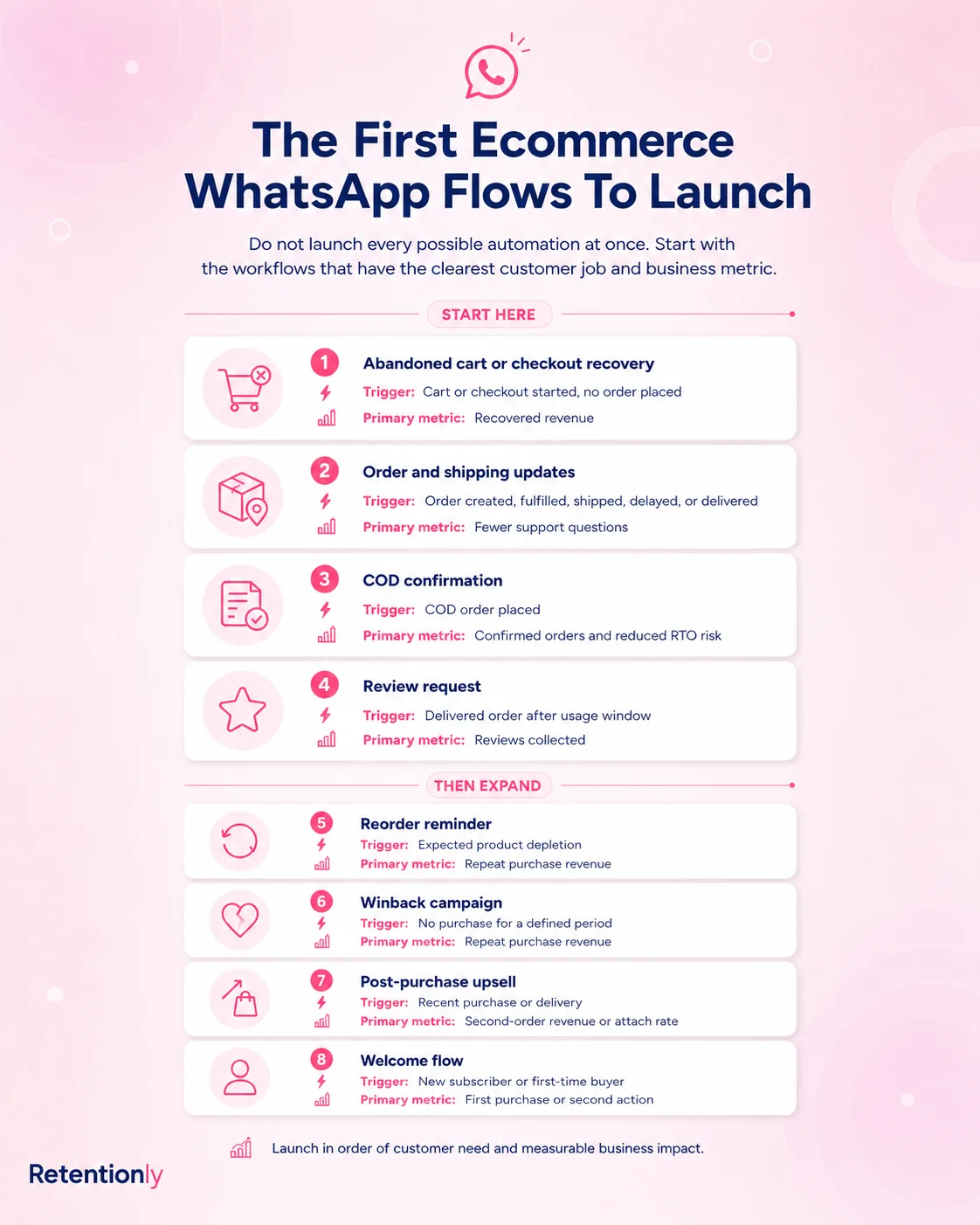
This sequencing is intentionally practical. Recover revenue first. Protect fulfillment margin where COD is important. Reduce avoidable support. Then build deeper retention flows.
Message Templates To Prepare
Templates should be specific enough to be useful and flexible enough to work across orders.
Start with these:
| Template | Example purpose | Useful variables |
|---|---|---|
| Abandoned checkout | Bring a shopper back to saved checkout | First name, product name, checkout link |
| COD confirmation | Confirm or cancel a COD order | First name, order number, order value |
| Order confirmation | Reassure customer after purchase | Order number, store name, support link |
| Shipping update | Share tracking details | Tracking link, courier, order number |
| Delivery follow-up | Confirm delivery and guide next step | Product name, support link |
| Review request | Ask for a review after delivery | Product name, review link |
| Winback | Re-engage an inactive customer | Collection link, offer code, last purchase context |
| Reorder reminder | Prompt repeat purchase | Product name, reorder link |
Keep promotional templates separate from utility templates. Mixing promotional language into an order update can create compliance and cost problems. It can also make the customer trust the message less.
How To Choose The Right Shopify WhatsApp Integration
Use this decision framework before installing an app or committing to a platform.
| Question | Why it matters |
|---|---|
| Does it connect to Shopify events directly? | Store events are the foundation of useful automation |
| Can it recover abandoned checkouts with checkout links? | This is usually the fastest revenue test |
| Can it confirm COD orders? | Important for stores with fulfillment risk |
| Can it send order, shipping, and delivery updates? | Useful for reducing repetitive support |
| Can it run review, winback, reorder, and upsell flows? | Shows whether the tool supports retention, not just chat |
| Does it handle opt-outs and stop conditions? | Prevents over-messaging and poor customer experience |
| Does it show revenue by flow? | Helps you improve automations instead of guessing |
| Are Meta message fees passed through or marked up? | Changes the real cost as volume grows |
| Is the setup simple enough for your team to own? | A powerful tool that nobody operates will not help |
The best tool is not always the broadest one. A Shopify store trying to improve retention needs a tool that makes Shopify lifecycle flows easy to launch and measure.
Common Mistakes To Avoid
The first mistake is installing a chat widget and assuming WhatsApp is integrated. A widget helps customers start conversations, but it does not automatically recover abandoned checkouts, confirm COD orders, or drive repeat purchases.
The second mistake is starting with broadcasts. Broadcasts can work, but only after opt-in quality, segmentation, template approval, and customer expectations are in place. Lifecycle automations are usually a better first test.
The third mistake is ignoring message categories and costs. Marketing, utility, authentication, and service messages do not behave the same commercially. Build your flows so customers receive useful messages and your team understands the cost of each one.
The fourth mistake is leaving replies unmanaged. A WhatsApp automation can start a customer conversation. If customers reply and nobody owns the thread, the automation creates friction instead of revenue.
The fifth mistake is measuring only delivery or open rates. The numbers that matter are recovered revenue, repeat purchase revenue, support reduction, confirmation rate, review collection, opt-outs, and blocks.
Where Retentionly Fits
Retentionly is built for Shopify stores that want WhatsApp automation tied to retention and repeat revenue, not just a generic WhatsApp inbox.
Use Retentionly when your integration goal is to launch flows such as:
Abandoned checkout recovery.
COD confirmation.
Order updates.
Review requests.
Winback campaigns.
Reorder reminders.
Post-purchase upsells.
The advantage is focus. Instead of starting with a broad system and then trying to shape it into Shopify workflows, you can start with the revenue moments that already exist in your store.
For a broader automation strategy, read the Shopify WhatsApp Automation Guide.
Final Recommendation
If you are adding WhatsApp to Shopify for the first time, do not start by asking "How do I connect WhatsApp?" Start by asking "Which Shopify event should trigger the first message?"
For most stores, the answer is abandoned checkout recovery. For COD-heavy stores, it may be COD confirmation. For support-heavy stores, it may be order and shipping updates.
Once that first flow is live, measure the result and expand from there.
A good Shopify WhatsApp integration should make that progression simple: connect the store, collect consent, create templates, trigger messages from Shopify events, stop when the customer converts or opts out, and report the result by flow.
Install Retentionly free on Shopify to connect WhatsApp with Shopify retention automations for abandoned checkout recovery, COD confirmation, order updates, reviews, winback, reorders, and post-purchase revenue.