WhatsApp Broadcast Shopify Guide: When to Send and When to Automate
TL;DRA WhatsApp broadcast can drive fast attention for a Shopify store, but it is also the easiest WhatsApp format to misuse. The message reaches many customers at once, which means weak segmentation, vague consent, poor timing, or a lazy offer can damage the channel faster than a low-performing email campaign.
The better way to think about WhatsApp broadcast Shopify campaigns is simple: use broadcasts for planned store moments, use automations for customer-triggered moments, and use retention campaigns when Shopify data tells you a known customer group is ready for a next action.
This guide shows when a Shopify WhatsApp broadcast makes sense, when an automation should own the workflow, how to segment broadcast audiences, what messages to send, and which metrics should decide whether the campaign worked.
What A WhatsApp Broadcast Means For Shopify
A WhatsApp broadcast is a one-to-many message sent to a selected audience. For a Shopify store, that audience might be VIP customers, repeat buyers, a product category segment, back-in-stock subscribers, inactive customers, or opted-in contacts who asked for offers.
The key word is selected. A broadcast should not mean every phone number in the database. It should mean one message, one clear reason, and one audience that can understand why the message arrived.
Good Shopify broadcast use cases include:
A new collection launch for customers who bought from that category before.
A back-in-stock drop for shoppers who requested an alert.
A limited VIP access window for high-value customers.
A seasonal campaign for customers whose past purchases match the season.
A storewide sale where the audience has clearly opted into promotional WhatsApp messages.
A product education announcement for customers who bought a specific item.
Weak broadcast use cases look different. They start with "we need sales today" and end with the same discount sent to every contact. That may create short-term revenue, but it also increases opt-outs, blocks, replies that nobody owns, and customer fatigue.
Broadcasts, Automations, And Retention Campaigns Are Different
Shopify teams often call every WhatsApp send a campaign. That makes the channel harder to operate.
Use these definitions instead.
| Message type | What starts it | Best Shopify use cases | Main risk |
|---|---|---|---|
| Lifecycle automation | A customer, checkout, order, delivery, or product event | Abandoned checkout, COD confirmation, order updates, review requests, reorder reminders | Missing stop rules after purchase, cancellation, refund, or opt-out |
| Retention campaign | A known customer segment or lifecycle stage | Winback, replenishment, VIP access, loyalty reward, product education | Segment too broad or timing too shallow |
| Broadcast | A planned store event | Product launch, seasonal sale, flash sale, store announcement, broad back-in-stock drop | Treating WhatsApp like a bulk discount list |
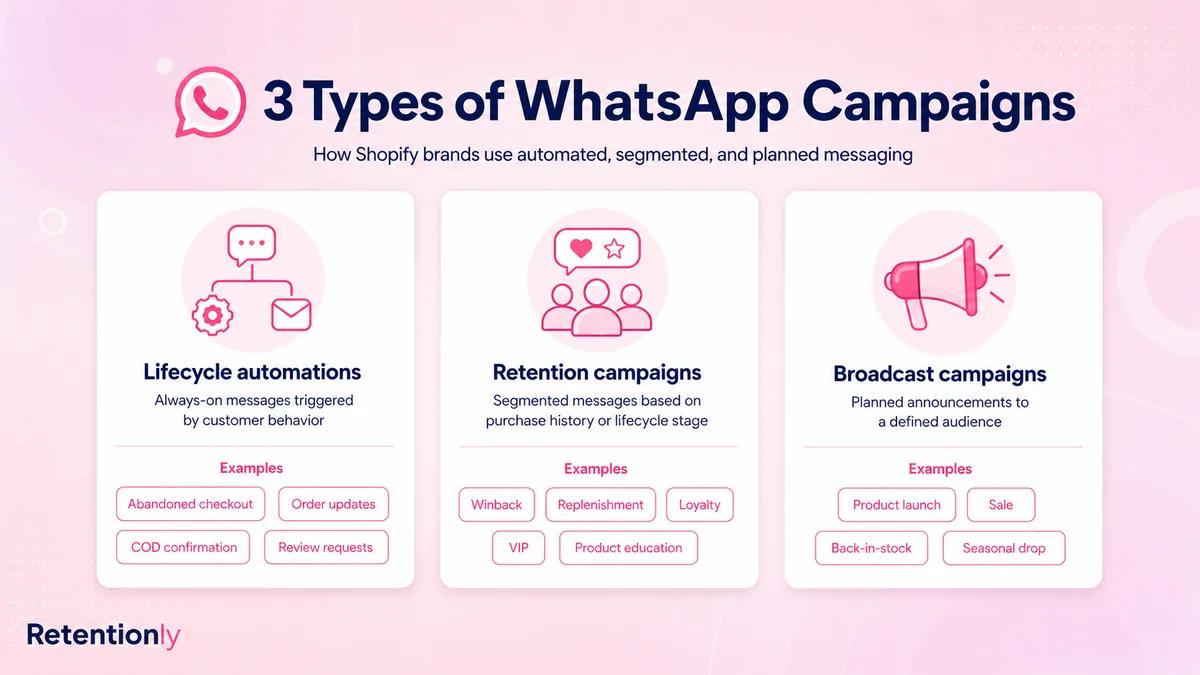
Build in that order. Lifecycle automations come first because the customer action creates the timing. Retention campaigns come next because they need Shopify customer history. Broadcasts come after the basics because they create the most volume and need the strongest controls.
If you are still planning the broader channel, start with the Shopify WhatsApp Marketing Guide. This article goes deeper into broadcast decisions.
When A Shopify WhatsApp Broadcast Makes Sense
A broadcast is useful when the message is tied to a shared store event and the audience has a clear reason to care.
The most common examples are launch, sale, availability, urgency, and customer access.
| Broadcast moment | Good audience | Message job | Metric |
|---|---|---|---|
| Product launch | Category buyers, VIPs, waitlist subscribers, engaged WhatsApp contacts | Introduce a relevant new product | Launch revenue and product clicks |
| Seasonal sale | Customers with matching purchase history or promotional opt-in | Drive timely purchase intent | Revenue per recipient and opt-out rate |
| Back-in-stock drop | Alert subscribers, product viewers, category buyers | Convert existing demand | Sell-through and restock revenue |
| VIP early access | High-LTV customers, repeat buyers, loyalty members | Reward priority customers | Revenue per VIP recipient |
| Limited inventory alert | Customers tied to a product or category | Help interested shoppers act before stock runs out | Conversion rate and inventory sell-through |
| Store announcement | Customers affected by the change | Share useful information quickly | Replies, clicks, and support reduction |
The best broadcast has a built-in answer to "why me, why now?" If the customer cannot infer that answer in a few seconds, the audience is probably too broad or the message is not ready for WhatsApp.
When You Should Automate Instead
Many messages that look like broadcasts should actually be automations.
An abandoned checkout reminder should not wait for a marketer to create a campaign. It should trigger when a checkout is abandoned, stop after purchase, and measure recovered revenue.
An order update should not be mixed into a sale broadcast. It should trigger from the order status and reduce customer uncertainty.
A review request should not go to every recent buyer on the same day. It should wait until the order is delivered and the product has had enough time to be used.
Use automation instead of broadcast for these workflows.
| Workflow | Why automation is better |
|---|---|
| Abandoned checkout | The timing depends on checkout activity and purchase status |
| COD confirmation | The action needs to happen before fulfillment |
| Order confirmation and shipping updates | The message is tied to order status |
| Delivery follow-up | The customer state changes after delivery |
| Review request | The right send time depends on product usage window |
| Reorder reminder | Timing depends on product replenishment cycle |
| Winback | The audience depends on inactivity and purchase history |
| Post-purchase upsell | The recommendation depends on the recent order |
For a deeper revenue workflow, read the Shopify Abandoned Cart WhatsApp Recovery Guide. For repeat purchase timing, read the Shopify Reorder Reminders WhatsApp Guide.
The Broadcast Planning Checklist
Before sending a Shopify WhatsApp broadcast, fill out the campaign mechanics.
| Question | Good answer | Weak answer |
|---|---|---|
| Who receives it? | Repeat buyers of skincare refills in the last 120 days | Everyone with a phone number |
| Why now? | A refill bundle launched and the segment has a real repeat cycle | We need more sales today |
| What is the message job? | Drive one-tap purchase of a relevant bundle | Announce a generic discount |
| What proof or context is included? | Product name, reason, benefit, direct link | Vague sale copy |
| What should stop it? | Purchase, opt-out, support issue, campaign end, stockout | Nothing |
| Who owns replies? | Support answers product questions; marketing tracks revenue | Nobody |
| What proves success? | Revenue per recipient, conversion, opt-outs, margin | Open rate only |
If the campaign does not pass this checklist, do not scale it. Narrow the audience first.
Shopify Segments That Work For Broadcasts
Broadcast segmentation does not need to be complex, but it should be commercially meaningful.
| Shopify segment | Broadcast example | What to avoid |
|---|---|---|
| First-time buyers | Care guide, second-order offer, product education | Sending VIP claims too early |
| Repeat buyers | Early access, loyalty reward, replenishment bundle | Treating them like cold prospects |
| VIP customers | Private sale, limited drop, concierge help | Over-discounting top customers |
| Category buyers | New launch in the same category | Sending unrelated collections |
| Back-in-stock subscribers | Product or variant return alert | Messaging people who never requested updates |
| Inactive customers | Relevant winback offer or new arrivals based on last order | Generic "we miss you" copy |
| Recent purchasers | Education or usage guide | Aggressive discount right after purchase |
| Customers with active support issue | Suppression from promotions | Sending cheerful sale copy during a problem |
The broadcast should feel like it was sent because of customer context, not because the store found a cheaper way to reach the inbox.
Message Examples For Shopify WhatsApp Broadcasts
Use these as starting points. Keep the copy short, specific, and tied to the customer segment.
Product Launch For Category Buyers
Hi [first_name], our new [category_name] drop is live. Since you bought from this category before, you can see the collection here: [collection_link]
This works because the audience has category context. It is weaker when sent to customers with no history in that category.
VIP Early Access
[first_name], you get early access to [collection_name] before it opens publicly. Your private link: [link]
VIP broadcasts should feel like access, not a normal discount with a VIP label.
Back-In-Stock Broadcast
[product_name] is back in stock at [store_name]. You can get it here before it sells out again: [product_link]
Use product or variant-level context. A size-specific restock should not go to every category subscriber.
Seasonal Campaign
[first_name], our [season_name] picks for [category_name] are ready. Based on your last order, these are the best places to start: [collection_link]
Seasonal broadcasts work better when they are filtered by product history, location, size, category, or customer value.
Limited Offer
Today only: [offer_name] is available for [customer_group]. See the offer here: [link]
Use limited-time offers carefully. If every week has a false urgency campaign, the channel becomes less trusted.
Product Education Announcement
Quick guide for [product_name]: here is how to get better results from your recent order: [guide_link]
Not every broadcast needs to sell immediately. Education can improve product experience and make the next purchase easier.
Template, Consent, And Opt-Out Basics
Shopify WhatsApp broadcasts are usually business-initiated messages. That means you should treat promotional broadcasts as marketing messages, use approved templates where required, and send only to customers who gave permission for that type of WhatsApp communication.
Do not assume a delivery phone number equals promotional consent. A customer who shared a phone number for shipping updates may not expect sale broadcasts. Keep the opt-in copy clear around what the customer will receive.
Strong opt-in sources include:
Checkout consent that clearly mentions WhatsApp offers or updates.
Back-in-stock or price-drop signup forms.
VIP or loyalty signup.
Product launch waitlists.
Click-to-WhatsApp ads where the user starts the chat.
Account or popup opt-ins that clearly mention WhatsApp marketing.
Every broadcast system also needs opt-out handling. If a customer replies with a stop word, complaint, or unsubscribe intent, remove them from promotional sends before the next campaign.
Meta has also been more explicit about message quality, user controls, and limits on business messages. That makes relevance a growth issue, not only a compliance issue.
Frequency And Suppression Rules
Broadcasts should sit below customer-triggered messages in priority.
Use these rules as a practical starting point:
Do not send a promotional broadcast to a customer currently in an abandoned checkout flow.
Stop broadcasts after the customer purchases from the campaign.
Suppress customers with an unresolved support issue.
Exclude refunded or recently canceled orders from cheerful promotional pushes.
Avoid sending a review request, upsell, and broadcast in the same short window.
Exclude recent purchasers from aggressive discount broadcasts unless the message is education, care, or a relevant add-on.
Keep a global WhatsApp frequency cap, not only per-flow limits.
Watch opt-outs, blocks, negative replies, and support load after every send.
The customer does not care that one message came from a campaign calendar and another came from an automation. They experience all of it as messages from your store.
What To Measure After A Broadcast
Open rate is not enough. WhatsApp gets attention. The question is whether the attention created useful action.
Measure broadcasts with a scorecard.
| Metric | Why it matters |
|---|---|
| Revenue per recipient | Shows whether the audience was commercially relevant |
| Conversion rate | Shows whether the message and landing path worked |
| Click rate | Shows whether the promise was interesting enough |
| Replies | Shows intent, questions, or confusion |
| Opt-out rate | Shows fatigue and expectation mismatch |
| Blocks or negative feedback | Shows channel health risk |
| Margin after discount | Shows whether revenue was profitable |
| Support load | Shows whether replies were owned properly |
| Repeat purchase behavior | Shows whether the broadcast helped retention, not only one-time sales |
For launch and sale broadcasts, revenue per recipient and margin matter most. For education broadcasts, replies, support reduction, and repeat purchase can matter more. For back-in-stock broadcasts, inventory sell-through and conversion are the useful signals.
Common Broadcast Mistakes
Avoid these mistakes when planning WhatsApp broadcast Shopify campaigns:
Sending to every phone number instead of a meaningful segment.
Using WhatsApp broadcasts before abandoned checkout and order automations are working.
Treating promotional consent as implied because the customer gave a delivery phone number.
Sending generic discounts to VIPs, recent purchasers, and inactive customers with the same copy.
Forgetting to suppress customers who purchased, opted out, complained, or opened a support issue.
Measuring opens instead of revenue, margin, replies, opt-outs, and customer state.
Running a broadcast without deciding who handles replies.
Sending broadcasts so often that customers stop seeing WhatsApp as useful.
Calling every message urgent.
A good broadcast strategy usually sends fewer broad campaigns than the team originally planned. The revenue comes from better timing and better segments, not only more sends.
Where Retentionly Fits
Retentionly is built for Shopify stores that want WhatsApp to behave like a retention automation system, not just a broadcast sender.
Use Retentionly when you want to:
Launch abandoned checkout, COD confirmation, order update, review, winback, reorder, upsell, welcome, and campaign flows.
Segment sends by Shopify customer behavior, order history, product interest, and lifecycle stage.
Keep broadcasts separate from lifecycle automations so planned promotions do not interrupt higher-intent customer moments.
Suppress customers after purchase, opt-out, support issue, refund, or a higher-priority flow.
Measure WhatsApp by recovered revenue, repeat purchases, review collection, and campaign outcomes.
Broadcasts still have a place. They are useful for launches, seasonal campaigns, VIP access, and time-sensitive announcements. But for most Shopify stores, the core WhatsApp revenue engine should be automated around customer behavior first.
If you want more campaign examples, read WhatsApp Campaign Ideas for Shopify Stores. If you are choosing an app, read the Shopify WhatsApp App Buyer Guide.
Final Recommendation
Use WhatsApp broadcasts only when the audience, reason, message job, stop rule, reply owner, and metric are clear.
For customer-triggered moments, automate instead. Abandoned checkout, COD confirmation, order updates, review requests, reorders, winback, and post-purchase upsells should not depend on a campaign calendar.
For planned store moments, broadcasts can work well when they are segmented and measured properly. Send product launches to category buyers. Send VIP access to VIPs. Send restock messages to people who showed demand. Send seasonal campaigns to customers whose history matches the moment.
That is how Shopify stores use WhatsApp broadcasts without turning the channel into another noisy promotion list.
Install Retentionly free on Shopify to launch WhatsApp automations and segmented campaigns for abandoned checkout recovery, order updates, reviews, winback, reorders, upsells, VIP access, and repeat purchases.