WhatsApp Automation for Shopify: What to Automate First
TL;DRWhatsApp automation for Shopify works best when it starts with the store events that already show customer intent. A shopper abandons checkout. A COD order needs confirmation. A package ships. A customer receives an order. A repeat buyer goes quiet. Those moments deserve automation before a store starts building broad campaigns.
The mistake is trying to automate everything at once. That creates too many templates, too many edge cases, and too many messages before the team knows what WhatsApp is actually improving.
A better approach is to launch the first few automations in the order that matches your business constraint: recovered revenue, COD risk, support volume, review collection, repeat purchase, or post-purchase expansion.
What WhatsApp Automation Means For Shopify
WhatsApp automation for Shopify connects store events to WhatsApp messages. The trigger comes from Shopify, the message uses customer or order context, and the workflow stops when the customer buys, confirms, opts out, or no longer needs the message.
The useful version is not "send more WhatsApp messages." It is a controlled lifecycle flow.
| Flow component | What it decides | Shopify example |
|---|---|---|
| Trigger | Which event starts the automation | Checkout abandoned |
| Audience | Who should receive it | Opted-in customers with valid phone numbers |
| Timing | When the message should send | 45 minutes after checkout abandonment |
| Message | What the customer should do | Return to saved checkout |
| Stop rule | When the flow should end | Customer completes purchase or opts out |
| Metric | How the flow will be judged | Recovered revenue |
If a flow does not have those six pieces, it is not ready to launch. It is only a message idea.
For a broader category overview, read the Shopify WhatsApp Automation Guide. This article focuses on launch order.
The Prioritization Scorecard
Before choosing your first automation, score each candidate flow against five questions.
| Question | Why it matters |
|---|---|
| Is the customer intent clear? | WhatsApp performs better when the message follows a recent action |
| Is the business impact measurable? | The team needs a revenue, support, or retention metric |
| Is the message useful to the customer? | Irrelevant WhatsApp messages damage trust quickly |
| Can the flow stop cleanly? | A customer should not keep receiving reminders after buying or opting out |
| Can your team handle replies? | Automations often create customer conversations |
The best first automation usually has strong answers to all five. That is why abandoned checkout recovery, COD confirmation, and order updates usually come before broadcasts.
Recommended Launch Order
Most Shopify stores should launch WhatsApp automation in this order.
| Priority | Automation | Best when | Primary metric |
|---|---|---|---|
| 1 | Abandoned checkout recovery | You have meaningful checkout abandonment | Recovered revenue |
| 2 | COD confirmation | You accept cash on delivery or see fake orders | Confirmation rate and RTO reduction |
| 3 | Order and delivery updates | Support gets repeated "where is my order?" questions | Ticket reduction and delivery success |
| 4 | Review request | You need more social proof from delivered orders | Reviews collected |
| 5 | Winback | Customers buy once and disappear | Repeat purchase revenue |
| 6 | Reorder reminder | Products have predictable replenishment cycles | Reorder conversion |
| 7 | Post-purchase upsell or cross-sell | You can recommend a relevant next product | Repeat revenue and attach rate |
| 8 | Broadcasts | You already have clean opt-ins and segments | Revenue per recipient and opt-outs |
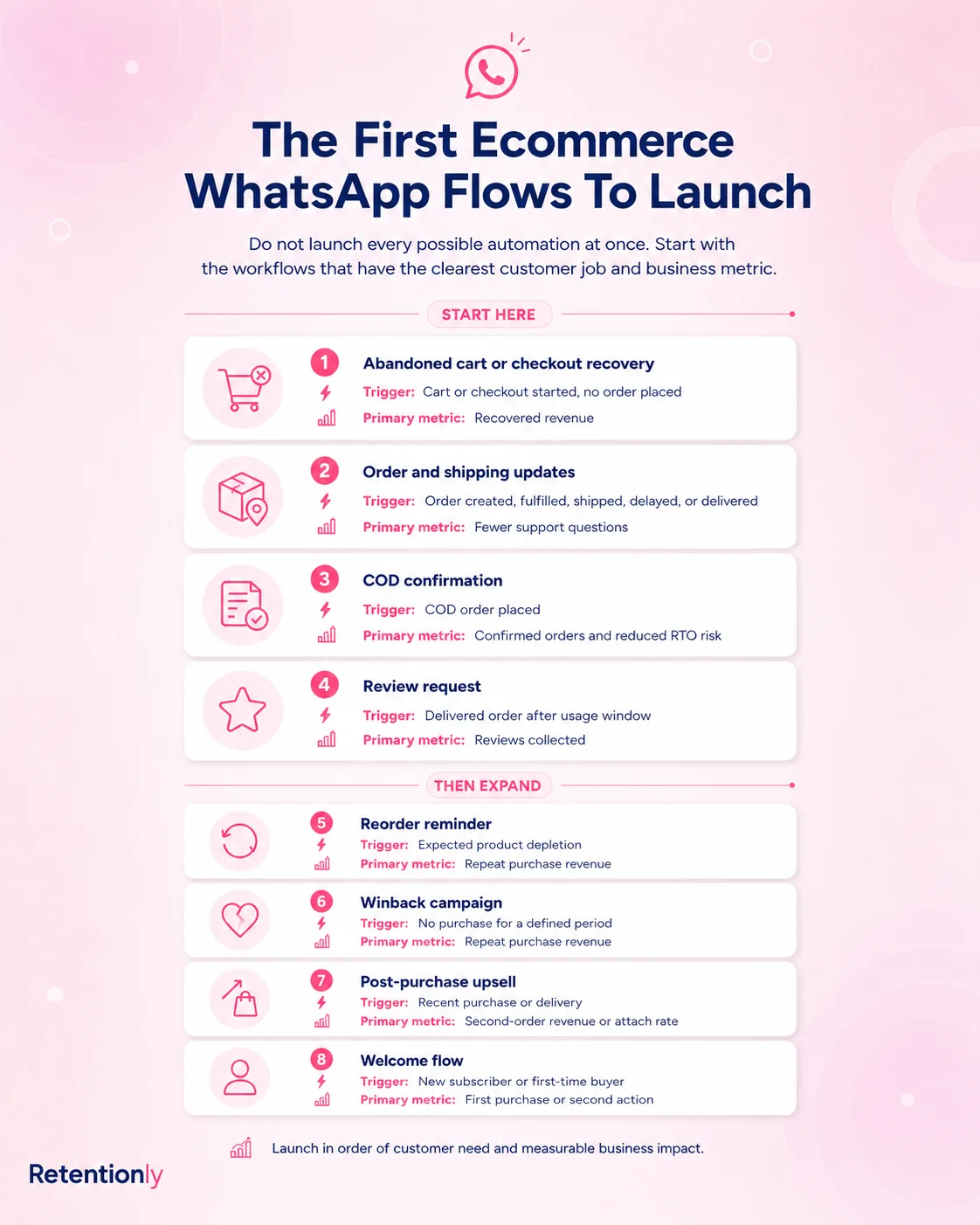
This order is not fixed for every store. A COD-heavy store may put COD confirmation first. A brand with low support capacity may start with order updates. A consumables brand may move reorder reminders higher.
The point is to choose based on the business bottleneck, not on the longest feature list.
Flow 1: Abandoned Checkout Recovery
Abandoned checkout recovery is usually the best first WhatsApp automation because the customer has already shown buying intent. They chose products, started checkout, and gave enough information for follow-up.
A clean first version:
| Setting | Recommendation |
|---|---|
| Trigger | Checkout started but order not completed |
| Audience | Opted-in customers with valid phone numbers |
| First message | 30 to 60 minutes after abandonment |
| Follow-up | One follow-up after 20 to 24 hours if no purchase happens |
| Stop rule | Stop if the order is completed, customer opts out, or message fails repeatedly |
| Metric | Recovered orders, recovered revenue, conversion rate, opt-outs |
Start with a helpful reminder before using a discount.
Example first message:
Hi [first_name], you left something in your cart at [store_name]. Your checkout is saved here: [checkout_link]. Reply if you need help choosing.
Example second message:
Still thinking it over? Your [store_name] cart is ready here: [checkout_link]. Use [code] before tonight if you want to complete your order.
The discount should not be automatic for every store. If your margins are tight or customers are trained to wait, test a non-discount reminder first. Then use offers for specific segments such as high cart value, first-time buyers, or shoppers who ignored the first reminder.
For a deeper playbook, read the Shopify Abandoned Cart WhatsApp Recovery Guide.
Flow 2: COD Confirmation
COD confirmation should move to the top if cash-on-delivery orders create fulfillment waste, fake orders, unreachable customers, or return-to-origin risk.
This flow has a simple job: confirm intent before the store spends money shipping the order.
| Setting | Recommendation |
|---|---|
| Trigger | COD order created |
| Audience | COD orders only, optionally filtered by value, region, or risk signal |
| Timing | Immediately after order placement |
| Message | Ask the customer to confirm or cancel |
| Stop rule | Stop after confirmation, cancellation, or manual-review threshold |
| Metric | Confirmation rate, cancellation rate, fulfillment holds, RTO reduction |
Example message:
Hi [first_name], please confirm your COD order [order_number] from [store_name]. Reply 1 to confirm or 2 to cancel.
A more advanced version can tag unconfirmed orders for review, send one reminder after a short delay, or route high-value unconfirmed orders to support. Keep the customer action simple. Do not ask them to read a long policy or respond with a complicated phrase.
Flow 3: Order And Delivery Updates
Order updates are not always the highest direct revenue flow, but they are often the easiest way to reduce support load and improve customer trust.
Useful update points include:
Order confirmation
Payment confirmation where relevant
Shipping confirmation
Out-for-delivery update
Delivery confirmation
Delay or exception update
The best order update flow is selective. Sending every small status change can make WhatsApp feel noisy. Send messages when the customer would reasonably want to know what happened.
| Message | When to send | Customer job |
|---|---|---|
| Order confirmation | Immediately after order placement | Reassure the customer the order went through |
| Shipping update | When fulfillment or tracking is available | Help the customer track delivery |
| Out for delivery | On delivery day where carrier data supports it | Reduce missed delivery risk |
| Delivery confirmation | After delivery | Close the loop and set up review or support follow-up |
Example shipping update:
Your [store_name] order [order_number] has shipped. Track it here: [tracking_link]. We will let you know if anything changes.
Measure replies and support tickets, not only delivered messages. If customers still ask where the order is, the timing, wording, or tracking link may need work.
Flow 4: Review Request
Review requests work when the timing respects product usage. Ask too early and the message feels automated in the wrong way. Ask too late and the customer has moved on.
Start from the delivery event, then delay based on product type.
| Product type | Suggested timing after delivery |
|---|---|
| Fashion accessory or simple product | 2 to 4 days |
| Beauty, skincare, food, supplement, or consumable | 5 to 14 days |
| Product that needs setup or repeated use | 7 to 21 days |
Example message:
Hi [first_name], hope you are enjoying your [product_name] from [store_name]. Could you share a quick review? It helps other shoppers choose with confidence: [review_link]
Exclude refunded orders, unresolved support issues, and customers who have opted out. A review flow should create social proof from happy customers, not pressure customers who are already frustrated.
The main metric is reviews collected. Secondary metrics include review rate, average rating, reply sentiment, and support follow-up needed.
Flow 5: Winback Campaigns
Winback automation is useful once the store has enough customer history to identify lapsed buyers. It should not be a generic blast to everyone who has not purchased recently.
Start by segmenting based on purchase pattern.
| Segment | Trigger | Message angle |
|---|---|---|
| First-time buyer who never returned | No second purchase after 45 to 60 days | Bestseller, starter bundle, or first-repeat incentive |
| Former repeat buyer | No purchase after expected cycle | "We saved your favorites" or replenishment angle |
| VIP customer | Inactive beyond normal purchase rhythm | Early access, personalized collection, or support-led check-in |
| Discount-sensitive buyer | Inactive after campaign purchase | Controlled offer with a clear expiry |
Example winback message:
Hi [first_name], it has been a while since your last order from [store_name]. We picked a few customer favorites you might like: [collection_link]
Winback should be measured by repeat purchase revenue, not message opens. Also watch opt-outs. If opt-outs rise, your inactivity window may be too short or the message may be too promotional.
Flow 6: Reorder Reminders
Reorder reminders are powerful for consumables because the timing is tied to product use, not arbitrary campaign dates.
Good fit categories include:
Beauty and skincare
Supplements
Food and beverage
Pet supplies
Household essentials
Personal care
The key is estimating when the product is likely to run low. If a customer buys a 30-day supply, a reminder around day 24 to 28 can feel useful. If they buy a jacket, a reorder reminder does not make sense.
Example message:
Running low on [product_name]? You can reorder from [store_name] in one tap here: [reorder_link]
Measure reorder conversion, time between purchases, and revenue per recipient. Over time, segment by product size, quantity, and buying cycle so customers are not reminded too early or too late.
Flow 7: Post-Purchase Upsell And Cross-Sell
Post-purchase upsell works when the recommendation is obviously related to what the customer bought.
Do not send random products after every order. Use the recent purchase as context.
| Purchase context | Better follow-up |
|---|---|
| Customer bought a shampoo | Conditioner, refill, or hair mask |
| Customer bought running shoes | Socks, care kit, or training accessory |
| Customer bought coffee | Subscription, grinder, or flavor bundle |
| Customer bought a dress | Matching accessory or next drop preview |
Example message:
Your [product_name] pairs well with [recommended_product]. If you want to complete the set, you can view it here: [product_link]
Wait until the original purchase is delivered or the customer has had enough time to use it. If you upsell too soon, the message can feel like pressure. If you wait too long, the purchase context weakens.
Track repeat revenue, attach rate, conversion rate, and opt-outs.
When Broadcasts Should Wait
Broadcasts can drive revenue, but they are a poor first automation for many Shopify stores.
They should wait until:
You have clean WhatsApp opt-ins.
You can segment customers by behavior or purchase history.
You know who owns replies.
You have frequency rules.
Your core lifecycle flows are already live.
You can measure revenue per recipient and opt-outs.
Lifecycle automation is safer because the customer context is built in. A customer who abandoned checkout understands why they are getting a reminder. A customer whose order shipped understands why they are getting tracking. A customer who bought a 30-day refill understands a reorder nudge.
Broadcasts need more restraint because the context is created by the marketer, not by a recent customer action.
Setup Rules Before You Launch
Before turning on any Shopify WhatsApp automation, make sure these basics are handled.
| Rule | What to decide |
|---|---|
| Opt-in | Where customers consent to WhatsApp messages and what they expect |
| Template category | Whether the message is marketing, utility, authentication, or service |
| Variables | Which customer, product, order, and link fields the template needs |
| Fallback copy | What appears if a variable is missing |
| Stop conditions | When the flow stops because the customer buys, confirms, opts out, or fails delivery |
| Frequency cap | How often one customer can receive WhatsApp messages |
| Reply owner | Who answers if the customer responds |
| Reporting | Which revenue, support, or retention metric proves the flow worked |
This is where many stores make WhatsApp harder than it needs to be. They prepare templates, but not stop rules. They set timing, but not reply ownership. They track opens, but not revenue or support reduction.
For setup details, read the Shopify WhatsApp Integration Guide. For app selection, read the Shopify WhatsApp App Buyer Guide.
What To Measure By Flow
WhatsApp automation should be judged by the job each flow is supposed to do.
| Automation | Primary metric | Watch-outs |
|---|---|---|
| Abandoned checkout | Recovered revenue | Discounts, opt-outs, block rate |
| COD confirmation | Confirmed orders and RTO reduction | Unconfirmed order handling |
| Order updates | Support ticket reduction | Repeated replies asking for tracking |
| Review request | Reviews collected | Asking too early or after bad support experiences |
| Winback | Repeat purchase revenue | Over-messaging inactive buyers |
| Reorder reminder | Reorder conversion | Wrong replenishment timing |
| Upsell or cross-sell | Repeat revenue and attach rate | Irrelevant recommendations |
| Broadcast | Revenue per recipient | List fatigue and opt-outs |
Do not optimize for delivered messages alone. A delivered WhatsApp message that creates a complaint is not success. A smaller flow with clear revenue, lower support load, or stronger retention is better than a large flow the team cannot explain.
Where Retentionly Fits
Retentionly is built for Shopify stores that want WhatsApp automation tied to customer lifecycle moments, retention, and repeat revenue.
Use Retentionly when your first priorities are:
Recovering abandoned checkouts.
Confirming COD orders before fulfillment.
Sending useful order and shipping updates.
Asking for reviews after delivery.
Winning back inactive customers.
Sending reorder reminders.
Running relevant post-purchase upsells.
Keeping setup simple for a Shopify team.
The advantage is focus. Instead of starting with a generic WhatsApp operations platform and shaping it into ecommerce workflows, you can start with automations that already map to Shopify events.
If you are still comparing app types, read the Best WhatsApp App for Shopify Guide.
Final Recommendation
Do not start WhatsApp automation by asking how many messages you can send. Start by asking which Shopify event deserves a timely customer follow-up.
For most stores, the first answer is abandoned checkout recovery. For COD-heavy stores, it is COD confirmation. For support-heavy stores, it is order and delivery updates. Once that first flow is live and measurable, add reviews, winback, reorders, post-purchase upsells, and only then broader broadcasts.
That sequence keeps WhatsApp useful. It ties messages to customer context, gives your team a clear metric, and prevents the channel from turning into another generic campaign list.
Install Retentionly free on Shopify to launch WhatsApp automations for abandoned checkout recovery, COD confirmation, order updates, reviews, winback, reorders, and repeat purchases without building a complex WhatsApp system from scratch.