Shopify WhatsApp App: What to Look For Before Installing
TL;DRA Shopify WhatsApp app should do more than add a chat button to your store. The right app connects WhatsApp to Shopify events, sends useful messages at the right time, and helps your team recover revenue without creating another messy channel to manage.
The buying mistake is choosing the app with the longest feature list. A broad WhatsApp platform may be useful for support, catalogs, chatbots, and campaigns. But if your goal is Shopify retention, the better question is simpler: which app helps you launch the flows that protect revenue and bring customers back?
This guide explains what to check before installing a Shopify WhatsApp app, which features matter first, how to compare pricing, and when a focused retention app is a better fit than a broad WhatsApp commerce suite.
Quick Verdict
Choose a Shopify WhatsApp app if you want WhatsApp messages triggered by real store events: abandoned checkouts, new orders, COD orders, fulfillment updates, delivery events, reviews, winbacks, reorders, and post-purchase upsells.
Do not choose an app only because it has WhatsApp in the name. Compare the workflows you will actually run.
| If your main need is... | Prioritize this type of app |
|---|---|
| Abandoned checkout recovery, COD confirmation, order updates, reviews, winback, and repeat purchase | Shopify retention automation app |
| Multi-agent support, manual replies, routing, and ticket-style operations | Shared inbox or support-led WhatsApp platform |
| Product catalogs, in-chat selling, campaigns, and broad conversational commerce | WhatsApp commerce platform |
| A simple click-to-chat button on the storefront | WhatsApp chat button app |
| Highly custom logic across internal systems | WhatsApp API provider plus middleware |
Most growing Shopify stores should start with retention automation. It is closer to revenue, easier to measure, and less likely to turn WhatsApp into a generic broadcast channel.
What A Shopify WhatsApp App Should Actually Do
A useful Shopify WhatsApp app connects your store data with WhatsApp Business messaging. That means it can listen to Shopify events, check customer eligibility, send approved templates or session messages, and report what happened.
At minimum, the app should help you answer four questions:
| Question | Why it matters |
|---|---|
| What Shopify event triggers the message? | Without store-event triggers, the app is mostly a chat widget or campaign tool |
| Which customer should receive it? | Segmentation prevents irrelevant messages and protects customer trust |
| What should happen if the customer buys, replies, or opts out? | Stop conditions keep automations from annoying customers |
| What result did the flow produce? | Revenue, confirmations, reviews, and support reduction matter more than opens |
This is the difference between "WhatsApp connected to Shopify" and "WhatsApp automation that improves the store."
The Five App Types You Will See
Most Shopify WhatsApp apps fall into one of five categories. Some tools overlap, but the primary product bias usually shows up quickly.
| App type | What it is good at | Main limitation |
|---|---|---|
| Chat button app | Lets shoppers start a WhatsApp conversation from the storefront | Usually weak for automated revenue workflows |
| Cart recovery app | Sends WhatsApp reminders for abandoned carts or checkouts | May not cover broader retention flows |
| Support inbox app | Helps teams reply, assign, and manage conversations | Can prioritize manual support over lifecycle automation |
| WhatsApp commerce platform | Combines catalogs, campaigns, inbox, automation, and bots | More setup and complexity than many retention teams need |
| Shopify retention automation app | Automates Shopify lifecycle flows through WhatsApp | Less useful if WhatsApp is mainly a large support operation |
The best choice depends on what job WhatsApp is supposed to do in your store.
If the job is "make it easy for customers to ask questions," a chat button may be enough. If the job is "recover abandoned checkouts and win back customers," you need event-based automation, revenue tracking, and Shopify context. If the job is "run WhatsApp as a full sales and support channel," a broader commerce platform may make sense.
Features To Check Before Installing
Use this checklist before adding another app to your Shopify stack.
| Feature | What to verify | Why it matters |
|---|---|---|
| Shopify event triggers | Checkout, order, fulfillment, delivery, customer, tag, and product events | Triggers are the foundation of automation |
| Abandoned checkout recovery | Saved checkout links, timing controls, follow-up logic, stop on purchase | Often the fastest revenue test |
| COD confirmation | Confirm, cancel, or tag COD orders before fulfillment | Helps reduce fake orders and fulfillment waste |
| Order and shipping updates | Confirmation, fulfillment, tracking, delivery, and delay messages | Reduces repetitive support questions |
| Review requests | Delivery-based timing and review app compatibility where relevant | Converts completed orders into social proof |
| Winback and reorder flows | Last purchase timing, product cycle, customer segment, and offer logic | Turns WhatsApp into a retention channel |
| Post-purchase upsell | Product-based recommendations and timing after delivery or usage | Grows repeat revenue without blasting everyone |
| Opt-in and opt-out handling | Consent capture, unsubscribe language, suppression lists, and compliance controls | Protects deliverability and customer trust |
| Template management | Approved WhatsApp templates, variables, fallbacks, and message categories | Prevents launch delays and broken personalization |
| Reporting | Revenue, recovered orders, confirmation rate, reviews, replies, blocks, and opt-outs | Lets the team improve flows instead of guessing |
You do not need every feature on day one. You need confidence that the app can support the first two or three flows you will actually launch.
The First Workflows To Launch
The strongest Shopify WhatsApp apps are not judged by menu items. They are judged by workflows.
Start with flows that map to a clear business outcome.
| Priority | Workflow | Trigger | What to measure |
|---|---|---|---|
| 1 | Abandoned checkout recovery | Checkout started but no order placed | Recovered revenue and conversion rate |
| 2 | COD confirmation | COD order created | Confirmation rate, cancellation rate, and RTO reduction |
| 3 | Order and shipping updates | Order created, fulfilled, shipped, or delivered | Support ticket reduction and reply rate |
| 4 | Review request | Order delivered and product-use window reached | Reviews collected and review rate |
| 5 | Winback | Customer inactive for 45, 60, or 90 days | Repeat purchase revenue |
| 6 | Reorder reminder | Expected replenishment window reached | Reorder conversion |
| 7 | Post-purchase upsell | Order delivered or product used | Repeat revenue and attach rate |
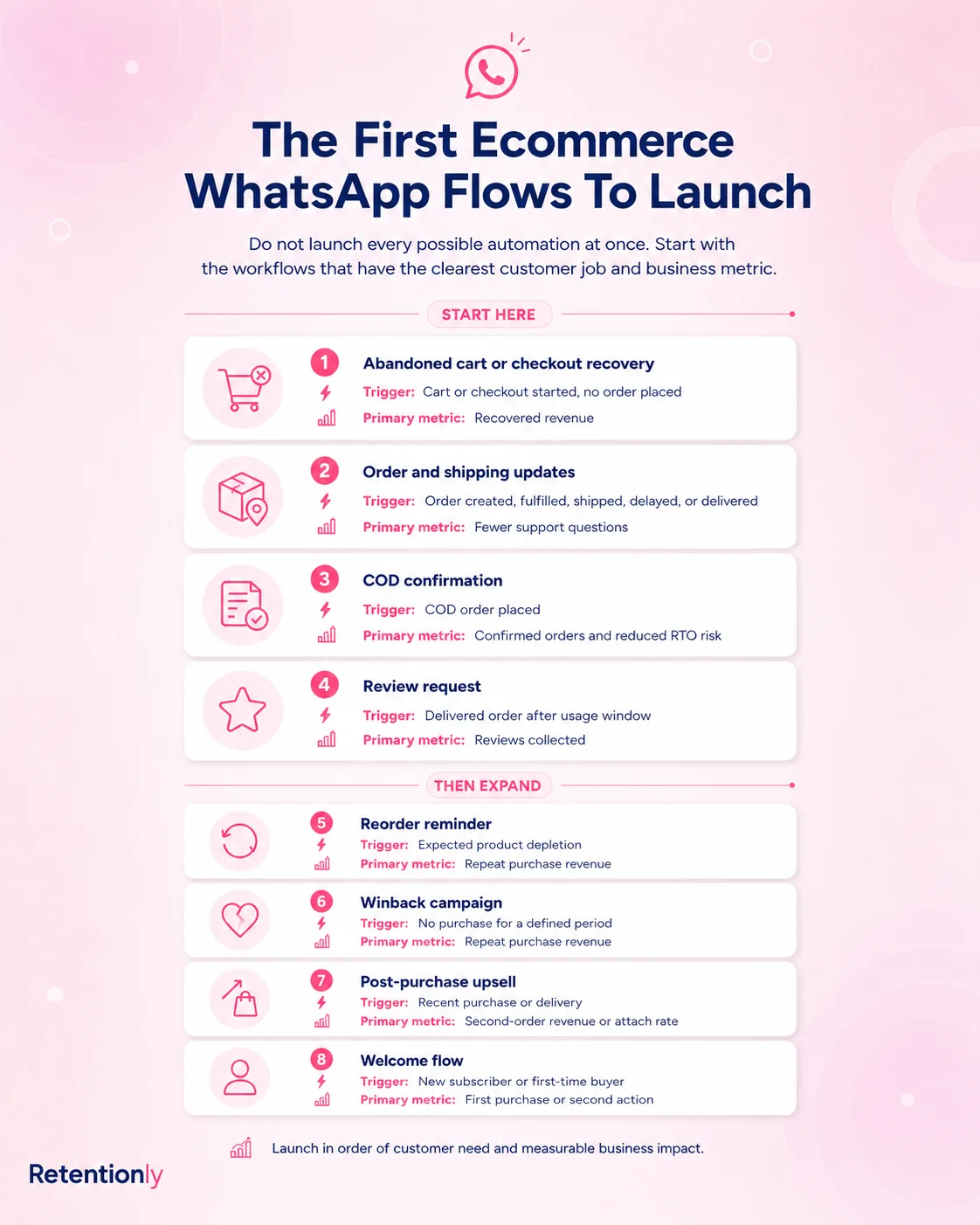
This order is practical. Recover buying intent first. Protect COD margin if you sell with cash on delivery. Reduce support noise. Then build retention flows that increase repeat purchase.
For a deeper automation strategy, read the Shopify WhatsApp Automation Guide. For setup paths and cost components, read the Shopify WhatsApp Integration Guide.
Pricing: Compare The Full Cost, Not The First Plan Card
Shopify WhatsApp app pricing can be confusing because there may be several layers:
| Cost component | What to check |
|---|---|
| App subscription | Monthly price, plan limits, stores, users, features, and automation access |
| Meta messaging fees | WhatsApp Business Platform message fees by country and category |
| Provider markup | Whether the app adds a markup on Meta fees |
| Usage limits | Included messages, conversations, orders, contacts, or automation runs |
| Add-ons | Chatbot sessions, extra agents, custom domains, higher API limits, or premium support |
| Per-chat or per-conversation costs | Whether inbound or handled chats affect the bill |
Do not compare only the cheapest starting price. A low plan can be fine for a chat widget and expensive for automation at scale if message fees, add-ons, or limits are unclear.
Retentionly pricing is built for clarity:
| Retentionly plan | Price | Best for |
|---|---|---|
| Basic | $24/month | Core WhatsApp automations and basic features |
| Growth | $49/month | Broadcasts and advanced automations such as winback |
| Scale | $99/month | CRM features and multi-agent chat |
Retentionly connects directly to Meta and does not add a markup on Meta messaging fees. There is no extra cost for adding more automations and no per-chat fee. For Shopify stores using WhatsApp as a retention channel, that makes the economics easier to forecast as message volume grows.
How Broad WhatsApp Platforms Compare
Broad platforms can be strong products. Wati, Zoko, Interakt, Dondy, and similar tools often cover more than one job: support inboxes, campaigns, chatbots, catalog selling, order notifications, and automation.
That breadth is useful when WhatsApp is a company-wide communication layer. It can be too much when the team mainly wants lifecycle revenue flows.
| Buying criterion | Broad WhatsApp commerce platform | Shopify retention automation app |
|---|---|---|
| Primary strength | Many WhatsApp use cases in one system | Shopify-triggered retention flows |
| Setup style | Configure a broader platform around your use case | Start from ecommerce lifecycle workflows |
| Best team fit | Support, sales, operations, and campaign teams | Shopify founders, marketers, and retention teams |
| Common features | Inbox, chatbot, campaigns, catalog, automations, support routing | Abandoned checkout, COD, order updates, reviews, winback, reorder, upsell |
| Risk | More complexity before the first revenue flow is live | Less broad if you need a large support operation |
| Decision question | "Do we need WhatsApp as a full operations channel?" | "Do we need WhatsApp to grow repeat revenue?" |
The answer is not that one category is always better. The answer is fit.
If your team spends all day handling WhatsApp conversations, a broader inbox-led platform may be right. If your team wants automated Shopify retention flows without building a large WhatsApp operations stack, a focused app is usually cleaner.
When A Chat Button Is Not Enough
A WhatsApp chat button is useful, but it is not a retention strategy.
It helps shoppers ask questions. It can reduce friction on product pages. It can make support feel more personal. But it does not automatically recover checkouts, confirm COD orders, send tracking updates, request reviews, or bring back inactive customers.
Use a chat button if your first problem is contactability. Use a Shopify WhatsApp automation app if your first problem is revenue leakage.
The same distinction applies to manual cart recovery. Manually sending messages can validate demand early, but it breaks once order volume grows. A serious app should let your team define timing, segments, templates, stop rules, and metrics.
Compliance And Customer Experience Checks
WhatsApp feels more personal than email. That is why the app you choose should make customer experience controls easy.
Before installing, check whether the app supports:
Consent-aware sending.
Opt-out handling.
Suppression of customers who purchased, replied negatively, or unsubscribed.
Separate templates for marketing and utility messages.
Frequency controls.
Clear reply ownership for customers who answer automations.
Reporting on blocks, opt-outs, and failed messages.
The goal is not to message every customer more often. The goal is to send fewer, better messages that match the customer's context.
The Decision Framework
Before installing a Shopify WhatsApp app, answer these questions.
| Question | Strong answer |
|---|---|
| What is the first business outcome? | Recovered checkout revenue, COD confirmation, fewer support tickets, reviews, or repeat purchases |
| Which Shopify event starts the flow? | A real event such as checkout abandoned, order created, fulfilled, delivered, or customer inactive |
| Who owns the flow after launch? | A founder, marketer, retention manager, or ecommerce operator who will review results |
| How will we know it worked? | Revenue, confirmation rate, reviews, repeat purchases, support reduction, opt-outs, and replies |
| What happens when customers reply? | A clear support or inbox process exists |
| How does pricing scale? | Subscription, Meta fees, markups, add-ons, usage limits, and seats are understood |
| Can we expand later? | The app can support winback, reorder, upsell, reviews, and broadcasts when ready |
If you cannot answer the first business outcome, wait before installing. It is better to launch one measurable flow than to add an app because WhatsApp sounds like a channel you "should" use.
Where Retentionly Fits
Retentionly is built for Shopify stores that want WhatsApp automation tied to retention and repeat revenue.
It is a strong fit when your priorities are:
Abandoned checkout recovery.
COD confirmation.
Order and shipping updates.
Review requests after delivery.
Winback campaigns.
Reorder reminders.
Post-purchase upsells.
Clear economics with no Retentionly markup on Meta message fees.
Retentionly is not trying to be the broadest WhatsApp platform for every department. The product is designed around Shopify lifecycle moments that a founder, marketer, or retention team can launch and improve.
That focus matters because WhatsApp can become complex quickly. The more direct path is to start with Shopify events, build useful flows, measure revenue and retention, then expand when the first automations are working.
Final Recommendation
Choose a Shopify WhatsApp app based on the workflows you need, not the number of features in the app listing.
If your store only needs a way for shoppers to message you, a chat button can work. If your team needs a broad WhatsApp support and sales operation, compare inbox-led and commerce platforms. If your goal is to recover revenue, reduce COD risk, send order updates, request reviews, win back inactive customers, and drive repeat purchases, choose an app built around Shopify retention automation.
Start with one flow that can pay for itself. For most stores, that is abandoned checkout recovery. For COD-heavy stores, it may be COD confirmation. Once that works, add order updates, reviews, winbacks, reorders, and post-purchase upsells.
Install Retentionly free on Shopify to launch WhatsApp automations for abandoned checkout recovery, COD confirmation, order updates, reviews, winback, reorders, and repeat purchases without turning WhatsApp into another complicated system to manage.
Quick FAQs
What is a Shopify WhatsApp app?
A Shopify WhatsApp app connects your Shopify store with WhatsApp so you can send messages, automate customer workflows, recover abandoned checkouts, confirm COD orders, send updates, and manage customer conversations.
What is the best WhatsApp app for Shopify?
The best app depends on the job. Choose a chat button for basic contact, a broad platform for support and commerce operations, or a retention automation app like Retentionly when your goal is Shopify lifecycle revenue.
Can a Shopify WhatsApp app recover abandoned checkouts?
Yes, if it supports abandoned checkout triggers, saved checkout links, message timing, follow-ups, and stop conditions when the customer purchases or opts out.
Do Shopify WhatsApp apps need the WhatsApp Business API?
Many automation-focused apps use the WhatsApp Business Platform or official API access for business-initiated templates and scalable messaging. Simple chat button apps may work differently, but they usually do not provide the same automation depth.
Should I start with broadcasts or automations?
Start with automations. Abandoned checkout, COD confirmation, order updates, reviews, winback, and reorder flows are more targeted than broad broadcasts and are easier to measure against revenue or operational impact.