WhatsApp Business Automation: What Ecommerce Teams Should Automate
TL;DRWhatsApp business automation should make the customer journey clearer, not just faster. For ecommerce teams, the best automations are tied to real store moments: a shopper leaves checkout, a COD order needs confirmation, a package ships, a product gets delivered, a customer is due to reorder, or a buyer has gone quiet.
That is why the first question is not "Can we automate WhatsApp?" The better question is "Which customer moments deserve automation, and which still need a person?"
This guide shows ecommerce and Shopify teams how to choose the right WhatsApp business automations, launch them in a sensible order, avoid noisy bulk sending, and measure whether the work is improving revenue, retention, or support load.
The Short Answer
Automate WhatsApp messages when the trigger is clear, the customer expects the message, and the business can measure the outcome.
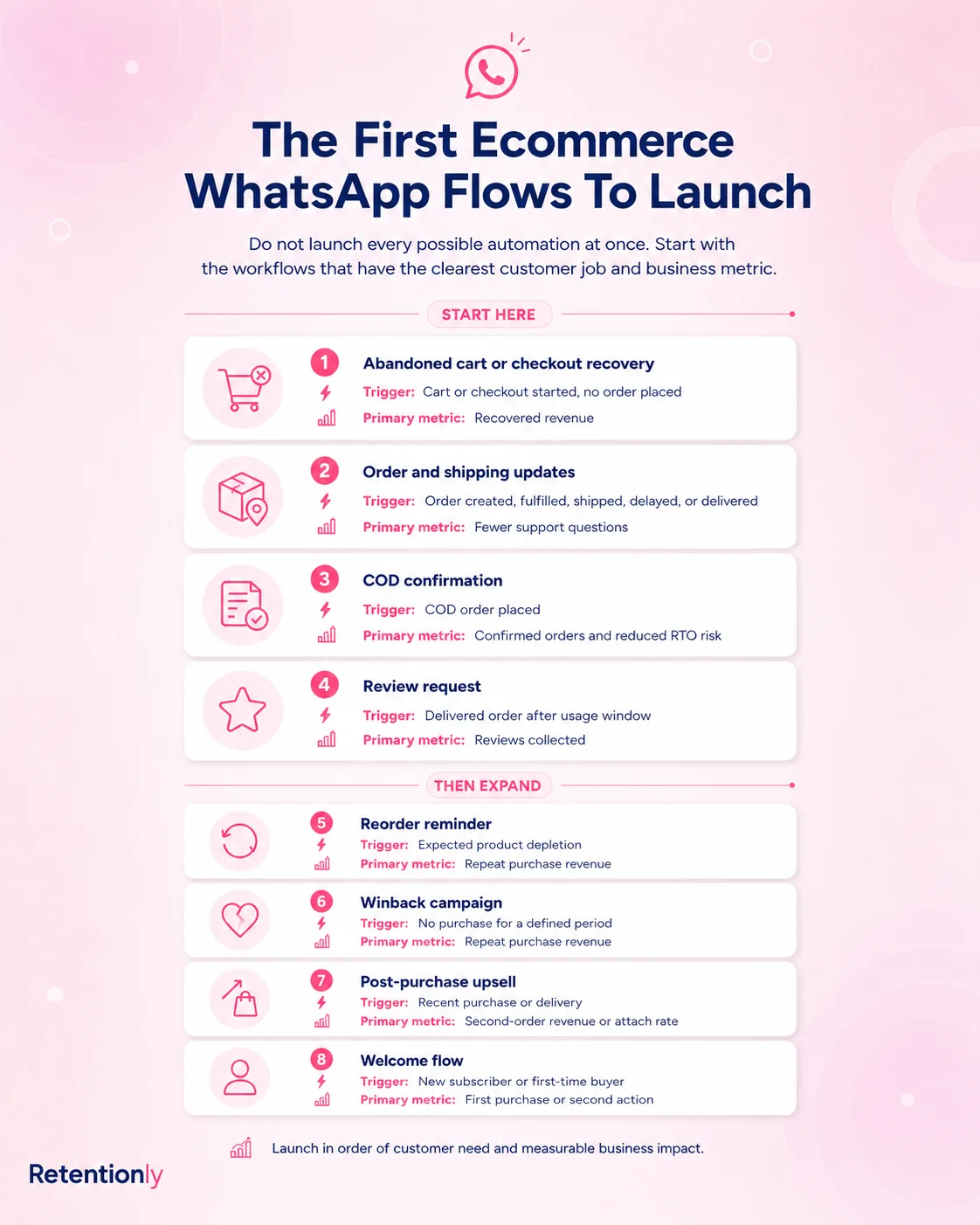
For most ecommerce teams, that means starting with these workflows.
| Priority | Automation | Business job |
|---|---|---|
| 1 | Abandoned checkout recovery | Bring high-intent shoppers back to checkout |
| 2 | Order and shipping updates | Reduce uncertainty and repetitive support questions |
| 3 | COD confirmation | Confirm buyer intent before fulfillment |
| 4 | Review requests | Turn delivered orders into social proof and feedback |
| 5 | Reorder reminders | Bring customers back when replenishment timing is obvious |
| 6 | Winback campaigns | Reactivate customers after their normal buying cycle |
| 7 | Post-purchase upsells | Recommend useful next products after purchase or delivery |
Do not start with every possible flow. Start with the automation where the customer signal is strongest and the metric is easiest to read.
What WhatsApp Business Automation Means
WhatsApp business automation means using rules to send, route, or prepare WhatsApp messages based on a customer action, store event, or team workflow.
In a small business, automation may be a greeting message, away message, or quick reply inside the WhatsApp Business app. In ecommerce, automation usually needs more structure because the message depends on order data, checkout status, payment method, delivery timing, product history, and customer consent.
A useful ecommerce automation has seven parts.
| Part | Question to answer | Ecommerce example |
|---|---|---|
| Trigger | What starts the automation? | Checkout abandoned |
| Audience | Who should receive it? | Opted-in shoppers with a valid checkout link |
| Timing | When should it send? | 45 minutes after checkout activity stops |
| Message | What should the customer do? | Return to checkout or ask a question |
| Stop rule | When should it stop? | Purchase, opt-out, reply, or final reminder |
| Owner | Who handles replies? | Support, sales, or founder inbox |
| Metric | How will success be judged? | Recovered revenue |
Without those pieces, WhatsApp automation becomes messy. Messages go out after the customer already bought. Promotions reach people who expected only delivery updates. Replies sit unanswered because nobody owns the conversation. The automation may be technically working, but the customer experience is not.
Why Ecommerce Teams Should Automate WhatsApp Carefully
WhatsApp is high attention. That is useful, but it also raises the cost of irrelevant messages.
Email can tolerate some noise because many customers ignore it. WhatsApp feels closer to a personal conversation. If the message is timely and useful, customers respond. If it feels like a random blast, they mute, block, complain, or lose trust.
The best ecommerce use cases have three qualities.
First, they are event-driven. A customer did something that makes the message relevant now.
Second, they are action-oriented. The message gives the customer a clear next step, such as completing checkout, confirming an order, tracking delivery, leaving a review, or reordering.
Third, they are measurable. The team can see whether the automation recovered revenue, reduced support questions, confirmed orders, collected reviews, or created repeat purchases.
That is the line between useful WhatsApp business automation and busywork.
The First Automations To Launch
Most stores should launch WhatsApp automation in layers.
1. Abandoned Checkout Recovery
Abandoned checkout recovery is usually the best first automation because the customer has already shown purchase intent.
A practical flow looks like this.
| Component | Recommended setup |
|---|---|
| Trigger | Checkout started but no order placed |
| Audience | Customers who gave WhatsApp consent and have a valid phone number |
| Timing | First reminder after 30 to 60 minutes |
| Message job | Return the shopper to the saved checkout |
| Follow-up | One second reminder after 20 to 24 hours if no purchase happened |
| Stop rule | Stop after purchase, opt-out, expired checkout, or negative reply |
| Metric | Recovered orders and recovered revenue |
Example message:
Hi [first_name], your [store_name] checkout is still saved. Complete your order here: [checkout_link]. Reply if you need help before ordering.
Start simple. A helpful reminder often teaches more than an immediate discount. Once the flow has data, test timing, reassurance, product context, and then selective offers.
For a deeper setup guide, read Shopify Abandoned Cart WhatsApp Recovery Guide.
2. Order And Shipping Updates
Order updates are not always treated as marketing, but they are central to retention. Customers remember whether the post-purchase experience felt clear or stressful.
Useful automations include:
Order confirmation
Payment confirmation where relevant
Shipping confirmation
Tracking link
Delay notice
Out-for-delivery message
Delivery confirmation
The key is restraint. Do not send a WhatsApp message for every internal status change. Send the updates customers actually want.
Example message:
Your [store_name] order [order_number] has shipped. Track it here: [tracking_link]. Reply if anything looks wrong.
This flow should reduce "Where is my order?" questions, not create more support work. If replies come in, the team should see order context and know who owns the conversation.
3. COD Confirmation
Cash-on-delivery orders can be profitable, but weak COD intent can create fulfillment waste. A WhatsApp confirmation flow helps the store check buyer intent before shipping.
| Component | Recommended setup |
|---|---|
| Trigger | New COD order placed |
| Audience | COD orders only, optionally filtered by value, region, or risk |
| Timing | Immediately after order creation |
| Message job | Ask the customer to confirm or cancel |
| Fallback | Hold or tag no-response orders for review |
| Stop rule | Stop after confirm, cancel, prepaid conversion, or manual decision |
| Metric | Confirmed orders, cancellations, no-response rate, and RTO reduction |
Example message:
Hi [first_name], please confirm COD order [order_number] for [order_total]. Reply 1 to confirm or 2 to cancel.
This automation works because it asks for one simple action at the right time. It should not become a generic promotional message.
4. Review Requests
Review requests work best after the customer has had enough time to use the product. Asking too early can create weak reviews or issue replies. Asking too late loses momentum.
| Product type | Better timing |
|---|---|
| Snacks, accessories, simple items | 1 to 3 days after delivery |
| Apparel and beauty | 3 to 7 days after delivery |
| Supplements or skincare | 10 to 21 days after delivery |
| Home, electronics, durable goods | After setup or meaningful usage |
Example message:
Hi [first_name], hope you are enjoying [product_name]. Could you leave a quick review for [store_name]? It helps other shoppers choose with confidence: [review_link]
Suppress customers with refunds, unresolved support issues, failed deliveries, or an existing review. A review request should feel like a natural follow-up, not pressure.
5. Reorder Reminders
Reorder reminders are strong when the product has a predictable use cycle.
Good fits include beauty, supplements, food, pet products, personal care, home care, and other consumables. Weak fits include one-time purchases where the customer is unlikely to need the same item again soon.
| Product cycle | Better reminder timing |
|---|---|
| 30-day supply | Day 24 to 28 |
| 45-day supply | Day 38 to 42 |
| 60-day supply | Day 50 to 56 |
| Irregular purchase | Use purchase history or skip the flow |
Example message:
Running low on [product_name]? You can reorder from [store_name] in one tap here: [reorder_link].
This is where WhatsApp can become a repeat-purchase channel. The message is useful because it arrives near the moment of need.
6. Winback Campaigns
Winback automation should be based on the customer's normal buying cycle, not a random number of days.
For some stores, 45 days of inactivity is meaningful. For others, customers naturally buy every 90 or 120 days. The automation should reflect the category.
| Segment | Better message angle |
|---|---|
| First-time buyer inactive after expected second purchase | Bestselling next product |
| Repeat buyer inactive after normal cycle | New arrivals or replenishment |
| VIP inactive for longer than usual | Early access, premium drop, or concierge help |
| Discount-sensitive buyer | Controlled offer with margin rules |
| Customer with recent support issue | Suppress or send a service-first check-in |
Example message:
Hi [first_name], it has been a while since your last [store_name] order. We picked a few new arrivals you may like: [collection_link].
Do not make every winback message a discount. Relevance, product fit, and timing usually matter more than shouting a bigger offer.
7. Post-Purchase Upsells
Post-purchase upsells work when the recommendation is clearly connected to what the customer bought.
Strong examples:
Accessory after a core product
Refill after a starter kit
Care product after a premium item
Bundle after a single-item purchase
Subscription after repeat behavior
Complementary shade, size, flavor, or variant
Example message:
Your [product_name] is on the way. Many customers pair it with [recommended_product] for [specific_benefit]. See it here: [product_link].
Timing matters. Some upsells fit immediately after purchase. Others should wait until delivery, first use, or the reorder window.
What Not To Automate First
Some WhatsApp tasks look tempting but should usually wait.
Broad promotional broadcasts should not be the first automation unless the store already has strong opt-in quality, clean segments, and suppression rules. A sale announcement to every phone number can create short-term clicks while damaging the channel.
AI chatbot automation should also wait if the store has not mapped the common questions, escalation rules, order context, and support owner. A bot that answers confidently without context is worse than a slower human reply.
Complex multi-step funnels should wait until the first lifecycle flows work. If the team has not measured abandoned checkout, order updates, COD confirmation, reviews, or winback, adding a large decision tree usually hides the real learning.
Start with customer moments that already exist in Shopify. Then expand once the operating rhythm is clear.
Choose The Right Automation Route
WhatsApp business automation can be built in different ways. The right route depends on the job.
| Route | Best for | Limits to watch |
|---|---|---|
| WhatsApp Business app | Greeting messages, away messages, quick replies, low-volume manual conversations | Not enough for Shopify-triggered revenue workflows |
| Generic WhatsApp inbox or chatbot tool | Support routing, FAQs, sales handoff, shared team inbox | Can become broad before retention flows are measurable |
| WhatsApp API or BSP setup | Custom messaging infrastructure and business-initiated templates | Needs workflow logic, Shopify data, consent, templates, and maintenance |
| Shopify WhatsApp automation app | Store-event triggers, lifecycle flows, revenue tracking, faster setup | Less custom than a fully built internal system |
For most Shopify stores, an app-based route is the practical starting point. It connects closer to the events that matter: checkout, order, fulfillment, delivery, customer activity, and product history.
For technical teams with unusual requirements, a direct API setup can make sense. But the API is only the rail. The business still needs triggers, segmentation, timing, templates, stop rules, handoff, and reporting.
How To Decide Whether A Workflow Is Ready
Before launching a WhatsApp automation, answer these questions.
| Question | Why it matters |
|---|---|
| What exact event starts the flow? | Prevents vague, list-based sending |
| Did the customer consent to this type of message? | Protects trust and compliance |
| What data must be present? | Avoids broken variables and missing links |
| What should the customer do next? | Keeps the message action-oriented |
| When should the message stop? | Prevents stale or embarrassing sends |
| Who owns replies? | Makes automation accountable |
| What metric proves it worked? | Keeps the team focused on business impact |
If the team cannot answer these questions, the automation is not ready. It may still be an idea, but it is not yet a workflow.
Metrics To Track By Automation
Do not judge WhatsApp business automation only by delivery or open rate. The real metric depends on the workflow.
| Automation | Primary metric | Secondary checks |
|---|---|---|
| Abandoned checkout | Recovered revenue | Click rate, conversion rate, discount use, opt-outs |
| Order updates | Support tickets avoided | Reply volume, tracking clicks, delivery issue replies |
| COD confirmation | Confirmed orders | Cancellations, no-response rate, RTO reduction |
| Review request | Reviews collected | Rating quality, issue replies, reminder conversion |
| Reorder reminder | Repeat purchase revenue | Reorder conversion, timing accuracy |
| Winback | Reactivated revenue | Revenue per recipient, margin, opt-outs |
| Post-purchase upsell | Second-order revenue | Attach rate, AOV lift, replies |
Also watch negative signals: blocks, spam reports, opt-outs, angry replies, failed sends, and support overload. A flow that drives revenue while irritating good customers may not be healthy.
Common Mistakes
The biggest mistake is treating WhatsApp automation like a louder email calendar.
Avoid these patterns:
Sending promotional messages before lifecycle flows are working.
Using the same message for first-time buyers, repeat buyers, VIPs, and inactive customers.
Asking for reviews before delivery or product usage.
Sending cart recovery after the customer already purchased.
Hiding offers inside order updates.
Letting automated-message replies sit unanswered.
Launching AI replies before support escalation rules are clear.
Measuring opens instead of revenue, retention, and support impact.
Good automation often sends fewer messages than expected. It works because the messages are better timed.
Where Retentionly Fits
Retentionly is built for Shopify and D2C teams that want WhatsApp automation tied to retention and repeat revenue.
Use Retentionly when your team wants to automate:
Abandoned checkout recovery
COD confirmation
Order and shipping updates
Review requests
Reorder reminders
Winback campaigns
Post-purchase upsells
Welcome and lifecycle campaigns
The advantage is focus. Instead of starting with a broad WhatsApp operations project, you can start with the Shopify customer moments that already affect revenue, support load, and repeat purchase.
For more context, read Shopify WhatsApp Automation: A Practical Guide, WhatsApp Marketing for Ecommerce, and How to Send Automated Messages on WhatsApp.
Final Recommendation
Start with one WhatsApp business automation that has a clear trigger, clear customer value, and clear metric.
For most ecommerce teams, that is abandoned checkout recovery. For COD-heavy stores, it may be COD confirmation. For teams drowning in delivery questions, order updates may create the fastest operational win. For replenishable products, reorder reminders may be the most natural retention play.
Once the first workflow works, add the next one. Keep every automation tied to a customer moment, not a campaign idea.
That is how WhatsApp becomes a retention system instead of another noisy channel.
If you run a Shopify store and want to launch WhatsApp automations for abandoned checkout recovery, COD confirmation, order updates, reviews, winback, reorders, and repeat purchases, Install Free on Shopify and start with the workflow closest to revenue.
Quick FAQs
What is WhatsApp business automation?
WhatsApp business automation is the use of rules to send, route, or prepare WhatsApp messages based on customer actions, business events, timing, or team workflows. For ecommerce, the useful version is usually tied to store data such as checkouts, orders, deliveries, reviews, and purchase history.
What should an ecommerce team automate first on WhatsApp?
Most ecommerce teams should start with abandoned checkout recovery because the customer has already shown purchase intent. COD confirmation, order updates, review requests, reorder reminders, and winback campaigns are also strong early workflows depending on the store's business model.
Is WhatsApp automation the same as a chatbot?
No. A chatbot is one type of automation, usually focused on answering or routing conversations. WhatsApp business automation can also include event-triggered messages such as cart reminders, order updates, COD confirmations, review requests, winback campaigns, and reorder reminders.
Do WhatsApp automations need approved templates?
Many business-initiated WhatsApp messages use approved templates, especially when the customer has not recently messaged the business. The exact requirement depends on the platform route, message type, customer consent, and current WhatsApp rules.
Can Shopify stores automate WhatsApp without developers?
Yes. A Shopify WhatsApp automation app can handle many common flows without a custom API build. Technical teams may still choose direct API setups for custom needs, but most stores should start with the workflow route that gets Shopify events, message timing, stop rules, and reporting working quickly.