WhatsApp Marketing Software for Ecommerce: What to Compare
TL;DRWhatsApp marketing software should help an ecommerce team send the right message after the right customer moment, not only send more campaigns. For a Shopify store, that means the software needs to understand customer behavior, purchase history, checkout activity, order status, consent, segments, replies, and revenue outcomes.
That is where this category gets confusing. Some WhatsApp marketing tools are built around bulk campaigns. Some are shared inboxes with campaign features. Some focus on chatbots, Click-to-WhatsApp ads, catalogs, or AI support. Some are broad WhatsApp Business platforms for sales, support, and operations. A Shopify merchant may need one of those, but the first buying question should be simpler: which software can reliably turn Shopify customer moments into retention revenue?
This guide compares WhatsApp marketing software by ecommerce use case, automation depth, segmentation, reporting, pricing model, setup effort, and team fit.
Quick Verdict
Choose WhatsApp marketing software based on the workflow your team will run every week.
| Ecommerce need | Best-fit software type | Why |
|---|---|---|
| Recover abandoned checkouts, confirm COD orders, send review requests, win back customers, and trigger repeat purchases | Shopify-first WhatsApp retention automation | The software starts from store behavior and measures revenue outcomes |
| Run large promotional broadcasts and campaign calendars | WhatsApp campaign platform | The team needs audience planning, scheduling, templates, segmentation, and campaign analytics |
| Manage customer replies after marketing messages | Shared inbox plus campaign tools | Agents need assignment, context, saved replies, and escalation paths |
| Sell through WhatsApp catalogs and assisted commerce | WhatsApp commerce platform | Product discovery, catalog sync, cart creation, and sales handoff matter |
| Automate repeat questions and route conversations | WhatsApp chatbot or AI support platform | The team needs support automation, qualification, and human fallback |
| Connect WhatsApp to a custom CRM or data stack | API-first setup or integration platform | Engineering owns the workflow logic and maintenance |
For ecommerce teams, the best software is rarely the one with the biggest menu. It is the one that owns the customer moments that actually change revenue, retention, or support load.
What WhatsApp Marketing Software Means For Ecommerce
WhatsApp marketing software is the system a business uses to collect opt-ins, segment audiences, send approved WhatsApp templates, automate customer journeys, manage replies, and measure campaign results.
In ecommerce, that definition needs one more layer: store context.
If the tool only knows a phone number and a tag, it can send a campaign. But it may not know whether the customer abandoned checkout, placed a COD order, received a shipment, bought a replenishable product, ignored the last promotion, opted out, or already purchased after the reminder.
That difference changes everything. Ecommerce WhatsApp marketing is not just a sending problem. It is a timing, context, and ownership problem.
| Software layer | What it should know | Ecommerce use |
|---|---|---|
| Customer profile | Name, phone, consent, tags, segments, order count, purchase history | Personalize messages and avoid irrelevant sends |
| Shopify events | Checkout started, order created, fulfillment status, delivery, product purchased | Trigger lifecycle automations |
| Campaign manager | Audience, template, offer, send time, opt-out handling, performance | Run planned promotions without losing control |
| Automation builder | Trigger, wait, condition, message, stop rule, fallback, goal | Turn customer behavior into repeatable workflows |
| Shared inbox | Replies, assignment, notes, customer context, escalation | Handle questions that campaigns create |
| Reporting | Delivered, read, replies, clicks, recovered orders, repeat purchase, opt-outs | Improve the next campaign or flow |
When these layers work together, WhatsApp becomes a retention channel. When they do not, it becomes another place to blast discounts.
The Main Types Of WhatsApp Marketing Software
Most ecommerce buyers compare multiple product categories under the same search. Separate them before you compare feature lists.
| Software type | Strongest fit | Watch-out |
|---|---|---|
| Campaign platform | Broadcasts, campaign calendars, segmentation, templates, analytics | Can become promotion-heavy if lifecycle flows are weak |
| Shopify WhatsApp automation app | Abandoned checkout, COD, order updates, reviews, winback, reorders, upsells | Best for retention ownership, not every sales or support operation |
| WhatsApp commerce platform | Catalog sync, conversational selling, cart actions, inbox, campaigns | Useful breadth, but may be more platform than a retention team needs first |
| Shared inbox or helpdesk | Team replies, assignments, support context, macros, SLAs | Good for conversations, but not always strong at triggered revenue flows |
| Chatbot or AI agent tool | Qualification, FAQs, support routing, guided selling | Needs guardrails, fallback, and clean product/order data |
| API or integration-led setup | Custom logic, advanced data control, internal systems | Flexible, but the team must build and maintain the marketing layer |
Wati, Interakt, Zoko, Dondy, DelightChat, and similar tools all validate the demand for WhatsApp marketing software. Their public pages commonly cover campaigns, AI, inboxes, Shopify integrations, catalogs, automations, analytics, and customer support.
That breadth is useful. The ecommerce buyer still needs to ask: which part of WhatsApp should this tool own first?
Features To Compare First
A long feature checklist can hide weak ecommerce fit. Start with the features that affect real operations.
| Feature | What good looks like | Weak version |
|---|---|---|
| Shopify integration depth | Checkout, order, fulfillment, customer, product, tag, and purchase data can drive messages | Only contact import or basic order sync |
| Lifecycle automation | Abandoned checkout, COD, order updates, review requests, winback, reorder, upsell, and welcome flows are clear | Broadcasts and generic autoresponders only |
| Segmentation | Segments use recency, purchase history, product interest, order value, payment method, tags, location, and consent | Static lists or manual labels |
| Campaign controls | Scheduling, template status, suppression, opt-outs, audience checks, frequency limits, and reply ownership are visible | Easy sending without enough guardrails |
| Message templates | Variables, fallback values, buttons, media, language, and category are handled cleanly | Templates are treated like plain text |
| Reply handoff | Replies from campaigns and automations land with context and an owner | Customers reply, but nobody owns the follow-up |
| Revenue reporting | Campaign and flow results connect to recovered orders, repeat purchases, clicks, replies, opt-outs, and support reduction | Only delivery and read metrics |
| Pricing clarity | Subscription, Meta fees, markup, seats, AI, contacts, add-ons, and usage limits are easy to model | Low entry plan but unclear scaling costs |
If a tool cannot explain how a Shopify event becomes a WhatsApp message, and how that message becomes a measurable business result, it may not be the right first marketing platform.
Ecommerce Workflows Your Software Should Support
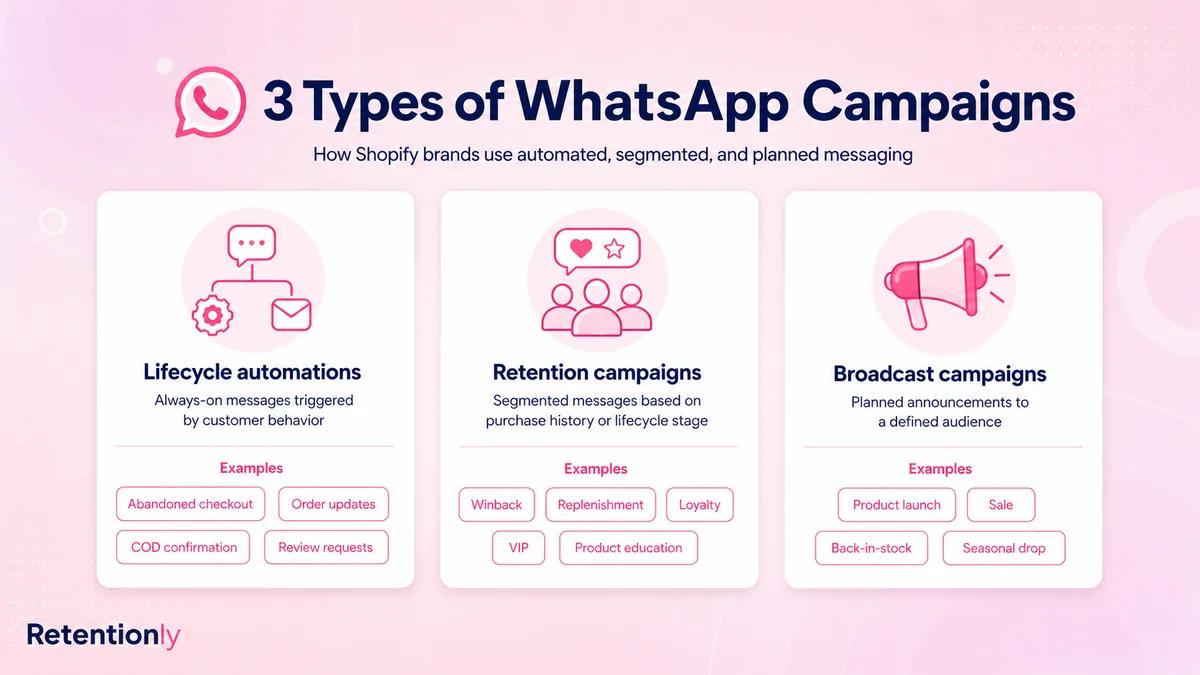
The easiest way to evaluate WhatsApp marketing software is to map it against actual customer moments.
| Workflow | Trigger or audience | Message job | Success metric |
|---|---|---|---|
| Abandoned checkout recovery | Checkout started but no order placed | Bring the shopper back with the right cart link and timing | Recovered revenue |
| COD confirmation | COD order created | Confirm intent before fulfillment | Confirmed orders and lower avoidable RTO |
| Order updates | Order created, shipped, delayed, or delivered | Reduce uncertainty and support questions | Fewer WISMO tickets |
| Review request | Delivered order with no open issue | Ask for a review and route unhappy replies first | Review rate and issue recovery |
| Winback | Customer inactive after expected repeat window | Bring back a lapsed customer with a relevant reason | Repeat purchase revenue |
| Reorder reminder | Product likely due for refill | Prompt replenishment before the customer switches | Repeat order rate |
| Post-purchase upsell | Recent purchase with a natural add-on | Offer a useful complement without disrupting fulfillment | Upsell conversion |
| Promotional campaign | Segment with consent and a clear offer | Announce a sale, launch, bundle, or seasonal moment | Revenue, replies, opt-outs, unsubscribes |
| Click-to-WhatsApp follow-up | Customer starts a conversation from an ad | Qualify, answer, recover, or retarget while intent is fresh | Lead quality and conversion |
For Shopify teams, lifecycle automations usually deserve priority before broad promotional calendars. They are easier to tie to revenue, easier to test, and less likely to train customers to wait for discounts.
Campaigns, Automation, Inbox, And Chatbots Are Different Jobs
WhatsApp marketing software often bundles many jobs into one product. That can be convenient, but it can also blur ownership.
Campaigns are planned sends. They need audience discipline, template approval, timing, opt-outs, frequency control, and reporting.
Automations are event-driven flows. They need triggers, conditions, waits, fallback paths, stop rules, and metrics tied to the customer event.
Inboxes are reply systems. They need assignment, context, macros, notes, permissions, and escalation.
Chatbots are decision systems. They need clear intents, product or order data, confidence thresholds, handoff rules, and a way to stop when the conversation becomes sensitive.
The software can include all four, but your team should not manage them as one fuzzy channel. Decide who owns each layer before buying.
| Layer | Owner to define | Main decision |
|---|---|---|
| Campaigns | Marketing or founder | Which audiences can receive planned sends? |
| Lifecycle automations | Retention, ecommerce, or operations | Which Shopify events should trigger messages? |
| Replies | Support, sales, or operations | Who handles questions, complaints, and exceptions? |
| Chatbot or AI | Support or sales | Where must the bot hand off to a human? |
| Reporting | Growth, lifecycle, or founder | Which revenue or support metric proves the tool worked? |
This ownership check prevents the most common failure: the software sends messages, customers reply, and the team does not know who is responsible for the conversation that follows.
Pricing: Compare The Whole Cost Model
WhatsApp marketing software pricing is rarely just one monthly number.
| Cost layer | What to verify |
|---|---|
| Software subscription | Monthly price, annual discount, included modules, stores, users, support, and plan limits |
| Meta messaging fees | WhatsApp Business Platform fees by country, message category, and volume |
| Provider markup or usage fee | Whether the vendor adds markup, wallet fees, conversation fees, handled-chat fees, or usage fees |
| Campaign limits | Broadcast volume, audience size, scheduled sends, templates, and fair-use rules |
| Automation limits | Flow count, trigger volume, API calls, custom events, webhooks, and advanced workflow access |
| Contact or conversation limits | Active contacts, monthly conversations, tickets, or marketing contacts |
| AI and chatbot add-ons | AI replies, campaign generation, chatbot sessions, product recommendations, or support agents |
| Team limits | Included inbox users, extra agents, roles, permissions, routing, and stores |
| Implementation effort | Setup, template creation, migration, testing, and weekly optimization time |
Retentionly keeps the software layer simple for Shopify WhatsApp retention:
| Retentionly plan | Price | Best for |
|---|---|---|
| Basic | $24/month | Basic automations and core features |
| Growth | $49/month | Broadcasts and advanced automations, including winback workflows |
| Scale | $99/month | CRM features and multi-agent chat |
Retentionly connects directly to Meta, does not add a markup on Meta messaging fees, does not charge extra for added automations, and does not charge per chat.
For any vendor, calculate the first three months of real usage before choosing. Include the flows you plan to launch, expected message volume, agent count, AI needs, support needs, and any add-ons required to make the workflow work.
How To Shortlist WhatsApp Marketing Software
Use the same buying test for every option.
| Test question | Strong answer |
|---|---|
| Can we launch abandoned checkout recovery without custom development? | The tool supports Shopify checkout triggers, cart links, timing, purchase stop rules, and recovered revenue reporting |
| Can we segment by purchase behavior? | The tool can use recency, order count, value, products, tags, location, payment method, and consent |
| Can we run promotions without over-messaging? | The tool supports opt-outs, suppression, frequency limits, excluded segments, and campaign reporting |
| Can replies be handled cleanly? | Replies land in an inbox or owner workflow with customer and order context |
| Can we measure more than delivery? | Reporting connects sends to revenue, repeat purchases, confirmations, replies, clicks, opt-outs, and support reduction |
| Can our team operate this weekly? | Non-technical owners can adjust templates, timings, segments, and reporting without waiting on engineering |
The best answer is not always the most advanced one. It is the answer your team will actually maintain after launch.
When A Broad WhatsApp Platform Is Better
A broad WhatsApp platform can be the right choice when WhatsApp is a company-wide operating system.
Choose a broader product when sales, support, marketing, and operations all need to work inside WhatsApp daily. It may also fit when catalog selling is central, agents handle high chat volume, AI support is a major requirement, Click-to-WhatsApp ads are a core acquisition channel, or the business needs WhatsApp connected to several non-Shopify systems.
In that case, compare inbox depth, routing, permissions, chatbot controls, CRM integrations, campaign analytics, commerce features, and support workflows. A broader product can justify its setup effort when many teams will use the same WhatsApp workspace.
The risk is buying breadth before proving the first business outcome. More modules do not automatically recover more carts, confirm more COD orders, or bring more customers back.
When A Shopify Retention Tool Is Better
A Shopify retention tool is the better fit when WhatsApp is owned by a founder, ecommerce operator, lifecycle marketer, retention manager, or operations lead.
Choose this path when the first goals are:
Recover abandoned checkouts.
Confirm COD orders before fulfillment.
Reduce repetitive order-status questions.
Request reviews after delivery.
Win back dormant customers.
Trigger reorder reminders.
Send post-purchase upsells.
Run segmented broadcasts without losing lifecycle discipline.
This is where Retentionly fits. It is built around Shopify customer moments rather than a generic campaign list. The store action creates the message opportunity, the workflow controls the timing, replies have a handoff path, and results can be judged by retention outcomes rather than only message metrics.
For deeper workflow examples, read the Shopify Abandoned Cart WhatsApp Recovery Guide, Shopify COD Confirmation WhatsApp Guide, and WhatsApp Winback Campaigns for Shopify.
Common Mistakes To Avoid
The first mistake is buying a campaign sender when the real need is lifecycle automation. Planned promotions are useful, but Shopify retention usually depends on customer behavior and timing.
The second mistake is ignoring replies. WhatsApp is conversational. If customers ask about sizes, delivery, returns, COD, coupon validity, or order status after a campaign, the software needs a clean handoff path.
The third mistake is comparing only the cheapest plan. Two tools with similar monthly prices can become very different once Meta fees, markups, agents, contacts, AI, campaigns, automations, and add-ons are included.
The fourth mistake is over-automating sensitive conversations. Bots and auto-replies are useful for repeat questions, but order issues, complaints, refund questions, and angry replies need escalation rules.
The fifth mistake is measuring only reads. A high read rate is not the same as recovered revenue, repeat purchase, confirmed COD orders, lower support load, or better reviews.
Final Recommendation
Choose WhatsApp marketing software by the customer moment you want to improve first.
If WhatsApp is your support desk, compare helpdesk and shared inbox depth. If WhatsApp is your sales channel, compare catalog, agent, chatbot, and commerce features. If WhatsApp is an acquisition channel, compare Click-to-WhatsApp ads, lead capture, qualification, and retargeting.
But if WhatsApp is meant to improve ecommerce retention, start with lifecycle workflows: abandoned checkout, COD confirmation, order updates, reviews, winback, reorders, post-purchase upsells, and segmented broadcasts.
Retentionly is built for that job: Shopify-triggered WhatsApp automations, practical retention workflows, reply handoff, and clear pricing without Retentionly markup on Meta messaging fees.
Quick FAQs
What is WhatsApp marketing software?
WhatsApp marketing software helps businesses collect opt-ins, segment audiences, send WhatsApp templates, automate campaigns, manage replies, and measure performance. For ecommerce, the best tools also connect to store events such as checkout, order, fulfillment, delivery, and purchase history.
What features matter most for ecommerce teams?
Prioritize Shopify or ecommerce data sync, lifecycle automation, segmentation, template handling, campaign controls, consent and opt-out handling, reply handoff, and reporting that connects WhatsApp activity to revenue or support outcomes.
Is WhatsApp marketing software the same as a bulk sender?
No. A bulk sender mainly sends messages to lists. Strong WhatsApp marketing software should also support segmentation, consent, triggered workflows, reply handling, stop rules, reporting, and customer lifecycle automation.
Should a Shopify store choose a broad WhatsApp platform or a retention automation app?
Choose a broad platform when WhatsApp is a sales, support, inbox, catalog, chatbot, and operations channel. Choose a retention automation app when the first job is abandoned checkout recovery, COD confirmation, reviews, winback, reorders, upsells, and repeat purchase.
Where does Retentionly fit?
Retentionly fits Shopify and D2C teams that want WhatsApp marketing tied to store events and retention outcomes rather than a generic campaign list or a full WhatsApp operations stack.