Shopify WhatsApp Automation: A Practical Guide for 2026
TL;DRShopify WhatsApp automation is not just sending messages faster. For a growing store, the point is to trigger the right WhatsApp message from the right Shopify event so abandoned checkouts, COD orders, deliveries, reviews, winbacks, and repeat purchases do not depend on manual follow-up.
The stores that get value from WhatsApp usually do not start with broad broadcasts. They start with lifecycle moments where a customer already has context: they left a checkout, placed an order, received a delivery, bought a consumable product, or has not returned in a while.
That is the difference between WhatsApp as another campaign channel and WhatsApp as a retention system.
What Shopify WhatsApp Automation Means
Shopify WhatsApp automation connects store events to WhatsApp messages. A trigger happens in Shopify, the app checks whether the customer should receive a message, and the customer gets a WhatsApp template or conversation at the right time.
Common triggers include:
Checkout abandoned
Order created
COD order placed
Order fulfilled
Order delivered
Customer subscribed
Customer inactive for a set period
Product ready for reorder
Review request window reached
The useful version of automation is not "send every possible message." It is a controlled workflow with a clear job.
| Flow component | Question to answer | Shopify example |
|---|---|---|
| Trigger | What event starts the flow? | Checkout abandoned |
| Timing | When should the message send? | 45 minutes after abandonment |
| Segment | Who should receive it? | Opted-in customers with cart value above your threshold |
| Message | What should the customer do next? | Return to checkout |
| Fallback | What happens if they do not respond or buy? | Send one follow-up, then stop |
| Metric | How do you know it worked? | Recovered revenue and conversion rate |
When those six pieces are clear, WhatsApp becomes easier to manage. Your team is not guessing what to send next. It is improving specific flows.
Why Shopify Stores Use WhatsApp Automation
WhatsApp works best when the message is timely, useful, and tied to a customer action. That makes Shopify a natural fit because the store already has meaningful events and purchase context.
For merchants, the commercial reasons are usually straightforward.
First, abandoned checkout recovery needs speed. Email reminders are useful, but many shoppers ignore email during the buying moment. A WhatsApp nudge can bring the shopper back while the product is still fresh in their mind.
Second, COD confirmation protects margin. If your store accepts cash on delivery, every fake order, unreachable customer, or low-intent buyer can create wasted fulfillment cost. A WhatsApp confirmation flow helps filter orders before shipping.
Third, post-purchase communication reduces support load. Order confirmation, shipping updates, and delivery messages stop customers from asking "Where is my order?" when the store could have answered automatically.
Fourth, retention flows create repeat revenue. Winback, reorder reminders, review requests, and post-purchase upsells give the store more chances to grow from existing customers instead of only paying for new acquisition.
The First WhatsApp Automations To Launch
Do not launch every flow on day one. Start with the automations that are closest to revenue, then add lifecycle depth.
| Priority | Flow | Why launch it |
|---|---|---|
| 1 | Abandoned checkout recovery | Recovers shoppers who already showed buying intent |
| 2 | COD confirmation | Reduces fake orders, cancellations, and avoidable fulfillment waste |
| 3 | Order and shipping updates | Cuts repetitive support questions and reassures customers |
| 4 | Review request | Converts delivered orders into social proof |
| 5 | Winback | Brings back customers who have stopped buying |
| 6 | Reorder reminder | Works well for consumables and repeat-use products |
| 7 | Post-purchase upsell | Increases repeat purchases and average order value after the first sale |
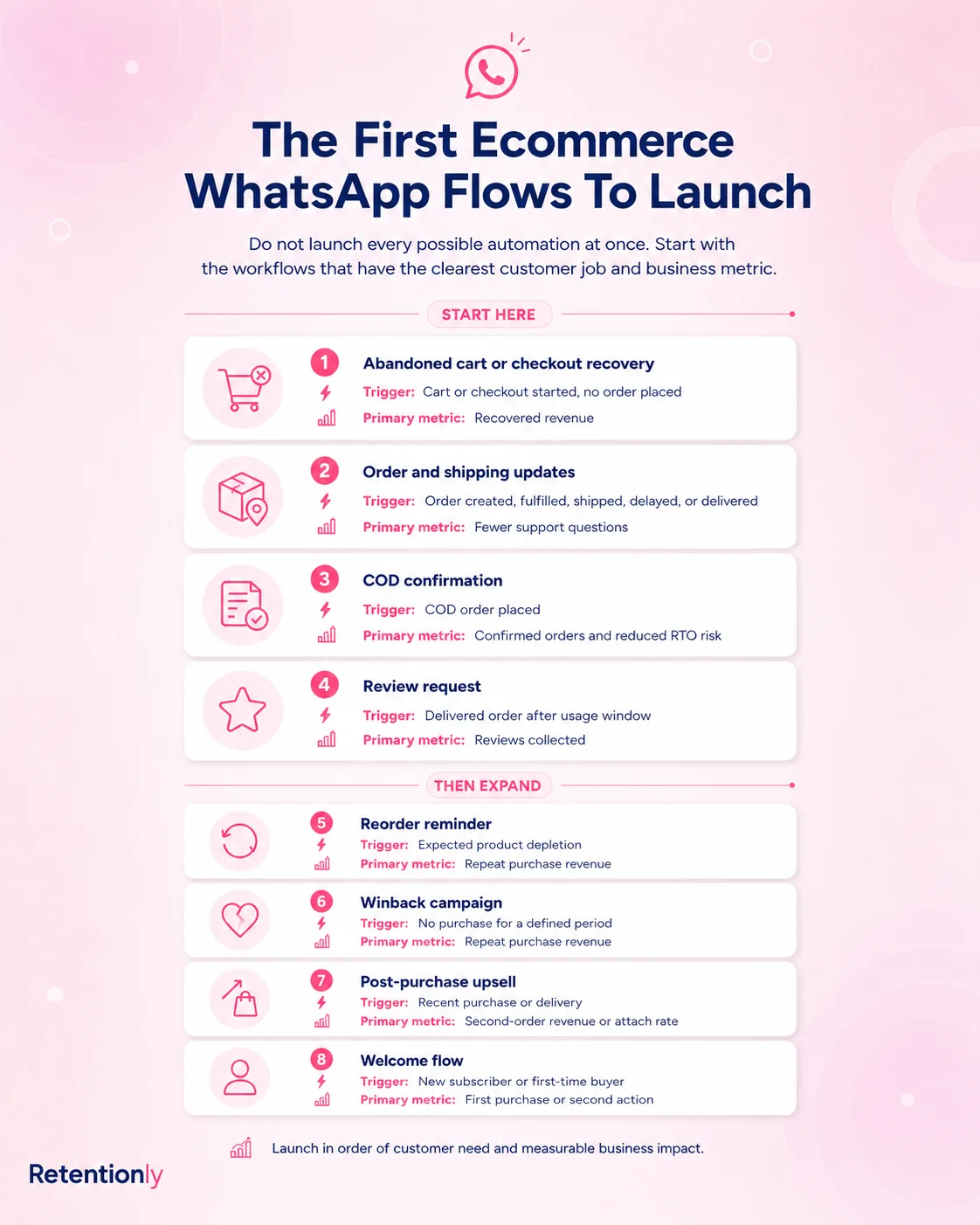
This order is practical because it follows the money. Recover carts first. Protect COD margins if relevant. Reduce support noise. Then build retention and expansion.
Flow 1: Abandoned Checkout Recovery
The abandoned checkout flow should be direct, helpful, and limited. The customer already knows the product. Your job is to make the return path easy.
A simple structure:
Trigger: customer starts checkout but does not complete the order.
Timing: send the first message after 30 to 60 minutes.
Segment: include customers who gave WhatsApp consent and have a valid phone number.
Message: remind them what they left and link back to checkout.
Fallback: send one more follow-up after 20 to 24 hours if no purchase happened.
Metric: recovered orders, recovered revenue, conversion rate, unsubscribe or block signals.
Example message:
Hi [first_name], you left something in your cart at [store_name]. Your checkout is saved here: [checkout_link]. Reply if you need help choosing.
Be careful with discounts. A discount can recover some shoppers, but using one too early trains customers to wait. Many stores should start with a helpful reminder, then test an offer only on the second message or on higher-intent segments.
Flow 2: COD Confirmation
COD confirmation is especially useful for markets where cash-on-delivery orders create return-to-origin risk. The goal is not to annoy every customer. The goal is to confirm intent before the store spends money fulfilling a weak order.
A practical COD flow:
Trigger: new COD order placed.
Timing: send immediately or within a few minutes.
Segment: COD orders only, optionally filtered by order value, shipping region, or risk signals.
Message: ask the customer to confirm or cancel.
Fallback: tag unconfirmed orders for manual review.
Metric: confirmation rate, cancellation rate, RTO reduction, fulfillment savings.
Example message:
Hi [first_name], please confirm your COD order [order_number] from [store_name]. Reply 1 to confirm or 2 to cancel.
This flow works because it creates a simple decision before fulfillment. It can also help the support team prioritize uncertain orders instead of treating every COD order the same.
Flow 3: Order And Shipping Updates
Order updates are not always direct revenue flows, but they protect the buying experience. Customers who feel informed are less likely to create support tickets, cancel out of uncertainty, or mistrust the store.
Useful messages include:
Order confirmation
Payment confirmation where relevant
Shipping confirmation
Out-for-delivery update
Delivery confirmation
Delay update
The key is restraint. Do not send five messages if two would do. Send messages when the customer would naturally want the update.
Example message:
Your [store_name] order [order_number] has shipped. Track it here: [tracking_link]. We will let you know when it is out for delivery.
For many teams, this is also where WhatsApp and support connect. If a customer replies with a question, the conversation should have a clear owner.
Flow 4: Review Requests
Review requests work best after the customer has had enough time to use the product. Asking too early feels automated in the wrong way. Asking too late loses momentum.
A better review request flow:
Trigger: order delivered.
Timing: wait based on product type, usually 2 to 7 days.
Segment: delivered orders, optionally excluding refunded or support-heavy orders.
Message: ask for a quick review and make the action easy.
Fallback: avoid repeated nagging if the customer does not respond.
Metric: review rate, review quality, reply sentiment.
Example message:
Hi [first_name], hope you are enjoying your order from [store_name]. Could you share a quick review? It helps other shoppers choose with confidence: [review_link]
If you sell products that require more usage time, delay the ask. A skincare product, supplement, or food subscription may need a different window than a fashion accessory.
Flow 5: Winback And Reorder
Winback and reorder flows are where WhatsApp becomes a retention channel instead of only an order update channel.
For winback, the trigger is inactivity. For reorder, the trigger is expected replenishment timing. Both need segmentation because the message should match the customer relationship.
| Flow | Good trigger | Message angle | Metric |
|---|---|---|---|
| Winback | No purchase for 45, 60, or 90 days | New arrivals, limited offer, personalized reason to return | Repeat purchase rate |
| Reorder | Expected product depletion date | Reminder to restock before running out | Reorder conversion |
| Post-purchase upsell | Recent order delivered or used | Complementary product, bundle, refill, or accessory | Repeat revenue and AOV |
Example winback message:
Hi [first_name], it has been a while since your last order from [store_name]. We picked a few customer favorites you might like: [collection_link]
Example reorder message:
Running low on [product_name]? You can reorder from [store_name] in one tap here: [reorder_link]
These flows should feel useful, not random. If the customer bought a 30-day supply, a reorder reminder around day 24 to 28 makes sense. If they bought a jacket, a generic reorder reminder does not.
How To Set Up Shopify WhatsApp Automation
There are three common setup paths.
| Setup path | Best for | Tradeoff |
|---|---|---|
| Shopify WhatsApp app | Merchants who want fast setup and store-specific flows | Less custom than building directly on APIs |
| WhatsApp Business API plus middleware | Technical teams with custom workflow needs | More setup, developer time, and maintenance |
| CRM or support platform | Teams using WhatsApp mainly for support or sales operations | Can become broad before retention flows are live |
For most Shopify stores, an app-based setup is the fastest path because it starts closer to the store events. You install the app, connect Shopify, configure WhatsApp sender details, create approved templates where needed, and turn on the first automations.
A simple launch checklist:
Confirm the use cases you want first.
Make sure you can collect WhatsApp-ready phone numbers and consent.
Connect your Shopify store.
Set up your WhatsApp Business sender.
Create message templates for business-initiated messages.
Launch one revenue flow before adding campaigns.
Track revenue, replies, blocks, and unsubscribes.
Improve timing and copy before adding more volume.
The important point is sequencing. A store does not need a huge WhatsApp program to start. It needs one useful workflow that is easy to measure.
Message Templates Shopify Stores Should Prepare
WhatsApp business-initiated messages often require approved templates, especially when the customer has not recently messaged the business. That means your team should write templates before launch instead of waiting until a campaign is urgent.
Start with templates for:
Abandoned checkout reminder
COD order confirmation
Order confirmation
Shipping update
Delivery confirmation
Review request
Winback message
Reorder reminder
Good templates are specific but flexible. They use variables for names, order numbers, checkout links, product names, and tracking links, but they do not depend on missing data.
Avoid templates that sound like generic blasts. A Shopify WhatsApp template should tell the customer why they are receiving the message and what action to take.
What To Measure
Do not judge WhatsApp only by open rates. Opens are useful, but revenue and customer experience are the real test.
Track metrics by flow:
| Flow | Primary metric | Secondary metric |
|---|---|---|
| Abandoned checkout | Recovered revenue | Click rate and conversion rate |
| COD confirmation | Confirmed COD orders | Cancellations and RTO reduction |
| Order updates | Support ticket reduction | Reply rate and delivery success |
| Review request | Reviews collected | Review rating and response quality |
| Winback | Repeat purchase revenue | Revenue per recipient |
| Reorder reminder | Reorder conversion | Time between purchases |
| Upsell | Post-purchase revenue | Attach rate and AOV |
Also watch negative signals: blocks, unsubscribes, spam complaints, and angry replies. If those rise, the flow may be too frequent, too broad, or too promotional.
Common Mistakes To Avoid
The biggest mistake is treating WhatsApp like a louder email list. WhatsApp feels personal to customers, so irrelevant messages create more friction than they would in a crowded inbox.
Avoid these mistakes:
Launching broadcasts before core lifecycle flows.
Sending abandoned cart discounts too early.
Sending the same message to every customer.
Ignoring opt-in quality and consent language.
Creating templates without clear variables and fallback copy.
Sending too many order updates for minor status changes.
Measuring opens instead of revenue, support impact, and retention.
Letting support replies go unanswered after an automation starts a conversation.
The better approach is boring in the best way: fewer flows, clearer logic, better timing, cleaner measurement.
Where Retentionly Fits
Retentionly is built for Shopify stores that want WhatsApp automation tied to retention and repeat revenue, not a generic messaging platform that has to be shaped into ecommerce workflows.
Use Retentionly when your priorities are:
Recovering abandoned checkouts
Confirming COD orders
Sending useful order updates
Asking for reviews after delivery
Running winback flows
Nudging repeat purchases and reorders
Sending post-purchase upsells
Keeping setup simple for a Shopify team
The main advantage is focus. Instead of starting with a broad inbox, chatbot, or CRM project, you can start with Shopify lifecycle automations that map to revenue moments.
If you are comparing broader platforms, these guides may help:
Zoko Alternative Shopify Stores Can Use for Retention Automation
Interakt Alternative Shopify Stores Can Use for Simpler Automation
Final Recommendation
Start with one flow that has a clear business case. For most stores, that means abandoned checkout recovery. For COD-heavy stores, it may mean COD confirmation first. For stores with high support volume, order and shipping updates may be the first operational win.
Then build from there.
Shopify WhatsApp automation works when it respects the customer context. Trigger from real Shopify events, send at sensible moments, personalize with useful data, stop when the customer buys or opts out, and measure the result by revenue, retention, or support impact.
That is how WhatsApp becomes more than a chat button. It becomes a retention channel your store can improve every week.
Install Retentionly free on Shopify to launch WhatsApp automations for abandoned checkout recovery, COD confirmation, order updates, reviews, winback, and repeat purchases without turning WhatsApp into another complex system to manage.