WhatsApp Bot Software: Ecommerce Features Worth Comparing
TL;DRWhatsApp bot software can look simple from the outside: install a tool, connect WhatsApp, write a few answers, and let the bot reply. Ecommerce teams usually discover the harder question later. Does the bot understand store events, order context, support risk, and revenue workflows well enough to improve the customer journey?
That is the difference between a useful WhatsApp bot and another disconnected support widget. For Shopify and D2C brands, the right software should help with product questions, abandoned checkout replies, COD confirmation, order updates, reviews, reorders, winback campaigns, and human handoff without turning every conversation into a generic bot menu.
This guide explains how to compare WhatsApp bot software for ecommerce, which features matter, how pricing models can differ, and when a Shopify-first retention automation tool is a better fit than broad chatbot software.
Quick Verdict
Choose WhatsApp bot software when your team needs faster replies, structured routing, and repeatable customer conversations inside WhatsApp.
Choose Shopify-first WhatsApp automation when the main job is to trigger revenue workflows from store events: checkout abandoned, order placed, order shipped, order delivered, customer inactive, or product ready for reorder.
The best setup often combines both. The bot handles predictable replies and triage. The automation system owns timing, eligibility, stop rules, and measurement.
| Buyer need | Better fit |
|---|---|
| Answer repetitive FAQs and product questions | WhatsApp bot software |
| Recover abandoned checkouts from Shopify events | Shopify WhatsApp automation |
| Route complaints, refunds, and delivery issues | Bot triage plus human inbox |
| Confirm COD orders before fulfillment | Button or reply-based automation |
| Send review requests after delivery | Delivery-timed retention flow |
| Build broad AI support across channels | AI chatbot or helpdesk platform |
| Grow repeat purchases with WhatsApp | Shopify-first retention automation |
If your team is choosing software this week, compare products by workflow ownership, not only by how impressive the bot demo feels.
What WhatsApp Bot Software Should Do
WhatsApp bot software lets a business automate replies, menus, routing, and sometimes AI-generated answers inside WhatsApp. It may include a flow builder, chatbot builder, shared inbox, team assignment, broadcasts, templates, analytics, integrations, and WhatsApp Business Platform access.
For ecommerce, the useful version does more than answer "What are your hours?" or "Where is my order?" It connects customer replies to store moments.
| Ecommerce moment | Useful bot role | What should be controlled |
|---|---|---|
| Product question | Share approved product, size, ingredient, care, or compatibility guidance | Claims, discounts, and sensitive advice |
| Abandoned checkout reply | Answer objections and route high-intent replies | Checkout trigger, offer rules, and purchase stop rule |
| COD order | Classify confirm, cancel, change address, or call-back replies | Fulfillment hold and final order action |
| Order status | Point to tracking or collect order details | Delay, damage, and lost-order escalation |
| Review request | Detect unhappy replies before asking for a public review | Delivery timing and review app link |
| Reorder window | Answer usage questions and send reorder path | Product cycle and eligibility |
| Campaign reply | Route support, sales, opt-out, or high-intent conversations | Segment, campaign calendar, and suppression |
This is why ecommerce teams should be careful with generic bot software. If the product cannot connect replies to store logic, the bot may reduce manual work while creating a weaker buying experience.
The Core Features To Compare
Start with the features that decide whether the software can run real ecommerce workflows.
| Feature | Why it matters for ecommerce |
|---|---|
| Official WhatsApp access | Keeps outbound messaging, templates, and account setup inside the supported WhatsApp Business Platform path |
| Shopify or store integration | Gives the bot order, customer, checkout, product, and fulfillment context |
| Flow builder | Lets the team design menus, branches, and reply paths without custom development |
| Template support | Helps with approved outbound messages for marketing and utility use cases |
| Human handoff | Prevents the bot from mishandling refunds, complaints, and unclear replies |
| Shared inbox | Gives support or sales teams ownership when automation stops |
| Segmentation | Controls who receives campaigns and which customers should be suppressed |
| Automation triggers | Starts workflows from checkout, order, delivery, inactivity, and purchase-cycle events |
| Reporting | Shows recovered orders, handoff rate, opt-outs, reply outcomes, and campaign impact |
| Audit trail | Lets the team review what the bot said and improve risky answers |
A long feature list is not enough. The decisive question is whether those features are connected to the customer lifecycle your store actually runs.
Pricing Models Can Hide The Real Cost
WhatsApp bot software pricing is rarely one number. You may be comparing a subscription, Meta messaging fees, provider markup, AI usage, seats, automation limits, contacts, inbox limits, and add-ons at the same time.
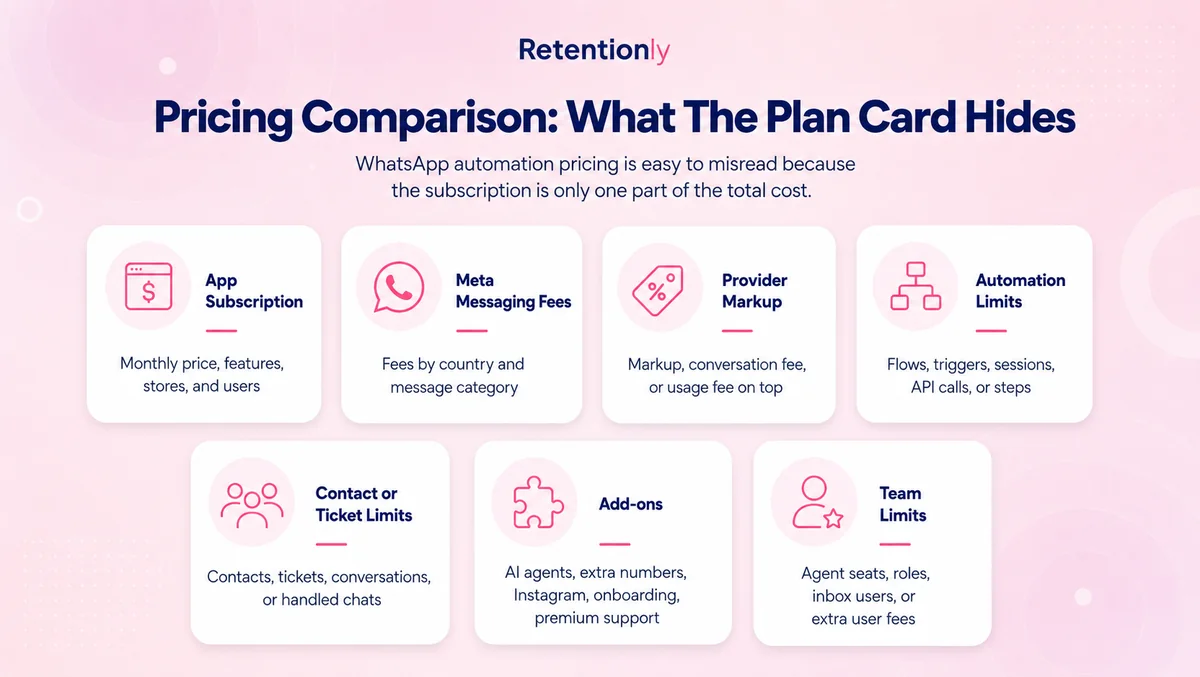
Use this pricing checklist before choosing a tool:
| Pricing component | What to ask |
|---|---|
| Subscription | What is included in the base plan, and what moves to higher tiers? |
| Meta messaging fees | Are WhatsApp message charges passed through separately? |
| Provider markup | Is there any additional per-message or conversation markup? |
| Contacts or audiences | Does pricing change with contact list size? |
| Agents or seats | How many team members can use the inbox? |
| Bot or AI usage | Are bot replies, AI answers, or automation runs limited? |
| Templates and campaigns | Are broadcasts, template sends, or campaign features gated? |
| Shopify workflows | Are abandoned checkout, COD, reviews, or order updates included? |
| Add-ons | Are integrations, green tick help, support, or advanced reporting extra? |
Do not compare tools only by the entry price. A low headline plan can become expensive if the first real ecommerce workflows require add-ons. A higher plan may be reasonable if it includes the store events, campaigns, and team controls you need.
Bot Software Versus Automation Software
Bot software and automation software overlap, but they are not the same job.
| Layer | Starts from | Main job | Risk if misused |
|---|---|---|---|
| WhatsApp bot | Customer message, keyword, button, or menu choice | Answer, route, classify, collect details | Overconfident replies and dead-end menus |
| WhatsApp automation | Store event, segment, or scheduled campaign | Send the right message at the right time | Over-messaging or weak stop rules |
| Shared inbox | Human-owned conversation | Resolve exceptions and relationship-sensitive issues | Slow ownership or missing context |
For ecommerce, automation usually creates the moment. The customer abandons checkout, places an order, receives delivery, or becomes eligible for a reorder. The bot becomes useful when the customer replies.
That means the buying decision should not be "bot or no bot." It should be "which system owns the workflow, and which system handles the reply?"
Ecommerce Workflows Your Software Should Support
If you sell on Shopify, use real store workflows as the test.
| Workflow | What good software should support |
|---|---|
| Abandoned checkout | Trigger from checkout activity, send a WhatsApp reminder, handle delivery or product questions, stop after purchase |
| COD confirmation | Ask the customer to confirm, cancel, change address, or request a call before fulfillment |
| Order updates | Send confirmation, shipping, delivery, and delay messages with tracking context |
| Review requests | Send after delivery, route unhappy replies to support, link to the right review destination |
| Reorder reminders | Time reminders by product cycle, last purchase, and eligibility |
| Winback campaigns | Segment inactive customers and avoid messaging recent buyers or support cases |
| Post-purchase upsell | Recommend compatible products after purchase without interrupting support conversations |
| Broadcast campaigns | Send permission-based offers to clean segments and classify replies correctly |
For a deeper use-case view, read the WhatsApp Chatbot for Ecommerce guide and the Shopify WhatsApp Automation guide.
AI Is Useful, But It Is Not The Whole Buying Decision
Many WhatsApp bot tools now lead with AI. AI can help when it answers from approved product content, policies, order context, and clear escalation rules. It can also create risk if it guesses, overpromises, or handles sensitive exceptions.
AI is useful for:
Repetitive product questions.
Size, fit, care, ingredient, or compatibility guidance.
Shipping and payment questions.
Order status triage.
First-level return or exchange intake.
Classifying campaign replies.
Drafting replies for a human to approve.
AI should not own final decisions on refunds, damaged orders, warranty exceptions, health or safety claims, angry customers, high-value complaints, or discount negotiation.
For most ecommerce teams, AI should improve triage and speed. It should not replace workflow design, approved templates, consent, stop rules, reporting, or human judgement.
Compare Broad Platforms Fairly
Broad WhatsApp platforms can be the right choice when WhatsApp is becoming a full communication layer across marketing, sales, service, support, and team inbox operations.
That kind of software may make sense when:
The business needs a large shared inbox.
Multiple teams manage WhatsApp conversations.
AI support is a major requirement.
The team wants one platform for campaigns, support, bot flows, and CRM-style records.
WhatsApp is not tied primarily to Shopify retention events.
The tradeoff is focus. A broad platform may have more surface area than a Shopify team needs for its first revenue workflows. Setup can become slower if the team must design bot menus, campaigns, inbox rules, and lifecycle automations all at once.
Retentionly is a better fit when the team wants WhatsApp to support Shopify retention first: abandoned checkout, COD confirmation, order updates, reviews, reorders, winback, upsell, broadcasts, and reply-aware handoff.
A Simple Evaluation Scorecard
Before buying WhatsApp bot software, score each option against the workflows you actually plan to run in the next 90 days.
| Question | Why it matters |
|---|---|
| Does it connect to Shopify customer, order, checkout, and product context? | Without store data, ecommerce replies become generic |
| Can it trigger messages from store events? | Revenue workflows need timing, not only replies |
| Can it pause campaigns during support issues? | Prevents tone-deaf messages during complaints |
| Can it hand off with conversation and order context? | Helps humans resolve exceptions faster |
| Does it support approved templates and opt-outs? | Keeps outbound messaging controlled |
| Can it measure recovered revenue and reply outcomes? | Avoids judging the bot only by ticket deflection |
| Is pricing clear at realistic usage levels? | Prevents surprises from contacts, seats, AI, or message fees |
| Can your team maintain the knowledge base? | A stale bot creates support risk |
If a tool scores well on chatbot features but poorly on Shopify workflows, treat it as support software. If it scores well on Shopify workflows but has limited AI, treat it as a retention automation layer. Both can be valid, but they solve different problems.
Where Retentionly Fits
Retentionly is built around Shopify WhatsApp retention automation. It is not trying to be a generic chatbot platform for every industry.
That focus matters when your WhatsApp priority is revenue and customer lifecycle execution:
Recover abandoned checkouts.
Confirm COD orders.
Send order and shipping updates.
Request reviews after delivery.
Remind customers to reorder.
Win back inactive buyers.
Send post-purchase upsells.
Run targeted broadcasts.
Route replies and support-sensitive conversations.
If your team needs a large AI support desk across many channels, compare dedicated chatbot and helpdesk platforms carefully. If your team wants Shopify-triggered WhatsApp workflows with clear retention ownership, Retentionly is the cleaner starting point.
Install Free on Shopify and start with the flows that connect WhatsApp to revenue moments, not just reply automation.
Quick FAQs
What is WhatsApp bot software?
WhatsApp bot software helps a business automate replies, menus, routing, and sometimes AI answers inside WhatsApp. For ecommerce, it should connect those replies to product questions, order status, checkout recovery, support handoff, and retention workflows.
Is WhatsApp bot software the same as WhatsApp automation software?
No. Bot software usually responds to customer messages or menu choices. WhatsApp automation software can also send messages from store events, customer segments, and lifecycle triggers such as abandoned checkout, order shipped, delivery, inactivity, or reorder timing.
What should ecommerce brands compare before choosing a WhatsApp bot?
Compare Shopify integration, official WhatsApp access, template support, flow builder depth, human handoff, inbox ownership, reporting, pricing model, AI guardrails, opt-outs, and whether the software can support the exact workflows you plan to run.
Do Shopify stores need AI in WhatsApp bot software?
AI can help with repetitive questions and reply classification, but it should use approved knowledge and clear handoff rules. Shopify stores still need event-based automations, consent, suppression, and human ownership for exceptions.
Where does Retentionly fit against WhatsApp bot tools?
Retentionly fits when a Shopify or D2C team wants WhatsApp retention automation first. It focuses on abandoned checkout, COD confirmation, order updates, reviews, reorders, winback, upsells, broadcasts, and reply-aware handoff rather than generic bot menus alone.