WhatsApp for Shopify: Use Cases That Actually Drive Revenue
TL;DRWhatsApp for Shopify works when it is tied to a real customer moment. A shopper left checkout. A COD order needs confirmation. A package shipped. A customer received the product. A buyer is due to reorder. Those are useful reasons to message someone on WhatsApp.
The weak version is treating WhatsApp as a louder broadcast list or a floating chat button that sits on the storefront and waits. That can help with conversations, but it does not create a retention system.
The better version connects Shopify events, customer context, and one clear outcome: recover the order, confirm intent, reduce support, collect a review, bring the customer back, or drive the next purchase.
What WhatsApp For Shopify Really Means
For a Shopify store, WhatsApp can play three different roles.
| Role | What it does | Shopify example |
|---|---|---|
| Chat channel | Lets customers ask questions before or after purchase | Product questions, delivery questions, return queries |
| Notification channel | Sends useful status messages | Order confirmation, shipping update, delivery update |
| Revenue automation channel | Triggers lifecycle messages from Shopify data | Abandoned checkout, COD confirmation, winback, reorder, upsell |
Most stores start with the first role because a WhatsApp chat button is easy to understand. But the bigger commercial value usually comes from the second and third roles.
A chat button depends on the customer starting the conversation. Revenue automation starts from the moments your store already sees in Shopify.
If you want the broader automation setup, read the Shopify WhatsApp Automation Guide. This article focuses on where WhatsApp should fit in the store and which use cases are worth launching.
When WhatsApp Is Worth Using
WhatsApp is a high-attention channel, so the bar should be higher than email. Do not use it just because a message can be sent. Use it when the customer context makes the message useful.
Good WhatsApp use cases usually pass five checks.
| Check | Why it matters |
|---|---|
| The customer recently did something | A recent Shopify event gives the message context |
| The next action is simple | The customer can confirm, return, track, review, or buy in one step |
| The timing is important | Waiting too long would reduce revenue or increase support |
| The message can stop cleanly | The flow stops after purchase, confirmation, delivery, review, or opt-out |
| The outcome can be measured | The store can track revenue, support reduction, reviews, or repeat orders |
If a message fails those checks, it may belong in email, onsite content, or support documentation instead.
The Best WhatsApp Use Cases For Shopify
Start with use cases that connect to revenue, support load, or customer trust. These are the strongest candidates.
| Use case | Best trigger | Customer action | Primary metric |
|---|---|---|---|
| Abandoned checkout recovery | Checkout started but order not completed | Return to saved checkout | Recovered revenue |
| COD confirmation | COD order created | Confirm or cancel | Confirmation rate and RTO reduction |
| Order and shipping updates | Order placed, fulfilled, shipped, or delivered | Track or understand order status | Support ticket reduction |
| Review request | Order delivered and usage window passed | Leave a review | Reviews collected |
| Winback campaign | Customer inactive for a defined period | Revisit collection or offer | Repeat purchase revenue |
| Reorder reminder | Expected replenishment window reached | Reorder product | Reorder conversion |
| Post-purchase upsell | Recent purchase or delivery | Buy a complementary product | Repeat revenue and AOV |
| Back-in-stock alert | Product becomes available again | Return to product page | Recovered demand |
| Welcome flow | New subscriber or first purchase | Learn offer or next step | First purchase or second purchase rate |
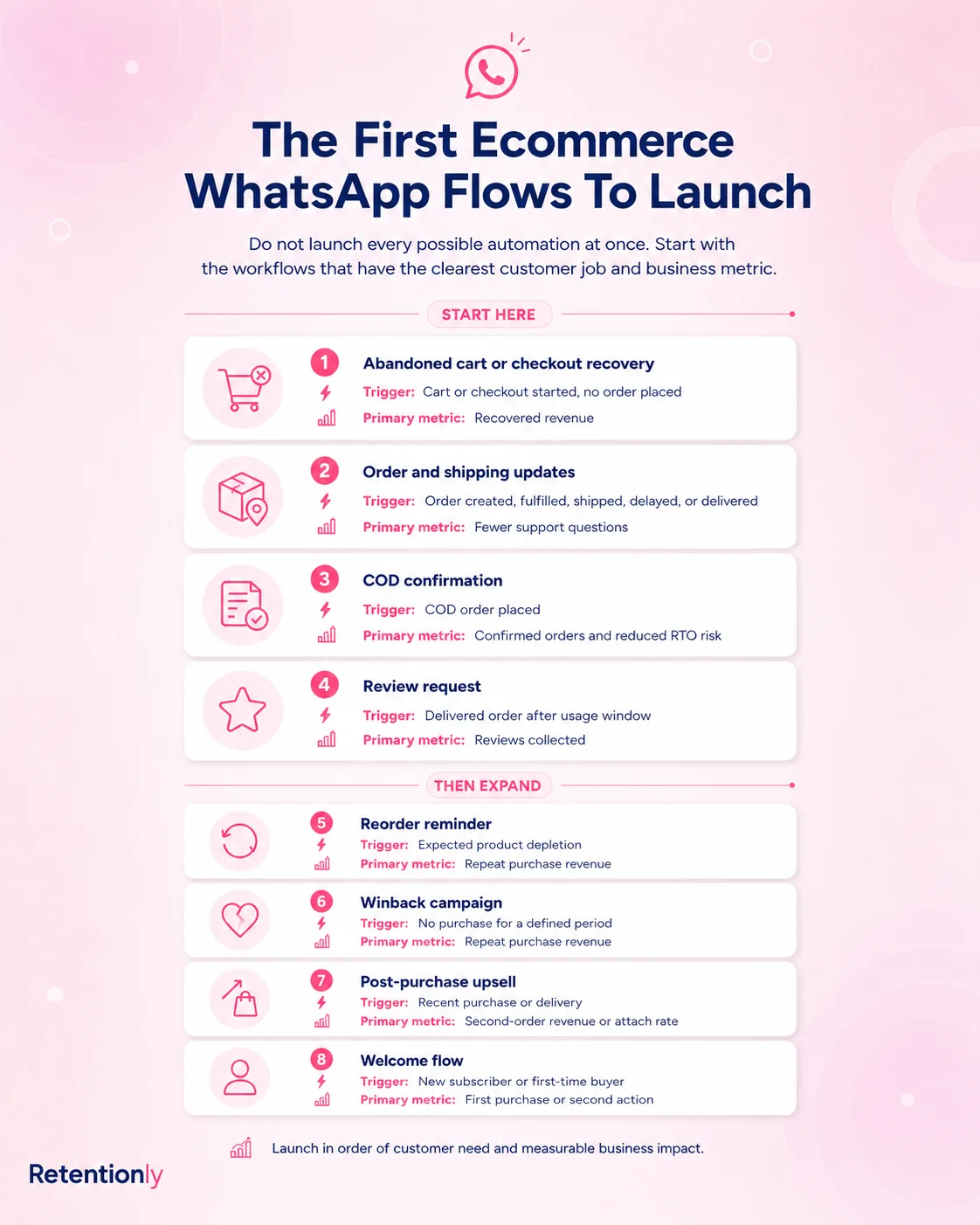
This map also helps avoid a common mistake: judging WhatsApp only by message delivery or open rate. A Shopify merchant should care about what happens after the message.
Use Case 1: Abandoned Checkout Recovery
Abandoned checkout is usually the first WhatsApp flow to launch because the shopper already showed buying intent. They selected products, started checkout, and may only need a timely nudge.
A simple flow:
| Component | Practical choice |
|---|---|
| Trigger | Checkout started but no order completed |
| Audience | Customers with WhatsApp consent and a valid phone number |
| First message | 30 to 60 minutes after abandonment |
| Follow-up | One reminder after 20 to 24 hours if no purchase happens |
| Stop rule | Stop after purchase, opt-out, or final reminder |
| Metric | Recovered orders, recovered revenue, conversion rate, opt-outs |
Example message:
Hi [first_name], you left something in your cart at [store_name]. Your checkout is saved here: [checkout_link]. Reply if you need help choosing.
Do not lead with a discount by default. Many stores should test a helpful reminder first, then reserve incentives for the second message, high-value carts, or first-time buyers who need a stronger reason to finish.
For a deeper version, read the Shopify Abandoned Cart WhatsApp Recovery Guide.
Use Case 2: COD Confirmation
For stores that accept cash on delivery, WhatsApp can protect margin before fulfillment costs are locked in. The goal is simple: confirm that the customer still wants the order before the team ships it.
A practical COD confirmation flow:
| Component | Practical choice |
|---|---|
| Trigger | COD order created |
| Audience | COD orders only, optionally filtered by value, region, or risk |
| Timing | Immediately after order placement |
| Message | Ask the customer to confirm or cancel |
| Fallback | Tag unconfirmed orders for review |
| Metric | Confirmation rate, cancellation rate, fulfillment holds, RTO reduction |
Example message:
Hi [first_name], please confirm your COD order [order_number] from [store_name]. Reply 1 to confirm or 2 to cancel.
Keep the action simple. If the customer has to read a long policy or answer multiple questions, the flow becomes harder to measure and easier to ignore.
Use Case 3: Order And Shipping Updates
Order updates do not always look like marketing, but they influence repeat purchase. A customer who knows what is happening is less likely to open a support ticket, cancel from uncertainty, or distrust the store.
Useful WhatsApp updates include:
Order confirmation.
Payment confirmation where relevant.
Shipping confirmation.
Tracking link.
Out-for-delivery notice.
Delivery confirmation.
Delay or exception update.
The rule is restraint. Send the updates customers actually want, not every minor status change.
Example message:
Your [store_name] order [order_number] has shipped. Track it here: [tracking_link]. We will update you if anything changes.
Measure support impact. If customers still ask "where is my order?" after the automation is live, the message may be too late, the tracking link may be unclear, or the delivery event may be wrong.
Use Case 4: Review Requests
WhatsApp review requests work because they happen close to the product experience. The timing should match the product.
| Product type | Suggested review timing |
|---|---|
| Fashion accessory or simple item | 2 to 4 days after delivery |
| Food, beauty, skincare, or supplement | 5 to 14 days after delivery |
| Product that needs setup or repeated use | 7 to 21 days after delivery |
Example message:
Hi [first_name], hope you are enjoying your [product_name] from [store_name]. Could you share a quick review? It helps other shoppers choose with confidence: [review_link]
Exclude refunded orders, unresolved support cases, and customers who opted out. A review flow should collect social proof from satisfied customers, not pressure customers who need help.
Use Case 5: Winback Campaigns
Winback messages should not be generic "we miss you" blasts. They work when they recognize the customer relationship and give a relevant reason to return.
| Segment | Trigger | Message angle |
|---|---|---|
| First-time buyer | No second order after 45 to 60 days | Bestseller, starter bundle, or first-repeat incentive |
| Repeat buyer | Inactive beyond normal purchase cycle | New arrivals or favorites based on prior category |
| VIP customer | No purchase after a longer inactivity window | Early access or personalized collection |
| Discount-sensitive buyer | Inactive after campaign purchase | Controlled offer with clear expiry |
Example message:
Hi [first_name], we saved a few new picks from [store_name] based on your last order. You can see them here: [collection_link]
Measure repeat purchase revenue and opt-outs together. A winback flow that creates short-term sales but high opt-outs is too aggressive.
Use Case 6: Reorder Reminders
Reorder reminders are strongest for products with predictable consumption. The message feels helpful because the customer may actually be running low.
Good categories include:
Beauty and skincare.
Supplements.
Food and beverage.
Pet products.
Household essentials.
Personal care.
Example message:
Running low on [product_name]? You can reorder from [store_name] in one tap here: [reorder_link]
Timing matters. If a customer bought a 30-day supply, a reminder around day 24 to 28 can work. If they bought a jacket, a reorder reminder does not make sense. Use product type, quantity, and purchase cycle instead of sending the same reminder to every customer.
Use Case 7: Post-Purchase Upsell And Cross-Sell
Post-purchase upsell works when the recommendation is obviously connected to the recent order. Random promotions after purchase can damage trust.
| Recent purchase | Better WhatsApp follow-up |
|---|---|
| Shampoo | Conditioner, refill, or hair mask |
| Running shoes | Socks, care kit, or training accessory |
| Coffee | Subscription, grinder, or flavor bundle |
| Phone case | Screen protector or charging cable |
| Skincare starter kit | Refill, routine add-on, or travel size |
The best timing depends on the product. Some offers make sense right after purchase. Others should wait until delivery or early product usage.
Example message:
Your [product_name] pairs well with [recommended_product]. You can add it to your next order here: [product_link]
Track attach rate, repeat revenue, and unsubscribes. Upsell should feel like a helpful recommendation, not an automatic sales push.
Use Case 8: Back-In-Stock And Price-Drop Alerts
Back-in-stock and price-drop alerts work when the customer already showed interest. These are not broad campaigns. They are demand recovery messages.
Use WhatsApp when:
A customer joined a waitlist.
A shopper viewed or saved a product.
A product was unavailable during checkout.
A customer asked support about availability.
A product price changes for a segment that has shown interest.
Example message:
Good news: [product_name] is back in stock at [store_name]. You can get it here before it sells out again: [product_link]
Be careful with price-drop messages. If every interested shopper gets frequent discounts, you may train customers to wait. Use them selectively for slow-moving inventory, seasonal moments, or high-intent segments.
What Not To Use WhatsApp For
Some messages are better left outside WhatsApp.
| Avoid this | Better approach |
|---|---|
| Daily promotional blasts | Segment campaigns and limit frequency |
| Generic newsletters | Email or onsite content |
| Long educational content | Blog, email, or product guide |
| Minor order status changes | Only send meaningful status updates |
| Repeated discount nudges | Use behavior-based offers with stop rules |
| Messages without opt-in | Build consent before automation |
The test is simple: would the customer understand why this message arrived on WhatsApp right now? If not, choose a lower-pressure channel.
Chat Button Vs Automation
A WhatsApp chat button can be useful, especially for product questions and pre-purchase support. But it should not be the entire WhatsApp strategy.
| Option | Best for | Limitation |
|---|---|---|
| Chat button | Customer-initiated conversations | Waits for the customer to start |
| Manual WhatsApp replies | Early-stage stores with low volume | Hard to scale and measure |
| Broadcast campaigns | Planned promotions to clean segments | Easy to overuse |
| Shopify-triggered automation | Revenue and lifecycle workflows | Needs clear setup, consent, and stop rules |
Most growing Shopify stores should use a combination. Keep the chat button for questions, but use automations for the moments that should not depend on manual follow-up.
How To Choose Your First WhatsApp Flow
Pick the first flow based on the store's constraint, not the longest feature list.
| Store situation | Start with |
|---|---|
| Many shoppers start checkout but do not buy | Abandoned checkout recovery |
| COD creates fake orders or RTO cost | COD confirmation |
| Support is full of order status questions | Order and shipping updates |
| The store needs more social proof | Review request |
| Customers buy once and disappear | Winback |
| Products run out on a predictable cycle | Reorder reminders |
| Customers buy products with natural complements | Post-purchase upsell |
| Popular products often sell out | Back-in-stock alerts |
Launch one or two flows first. Measure them for a few weeks. Improve timing, message copy, segmentation, and stop rules before adding more WhatsApp volume.
What To Measure
WhatsApp performance should be judged by business outcomes.
| Flow | Main metric | Watch also |
|---|---|---|
| Abandoned checkout | Recovered revenue | Opt-outs, conversion rate, discount cost |
| COD confirmation | Confirmed orders and RTO reduction | Cancellation rate, manual review volume |
| Order updates | Support ticket reduction | Delivery exceptions, reply volume |
| Review request | Reviews collected | Rating quality, support replies |
| Winback | Repeat purchase revenue | Opt-outs, revenue per recipient |
| Reorder reminder | Reorder conversion | Timing accuracy, product-level performance |
| Upsell | Repeat revenue and AOV | Attach rate, unsubscribes |
| Back-in-stock | Recovered demand | Sell-through and message fatigue |
Delivered messages are not enough. A flow that sends successfully but does not change behavior needs better timing, audience, or message intent.
Where Retentionly Fits
Retentionly is built for Shopify stores that want WhatsApp to drive retention workflows, not just live chat or generic broadcasts.
Use Retentionly when you want:
Shopify-first WhatsApp automations.
Abandoned checkout, COD confirmation, order updates, reviews, winback, reorder, and upsell flows.
Clear revenue and retention ownership for each message.
A practical setup path without turning WhatsApp into a broad CRM project.
Meta message pricing without unnecessary markup.
If your goal is only a manual support inbox, a broad helpdesk may be enough. If your goal is to recover orders, reduce avoidable support, and bring customers back through Shopify-triggered WhatsApp flows, Retentionly is the sharper fit.
Install Free on Shopify and launch the first WhatsApp flow around the customer moment that matters most to your store.