Abandoned Cart WhatsApp
TL;DRAbandoned cart WhatsApp is an automated recovery system that messages an eligible shopper after they leave an ecommerce checkout without buying. The useful version is not a generic promotional blast. It connects a real cart or checkout event to a timely WhatsApp reminder, a valid return link, a reply path, a purchase stop rule, and revenue attribution.
That system can recover buying intent while it is still fresh. It can also create noise quickly if the trigger is weak, consent is unclear, the cart link is stale, or messages continue after the customer buys.
This guide explains the complete category: what abandoned cart WhatsApp means, how the flow works, what a store needs before launch, which messages to send, how to handle replies, and what to measure.
Abandoned Cart WhatsApp: The Quick Answer
An abandoned cart WhatsApp flow should do seven things well:
Detect a high-intent cart or incomplete checkout.
Confirm the shopper is eligible for WhatsApp messaging.
Wait long enough to avoid interrupting an active checkout.
Send a useful reminder with accurate cart context.
Let the shopper return to checkout or ask a question.
Stop immediately after purchase, opt-out, or the final attempt.
Connect recovered orders and revenue to the flow.
| Flow decision | Practical starting point |
|---|---|
| Trigger | Checkout started or cart reached a high-intent stage, but no order followed |
| Eligibility | Valid WhatsApp number, clear consent, supported market, and approved message path |
| First reminder | Often 30 to 60 minutes after abandonment |
| Second reminder | Often 20 to 24 hours later if no purchase |
| Third reminder | Optional for selected carts, usually 48 to 72 hours later |
| Main action | Return to the saved cart or checkout |
| Reply path | Sales or support help for delivery, sizing, payment, COD, or product questions |
| Stop rules | Purchase, opt-out, invalid number, expired cart, or final attempt |
| Primary metric | Recovered revenue after messaging cost and discounts |
Those timings are starting points, not universal rules. A flash-sale checkout, high-consideration product, grocery reorder, and international shipment can need different pacing.
What Counts as an Abandoned Cart?
Ecommerce teams often use cart and checkout abandonment as if they were the same event. They are related but not identical.
| Event | What happened | Intent level | WhatsApp use |
|---|---|---|---|
| Product viewed | Shopper opened a product page | Low | Usually too weak for a cart recovery message |
| Added to cart | Shopper placed an item in the cart | Medium | Useful only when phone, consent, and cart identity are available |
| Checkout started | Shopper entered checkout and shared contact details | High | Strong starting trigger for recovery |
| Payment attempted | Shopper tried to pay but no order completed | Very high | May need payment help rather than a generic reminder |
The safest first implementation uses an incomplete checkout or another high-intent event. A product view does not prove that the shopper wanted a reminder. A checkout event gives the message a clear reason and usually provides a better return path.
Stores should also distinguish a genuinely abandoned checkout from an active session. If the first automation fires while the shopper is still comparing shipping methods or entering payment details, the message feels intrusive and can create duplicate work.
How an Abandoned Cart WhatsApp Flow Works
The system is a sequence of decisions, not only a message template.
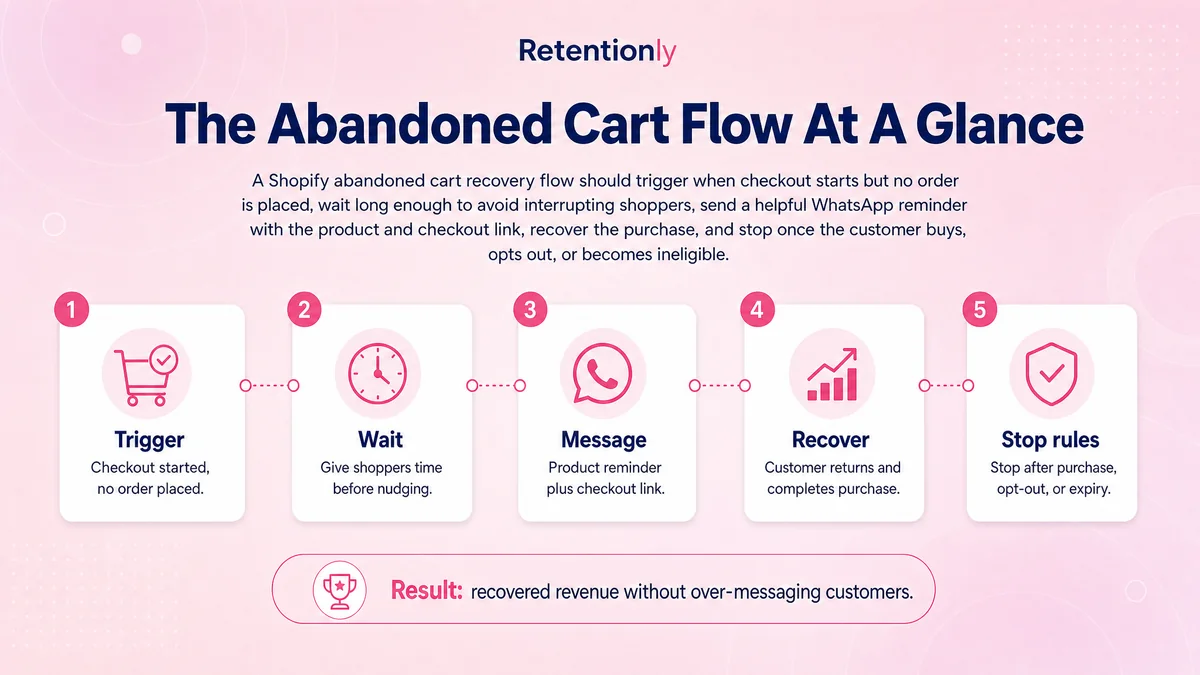
1. Capture the Ecommerce Event
The store or ecommerce integration records that a shopper reached the cart or checkout and did not complete an order. The event should include enough original context to recover the journey: customer identity, phone number, cart or checkout URL, products, value, currency, and timestamps.
2. Wait and Recheck
The automation waits for the chosen delay, then checks whether an order has already been created. This recheck prevents a customer who completed checkout in another tab from receiving an unnecessary reminder.
3. Verify Messaging Eligibility
Before sending, confirm that the phone number is usable on WhatsApp, the shopper has given the required consent, the selected template is approved where required, and the customer has not opted out.
4. Send One Clear Message
The message should identify the store, refer accurately to the cart or product, include a working return link, and offer a reply path. The first reminder normally needs help and convenience more than urgency.
5. Handle the Customer's Next Action
The customer may buy, click without buying, ask a question, ignore the message, or opt out. Each action needs a path. A reply about sizing or delivery should reach someone who can resolve it; a purchase should suppress every remaining reminder.
6. Attribute the Outcome
Record whether the shopper completed the order after the message, how much revenue was recovered, what discount was used, and what messaging cost applied. This is what turns cart recovery into an operating workflow rather than a collection of sent-message counts.
What You Need Before Launch
An abandoned cart WhatsApp tool is only as reliable as the data and rules behind it.
| Requirement | Why it matters | Failure to avoid |
|---|---|---|
| Ecommerce integration | Supplies cart, checkout, customer, product, and order events | Generic messages with no real cart context |
| Valid phone number | Gives the automation a deliverable destination | Sending to malformed or wrong-country numbers |
| Consent record | Establishes permission and channel expectations | Treating a checkout phone field as automatic marketing consent |
| WhatsApp Business setup | Enables approved business messaging and templates | Building on an unsupported manual workaround |
| Approved templates | Allows business-initiated messages where required | Last-minute launch delays or rejected copy |
| Saved cart or checkout link | Returns the shopper to the correct purchase state | Sending a homepage or expired link |
| Purchase event | Stops reminders and supports attribution | Messaging customers after they already ordered |
| Opt-out handling | Protects customer choice and list quality | Continuing after STOP or another clear opt-out |
| Reply ownership | Gives questions a human or automated resolution path | Inviting replies that nobody monitors |
| Reporting | Connects cost, recovered orders, revenue, and opt-outs | Optimizing only for reads or clicks |
The consent design should be explicit about WhatsApp and appropriate to the store's markets. Keep the source and timestamp of consent, honor opt-outs, and review the latest WhatsApp and local legal requirements before launch.
For a deeper implementation guide, use the WhatsApp Checkout Opt-In Shopify Best Practices.
The Best Starting Message Sequence
Start with fewer messages than you think you need. A simple two-message sequence is easier to evaluate than a complex journey with discounts, branches, and repeated urgency.
Message 1: Helpful Reminder
Send the first reminder after enough time has passed to treat the checkout as abandoned. Keep it direct.
Hi [first_name], your cart at [store_name] is still saved. You can return here: [checkout_link]. Reply if you have a question about the product, payment, or delivery.
The job is to restore context and remove friction. Do not manufacture scarcity or lead with a coupon automatically.
Message 2: Resolve the Likely Objection
If no order follows, the second message can address common hesitation.
Still deciding on your [store_name] order? If sizing, delivery, COD, returns, or payment stopped you, reply here and we will help. Your checkout: [checkout_link]
This message gives the conversation a purpose. A customer who replies with a real concern is more valuable than a click with no purchase.
Message 3: Selective Final Nudge
A third message should be optional and restricted to segments where another contact is commercially and ethically sensible.
Your [store_name] checkout is still available: [checkout_link]. If you want help before ordering, reply here. This is the final reminder about this cart.
If a discount is used, state the real terms and expiration. Do not claim low stock, expiring carts, or deadlines unless the system can support that claim.
For more copy variations, discount and no-discount examples, and category-specific templates, read Abandoned Cart WhatsApp Message Examples.
Timing: Fast Enough to Help, Slow Enough to Respect the Shopper
The first reminder often performs best while the purchase is still familiar, but immediate messaging can interrupt checkout. A starting delay of 30 to 60 minutes is practical for many stores because it creates separation without letting intent cool completely.
The second reminder can wait roughly 20 to 24 hours. This gives the shopper time while keeping the cart relevant. A third attempt, if justified, can wait 48 to 72 hours and should usually be limited by cart value, customer history, product category, or another clear business rule.
Test timing by segment instead of applying one schedule to every customer:
| Segment | Timing consideration |
|---|---|
| Low-consideration product | Earlier reminder may be useful |
| High-ticket product | Give more time and emphasize assistance |
| Repeat customer | Familiar tone and shorter path may work |
| First-time buyer | Reassurance about delivery, returns, and payment may matter |
| COD-heavy market | Questions about COD eligibility or confirmation can block purchase |
| International shopper | Respect local time and delivery uncertainty |
| Sale or launch period | Avoid fake urgency and account for genuine deadlines |
Do not optimize timing only for message opens. The goal is profitable recovered revenue without an unacceptable increase in opt-outs or blocks.
Segment Before You Send
One abandoned cart flow rarely fits every checkout. Segmentation improves relevance and protects margin.
Useful segments include:
Cart value bands.
First-time versus repeat customers.
Product category or purchase cycle.
Full-price versus already-discounted carts.
Domestic versus international delivery.
COD eligibility and prepaid preference.
Customer language and time zone.
VIP or high-LTV customer status.
Previous cart-recovery contact and opt-out state.
Exclude shoppers when the order completed, the cart link expired, the item is unavailable, consent is missing, the customer opted out, the number is invalid, the cart value is too low to justify messaging cost, or the store cannot fulfill the order.
Use Discounts as a Controlled Variable
Discounting every abandoned cart can train customers to leave checkout and wait. It can also make a successful recovery look better than it is because gross recovered revenue hides margin lost to the offer.
Use a sequence of tests:
Start with a help-first reminder and no discount.
Fix broken links, timing, product context, and reply handling.
Test reassurance such as delivery, returns, or payment support.
Introduce a selective offer only where the expected incremental margin supports it.
Compare recovered contribution, not only order count.
Good discount controls include minimum cart value, first-order eligibility, product exclusions, one-time codes, real expiration, margin thresholds, and suppression for customers who repeatedly abandon carts after receiving offers.
Replies Are Part of Cart Recovery
WhatsApp is conversational. A customer may reply instead of clicking because the checkout failed, a size is unavailable, delivery is unclear, COD is not offered, or a payment method did not work.
Define ownership before sending:
| Reply type | Best next action |
|---|---|
| Product or sizing question | Route to sales or product support with cart context |
| Delivery question | Provide destination-specific timing and cost |
| Payment failure | Offer a supported retry or alternative payment path |
| COD question | Confirm eligibility and explain the process |
| Discount request | Apply a consistent margin-approved rule |
| Opt-out | Suppress immediately and confirm respectfully |
| Purchase completed | Stop the flow and avoid another sales nudge |
The agent should see what triggered the message, which products were in the cart, previous reminders, customer history, and the current checkout state. Without that context, the team inbox becomes another disconnected support queue.
Stop Rules Protect Revenue and Trust
A well-built abandoned cart WhatsApp flow knows when not to send.
Stop the sequence when:
An order is created from the cart or customer.
The customer opts out.
The number is invalid or undeliverable.
The checkout link expires.
An agent marks the conversation resolved or inappropriate for automation.
The product is unavailable or cannot be fulfilled.
The maximum number of reminders is reached.
Recheck these conditions before every message, not only when the flow begins. Orders, inventory, consent, and support status can change during the wait between reminders.
Measure the Funnel, Not Just Message Opens
An abandoned cart WhatsApp report should show where the workflow succeeds and where it leaks.
| Metric | What it tells you |
|---|---|
| Eligible abandoned checkouts | Size of the reachable opportunity |
| Messages sent and delivered | Technical reach and data quality |
| Link clicks | Return interest |
| Replies | Questions or objections created by the flow |
| Recovered orders | Completed purchases after eligible reminders |
| Recovered revenue | Gross order value attributed to the flow |
| Messaging cost | Meta and software-related send cost |
| Discount cost | Revenue concession used to recover orders |
| Net recovered contribution | Commercial value after major variable costs |
| Opt-outs and blocks | Customer-trust cost |
Use a defined attribution window and keep the rule consistent. If a customer receives WhatsApp, email, SMS, and retargeting ads, do not assume WhatsApp created every later order. Compare channel exposure, clicked links, coupon use, conversation history, and the store's chosen attribution model.
A Simple Revenue Model
Build the business case with your own numbers rather than a generic recovery benchmark.
Suppose a store has 1,000 abandoned checkouts in a month. Six hundred are eligible for WhatsApp. If 18 of those checkouts become attributed orders with a $75 average order value, gross recovered revenue is $1,350.
Then subtract the costs that matter:
WhatsApp messaging fees.
Software cost allocated to the workflow.
Discounts and free shipping.
Refunds or cancellations.
Agent time used to resolve replies.
Product cost and other variable fulfillment cost when evaluating contribution.
The number to improve is not simply recovery rate. It is profitable recovered revenue while consent quality, opt-outs, and customer experience remain healthy.
Choosing an Abandoned Cart WhatsApp Tool
Compare tools on the operating workflow, not a checkbox that says cart recovery.
| Buying criterion | Question to ask |
|---|---|
| Trigger accuracy | Does it use a real incomplete checkout or a weaker event? |
| Store integration | Which cart, checkout, order, product, and customer fields are available? |
| Consent | Can the store record and filter WhatsApp eligibility? |
| Templates | How are templates created, approved, localized, and updated? |
| Timing | Can delays and time-zone rules be controlled? |
| Segmentation | Can the flow branch by cart value, customer, product, or market? |
| Stop rules | Is purchase checked before every reminder? |
| Link quality | Does the customer return to a valid saved checkout? |
| Replies | Where do replies go, and who owns them? |
| Attribution | Are orders and revenue tied back to the flow? |
| Economics | What are the plan, message, automation, contact, inbox, or add-on costs? |
Zoko, Wati, Dondy, DelightChat, and other WhatsApp ecommerce platforms publish abandoned cart capabilities. Their broader strengths may include catalog selling, omnichannel support, AI agents, shared inboxes, or campaign suites. The right choice depends on whether the store wants a broad WhatsApp operations platform or a focused retention layer.
Where Retentionly Fits
Retentionly is built for Shopify and D2C teams that want abandoned cart WhatsApp to operate as a measurable retention workflow.
The flow begins with Shopify intent, sends approved reminders with a usable checkout path, stops after purchase or opt-out, supports customer replies, and tracks recovered revenue. That same retention system can extend into COD confirmation, order updates, review requests, winback, upsells, and repeat purchase.
For the deeper Shopify-specific setup, read the Shopify Abandoned Cart WhatsApp Recovery Guide.
Launch Checklist
Before switching the flow on, verify:
The title and exact cart-recovery use case are clear internally.
The trigger fires on a high-intent event.
The order event reliably suppresses reminders.
WhatsApp consent and opt-out state are available.
Phone numbers are normalized with country codes.
Message templates are approved and variables render correctly.
Saved checkout links work on mobile.
Time delays and local sending hours are set.
Discounts follow margin and eligibility rules.
Replies reach an owned inbox or workflow.
Inventory and fulfillment exceptions are handled.
Recovered orders, revenue, cost, and opt-outs are reported.
A test order proves the full path before customer launch.
Start with one or two reminders, no automatic discount, and a small eligible audience. Improve the system from real checkout and revenue data.
Final Recommendation
Abandoned cart WhatsApp works when it behaves like a controlled ecommerce recovery system: high-intent trigger, clear consent, useful timing, accurate cart context, an easy checkout link, reply ownership, purchase suppression, and revenue measurement.
Avoid turning it into another broadcast channel. The shopper has already shown intent; the job is to remove friction and make the next step easy.
Install Free on Shopify and launch a simple abandoned checkout flow with Retentionly. Measure recovered revenue first, then improve timing, segments, messages, and offers without losing customer trust.
Quick FAQs
What is abandoned cart WhatsApp?
Abandoned cart WhatsApp is an automated message or sequence sent to an eligible shopper after they leave a cart or checkout without buying. A complete system includes the ecommerce trigger, consent, timing, cart link, replies, stop rules, and revenue attribution.
When should an abandoned cart WhatsApp message be sent?
Many stores start with a first reminder 30 to 60 minutes after abandonment and a second message around 20 to 24 hours later. Timing should be tested by product, cart value, customer type, time zone, and purchase cycle.
Do I need consent for WhatsApp cart recovery?
Businesses should have a valid WhatsApp messaging basis and follow applicable WhatsApp and local requirements. Use clear WhatsApp-specific consent, store the source and timestamp, and honor opt-outs promptly.
Should the first abandoned cart message include a discount?
Usually, start without one. First fix timing, links, product context, reassurance, and reply handling. Test selective discounts only when the incremental contribution supports the offer.
What should an abandoned cart WhatsApp tool track?
Track eligible checkouts, delivery, clicks, replies, recovered orders, recovered revenue, message cost, discount cost, opt-outs, blocks, and a consistent attribution window.