WhatsApp Business API for Ecommerce: Use Cases Beyond Support
TL;DRWhatsApp Business API for ecommerce is useful when it is connected to real buying, fulfillment, and repeat-purchase moments. The API is not only a support inbox upgrade. For an online store, the bigger opportunity is to turn customer events into useful WhatsApp journeys: abandoned checkout recovery, COD confirmation, order updates, review requests, reorders, winback, and post-purchase upsells.
That distinction matters because many ecommerce teams outgrow the WhatsApp Business app but still do not need a custom API project. They need the API capabilities wrapped in workflows that a founder, marketer, ecommerce manager, or retention lead can operate.
This guide explains what the WhatsApp Business API changes for ecommerce, which use cases should come first, and how to choose a setup that supports revenue without turning WhatsApp into another disconnected operations channel.
What WhatsApp Business API Means For Ecommerce
The WhatsApp Business API, now part of the WhatsApp Business Platform, lets a business send and receive WhatsApp messages through approved software, integrations, automations, templates, and webhooks. It is different from the free WhatsApp Business app that a small team uses manually from a phone.
For ecommerce, the practical difference is control.
| Capability | Manual WhatsApp Business app | API-backed ecommerce setup |
|---|---|---|
| Order-triggered messages | Manual or limited | Triggered from store events |
| Abandoned checkout recovery | Manual follow-up if the team notices | Automated reminders with checkout links and stop rules |
| Customer segmentation | Basic labels and manual lists | Segments from store behavior, purchase history, and opt-in source |
| Templates | Not the main operating layer | Required for many business-initiated messages |
| Reply ownership | Phone-based inbox | Inbox, assignment, app, or support workflow |
| Reporting | Limited | Delivery, clicks, replies, conversions, and revenue attribution when the software supports it |
The API is the messaging foundation. The ecommerce value comes from what you build on top of it.
A store that only wants a WhatsApp chat button may not need the API yet. A store that wants automated abandoned checkout recovery, order notifications, COD confirmation, and repeat-purchase campaigns usually does.
Why Ecommerce Teams Outgrow Manual WhatsApp
Manual WhatsApp works early because it feels personal. The founder can reply to product questions, confirm an order, handle a delivery issue, or send a payment link directly.
The same habit breaks when order volume grows.
Customers abandon checkouts at different times. COD orders need confirmation before fulfillment. Tracking links arrive from shipping systems. Review requests should wait until after delivery. Reorder reminders depend on product cycle timing. Winback campaigns should exclude recent buyers, refunds, support problems, and opt-outs.
Those jobs cannot depend on someone remembering to send messages from a phone.
The API becomes valuable when the store needs:
A message to send because a specific ecommerce event happened.
A template to match the customer's reason for receiving it.
A delay that respects the buying journey.
A stop rule so purchased, canceled, opted-out, or support-escalated customers do not keep receiving messages.
Reporting that shows whether WhatsApp moved revenue, reduced tickets, or protected margin.
That is why the best ecommerce WhatsApp setup starts with flows, not features.
The Ecommerce Workflows To Launch First
Do not start by trying to automate every WhatsApp conversation. Start with the workflows where the store already has intent, context, and a measurable outcome.
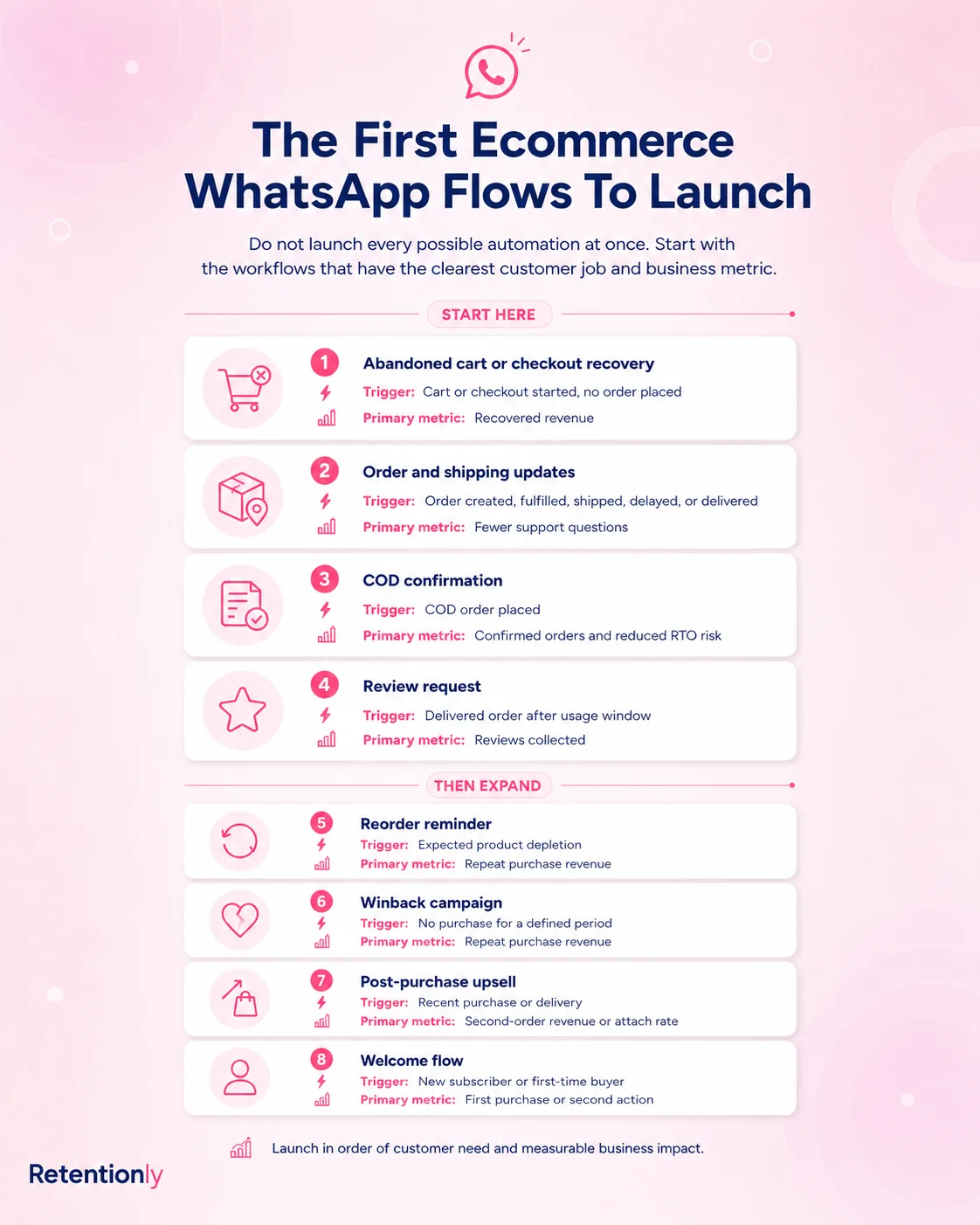
| Workflow | Ecommerce trigger | Message job | Primary metric |
|---|---|---|---|
| Abandoned checkout | Checkout started but no order completed | Bring the shopper back to the saved checkout | Recovered revenue |
| COD confirmation | Cash-on-delivery order created | Confirm or cancel before dispatch | Confirmation rate and RTO reduction |
| Order update | Order, fulfillment, or delivery status changes | Reassure the buyer and reduce support load | WISMO ticket reduction |
| Review request | Delivered order plus usage delay | Capture feedback and public reviews | Review completion rate |
| Reorder reminder | Purchase cycle window opens | Bring a satisfied buyer back | Repeat purchase rate |
| Winback | Customer inactive after purchase | Re-engage lapsed buyers | Reactivation revenue |
| Post-purchase upsell | Recent order plus relevant add-on | Increase customer value after purchase | Upsell conversion and margin |
These flows are not generic WhatsApp broadcasts. They are ecommerce operating moments. The customer understands why the message arrived, and the team can measure whether it helped.
Flow 1: Abandoned Checkout Recovery
Abandoned checkout is usually the first WhatsApp Business API use case ecommerce teams test because the shopper has already shown buying intent.
A useful flow is not just "send a reminder." It needs the full path:
| Flow element | Practical setup |
|---|---|
| Trigger | Checkout started and no order completed |
| Audience | Valid phone number plus relevant WhatsApp opt-in |
| Timing | First reminder after a short delay, often 30 to 60 minutes |
| Message | Saved checkout, product or cart context, checkout link, help option |
| Stop rule | Stop after purchase, opt-out, reply requiring support, invalid link, or final reminder |
| Metric | Recovered revenue, click rate, conversion rate, reply rate, opt-out rate |
The message should feel like help, not pressure. A first reminder can mention that the checkout is saved and include a clean return link. Discounts should be tested carefully, not used as the default behavior for every cart.
For a deeper cart recovery buildout, read the Abandoned Cart WhatsApp Guide.
Flow 2: COD Confirmation
For ecommerce brands that accept cash on delivery, WhatsApp can protect margin before the order is packed and shipped.
The API lets the store send a confirmation request as soon as a COD order is created. The customer can confirm, cancel, or ask a question. The fulfillment team can hold or review risky orders before shipping cost is locked in.
| Flow element | Practical setup |
|---|---|
| Trigger | COD order created |
| Audience | COD buyers with a reachable WhatsApp number |
| Timing | Immediately after order placement |
| Message | Ask the customer to confirm or cancel with one clear action |
| Stop rule | Stop after confirm, cancel, prepaid conversion, support escalation, or manual review |
| Metric | Confirmation rate, cancellation rate, no-response rate, RTO reduction |
Keep this message operational. Do not mix COD confirmation with a discount, review request, or upsell. The job is to verify purchase intent before fulfillment.
Flow 3: Order, Shipping, And Delivery Updates
Order updates are not glamorous, but they are one of the safest ecommerce API use cases because customers already expect them.
Good WhatsApp order updates can include:
Order confirmation.
Payment confirmation when relevant.
Shipping confirmation.
Tracking link.
Delay notice.
Out-for-delivery update.
Delivery confirmation.
The mistake is sending every possible status change. Customers do not need noise. They need the updates that reduce anxiety or help them take action.
| Message type | Best use | Avoid |
|---|---|---|
| Order confirmation | Reassure the customer that the order was received | Repeating the full invoice in a long message |
| Shipping update | Share tracking when tracking is available | Sending before the link works |
| Delay notice | Be transparent when fulfillment changes | Hiding an apology inside promotional copy |
| Delivery follow-up | Catch delivery issues and route replies | Asking for a review before the customer has the product |
Measure order-update flows by support reduction, tracking clicks, delivery issue replies, and customer satisfaction. If the flow only adds notifications without reducing uncertainty, it needs refinement.
Flow 4: Review Requests
Reviews should be triggered by delivery and product experience, not by the order timestamp alone.
For a fast-consumption product, a review request may make sense shortly after delivery. For apparel, beauty, home goods, or supplements, the store may need a longer delay. The API helps because the flow can wait for the right moment and exclude risky cases.
| Rule | Why it matters |
|---|---|
| Wait until delivery is complete | Avoids asking before the product arrives |
| Exclude refunds, failed deliveries, and open support issues | Prevents tone-deaf messages |
| Mention the product when reliable | Makes the ask more personal |
| Use one review link | Reduces friction |
| Stop after review, support reply, or opt-out | Prevents repeated asks |
The review message should be simple. If the customer replies with a problem, route that reply to support before asking again.
Flow 5: Reorder Reminders
Reorder reminders are where WhatsApp starts acting like a retention channel, not just a recovery or notification channel.
The best fit is a product with a predictable replenishment cycle: skincare, supplements, food, pet supplies, personal care, household goods, filters, accessories, or repeat-use consumables.
The flow depends on timing and segmentation.
| Flow element | Practical setup |
|---|---|
| Trigger | Customer bought a replenishable product |
| Timing | Product-specific reorder window, not a generic monthly blast |
| Message | Helpful restock reminder with reorder link |
| Segment | Exclude recent buyers, refunds, unresolved support issues, and opt-outs |
| Metric | Repeat purchase rate, time to next order, revenue per recipient |
Do not send the same reorder reminder to every buyer. A customer who bought a one-time gift should not receive the same message as a customer buying a 30-day consumable.
Flow 6: Winback Campaigns
Winback campaigns target customers who bought before but have not returned within a meaningful window.
This is different from a normal sale broadcast. A good winback message uses purchase history, category interest, inactivity timing, and an offer only when the margin supports it.
| Winback decision | Better choice |
|---|---|
| Audience | Lapsed buyers by product category, value, or purchase cycle |
| Timing | After the normal repeat window has passed |
| Message angle | New arrivals, replenishment, bundle, useful reminder, or selective offer |
| Exclusions | Recent buyers, low-margin orders, refund cases, support escalations, opt-outs |
| Metric | Reactivation rate, revenue per recipient, margin after incentive |
WhatsApp can be strong for winback because it is visible and conversational. That is also why it needs restraint. If every inactive customer receives the same urgent offer every week, the channel becomes easier to ignore.
Flow 7: Post-Purchase Upsell And Cross-Sell
Post-purchase upsell works when the recommendation is connected to what the customer just bought.
The useful version is specific:
A refill pack after a first purchase.
A compatible accessory after a main product.
A bundle upgrade after delivery.
A care product after apparel or footwear.
A subscription offer after the customer has experienced the product.
The weak version is a generic "buy more" message after every order.
| Flow element | Practical setup |
|---|---|
| Trigger | Purchase completed or delivery completed |
| Timing | After order confidence is established |
| Segment | Product, category, customer value, and purchase history |
| Message | One relevant next purchase path |
| Stop rule | Stop after purchase, opt-out, refund, delivery issue, or support reply |
| Metric | Upsell conversion, average order value lift, margin, complaints |
For many stores, upsell should come after the basics are working. Recover carts, confirm COD, send clean updates, and collect reviews first. Then expand into post-purchase growth.
Templates, Categories, And Message Windows
Ecommerce teams using the API need to understand templates at an operating level.
Many business-initiated WhatsApp messages require approved templates. Templates are categorized by purpose, commonly utility, marketing, or authentication. Customer-initiated replies also create a service window where free-form replies may be possible through the connected platform.
The practical rule is this:
| Message job | Typical category thinking |
|---|---|
| Order confirmation, shipping update, delivery update | Utility when strictly transactional |
| Abandoned checkout, winback, product launch, back-in-stock, price drop | Marketing or promotional intent |
| OTP or login verification | Authentication |
| Reply to a customer who just messaged | Service or free-form handling inside the customer service window |
Do not hide promotions inside utility messages. If a shipping update includes a discount, the message may no longer behave like a clean transactional update. Keep each template honest about its job.
For template planning, read WhatsApp Business API Templates Shopify Stores Should Start With.
Consent And Suppression Matter More Than Volume
The API can make WhatsApp scalable, but scale without consent becomes a trust problem.
For ecommerce, do not treat every phone number as permission to send every type of WhatsApp message. A checkout phone number, order update opt-in, product alert signup, loyalty signup, and promotional popup can represent different customer expectations.
Build suppression rules before increasing volume:
| Suppression rule | Why it matters |
|---|---|
| Stop after purchase | Prevents stale recovery messages |
| Stop after opt-out | Protects trust and compliance |
| Stop after refund or cancellation | Avoids awkward retention asks |
| Stop after support escalation | Lets a person handle the issue |
| Stop when a link is missing or expired | Avoids broken experiences |
| Frequency cap messages | Prevents a helpful channel from becoming noisy |
The best ecommerce WhatsApp programs are not the ones that send the most. They are the ones where every message has a clear reason, a valid audience, and a measured outcome.
How To Choose The Right API Setup
There are three common routes to using WhatsApp Business API for ecommerce.
| Route | Best fit | Tradeoff |
|---|---|---|
| Direct Cloud API | Engineering-led teams building custom infrastructure | Maximum control, but you own integration, templates, webhooks, retries, security, and reporting |
| Broad WhatsApp platform | Teams combining support, sales, broadcasts, chatbots, inbox, and campaigns | Strong breadth, but workflow ownership can become complex |
| Shopify automation app | Ecommerce teams focused on store-triggered retention workflows | Faster launch for Shopify flows, less useful for broad custom messaging needs |
If your team mainly wants a shared inbox, AI support, and multichannel operations, a broad platform can make sense. If your team wants custom infrastructure, direct API access may be justified.
If your main jobs are abandoned checkout recovery, COD confirmation, order updates, reviews, winback, reorders, and upsells from Shopify events, a Shopify-first automation app is usually the cleaner path.
What To Measure In The First 30 Days
Measure WhatsApp by workflow, not by total sends.
| Workflow | Metrics to review |
|---|---|
| Abandoned checkout | Recovery rate, recovered revenue, click rate, opt-out rate, discount usage |
| COD confirmation | Confirmed orders, canceled orders, no-response orders, RTO risk, fulfillment savings |
| Order updates | Tracking clicks, WISMO ticket reduction, delivery issue replies |
| Review requests | Review clicks, review completions, negative replies, support escalations |
| Reorders | Repeat purchase rate, days between orders, revenue per recipient |
| Winback | Reactivation revenue, margin after offer, unsubscribe rate |
| Upsell | Conversion rate, AOV lift, refund or complaint rate |
Also review reply handling. WhatsApp messages often create conversations. If nobody owns those replies, automation will create a poor customer experience even when delivery rates look good.
Common Ecommerce API Mistakes
The first mistake is treating the API as the strategy. API access does not decide which customers to message, when to message them, what to say, or when to stop.
The second mistake is copying email logic into WhatsApp. WhatsApp is more personal and more interruptive. A long email sequence can feel aggressive when moved into chat.
The third mistake is mixing support, operations, and marketing in the same flow. A delivery update should not secretly become a promotion. A COD confirmation should not become an upsell. A support reply should not trigger a campaign without context.
The fourth mistake is ignoring ecommerce data quality. If phone numbers, checkout links, product names, tracking links, or delivery events are unreliable, the message will expose the weakness.
The fifth mistake is choosing software only by API access. Most providers can connect to WhatsApp. The better question is which one helps your team operate the flows that matter.
Where Retentionly Fits
Retentionly is built for Shopify and D2C teams that want the WhatsApp Business API to drive retention workflows instead of becoming a standalone messaging project.
Use Retentionly when your team wants to:
Trigger WhatsApp messages from Shopify events.
Launch abandoned checkout, COD confirmation, order update, review, winback, reorder, and upsell flows.
Keep messages tied to consent, templates, timing, and stop rules.
Measure recovered revenue, retention, and operational impact.
Avoid building custom API infrastructure just to run common ecommerce workflows.
Retentionly is not trying to replace every possible WhatsApp support, sales, chatbot, or custom API use case. It is the stronger fit when the ecommerce team wants WhatsApp to improve lifecycle revenue and repeat purchase behavior.
Final Recommendation
Use WhatsApp Business API for ecommerce when manual WhatsApp can no longer support the workflows your store needs to run consistently.
Start with the flows that already have customer intent and a measurable result: abandoned checkout, COD confirmation if relevant, order updates, review requests, and repeat-purchase reminders. Add winback, upsell, product alerts, and broadcasts after the core lifecycle system is working.
The API gives you scale. The ecommerce value comes from workflow ownership: trigger, audience, timing, template, reply path, stop rule, and metric.
Install Free on Shopify and use Retentionly to turn WhatsApp Business API access into Shopify retention automations that recover revenue, reduce avoidable support work, and bring customers back at the right moment.
Quick FAQs
What is WhatsApp Business API for ecommerce?
WhatsApp Business API for ecommerce is the use of WhatsApp's business messaging platform through approved software or integrations to send automated, template-based, and reply-capable messages from ecommerce events such as checkout abandonment, order updates, delivery, reviews, and repeat-purchase campaigns.
Do ecommerce stores need the API or the WhatsApp Business app?
The WhatsApp Business app can work for manual one-to-one conversations. The API is better when the store needs automated messages, approved templates, Shopify or ecommerce event triggers, shared reply ownership, and workflow reporting.
What ecommerce workflows should use WhatsApp Business API first?
Start with abandoned checkout recovery, COD confirmation where relevant, order and shipping updates, review requests, and reorder reminders. These workflows have clear triggers, customer context, and measurable outcomes.
Is abandoned checkout a support message or marketing message?
Abandoned checkout is usually closer to a marketing or recovery message because it encourages the customer to complete a purchase. Keep consent clear, use an approved template when required, and avoid disguising promotional intent as an order update.
Can WhatsApp Business API reduce ecommerce support tickets?
Yes, when it sends useful order, shipping, delivery, and delay updates before customers need to ask. It will not reduce support load if messages are vague, links are missing, or customer replies are not assigned to someone.
Why use Retentionly instead of building directly on the API?
Use Retentionly when the goal is Shopify retention automation, not custom messaging infrastructure. It connects WhatsApp workflows to ecommerce events such as abandoned checkout, COD confirmation, order updates, reviews, winback, reorders, and upsells.