WhatsApp Business Account Cost: Setup, Number, and Messaging Fees
TL;DRWhatsApp Business account cost depends on the account path you choose. A basic WhatsApp Business app account is free to download and use, but a growing store may still pay for a business phone number, mobile data, optional Meta features, click-to-WhatsApp ads, WhatsApp Business Platform message fees, provider charges, or ecommerce automation software.
That distinction matters for Shopify teams. Setting up a professional WhatsApp presence is not the same as running abandoned checkout recovery, COD confirmation, order updates, review requests, winback campaigns, and repeat purchase reminders.
This guide breaks down what a WhatsApp Business account can cost at each stage so you can start simple and avoid surprises when the store needs automation.
Quick Verdict
If you only need a business profile, catalog, quick replies, labels, greeting messages, away messages, and manual customer conversations, the WhatsApp Business app is the lowest-cost starting point. The app itself is free, though normal phone, data, device, and team-time costs still exist.
If you need automated outbound messages, approved templates, higher-volume sending, Shopify event triggers, or system integrations, you are moving toward the WhatsApp Business Platform. That adds Meta delivered-message fees and usually a provider, platform, or app layer.
If your store wants WhatsApp to become a retention channel, compare account cost by workflow, not only by the price of the account. The real question is whether the setup can recover carts, confirm COD orders, reduce support load, and bring customers back profitably.
| Account path | What you usually pay for | Best fit |
|---|---|---|
| WhatsApp Business app account | Free app, phone number, mobile data, optional paid features or ads | Manual chats, small catalogs, early customer conversations |
| WhatsApp Business Platform account | Meta message fees, phone number readiness, provider or hosting fee, setup work | API-backed messaging, templates, integrations, scale |
| Broad WhatsApp platform | Subscription, inbox users, campaigns, chatbots, AI, add-ons, message fees | Teams using WhatsApp for sales, support, marketing, and operations |
| Shopify WhatsApp automation app | App subscription, Meta fees, Shopify workflows, reporting | Stores focused on abandoned checkout, COD, order updates, reviews, winback, and repeat purchases |
What A WhatsApp Business Account Actually Means
People use "WhatsApp Business account" to mean different things.
The first meaning is the WhatsApp Business app account. This is the mobile app account many small businesses use for a business profile, catalog, customer chats, labels, quick replies, greeting messages, and away messages. It is the easiest way to make WhatsApp look professional without a technical setup.
The second meaning is a WhatsApp Business Platform account, often still called a WhatsApp Business API account. This is the setup used for templates, integrations, automations, and programmatic messaging. It can be connected directly through Meta or through a provider, platform, or ecommerce app.
The third meaning is the full operating stack around the account. That may include a shared inbox, chatbots, campaigns, AI agents, Shopify integration, analytics, team seats, support, or a managed provider.
The account itself is only one part of the cost. The bigger decision is what job WhatsApp needs to do for the business.
Is A WhatsApp Business Account Free?
A WhatsApp Business app account can be created through the WhatsApp Business app, which is free to download from the Google Play Store and Apple App Store. For many early businesses, this is enough to start.
With the app, a merchant can create a business profile, add business details, showcase products in a catalog, organize chats with labels, save common answers as quick replies, and send simple automated greetings or away messages.
That makes the free app useful for:
Replying to product questions.
Sharing catalog items in chat.
Handling manual support conversations.
Giving customers a recognizable business profile.
Organizing conversations before the team needs a helpdesk.
Testing whether customers want to talk to the store on WhatsApp.
But free setup does not mean every WhatsApp Business use case is free. A store may still pay for the phone number, mobile plan, devices, staff time, paid Meta features where available, or ads that send shoppers into WhatsApp conversations.
More importantly, the free app is not built to run Shopify event-triggered automation by itself. It does not automatically watch a checkout, wait 30 minutes, send an approved reminder, stop after purchase, attribute recovered revenue, and prevent duplicate messages across the customer journey.
The Setup Costs To Plan For
The first cost layer is the phone number. A WhatsApp Business app account needs a phone number that can receive the verification step and stay associated with the business. Some stores use a dedicated mobile number. Others use a business line that the team can manage consistently.
The second layer is device and access. A solo operator may manage WhatsApp from one phone and linked devices. A larger team may need clearer ownership, response rules, and eventually a shared inbox or platform so conversations do not live on one person's phone.
The third layer is customer acquisition. QR codes, short links, website buttons, and social profile entry points can be low cost. Paid click-to-WhatsApp ads are different: the WhatsApp account may be free, but the conversation starts from an ad budget.
The fourth layer is verification and trust. Some business identity or paid visibility features can be useful, but they should not be confused with the base cost of using the Business app. Treat those as optional trust or growth investments, not mandatory account setup fees.
The fifth layer is automation readiness. Before a Shopify store pays for API-backed WhatsApp automation, it should have a clean phone number plan, customer opt-in path, message templates, ownership of replies, and a clear first workflow.
When The Account Becomes An API Cost
Costs change when the store needs the WhatsApp Business Platform.
Meta's current WhatsApp Business Platform pricing is based on delivered messages. The amount depends on the destination market and message category. The main categories are marketing, utility, authentication, and service.
For ecommerce, the categories usually map like this:
| Message category | Ecommerce examples | Cost planning note |
|---|---|---|
| Marketing | Abandoned checkout reminders, offers, product recommendations, winback messages | Usually the category to watch for revenue campaigns |
| Utility | Order confirmations, shipping updates, delivery updates, payment updates | Useful for transactional updates when the content stays non-promotional |
| Authentication | Login codes and verification messages | Relevant if WhatsApp is used for account access or identity checks |
| Service | Replies during a customer-initiated support window | Useful for support and handoff conversations |
Meta says businesses are charged when messages are delivered, not simply when they are attempted. Meta also describes free service messages, free utility messages sent in response to users, volume tiers for utility and authentication, and a 72-hour free entry point window after customers message from click-to-WhatsApp ads or Facebook Page call-to-action buttons.
Those rules are helpful, but they do not make outbound automation free. If your Shopify store sends abandoned checkout reminders, winback offers, product launches, reorder nudges, or promotional broadcasts, you still need to budget for delivered template messages.
For API-specific rates and category details, read the WhatsApp Business API Pricing Guide.
Why Account Cost And Message Cost Get Confused
A WhatsApp Business app account can be free while WhatsApp Business Platform messaging is paid. This is where many pricing searches become confusing.
A merchant using the free app for one-on-one chats may not pay WhatsApp message fees. A store using API-backed automations to send thousands of abandoned checkout reminders and order updates has a different cost model.
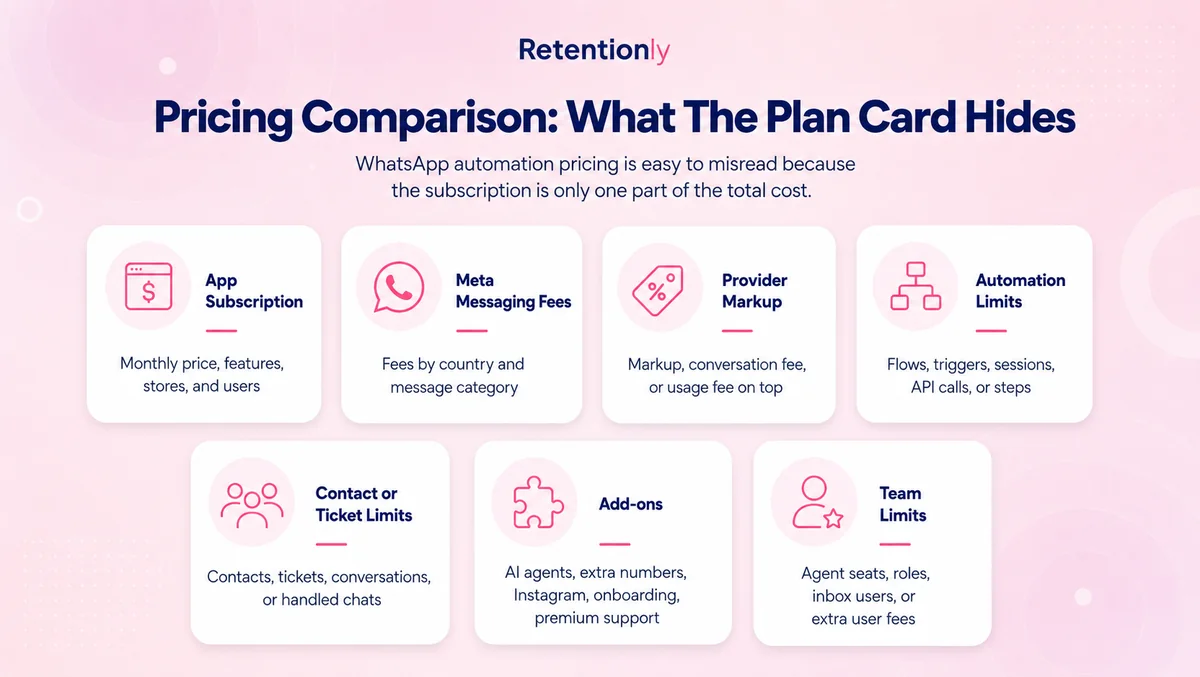
Provider pricing adds another layer. Some providers charge a monthly fee per number. Some charge a platform subscription. Some add shared inbox seats, campaigns, chatbot flows, AI usage, wallet requirements, support, onboarding, or markup on Meta message fees.
Software pricing adds another layer again. A Shopify WhatsApp app may charge a monthly subscription for automation features, reporting, templates, and Shopify-triggered workflows, while still passing through Meta message fees separately.
The clean way to compare account cost is to separate the bill.
| Cost layer | What it includes | How to think about it |
|---|---|---|
| Business app account | App download and manual business profile setup | Usually the lowest-cost starting point |
| Number and access | Phone number, data, device, linked devices, team ownership | Operational cost, not WhatsApp message pricing |
| Meta message fees | Delivered Platform messages by market and category | Usage cost for API-backed messaging |
| Provider or platform | API hosting, number fee, support, wallet, markup, inbox, campaigns | Vendor cost that varies by product |
| Shopify automation app | App plan, workflow setup, reporting, lifecycle automations | Revenue workflow cost for stores that want retention automation |
Build A Shopify Cost Model From The First Workflow
Do not start by asking what the account costs forever. Start with the first WhatsApp workflow the store needs.
For most Shopify stores, a good first workflow is abandoned checkout recovery, COD confirmation, order updates, review requests, winback, reorder reminders, or post-purchase upsells. Each one has a different trigger, timing, category, and business outcome.
| Workflow | Trigger | Main cost driver | What to measure |
|---|---|---|---|
| Abandoned checkout recovery | Checkout started but no order placed | Marketing templates and sequence length | Recovered revenue, margin after discount and message cost |
| COD confirmation | Cash-on-delivery order created | Template classification, reply handling, support time | Confirmed orders, cancellations, RTO reduction |
| Order updates | Order placed, fulfilled, shipped, delivered | Utility templates and order volume | Fewer support tickets, delivery confidence |
| Review requests | Delivered order after a delay | Template category, timing, audience size | Reviews collected, reply rate, repeat purchase lift |
| Winback | No purchase after a set period | Marketing templates and segment size | Reorders, contribution margin, opt-outs |
| Reorder reminders | Expected replenishment date | Reminder template volume | Repeat purchase rate, revenue per delivered message |
| Post-purchase upsell | Recent order or product affinity | Marketing templates and offer margin | Upsell revenue, conversion rate, customer fatigue |
This workflow model keeps the account-cost question grounded. If the free Business app can handle the job manually, there is no reason to overbuy. If the store needs event-triggered lifecycle messaging, the account should be part of an automation setup that can prove its value.
Business App Vs Platform Vs Retentionly
| Question | WhatsApp Business app | WhatsApp Business Platform | Retentionly |
|---|---|---|---|
| Is the basic account path free to start? | Yes, the app is free to download and use | The account path can require provider or setup costs | App subscription plus Meta fees for automated messaging |
| Can it handle manual customer chats? | Yes | Yes, through connected tools | Yes, depending on inbox and handoff setup |
| Can it automate Shopify events? | No native Shopify event automation | Yes, with integration work | Yes, built around Shopify retention flows |
| Can it send approved templates at scale? | Not as an API automation layer | Yes | Yes, through the connected Platform setup |
| Does it require developer ownership? | Usually no | Often yes unless using a provider or app | Usually no |
| Does it show Shopify workflow revenue? | No | Custom or provider-dependent | Built for retention workflow reporting |
| Best fit | Manual business conversations | Custom messaging infrastructure | Shopify/D2C retention automation |
The right choice depends on the job.
Use the WhatsApp Business app when the team can personally reply and the main need is a professional WhatsApp presence.
Use the Platform when the business needs programmatic messaging, templates, integrations, or custom control.
Use a Shopify-focused app when the goal is not to manage WhatsApp infrastructure, but to launch retention workflows that should pay for themselves.
Where Retentionly Fits
Retentionly is built for Shopify and D2C teams that want WhatsApp to drive retention revenue without turning the setup into a broad messaging operations project.
Retentionly pricing is straightforward:
| Plan | Price | Best for |
|---|---|---|
| Basic | $24/month | Core automations and early WhatsApp retention workflows |
| Growth | $49/month | Broadcasts and advanced automations, including winback |
| Scale | $99/month | CRM features and multi-agent chat |
Meta message fees still apply when WhatsApp Business Platform messages are delivered. The difference is that Retentionly connects directly to Meta, does not add a markup on Meta fees, does not charge per-chat fees, and does not charge extra for added automations.
That matters when a store starts with one workflow and then expands. A team may begin with abandoned checkout recovery, then add COD confirmation, order updates, review requests, winback, reorder reminders, and post-purchase upsells. Clear pricing makes it easier to judge whether each flow is creating profit.
Common Account Cost Mistakes
The first mistake is assuming the free Business app means WhatsApp automation is free. The app is a good manual account path, but API-backed templates, providers, and software can add real costs.
The second mistake is buying a broad platform before the first workflow is clear. If the store only wants abandoned checkout recovery or COD confirmation, compare whether the chosen tool owns those Shopify workflows directly.
The third mistake is using a personal number without thinking ahead. Changing numbers later can confuse customers and create migration work. A dedicated business number is often cleaner when the store expects WhatsApp to become a revenue channel.
The fourth mistake is comparing only monthly subscriptions. Message fees, provider markup, agent seats, AI usage, campaigns, automations, support, setup, and wallet rules can matter more than the headline plan.
The fifth mistake is ignoring opt-ins and stop rules. A cheap account can become an expensive channel if the store sends irrelevant messages, keeps messaging after purchase, or treats WhatsApp like a generic bulk sender.
Final Recommendation
Start with the cheapest account path that can do the job.
If your store only needs manual conversations, create a WhatsApp Business app account, set up the profile, catalog, quick replies, greeting message, away message, and basic customer entry points.
If your team needs automation, do not evaluate the account in isolation. Model the first Shopify workflow: who enters, what message is sent, which category applies, when it stops, and what revenue or operational metric proves it worked.
If your goal is Shopify retention, choose the setup that gets revenue workflows live without making your team manage a broad WhatsApp stack. Retentionly is built for that path: abandoned checkout, COD confirmation, order updates, reviews, winback, reorder reminders, and post-purchase upsells.
Quick FAQs
How much does a WhatsApp Business account cost?
A basic WhatsApp Business app account is free to create through the WhatsApp Business app. Costs can appear from your phone number, data plan, optional paid features, ads, API-backed messages, providers, or automation software.
Is the WhatsApp Business app free?
Yes, the WhatsApp Business app is free to download and use. It includes business profile tools, catalog features, labels, quick replies, greeting messages, away messages, and manual conversation tools.
Do I need to pay for a phone number?
You need a phone number for the account. Whether that creates a new cost depends on whether you already have a dedicated business number or need a new mobile, landline, or virtual number that can complete WhatsApp verification.
When do WhatsApp Business message fees start?
Message fees are mainly a WhatsApp Business Platform topic. When a business uses API-backed messaging, Meta charges based on delivered messages, destination market, and message category, with provider or software fees added separately.
Do Shopify stores need the WhatsApp Business API?
Not always. A small store can start with the Business app for manual conversations. A store usually needs an API-backed setup when it wants automated abandoned checkout recovery, COD confirmation, order updates, reviews, winback, reorder reminders, or post-purchase upsells.