WhatsApp Business API Pricing: Costs, Messages, and App Fees
TL;DRWhatsApp Business API pricing is not one universal monthly price. The real cost depends on the Meta message fees for the countries you send to, the type of WhatsApp template you send, the provider or platform you choose, and the Shopify workflows you plan to automate.
That distinction matters because a Shopify store rarely needs "the API" in isolation. It usually needs abandoned checkout recovery, COD confirmation, order updates, review requests, winback campaigns, post-purchase upsells, and a clean way to measure whether WhatsApp is driving repeat revenue.
This guide explains how WhatsApp Business API pricing works, what cost layers to compare, and when a Shopify-focused app like Retentionly is easier than managing a raw API or broad WhatsApp platform.
Quick Verdict
If you want developer-level control over WhatsApp infrastructure, compare direct API providers and BSPs by phone-number fees, throughput, support, compliance help, and Meta rate-card pass-through.
If you want WhatsApp to run sales, support, inbox, catalogs, AI agents, broadcasts, and operations, a broader WhatsApp platform may be worth the extra pricing variables.
If your main goal is Shopify retention automation, start with the flows you will actually launch. Retentionly is built for Shopify and D2C teams that want WhatsApp automations for checkout recovery, COD confirmation, order updates, winback, reviews, upsells, and repeat purchases without turning pricing into a custom API project.
| Buyer type | What pricing should include | Best fit |
|---|---|---|
| Developer-led API setup | Meta message fees, BSP or hosting fee, phone number, developer time, support | Teams with internal engineering and custom workflow needs |
| Broad WhatsApp platform | Subscription, message fees, inbox seats, campaigns, chatbots, AI, add-ons, workflow limits | Teams using WhatsApp for support, sales, marketing, and operations |
| Shopify retention app | App subscription, Meta message fees, Shopify automations, revenue tracking, support handoff | Shopify founders, marketers, and retention teams |
How WhatsApp Business API Pricing Works
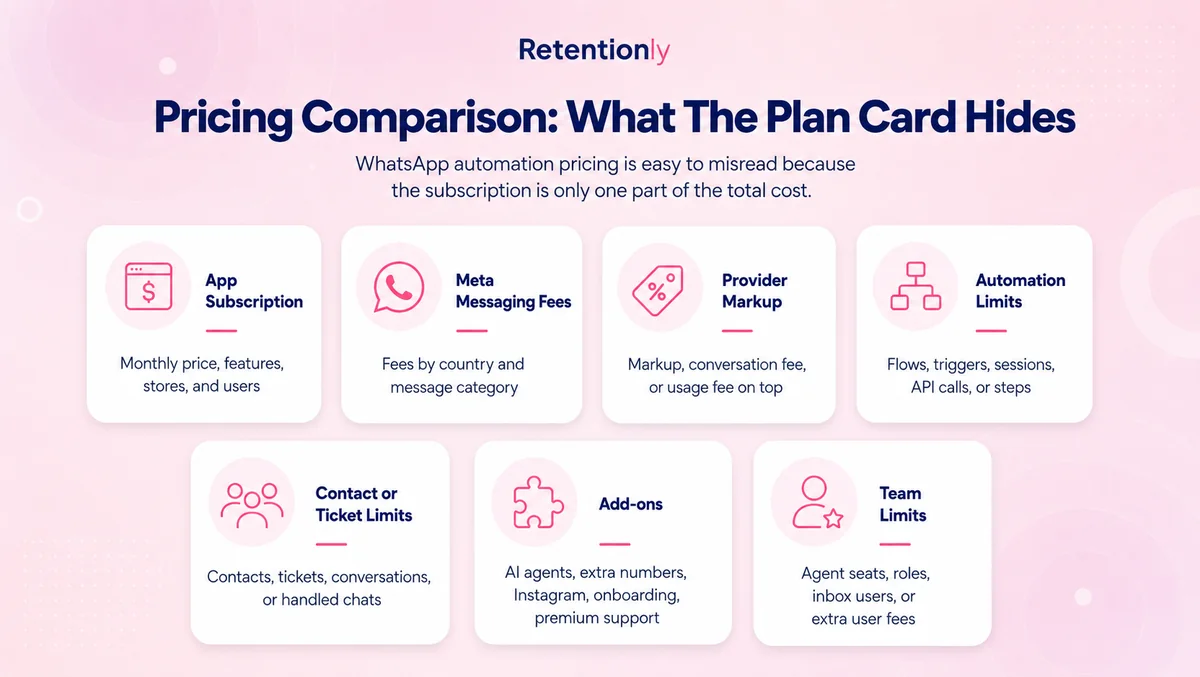
WhatsApp Business API pricing has three layers.
The first layer is Meta's WhatsApp Business Platform messaging fee. Meta charges businesses on a per-message basis when messages are delivered to users. The rate depends on the customer's country or market, the message category, the billing currency, and any applicable volume tier.
The second layer is the provider layer. If you use a Business Solution Provider, hosting provider, or direct API partner, that provider may charge a monthly license fee, phone-number fee, support fee, markup, prepaid wallet requirement, or onboarding fee. Some providers pass Meta fees through directly. Others bundle, mark up, or add usage charges.
The third layer is the software layer. If you use a WhatsApp automation app or ecommerce platform, you may pay for features such as Shopify integration, campaigns, inbox users, chatbots, AI replies, reporting, automation limits, flow steps, extra channels, or managed setup.
For a Shopify store, the useful question is not "What is the WhatsApp API price?" It is "What will it cost to run the flows that recover revenue and reduce support load?"
The Message Categories That Affect Cost
Meta groups WhatsApp Business Platform messages into categories. These categories matter because they affect whether a message is charged and how it should be budgeted.
| Message category | What it usually means for ecommerce | Cost planning note |
|---|---|---|
| Marketing | Offers, promotions, abandoned cart reminders, product recommendations, winback messages | Usually the category to watch most carefully because it is used for revenue campaigns |
| Utility | Order confirmations, shipping updates, delivery updates, payment or account updates | Can be free when sent in response to a user inside the customer service window |
| Authentication | One-time passwords and verification codes | Mostly relevant if your store or app uses WhatsApp for login or verification |
| Service | Free-form replies to customer-initiated conversations inside the 24-hour customer service window | Useful for support replies and handoffs, but not a replacement for outbound automation |
There are also free windows to understand. When a customer messages your business, the 24-hour customer service window lets you respond with service messages at no charge. Meta also describes a 72-hour free entry point window when a user messages from a click-to-WhatsApp ad or a Facebook Page call-to-action button.
These rules are useful, but they do not remove the need to budget for outbound templates. A Shopify store that sends abandoned checkout reminders, winback campaigns, reorder nudges, or promotional broadcasts still needs to model the delivered template messages it plans to send.
Why A Universal Rate Table Can Mislead Shopify Stores
A single WhatsApp Business API pricing table can look simple, but it often hides the real decision.
Meta rates vary by market and category. A store sending mostly utility order updates to one country may have a very different bill from a store sending marketing winback messages across several countries. A store with customers in India, the United Kingdom, the United States, the UAE, and Brazil should not use one blended assumption without checking the current rate card.
Volume also matters. Meta offers volume tiers for utility and authentication messages, so larger senders may unlock better rates in specific market-category pairs. But those tiers are not a generic discount across every message. They depend on category, market, and monthly volume.
Provider pricing can change the picture again. One provider may charge per number plus Meta fees. Another may charge a platform subscription, agents, add-ons, or markup. A Shopify app may include automation and reporting in the subscription but still pass through Meta message fees.
The practical answer is to build a workflow budget.
A Shopify Workflow Budget Is Better Than A Generic API Budget
Start with the flows you plan to launch in the first 90 days. Then estimate how many customers will enter each flow, which message category each flow uses, and how many delivered templates are likely.
| Shopify workflow | Typical trigger | Likely message type | Budgeting question |
|---|---|---|---|
| Abandoned checkout recovery | Checkout started but no order placed | Marketing | How many reminders will you send before stopping? |
| COD confirmation | COD order created | Utility or marketing, depending on message content and template classification | Will customer replies reduce fake orders or fulfillment waste? |
| Order updates | Order placed, fulfilled, shipped, delivered | Utility | Can updates be sent inside a customer service window, or will templates be charged? |
| Review requests | Delivered order | Marketing or utility depending on content and classification | How many customers should receive the ask, and after what delay? |
| Winback | No purchase after a set period | Marketing | Which segment is worth paying to re-engage? |
| Reorder reminder | Expected replenishment window | Marketing or utility depending on content and template classification | Does the reorder margin justify the message cost? |
| Post-purchase upsell | Recent order or product affinity | Marketing | Which add-on product or bundle has enough margin? |
This is where Shopify context matters. A generic WhatsApp API setup can send messages, but it does not automatically decide timing, suppression rules, customer segments, or revenue attribution. Those details determine whether the message cost is a growth investment or another operating expense.
What App And Provider Fees Can Include
After Meta fees, compare the software and provider charges separately.
Some API providers charge a monthly fee per WhatsApp number and then pass through Meta messaging fees. That model can be clean if your team has developers and wants control over templates, webhooks, automations, and data flows.
Broad WhatsApp platforms may add a shared inbox, campaign builder, chatbot builder, catalog features, AI agents, Instagram or Facebook channels, contact limits, user seats, automation triggers, flow steps, or premium support. Those features can be valuable when WhatsApp is a full sales and support operation. They can also be more platform than a Shopify retention team needs.
Shopify-focused automation apps should be evaluated differently. The question is not whether they expose every API primitive. The question is whether they own the revenue workflows: abandoned checkout, COD confirmation, order updates, reviews, winback, upsells, and repeat purchase automation.
Direct API vs WhatsApp Platform vs Retentionly
| Pricing factor | Direct API or BSP | Broad WhatsApp platform | Retentionly |
|---|---|---|---|
| Meta message fees | Usually separate or passed through | Usually separate, sometimes with markup or wallet rules | Direct Meta connection with no Retentionly markup on Meta fees |
| Monthly software cost | Provider, hosting, or number fee | Subscription plans, seats, add-ons, usage limits | Basic $24/month, Growth $49/month, Scale $99/month |
| Shopify automation | Custom build or integration work | Often available, but mixed with broader platform features | Built around Shopify retention flows |
| Campaign and lifecycle logic | Your team builds it | Platform-dependent | Included for retention workflows |
| Reporting | Custom or provider-dependent | Platform-dependent | Revenue-oriented Shopify workflow reporting |
| Best fit | Engineering-led teams | Teams running WhatsApp as a broad operations channel | Shopify/D2C teams focused on retention revenue |
Retentionly does not charge extra for added automations and does not charge per-chat fees. That matters when WhatsApp grows from one abandoned checkout test into a full retention channel with order updates, review requests, winback campaigns, and repeat purchase reminders.
How To Estimate Your Monthly WhatsApp Business API Cost
Use a simple model before choosing a provider.
| Step | What to estimate | Example input |
|---|---|---|
| 1. Destination markets | Where your customers' WhatsApp numbers are located | India, UAE, United Kingdom, United States |
| 2. Message categories | Marketing, utility, authentication, service | Cart reminders are usually marketing; order updates are utility |
| 3. Monthly delivered messages | Delivered templates, not only attempted sends | 10,000 cart reminders, 4,000 order updates |
| 4. Provider fees | Number hosting, BSP fee, platform subscription, wallet rules | Per-number fee plus Meta fees, or app subscription plus Meta fees |
| 5. Software limits | Automations, agents, contacts, campaigns, AI, flows, add-ons | Does the chosen plan include the flows you need? |
| 6. Revenue impact | Recovered orders, repeat purchases, support reduction | WhatsApp revenue minus message and software costs |
The final line is the one Shopify teams should care about: incremental contribution margin after WhatsApp costs. A cheaper API setup is not automatically better if it takes weeks to launch or misses the flows that create revenue. A broader platform is not automatically better if the store only needs retention automation.
Common Pricing Mistakes
The first mistake is comparing only the monthly plan. A $49 software plan and a $99 software plan can have very different total costs if one has message markup, agent fees, add-ons, automation limits, or paid flow steps.
The second mistake is treating every WhatsApp message as the same. A support reply inside the customer service window is not the same as an outbound marketing template. A shipping update is not the same as a winback offer. Your cost model should match your actual flows.
The third mistake is ignoring message quality and suppression rules. Sending more reminders is not always better. For cart recovery, COD confirmation, and winback, the profitable version usually has clear stop conditions: stop after purchase, stop after opt-out, stop after reply, stop after too many recent messages, and avoid sending to low-intent segments.
The fourth mistake is separating cost from setup effort. If your team has to build every Shopify trigger, template, webhook, attribution rule, and fallback manually, the API may be cheaper on paper but slower in practice.
When Retentionly Is The Cleaner Pricing Fit
Retentionly is a strong fit when the buyer is a Shopify founder, marketer, ecommerce manager, or retention team that wants WhatsApp to drive repeat revenue without managing a broad WhatsApp operations stack.
Use Retentionly when your priority is:
Recovering abandoned checkouts.
Confirming COD orders before fulfillment.
Sending order and shipping updates.
Requesting reviews after delivery.
Winning back inactive customers.
Sending reorder reminders for consumable products.
Running post-purchase upsells and lifecycle campaigns.
Retentionly's pricing is designed around that job: Basic at $24/month, Growth at $49/month, and Scale at $99/month. Meta message fees are still a real cost, but Retentionly does not add a markup on those Meta fees, does not charge per-chat fees, and does not charge extra for added automations.
If you want to make WhatsApp a Shopify retention channel, install Retentionly and start with the highest-value flow first: abandoned checkout recovery, COD confirmation, or winback.
Quick FAQs
Is WhatsApp Business API free?
No. The WhatsApp Business app is free to use, but the WhatsApp Business Platform/API has message-based pricing for delivered business messages, plus any provider, platform, or software fees you choose.
What is the main cost in WhatsApp Business API pricing?
The main cost is usually a combination of Meta message fees and your provider or software subscription. Meta fees vary by destination market, message category, currency, and volume tier.
Are customer replies free on WhatsApp Business API?
Service messages inside the 24-hour customer service window are not charged by Meta. That is useful for support replies, but outbound template messages such as marketing campaigns still need to be budgeted separately.
Why do WhatsApp API providers show different prices?
Providers package the API differently. Some charge per phone number and pass through Meta fees. Others bundle inboxes, chatbots, campaigns, AI, automations, Shopify integrations, add-ons, and support. Compare the full pricing model, not only the first plan price.
What should Shopify stores compare before choosing a WhatsApp API tool?
Compare Meta fee handling, message markup, Shopify trigger support, included automations, campaign limits, inbox seats, AI fees, reporting, setup effort, and whether the tool is built around retention workflows or broad WhatsApp operations.