Shopify Abandoned Checkout WhatsApp Flow: Timing and Examples
TL;DRShopify abandoned checkout WhatsApp works best when it is built around the exact checkout moment, not a vague cart reminder. The shopper reached checkout, shared enough information to be identifiable, and then left before completing payment. That makes the message high intent, but also easy to mishandle.
The goal is not to send more reminders. The goal is to recover a real checkout with a useful return link, sensible timing, clean consent, reply ownership, and purchase stop rules.
This guide shows how to design a Shopify abandoned checkout WhatsApp flow that is specific enough to measure and restrained enough to protect customer trust.
The Short Version
A Shopify abandoned checkout WhatsApp flow should answer six operating questions before the first message goes live.
| Flow decision | Practical starting point |
|---|---|
| Trigger | Checkout started, but no order was completed after a short waiting period |
| Eligibility | WhatsApp-ready phone number, consent, supported market, and recoverable checkout |
| First delay | Usually 30 to 60 minutes after checkout abandonment |
| Follow-up delay | Around 20 to 24 hours later if no purchase happened |
| Offer policy | No automatic discount in the first message; test offers later by segment |
| Stop rules | Purchase, opt-out, reply, expired checkout, invalid number, or final attempt |
| Main metric | Recovered revenue after discounts and message cost |
This is different from a generic abandoned cart workflow. A cart can be an earlier, weaker intent signal. An abandoned checkout usually means the shopper got closer to purchase and left at a more specific decision point: shipping, payment, delivery, COD, discount code, trust, or timing.
That difference matters because the message should not sound like a broadcast. It should help the customer finish a checkout they already started.
Abandoned Checkout vs Abandoned Cart
Shopify merchants often use "abandoned cart" and "abandoned checkout" interchangeably. For automation, the distinction is useful.
| Event | What happened | Intent level | WhatsApp implication |
|---|---|---|---|
| Product viewed | Shopper opened a product page | Low | Usually too weak for WhatsApp recovery |
| Added to cart | Shopper placed an item in the cart | Medium | Useful only if the shopper is identifiable and opted in |
| Checkout started | Shopper entered checkout details but did not complete payment | High | Strong trigger for WhatsApp recovery |
| Payment failed | Shopper tried to pay but the order was not created | Very high | May need help-first messaging, not a discount |
If your platform can track both cart and checkout abandonment, keep the flows separate. The cart flow can recover earlier browsing intent. The checkout flow should prioritize the most purchase-ready shoppers and avoid overlapping with the cart flow.
For broader category context, read Abandoned Cart WhatsApp. For copy variations, read Abandoned Cart WhatsApp Message Examples.
What Makes a Checkout Eligible
An abandoned checkout is not automatically eligible for WhatsApp recovery. The store needs enough data, permission, and operational context to send a useful message.
Use this eligibility checklist:
| Requirement | Why it matters |
|---|---|
| Checkout reached | Confirms the customer moved beyond casual browsing |
| Phone number captured | Gives the flow a WhatsApp destination |
| WhatsApp consent available | Keeps the message aligned with channel expectations |
| Checkout is still recoverable | Avoids sending a dead or irrelevant link |
| Products are still purchasable | Prevents sending shoppers back to unavailable items |
| Order was not completed | Prevents duplicate or embarrassing recovery messages |
| Customer has not opted out | Protects list quality and trust |
| Another flow is not active | Prevents a broadcast, winback, and checkout reminder from colliding |
The key is to recheck eligibility before every message, not only when the flow begins. A customer may complete the order, opt out, reply to support, or become ineligible while the next reminder is waiting.
The Flow Architecture
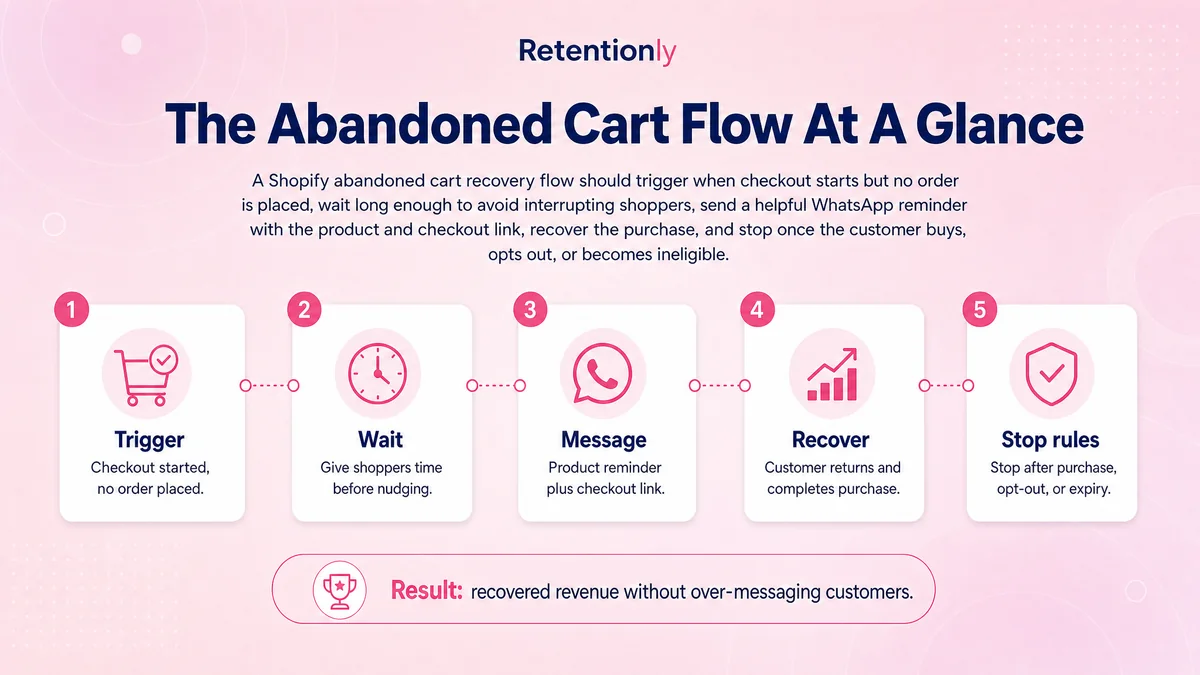
Build the workflow as a sequence of decisions, not a stack of message templates.
| Step | Decision | Recommended rule |
|---|---|---|
| 1. Trigger | When did the shopper abandon checkout? | Start after checkout activity and no order completion |
| 2. Wait | How long before messaging? | Wait long enough to avoid interrupting an active checkout |
| 3. Recheck | Is the checkout still recoverable? | Recheck order, opt-out, inventory, and link status |
| 4. Send | What should the message do? | Bring the shopper back or resolve likely friction |
| 5. Route | What happens if the customer replies? | Send the reply to an owner with checkout context |
| 6. Suppress | What should stop the sequence? | Stop after purchase, reply, opt-out, invalid number, or final reminder |
| 7. Measure | Did the flow create profitable recovery? | Track orders, revenue, costs, discounts, replies, and opt-outs |
This structure keeps the flow commercially useful. Without the recheck, customers may receive reminders after buying. Without reply ownership, WhatsApp becomes a dead-end channel. Without attribution, the team optimizes for sends and clicks instead of profitable recovered revenue.
Timing: Start With Two Messages
Many Shopify stores should start with two abandoned checkout WhatsApp messages.
| Message | Timing | Job |
|---|---|---|
| Reminder 1 | 30 to 60 minutes after checkout abandonment | Restore the checkout and offer help while intent is fresh |
| Reminder 2 | 20 to 24 hours later | Resolve hesitation, add reassurance, or test a controlled offer |
| Reminder 3 | Optional, 48 to 72 hours later | Use only for selected carts where another nudge is justified |
Some tools use a faster default sequence. That can work for some stores, but a Shopify team should test the timing against its own buyer behavior. A 15-minute reminder may help in a fast-moving sale. It may also interrupt a shopper who is still comparing payment or shipping options.
The practical rule is simple: send fast enough to preserve intent, but not so fast that the customer feels watched.
Message Examples
The best abandoned checkout message is short, clear, and tied to the real checkout. It should not sound like a generic campaign.
First Reminder
Use the first message to restore context.
Hi [first_name], your checkout at [store_name] is still saved. You can complete it here: [checkout_link]. Reply if you need help with delivery, size, or payment.
Why it works: it names the checkout, includes the link, and opens a reply path without forcing a discount.
Payment Friction Message
Use this when payment failures or payment uncertainty are common.
Hi [first_name], it looks like your [store_name] checkout was not completed. If payment did not go through, you can try again here: [checkout_link]. Reply if you want help.
Why it works: it treats the customer as someone who may have hit friction, not someone who needs pressure.
Shipping Or Delivery Reassurance
Use this for products where delivery timing, COD eligibility, or shipping fees often block purchase.
Still deciding? Your [store_name] checkout is saved here: [checkout_link]. Reply if you have a question about delivery, returns, or payment before ordering.
Why it works: it keeps the message useful even if the shopper's concern is not price.
Controlled Offer
Use a discount only after the first reminder has had a chance to work, and only when the segment supports it.
Hi [first_name], your checkout is still available: [checkout_link]. Use [discount_code] before [deadline] if you want to complete your order today.
Why it works: the offer is clear, bounded, and tied to the saved checkout.
Final Reminder
Use a final reminder sparingly.
Last reminder from [store_name]: your checkout is still saved here: [checkout_link]. We will stop reminders about this checkout after this message.
Why it works: it closes the loop and sets a clear expectation.
When to Discount and When to Hold Back
Discounts can recover checkouts, but they can also reduce margin and train customers to wait.
| Situation | Better approach |
|---|---|
| First reminder | Send a helpful link and support option, not an automatic coupon |
| First-time shopper | Use reassurance about delivery, returns, payment, or trust |
| High-value cart | Consider human assistance before discounting |
| Low-margin product | Avoid blanket offers; test free shipping or no discount |
| Repeat discount seeker | Suppress automatic offers or use stricter eligibility |
| Second reminder underperforms | Test a small, time-bound offer by segment |
The important measurement is not gross recovered revenue. It is recovered contribution after message fees, discounts, refunds, and fulfillment costs.
Suppression Rules That Prevent Over-Messaging
Checkout recovery competes with every other message your store sends. A customer does not care whether one message came from a broadcast, another from winback, and another from checkout recovery. They experience all of them as your brand.
Add suppression rules for:
Customers who completed the order.
Customers who opted out or blocked the store.
Customers who replied and need a human response.
Customers with an unresolved support issue.
Customers who received a broadcast very recently.
Customers currently inside a winback, reorder, or post-purchase flow.
Customers whose checkout link, discount, or product is no longer valid.
Suppression is part of conversion. A cleaner customer experience can make every remaining message perform better.
What to Track
The abandoned checkout report should help the team improve the workflow, not just celebrate high WhatsApp visibility.
| Metric | Why it matters |
|---|---|
| Abandoned checkouts detected | Shows the size of the checkout leak |
| Eligible WhatsApp recipients | Shows how much of the leak is reachable |
| Messages sent and delivered | Shows technical reach and data quality |
| Checkout link clicks | Shows return intent |
| Replies | Shows friction that messaging surfaced |
| Recovered orders | Shows completed purchases after the flow |
| Recovered revenue | Shows gross commercial impact |
| Discount cost | Shows how much margin the flow consumed |
| Messaging cost | Shows channel cost |
| Opt-outs and blocks | Shows customer trust cost |
Review the metrics by message number. If the first reminder recovers most orders and the third reminder mostly creates opt-outs, remove the third. If high-value carts reply more often than they click, route those conversations to a sales owner quickly.
A Simple Launch Plan
Start smaller than the full automation you imagine.
| Week | What to launch | What to learn |
|---|---|---|
| 1 | One message after 30 to 60 minutes | Whether the trigger, link, and suppression rules work |
| 2 | Add a second message around 24 hours | Whether reassurance improves recovery |
| 3 | Segment high-value carts | Whether support or selective offers improve margin |
| 4 | Test offer rules | Whether discounts create incremental profit |
| 5 | Review suppression | Whether messages are colliding with broadcasts or winback |
Do not begin with a complex branching tree. A simple flow with clean data will beat a complicated flow with weak stop rules.
Common Mistakes
Avoid these mistakes when building Shopify abandoned checkout WhatsApp recovery:
Treating checkout abandonment like generic cart abandonment.
Sending the first message immediately without a recheck.
Using a discount before testing a plain recovery link.
Sending the same sequence to every cart value and product category.
Letting cart recovery and checkout recovery overlap.
Forgetting to stop after purchase or customer reply.
Using an expired checkout link or invalid discount code.
Inviting replies when no one owns the inbox.
Measuring only opens, reads, or sends.
If the flow feels aggressive, reduce the number of messages before changing the copy.
Where Retentionly Fits
Retentionly is built for Shopify stores that want WhatsApp recovery tied to real lifecycle revenue. The abandoned checkout flow can start from Shopify intent, use a saved checkout path, respect consent and suppression rules, route replies, and track recovered revenue.
That same foundation can extend into COD confirmation, order updates, review requests, winback, reorder reminders, post-purchase upsells, and broadcasts. The point is not to make WhatsApp louder. It is to make the most valuable Shopify moments easier to complete.
If abandoned checkout recovery is your first workflow, keep the first version simple: one helpful reminder, one follow-up, no automatic discount, clear stop rules, and recovered revenue tracking.
Install Free on Shopify and launch a controlled WhatsApp checkout recovery flow with Retentionly.
Quick FAQs
What is Shopify abandoned checkout WhatsApp?
Shopify abandoned checkout WhatsApp is an automated recovery flow that messages eligible shoppers after they start checkout but leave before completing payment. The strongest version includes consent, a valid checkout link, timing rules, stop rules, reply ownership, and revenue tracking.
Is abandoned checkout the same as abandoned cart?
No. An abandoned cart usually happens earlier, after a shopper adds items but does not start checkout. An abandoned checkout means the shopper reached checkout and left before payment was completed. The checkout flow is usually higher intent.
When should the first WhatsApp checkout recovery message be sent?
Many Shopify stores start with 30 to 60 minutes after checkout abandonment. Faster timing can work in some cases, but it should be tested carefully so the message does not interrupt an active checkout.
Should abandoned checkout WhatsApp messages include a discount?
Usually not in the first message. Start with a saved checkout link and help-first copy. Test discounts later by segment so you can measure whether the offer creates incremental profit or just gives away margin.
What should stop an abandoned checkout WhatsApp flow?
Stop the flow when the customer completes the order, opts out, replies for help, reaches the final reminder, has an invalid number, or no longer has a recoverable checkout.