Official WhatsApp Business API: What It Means for Merchants
TL;DRThe official WhatsApp Business API matters because it gives a business a compliant, scalable way to send and receive WhatsApp messages through Meta's business messaging infrastructure. But official access is only the starting point.
For a merchant, the real question is not "Can we get the API?" It is "Can we use WhatsApp to recover abandoned checkouts, confirm COD orders, send delivery updates, request reviews, bring customers back, and measure the result without turning the channel into a custom engineering project?"
This guide explains what official WhatsApp Business API access means, what it does not solve by itself, and how ecommerce teams should choose between direct API access, a broad WhatsApp platform, and a Shopify-first automation app.
What Official WhatsApp Business API Means
The official WhatsApp Business API is the business messaging infrastructure behind scalable WhatsApp communication. Meta now commonly refers to this product area as the WhatsApp Business Platform, while many buyers and vendors still use the older "WhatsApp Business API" wording.
In practical terms, official access means the business is using WhatsApp through Meta-approved infrastructure rather than an unofficial sender, personal device workaround, browser automation script, or risky bulk-sending tool.
That matters because API-backed WhatsApp can support:
Business-initiated messages through approved templates.
Customer replies and service conversations.
Message categories such as marketing, utility, authentication, and service.
Webhooks, delivery events, and programmatic sends.
WhatsApp Business Account and phone-number setup.
Connections to ecommerce, CRM, helpdesk, marketing, and internal systems.
For Shopify teams, the API is not valuable because it sounds technical. It is valuable because it can connect real store events to timely WhatsApp messages customers are likely to notice.
Official API Vs WhatsApp Business App Vs Automation App
The names are easy to mix up. Merchants usually hear four different products described as "WhatsApp for business."
| Option | What it is | Best for | Main limitation |
|---|---|---|---|
| WhatsApp Business app | The app used manually from a phone or desktop | Small teams handling one-to-one customer chats | Not built for Shopify event automation at scale |
| Official WhatsApp Business API / Platform | Meta's scalable messaging infrastructure | Approved templates, automation, integrations, and higher-volume messaging | Needs a provider, platform, app, or developer-owned setup |
| WhatsApp platform | Software built around official API access | Shared inbox, campaigns, contacts, chatbots, support, sales, and team workflows | Can be broader than a focused retention use case |
| Shopify WhatsApp automation app | A Shopify app that uses API-backed messaging for store workflows | Abandoned checkout, COD confirmation, order updates, reviews, winback, reorders, upsells | Less custom than building directly on APIs |
The official API is the foundation. A platform or app is usually the operating layer. The mistake is assuming that official API access alone will automatically produce useful Shopify automations.
It will not. Someone still needs to connect store events, write templates, collect consent, define timing, stop messages after purchase, route replies, handle opt-outs, and measure revenue.
What You Need Before Using The Official API
The exact setup path depends on whether you go direct, use a provider, or install an app. Still, the same core pieces usually show up.
| Setup piece | What it means for merchants | Why it matters |
|---|---|---|
| Meta business setup | Business portfolio, permissions, and business identity | Blocks access if ownership is unclear |
| WhatsApp Business Account | The WABA that holds your WhatsApp sender setup | Connects the business to API-backed messaging |
| Phone number | A number that can be used for WhatsApp Business messaging | Affects sender identity and customer trust |
| Message templates | Approved copy for business-initiated messages | Needed for proactive flows outside normal reply windows |
| Customer opt-in | Permission to message customers on WhatsApp | Protects trust and deliverability |
| Billing model | Meta message fees plus provider, platform, or app fees | Determines the real cost of scaling |
| Reply handling | Inbox, assignment, or workflow for customer replies | Automations often create conversations |
| Shopify event connection | Checkout, order, fulfillment, delivery, customer, and segment data | Turns API access into revenue workflows |
This is why the buying decision should start from the first workflow, not from the API label.
If the first workflow is abandoned checkout recovery, the setup must answer: What triggers the reminder? How long should it wait? Which template sends? Does it stop after purchase? Who sees replies? Where is recovered revenue reported?
If the first workflow is COD confirmation, the setup must answer: How does a customer confirm or cancel? What happens to no-response orders? Does fulfillment wait? Which metric shows reduced RTO?
What Official API Access Enables For Ecommerce
Official WhatsApp infrastructure becomes useful when it powers repeatable customer journeys.
| Ecommerce workflow | Why API-backed WhatsApp helps | What to define before launch |
|---|---|---|
| Abandoned checkout recovery | Sends a timely reminder after a high-intent shopper leaves checkout | Trigger, delay, cart link, offer logic, stop-on-purchase rule |
| COD confirmation | Confirms order intent before fulfillment | Confirm/cancel reply, no-response path, tag or hold behavior |
| Order confirmation | Reassures the customer after purchase | Utility template, order variables, support handoff |
| Shipping and delivery updates | Reduces "where is my order?" tickets | Fulfillment events, tracking link, support reply owner |
| Review requests | Captures feedback after the customer receives the product | Delivery timing, review link, reminder rule |
| Winback campaigns | Brings inactive customers back with relevant offers | Segment, offer, frequency cap, opt-out handling |
| Reorder reminders | Drives repeat purchases for consumable products | Product cycle, customer segment, reorder link |
| Post-purchase upsells | Suggests a relevant next product after purchase | Product logic, timing, margin, conversion metric |
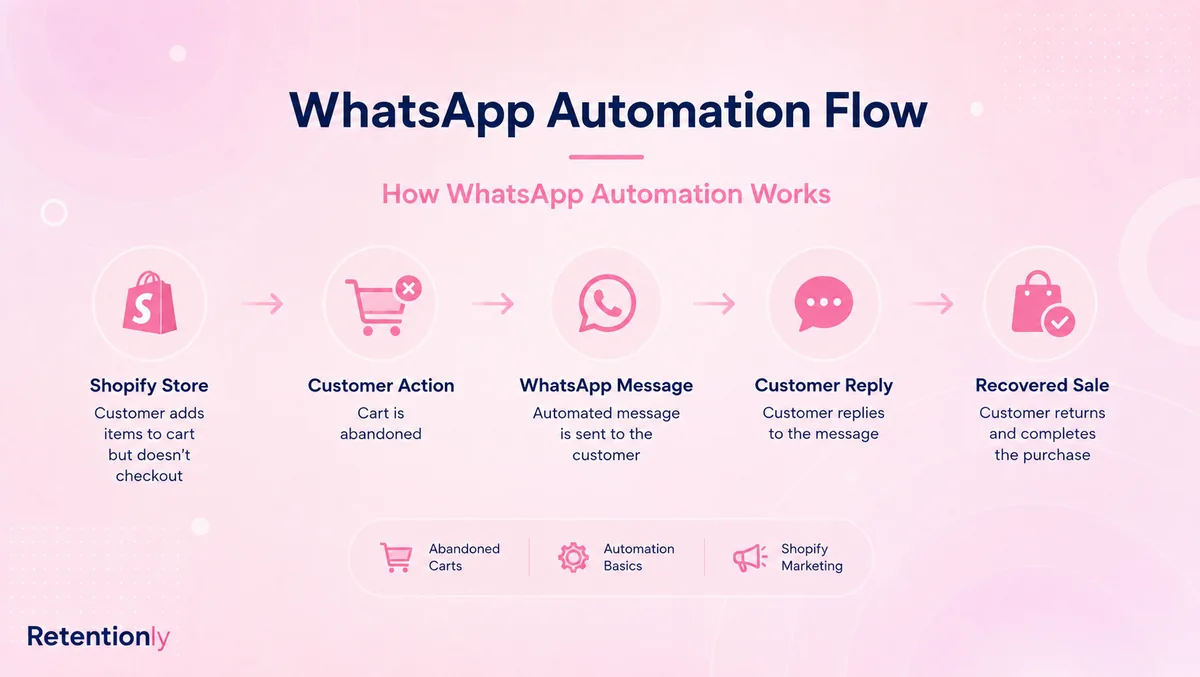
Notice the pattern. The API sends the message, but the workflow makes the message commercially useful.
Message Categories Still Matter
Official WhatsApp Business Platform messaging uses categories such as marketing, utility, authentication, and service. Merchants do not need to memorize every rate card before starting, but they do need to understand the practical difference.
Marketing messages are usually used for promotions, retargeting, abandoned cart reminders, product launches, winback campaigns, and related product suggestions.
Utility messages are usually tied to a customer action or transaction, such as an order confirmation, payment update, shipping update, delivery alert, or account-related notification.
Authentication messages are used for verification codes and login-related identity checks.
Service messages are replies when the customer starts or continues a conversation with the business.
The category affects template approval, customer expectations, and message cost. A store should not force promotional content into a utility-style order update just because it wants the message to look transactional. Keep each template honest: one job, one customer reason, one clear action.
For a deeper cost breakdown, read the WhatsApp Business API Pricing Guide.
Three Ways To Get Official API Access
There are three common paths. None is universally best.
| Path | Best when | What your team owns |
|---|---|---|
| Direct API or provider-led setup | You have developers, an agency, or a custom system | Webhooks, retries, templates, data sync, reply routing, reporting, maintenance |
| Broad WhatsApp platform | WhatsApp is shared across sales, support, marketing, and operations | Platform configuration, team inbox workflows, campaigns, contact management, add-ons |
| Shopify automation app | Your main goal is ecommerce retention workflows | Flow selection, template approval, message strategy, revenue review |
Choose the direct route when infrastructure control is important. This can fit larger teams, custom CRM builds, marketplaces, SaaS products, agencies, or brands with unusual routing rules.
Choose a broad platform when WhatsApp is a full operating workspace. This can fit teams that need agents, routing, campaigns, AI support, product catalogs, lead management, and several departments working from the same conversation layer.
Choose a Shopify automation app when the first job is straightforward: launch useful WhatsApp flows from Shopify events without building the workflow layer around an API provider.
How To Evaluate "Official" Claims
Many vendors mention official WhatsApp API access. That statement is useful, but it is not enough for a buying decision.
Ask these questions before choosing a tool:
| Question | Good answer should explain |
|---|---|
| How is the WhatsApp Business Account connected? | Who owns the WABA, phone number, permissions, and setup steps |
| How are templates created and approved? | Who writes them, where they are managed, and how category mistakes are avoided |
| How are Meta message fees handled? | Whether fees are passed through, marked up, bundled, prepaid, or hidden inside credits |
| Which Shopify events are supported? | Checkout, order, fulfillment, delivery, customer segment, product, and tag events |
| What happens when a customer replies? | Inbox, notifications, assignment, order context, and handoff process |
| What stops a message from sending? | Purchase, cancellation, opt-out, invalid data, reply, or frequency cap |
| What is reported by workflow? | Recovered revenue, confirmations, reviews, repeat orders, replies, opt-outs, and failures |
The best tool is not the one that repeats "official API" most often. It is the one that makes the official API useful for your operating model.
Where Retentionly Fits
Retentionly is built for Shopify and D2C teams that want official WhatsApp infrastructure to become retention automation.
It is not trying to be a raw API provider for every custom system. It is also not trying to be a broad customer operations suite where every team manages every conversation type. The product is focused on Shopify workflows that can recover revenue, reduce support load, and drive repeat purchases.
Retentionly is a strong fit when you want:
Abandoned checkout recovery.
COD confirmation.
Order and shipping updates.
Review requests.
Winback campaigns.
Reorder reminders.
Post-purchase upsells.
Welcome flows.
Segmented broadcasts.
Clear reply handoff and ecommerce context.
That focus matters because the first success metric is not API uptime alone. It is whether WhatsApp helps the store recover a checkout, confirm a risky order, reduce a support ticket, collect a review, or bring a customer back.
If your team wants direct API control, choose a provider path. If your team wants a broad sales and support workspace, compare broad WhatsApp platforms. If your team wants Shopify retention workflows live with less technical ownership, Retentionly is the cleaner route.
Launch Checklist
Use this before the first official API-backed flow goes live.
Pick one business outcome, such as abandoned checkout recovery or COD confirmation.
Confirm where WhatsApp opt-in is collected.
Decide which WhatsApp number and business profile customers will see.
Write one clear template for the first flow.
Check whether the message is marketing, utility, authentication, or service.
Connect the Shopify event that should trigger the message.
Set timing, audience, fallback, and stop rules.
Test with an internal order or checkout.
Assign reply ownership before customers respond.
Track the metric that proves the workflow worked.
This keeps the setup grounded. You are not implementing the official WhatsApp Business API in the abstract. You are launching one customer journey that should improve revenue, operations, or retention.
Quick FAQs
Is the WhatsApp Business API official?
Yes, when it uses Meta's WhatsApp Business Platform and approved business messaging infrastructure. Merchants should avoid unofficial device automation, browser automation, scraped sending tools, and bulk-sender workarounds that can damage trust or sender quality.
Is WhatsApp Business API the same as WhatsApp Business Platform?
They are often used to describe the same product area. Meta now commonly uses WhatsApp Business Platform, while many merchants, agencies, and vendors still say WhatsApp Business API.
Do Shopify stores need the official WhatsApp Business API?
They need API-backed WhatsApp when they want scalable automation, approved templates, customer replies, and Shopify event-based messaging. A basic WhatsApp chat button or manual WhatsApp Business app may be enough for simple one-to-one support.
Can I use the official API without a provider?
Some teams can work more directly with Meta's developer tools, but most merchants use a provider, platform, Shopify app, or implementation partner. The right route depends on how much technical ownership the business wants.
What is the safest first workflow to launch?
Start with a workflow that has a clear customer reason and measurable outcome. Abandoned checkout recovery, COD confirmation, order updates, and review requests are usually better first workflows than broad promotional broadcasts.
Why choose Retentionly instead of a direct API provider?
Choose Retentionly when the goal is Shopify WhatsApp retention automation, not raw API ownership. Retentionly focuses on store-event workflows, templates, replies, and revenue outcomes so the merchant does not need to build those layers from scratch.