WhatsApp Order Confirmation Message Templates
TL;DRA WhatsApp order confirmation message should answer the customer's first post-purchase question: did my order go through?
That sounds simple, but many stores overload the first message with tracking, offers, review requests, support instructions, and policy text. The result feels less like a confirmation and more like a campaign. A better order confirmation message is short, transactional, and tied to one Shopify order.
This guide gives you practical WhatsApp order confirmation message templates for Shopify and ecommerce teams, plus the rules that keep the message useful for customers and operationally clean for your team.
What The First Confirmation Message Should Do
The first order confirmation message has one job: reassure the customer that the order was received and explain what happens next.
It should not try to do every post-purchase task at once. Shipping updates, out-for-delivery alerts, delivery issue messages, review requests, winback campaigns, and reorder reminders all deserve separate messages because they happen at different customer moments.
For the first confirmation, include:
| Element | Why it matters |
|---|---|
| Store name | Helps the customer recognize the sender |
| Customer name | Makes the message feel tied to the buyer |
| Order number | Gives the customer and support team a shared reference |
| Payment or order total | Reduces anxiety about whether payment worked |
| Next update | Sets the expectation for shipping or tracking |
| Reply path | Lets the customer ask for help before packing begins |
Keep the message calm. The customer just bought. They need clarity, not a sales pitch.
Order Confirmation Vs Shipping Update Vs COD Confirmation
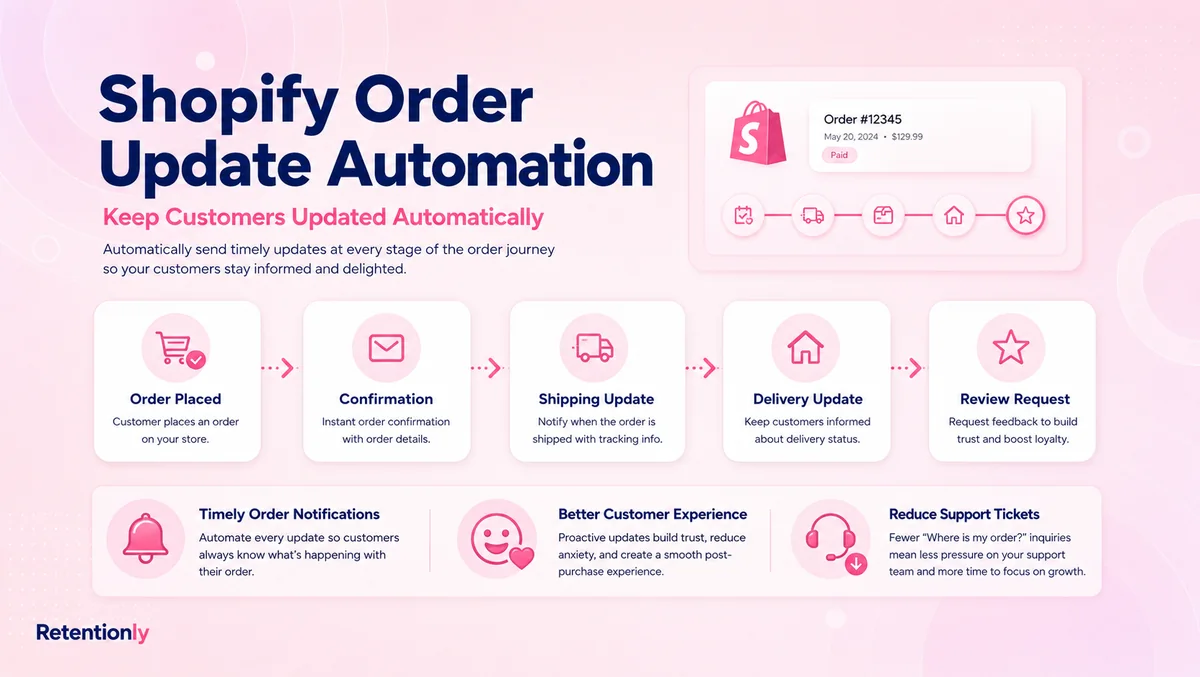
Order confirmation is only one part of the post-purchase WhatsApp flow. Do not use one template for every order status.
| Message type | Trigger | Message job |
|---|---|---|
| Order confirmation | Shopify order is created or paid | Confirm the order was received |
| Payment confirmation | Payment is captured or verified | Confirm money was received or authorization succeeded |
| COD confirmation | Customer placed a cash-on-delivery order | Ask the customer to confirm, cancel, or request help |
| Shipping update | Fulfillment or tracking is available | Share shipping status and tracking |
| Delivery issue message | Carrier reports exception or failed attempt | Help the customer fix the delivery problem |
| Delivered message | Order is marked delivered | Confirm completion and route issues quickly |
If you need the full order-status flow, read the Shopify Order Updates WhatsApp Automation Guide. This article focuses on the first confirmation message and the copy variants around it.
Basic WhatsApp Order Confirmation Message Templates
Use these when the customer has placed a normal prepaid order and your team only needs to confirm that the order exists.
| Situation | Message template |
|---|---|
| Simple confirmation | Hi [first_name], your order [order_number] from [store_name] is confirmed. We will update you here when it ships. |
| Confirmation with amount | Hi [first_name], we received your order [order_number] for [order_total]. We are preparing it now and will send tracking when it ships. |
| Confirmation with order status link | Thanks for your order, [first_name]. Order [order_number] is confirmed. You can view the latest status here: [order_status_link]. |
| Confirmation with support path | Hi [first_name], order [order_number] is confirmed. If anything looks wrong, reply here before we pack it. |
| Short brand message | Thanks for shopping with [store_name]. Your order [order_number] is confirmed and our team will share shipping updates soon. |
The safest default is short and factual. Do not include a coupon, product recommendation, or broad announcement in the first confirmation. If you add promotional content, the message stops behaving like a clean transactional update.
Shopify Order Confirmation Templates
Shopify stores usually have reliable order variables available immediately after checkout. Use only the variables your automation can fill every time.
| Use case | Message template |
|---|---|
| First-time buyer | Hi [first_name], thanks for your first order with [store_name]. Order [order_number] is confirmed. We will message you here when it ships. |
| Returning customer | Welcome back, [first_name]. Your order [order_number] is confirmed. We will keep you updated here until delivery. |
| High-value order | Hi [first_name], your order [order_number] for [order_total] is confirmed. Reply here if any delivery detail needs attention before we pack it. |
| Multi-item order | Hi [first_name], order [order_number] with [item_count] items is confirmed. We will send tracking once your order ships. |
| Fast dispatch store | Hi [first_name], your order [order_number] is confirmed and will move to packing soon. We will send the tracking link as soon as it is ready. |
| Local delivery | Hi [first_name], your local delivery order [order_number] is confirmed. We will update you here with the delivery window. |
For Shopify, the order number and order status link are usually more useful than a full itemized receipt. Customers can check the details if needed, while the WhatsApp message stays readable.
Payment Confirmation Message Templates
Use a payment confirmation when the customer may worry about whether the payment was captured, authorized, or verified.
| Situation | Message template |
|---|---|
| Prepaid payment captured | Hi [first_name], payment for order [order_number] is confirmed. We are preparing your order and will send shipping details soon. |
| Payment authorized | Hi [first_name], your payment for order [order_number] has been authorized. We will update you when the order moves to fulfillment. |
| UPI or bank transfer verified | Hi [first_name], we have verified payment for order [order_number]. Your order is now confirmed for processing. |
| Partial payment | Hi [first_name], we received [amount_paid] for order [order_number]. Our team will confirm the next step before dispatch. |
| Payment issue | Hi [first_name], we could not confirm payment for order [order_number]. Reply here if you completed payment or need help placing the order again. |
Only send payment confirmation when it adds clarity. If your normal order confirmation already says the payment was received, a second payment message may be unnecessary.
COD Order Confirmation Templates
Cash-on-delivery orders need a different message because the store may need confirmation before fulfillment.
| Situation | Message template |
|---|---|
| Simple COD confirmation | Hi [first_name], please confirm your COD order [order_number] from [store_name] for [order_total]. Reply 1 to confirm or 2 to cancel. |
| Button-style COD confirmation | Please confirm COD order [order_number]. Tap Confirm Order if we should ship it, or Cancel Order if this was a mistake. |
| Address check | Hi [first_name], your COD order [order_number] is waiting. Reply 1 if the delivery address is correct, or HELP if it needs changes. |
| High-value COD order | Hi [first_name], your COD order [order_number] is above [order_value]. Please reply 1 to confirm before dispatch or 2 to cancel. |
| COD reminder | Quick reminder: please confirm COD order [order_number]. Reply 1 to confirm, 2 to cancel, or HELP if you need support. |
If COD is a major workflow for your store, use a dedicated confirmation flow instead of mixing it into normal prepaid order confirmations. Read the WhatsApp COD Confirmation Message Examples for deeper COD copy and reply handling.
Address Check Templates
Address checks are useful when wrong addresses, missing landmarks, or unreachable delivery contacts create failed deliveries.
| Situation | Message template |
|---|---|
| Address confirmation | Hi [first_name], order [order_number] is confirmed. Please reply YES if your delivery address is correct, or HELP if it needs changes. |
| Landmark request | Hi [first_name], order [order_number] is confirmed. Reply LANDMARK if you want to add a nearby landmark before dispatch. |
| Phone number check | Hi [first_name], we are confirming this WhatsApp number for order [order_number]. Reply YES if this is the right delivery contact. |
| Apartment or building detail | Hi [first_name], order [order_number] is confirmed. Reply HELP if your apartment, building, or landmark detail needs an update. |
| Pre-dispatch correction | We are preparing order [order_number]. If the delivery address needs correction, reply HELP before [cutoff_time]. |
Do not ask every customer to retype a full address. The goal is to identify exceptions, not create extra friction for clean orders.
Tracking-Expectation Templates
Sometimes the tracking link is not ready when the first confirmation sends. Say that clearly instead of promising a link you do not have.
| Situation | Message template |
|---|---|
| Tracking not ready | Hi [first_name], order [order_number] is confirmed. Tracking is not ready yet, but we will message you here as soon as it ships. |
| Processing window | Thanks [first_name]. Order [order_number] is confirmed and usually ships within [processing_time]. We will send tracking once available. |
| Made-to-order item | Hi [first_name], your made-to-order purchase [order_number] is confirmed. We will update you when production and shipping move ahead. |
| Preorder | Hi [first_name], your preorder [order_number] is confirmed. Expected shipping window: [shipping_window]. We will send updates here. |
| Split shipment | Hi [first_name], order [order_number] is confirmed. Some items may ship separately, and we will send tracking for each shipment. |
This small expectation-setting line reduces "where is my order" questions later because the customer knows when to expect the next message.
Reply And Button Options
The first confirmation can include a reply path, but keep the action simple.
| Option | Best for | Example |
|---|---|---|
| Reply HELP | Stores with support ownership | Reply HELP if anything looks wrong before we pack it. |
| Track order button | Stores with an order status page | Button label: Track order |
| Contact support button | Stores with a team inbox | Button label: Need help |
| Confirm or cancel buttons | COD orders | Button labels: Confirm Order, Cancel Order |
| Address help reply | Stores with delivery issues | Reply ADDRESS if your delivery details need changes. |
Do not add too many options. If the first confirmation has five buttons or multiple reply codes, customers may ignore all of them.
Template Wording Rules For WhatsApp Approval
Most automated business-initiated WhatsApp messages need approved templates. An order confirmation should usually be written as a utility-style message tied to a transaction the customer already started.
Use these rules:
| Rule | Better approach |
|---|---|
| Keep the purpose transactional | Mention the specific order and next status |
| Avoid promotional copy | Do not add coupons, launches, or unrelated recommendations |
| Use reliable variables | Use order number, total, customer name, and status link only when available |
| Keep buttons specific | Use Track Order, Need Help, Confirm Order, or Cancel Order |
| Avoid vague urgency | Do not use "act now" unless an operational cutoff is real |
| Respect opt-outs | Stop future WhatsApp messages when the customer opts out |
This is too promotional for a first order confirmation:
Your order is confirmed. Use code NEXT20 to shop again today.
This is cleaner:
Hi [first_name], your order [order_number] is confirmed. We will send tracking when it ships. Reply here if anything looks wrong.
Promotional messages can still have a place in a lifecycle strategy. They just should not be hidden inside the first confirmation message.
Map Replies To Shopify Actions
An order confirmation message is only operationally useful if replies change the right state.
| Customer reply | Shopify or team action |
|---|---|
| Needs address change | Tag order for address review and pause fulfillment if needed |
| Asks to cancel | Check fulfillment/payment status and route to cancellation policy |
| Asks "when will it ship?" | Send order status or support response based on fulfillment status |
| Says payment failed | Check payment status before asking the customer to reorder |
| Confirms COD order | Tag as COD confirmed and release for fulfillment |
| Cancels COD order | Tag or cancel based on store policy |
| No response | Continue normal prepaid flow, or hold COD order based on risk rules |
The reply owner matters. Decide whether automation, support, fulfillment, or finance handles each reply before turning on the template.
A Simple Shopify Order Confirmation Flow
Start with a practical first version before adding complex branches.
| Step | Trigger | Message job | State to watch |
|---|---|---|---|
| Order created | Shopify order exists | Confirm order received | Order number and customer phone |
| Payment confirmed | Payment captured or verified | Reassure the customer | Payment status |
| COD confirmation | COD payment method selected | Confirm or cancel before shipping | Customer response |
| Fulfillment starts | Order moves to packing | Set shipping expectation | Fulfillment status |
| Tracking available | Tracking URL exists | Share tracking link | Tracking link presence |
| Support reply | Customer asks for help | Route the issue before packing | Team owner and order tag |
For many stores, the first version only needs order confirmation plus shipping update. Add payment checks, address checks, and COD confirmation when the operational data shows they reduce support or failed deliveries.
Common Mistakes To Avoid
The biggest mistake is making the first confirmation do too much.
Avoid these:
Adding discounts or product recommendations to a utility-style confirmation.
Sending the same message to prepaid and COD orders.
Promising tracking before a tracking link exists.
Using variables that often come through blank.
Sending duplicate confirmations after order edits.
Forgetting to suppress messages for cancelled orders.
Letting customer replies sit without an owner.
Treating the message as success because it was delivered, even if support tickets stay the same.
The confirmation should reduce anxiety and support load. If it creates more customer questions, simplify the copy.
What To Measure
Do not judge order confirmation messages only by delivery rate.
Track:
| Metric | What it tells you |
|---|---|
| Message delivery rate | Whether phone numbers and WhatsApp reach are healthy |
| Reply rate | Whether the message creates questions or useful corrections |
| Address-change replies | Whether delivery data needs cleanup |
| Cancellation replies | Whether customers are catching accidental orders early |
| WISMO tickets | Whether customers still ask "where is my order" after purchase |
| Failed delivery rate | Whether address and COD checks help fulfillment |
| Opt-out rate | Whether post-purchase messaging feels too noisy |
The best order confirmation message is not the longest or most branded. It is the one that prevents avoidable confusion.
Where Retentionly Fits
Retentionly is built for Shopify stores that want WhatsApp automation tied to real customer moments.
Use Retentionly when you want to:
Send WhatsApp order confirmations from Shopify order events.
Separate prepaid, COD, high-value, and address-risk orders.
Keep confirmation messages transactional and easy to approve.
Route customer replies to the right owner before fulfillment moves ahead.
Connect order confirmation with shipping updates, COD confirmation, review requests, winback, reorder reminders, and post-purchase upsells.
Install Retentionly free on Shopify if you want WhatsApp order confirmation messages and post-purchase automations built around Shopify retention workflows instead of generic broadcasts.
Quick FAQs
What is a WhatsApp order confirmation message?
It is a WhatsApp message sent after a customer places an order. It confirms that the store received the order and tells the customer what happens next.
What should an order confirmation message include?
Include the customer name, store name, order number, order total or payment status when useful, and the next expected update. Add a simple support reply path if your team can handle replies.
Is an order confirmation message a marketing message?
A clean order confirmation is usually transactional because it relates to a purchase the customer already made. Avoid adding discounts, product recommendations, or unrelated promotional copy to the first confirmation.
Should I send tracking in the order confirmation?
Only include tracking if it already exists. If tracking is not ready, say that you will send another WhatsApp message when the order ships.
Can I use the same template for COD and prepaid orders?
It is better to separate them. Prepaid orders usually need reassurance and shipping expectations. COD orders often need a confirm, cancel, or help action before fulfillment.