WhatsApp Marketing Messages for Ecommerce: Examples and Timing
TL;DRWhatsApp marketing messages for ecommerce work when the customer understands why the message arrived. A saved checkout, a restocked product, a reorder window, a VIP launch, or a loyalty reward gives the message context. A generic "buy now" blast does not.
That context matters because WhatsApp feels more personal than email or paid retargeting. The best ecommerce teams write messages around customer timing, not only campaign copy. They decide who should receive the message, why now, what action matters, who should be suppressed, and what metric will prove the message helped.
This guide gives ecommerce teams practical WhatsApp marketing message examples across conversion, post-purchase, retention, and broadcast campaigns, with timing and stop rules for each one.
What Counts As A WhatsApp Marketing Message?
A WhatsApp marketing message is any business-initiated message designed to create demand, recover a sale, increase repeat purchases, reactivate a customer, or move a shopper toward a commercial action.
For ecommerce, that includes:
Abandoned checkout reminders.
Back-in-stock and price-drop alerts.
Product launch messages.
VIP, loyalty, and early-access campaigns.
Winback and reorder reminders.
Post-purchase upsell or cross-sell messages.
Click-to-WhatsApp ad follow-up.
Segmented sale or festival messages.
Order confirmations, shipping updates, and delivery alerts are usually utility messages, not marketing messages. Keep that distinction clear. If the goal is to sell, reactivate, promote, or expand revenue, treat the message like marketing: use clear opt-in, relevant timing, approved templates when required, and an easy way to stop.
Start With Message Timing, Not Copy
The right message at the wrong time still feels noisy. Before writing copy, choose the customer moment.
| Customer moment | Best message type | Good timing | Main risk |
|---|---|---|---|
| Checkout started but no order | Abandoned checkout reminder | 30 to 60 minutes after checkout inactivity | Sending after purchase or checkout expiry |
| Product interest but no purchase | Browse, price-drop, or back-in-stock message | After a strong product signal | Treating weak browsing as purchase intent |
| Order delivered | Review, education, or cross-sell message | After delivery plus usage delay | Selling before the customer has used the product |
| Repeat purchase window | Reorder reminder | Based on product usage cycle | Guessing timing without product context |
| Customer inactive | Winback message | After normal buying cycle passes | Sending the same offer to every lapsed customer |
| Launch or sale window | Segmented broadcast | When inventory and audience match | Blasting the full list too often |
| Paid click starts chat | Click-to-WhatsApp follow-up | Immediately after conversation starts | Losing the ad context |
This is why ecommerce WhatsApp marketing should not start with a swipe file. Start with the moment, then write the message.
The Five-Part Message Formula
Use this formula before sending any WhatsApp marketing message.
| Part | Question | Example |
|---|---|---|
| Audience | Who should receive this? | Customers who abandoned checkout with WhatsApp consent |
| Timing | Why should it arrive now? | 45 minutes after checkout inactivity |
| Promise | What useful reason does the customer have to act? | Your checkout is still saved |
| Stop rule | When should the message stop? | Purchase, opt-out, support issue, or final reminder |
| Metric | What proves it worked? | Recovered revenue, replies, conversion, opt-outs |
If one part is missing, the message is not ready. Most poor WhatsApp campaigns fail because the audience is too broad, the timing is vague, or the stop rule is missing.
Abandoned Checkout Marketing Messages
Abandoned checkout is usually the strongest first WhatsApp marketing message because the shopper already showed high purchase intent.
| Use case | Message |
|---|---|
| Help-first reminder | Hi [first_name], your [store_name] checkout is still saved. You can finish it here: [checkout_link]. Reply if you have a question before ordering. |
| Product reminder | Hi [first_name], [product_name] is still in your checkout. Complete your order here when you are ready: [checkout_link]. |
| Controlled offer | Your [store_name] checkout is saved. Use [discount_code] before [deadline] if you want to complete it today: [checkout_link]. |
| Final reminder | Last reminder, [first_name]: your checkout is here if you still want it: [checkout_link]. We will stop cart reminders after this. |
Best timing: send the first reminder 30 to 60 minutes after checkout inactivity. Add a second reminder only if the store has enough intent and the opt-out rate stays healthy.
Suppress: customers who purchased, opted out, started a support issue, already received the final reminder, or no longer have a valid checkout link.
Measure: recovered revenue, conversion rate, reply quality, discount usage, and opt-out rate.
For deeper cart copy, read Abandoned Cart WhatsApp Message Examples for Shopify.
Back-In-Stock Messages
Back-in-stock messages can feel expected because the customer already showed interest in the unavailable item.
| Use case | Message |
|---|---|
| Product restock | [product_name] is back in stock at [store_name]. You can order it here while inventory is available: [product_link] |
| Variant restock | Good news, [first_name]. [variant_name] is available again. Here is the direct link: [product_link] |
| Waitlist early access | You asked for the update first, so you get early access to [product_name] before the public restock: [product_link] |
Best timing: send as soon as the product or variant is actually purchasable.
Suppress: customers who bought after joining the waitlist, customers waiting for a different variant, customers with no marketing consent, and products that are already low-stock enough to disappoint buyers.
Measure: restock revenue, sell-through, conversion rate, time to purchase, and opt-outs.
For the full workflow, read the Shopify Back-In-Stock WhatsApp Alerts Guide.
Price-Drop Messages
Price-drop messages work when they are tied to a product the customer already cared about. They get risky when every small discount becomes a WhatsApp send.
| Use case | Message |
|---|---|
| Product watcher | Good news, [first_name]. [product_name] just dropped to [price]. You can check it here: [product_link] |
| Saved checkout price drop | The item in your saved checkout is now [price]. Complete your order here before the offer ends: [checkout_link] |
| Category markdown | Your saved [category_name] picks are now on sale. See what is available here: [collection_link] |
Best timing: send when the price change is meaningful enough to explain the interruption.
Suppress: customers who already purchased, customers who received another discount recently, products that are out of stock, and price changes that are too small to matter.
Measure: revenue, margin after discount, conversion rate, discount dependency, and opt-outs.
Product Launch Messages
Launch messages perform better when they go to people with a reason to care.
| Use case | Message |
|---|---|
| Category buyer launch | Hi [first_name], our new [category_name] drop is live. Since you bought from this category before, you can see it here first: [collection_link] |
| Waitlist launch | [product_name] is now live at [store_name]. You asked for the update, so here is your early link: [product_link] |
| Limited stock launch | Limited stock of [product_name] is available now. Shop before the wider announcement here: [product_link] |
| Preorder launch | Preorders for [product_name] are open until [deadline]. Reserve yours here: [product_link] |
Best timing: send at launch, early-access opening, preorder start, or when the specific product is ready.
Suppress: customers outside the relevant category, customers who already bought the item, recent purchasers who should not receive another promotional nudge, and support-risk customers.
Measure: launch revenue, conversion by segment, sell-through, opt-outs, and revenue per recipient.
VIP, Loyalty, And Reward Messages
Relationship-based messages can perform well because the customer can understand why they were selected.
| Use case | Message |
|---|---|
| VIP early access | [first_name], VIP access is open for [collection_name]. You can shop before the public sale here: [link] |
| Loyalty reward | You have [points] points available at [store_name]. Use them on your next order here: [link] |
| Birthday offer | Happy birthday, [first_name]. Your birthday offer is ready: [offer_details]. Use it before [deadline]: [link] |
| Customer anniversary | It has been a year since your first [store_name] order. Here is a thank-you offer for your next one: [link] |
Best timing: send when the reward is real, usable, and easy to redeem.
Suppress: customers who are not eligible, customers who recently used a similar offer, customers with open complaints, and customers who opted out of marketing.
Measure: redemption rate, repeat purchase revenue, margin, opt-outs, and loyalty participation.
Winback Messages
Winback messages should not treat every inactive customer the same. A one-time buyer, repeat buyer, VIP, and refill customer need different copy.
| Use case | Message |
|---|---|
| Soft reactivation | Hi [first_name], it has been a while since your last [store_name] order. Here are customer favorites you may like: [collection_link] |
| Category winback | We added new [category_name] picks since your last order. You can see them here: [collection_link] |
| Offer-led winback | We would love to see you back. Use [offer_code] before [deadline] on your next order: [collection_link] |
| VIP return | [first_name], your private return offer is ready. Use it on your next [store_name] order here: [link] |
Best timing: send after the expected buying cycle has passed. That may be 30 days for consumables, 60 to 90 days for many apparel and beauty categories, or longer for durable products.
Suppress: recent buyers, refund customers, unresolved support cases, repeated non-responders, and customers who no longer match the category.
Measure: reactivation rate, repeat purchase revenue, revenue per recipient, offer cost, and opt-outs.
For more variants, read WhatsApp Winback Message Examples for Ecommerce.
Reorder Reminder Messages
Reorder reminders are best for products with a predictable usage cycle: supplements, skincare, coffee, tea, snacks, pet care, baby care, refills, and home-care products.
| Use case | Message |
|---|---|
| Simple reorder | Hi [first_name], your [product_name] may be running low soon. You can reorder it here: [reorder_link] |
| Repeat last order | Ready to repeat your last [store_name] order? Your quick reorder link is here: [reorder_link] |
| Routine continuity | Keeping your [product_name] routine going? You can restock here: [reorder_link] |
| Subscription option | If you reorder [product_name] regularly, a subscription may help you avoid running out. See options here: [subscription_link] |
Best timing: match the product's real consumption window. Do not send the same day count for every product.
Suppress: customers who reordered, subscribed, returned the product, complained, opted out, or bought a replacement product.
Measure: repeat purchase rate, reorder conversion, time between orders, subscription starts, and unsubscribe rate.
For more copy, read WhatsApp Reorder Reminder Message Examples.
Post-Purchase Upsell Messages
Upsell and cross-sell messages should make the original purchase more useful. If the relationship between products is weak, WhatsApp will make that weakness more visible.
| Use case | Message |
|---|---|
| Complementary product | Your [product_name] should be with you now. Customers often pair it with [related_product] for [specific_benefit]. See it here: [product_link] |
| Add-on before fulfillment | We are preparing your [product_name] order. If you want [addon_name] shipped with it, add it before [cutoff_time]: [link] |
| Bundle recommendation | If you plan to use [product_name] regularly, the [bundle_name] may be better value than buying items one by one: [link] |
| Upgrade path | Quick option before you continue with [product_name]: [upgrade_name] gives you [premium_benefit]. Compare both here: [link] |
Best timing: send after the customer has enough context to understand the recommendation, or before fulfillment only when the add-on clearly belongs with the order.
Suppress: delayed deliveries, refunds, returns, support issues, irrelevant recommendations, and customers who already bought the recommended item.
Measure: attach rate, second-order revenue, average order value lift, refund rate, complaint replies, and opt-outs.
For more examples, read WhatsApp Upsell Message Examples for Ecommerce.
Click-To-WhatsApp Ad Follow-Up Messages
When someone starts a WhatsApp conversation from an ad, the first message should continue the ad promise. Do not drop them into a generic broadcast path.
| Use case | Message |
|---|---|
| Offer continuation | Thanks for checking out [offer_name]. Want help choosing the right option? Reply 1 for [option_a] or 2 for [option_b]. |
| Quiz-style follow-up | Tell us what you are shopping for and we will suggest the best match. Reply 1 for [need_a], 2 for [need_b], or 3 for [need_c]. |
| Product help | You clicked on [product_name]. Want sizing, delivery, or bundle help before ordering? Reply here and we will help. |
| Saved offer link | Here is the [offer_name] link from the ad: [link]. Reply if you want help before checkout. |
Best timing: immediately after the customer starts the conversation.
Suppress: contacts who did not start the chat, contacts who already purchased, and ad conversations that have moved into support or complaint handling.
Measure: cost per conversation, reply rate, assisted conversion, revenue, and handoff quality.
Message Timing Rules Ecommerce Teams Should Use
Use these rules as a starting point, then tune based on product type, buying cycle, and opt-out behavior.
| Message type | Starting timing | When to delay |
|---|---|---|
| Abandoned checkout | 30 to 60 minutes after inactivity | If checkout link, product data, or consent is missing |
| Back in stock | When product or variant is purchasable | If inventory is too low or variant does not match |
| Price drop | When discount is meaningful | If the customer bought recently or margin is weak |
| Product launch | At launch or early-access opening | If the segment is too broad |
| Review request | After delivery plus usage window | If delivery issue, refund, or complaint exists |
| Reorder reminder | Before the product runs out | If product cycle is unknown |
| Winback | After normal buying cycle passes | If the customer recently engaged elsewhere |
| Upsell | After product context is clear | If the first order experience is not complete |
| Broadcast sale | During real campaign window | If customer received another promotion recently |
Do not use WhatsApp to compensate for weak segmentation. Better timing usually beats louder copy.
Common Mistakes To Avoid
The first mistake is using the same message for every customer. WhatsApp marketing works best when the copy reflects the customer's last action, product interest, order state, or lifecycle stage.
The second mistake is sending too soon after purchase. A customer who just ordered may need reassurance, tracking, or product education before another offer.
The third mistake is mixing utility and marketing. If an order update contains a hidden promotion, the customer may feel tricked. Keep order updates clear and send marketing only when the purpose is obvious.
The fourth mistake is ignoring replies. WhatsApp marketing creates conversations. Someone needs to own questions, complaints, opt-outs, and buying assistance.
The fifth mistake is missing suppression rules. Stop marketing messages after purchase, opt-out, refund, support escalation, delivery issue, campaign expiry, or a higher-priority flow.
What To Measure
Every WhatsApp marketing message needs one main metric and a few guardrails.
| Message type | Main metric | Guardrail |
|---|---|---|
| Abandoned checkout | Recovered revenue | Opt-outs and support replies |
| Back in stock | Restock revenue | Stockout frustration |
| Price drop | Revenue and margin | Discount dependency |
| Product launch | Launch revenue | Segment fatigue |
| VIP or loyalty | Redemption revenue | Over-discounting loyal customers |
| Winback | Reactivation revenue | Offer cost and opt-outs |
| Reorder | Repeat purchase rate | Wrong timing |
| Upsell | Attach rate or second-order revenue | Irrelevant recommendations |
| Click-to-WhatsApp | Assisted conversion | Context loss |
| Broadcast sale | Revenue per recipient | Full-list fatigue |
Clicks are helpful, but they are not enough. A healthy WhatsApp marketing message improves revenue or retention without damaging trust, reply quality, or opt-in health.
Where Retentionly Fits
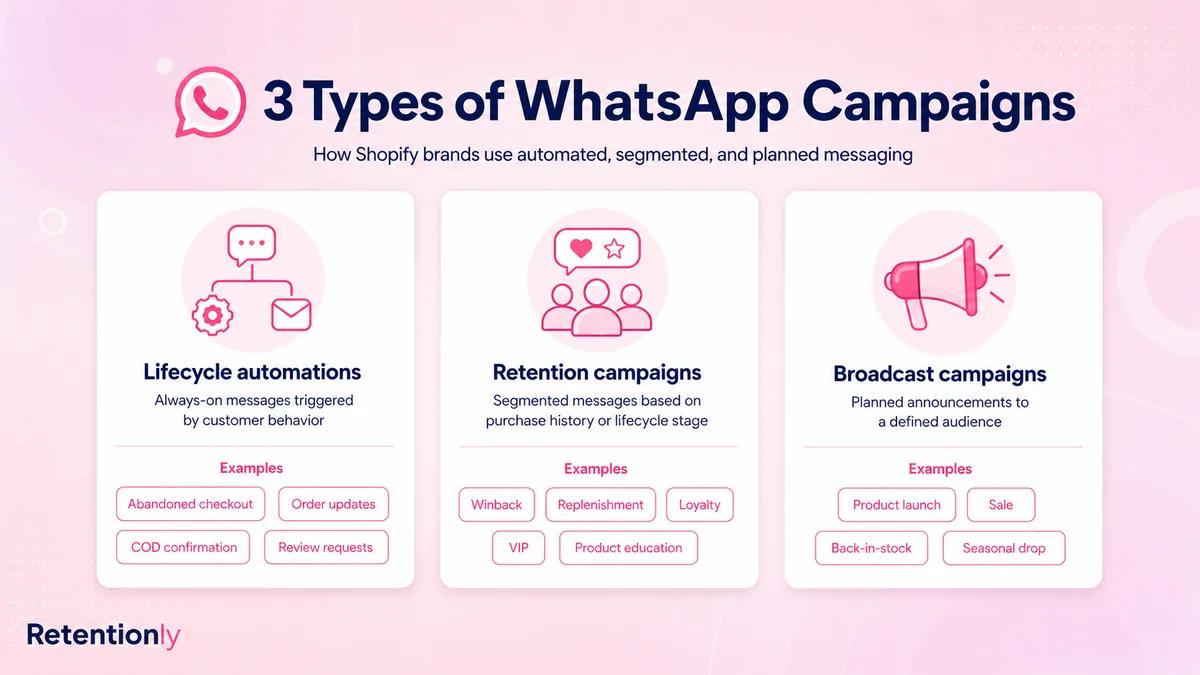
Retentionly is built for Shopify and D2C teams that want WhatsApp marketing messages tied to customer events, not generic lists.
Use Retentionly when you want to:
Trigger WhatsApp messages from Shopify checkout, order, product, customer, and lifecycle signals.
Launch abandoned checkout, back-in-stock, price-drop, review, reorder, winback, upsell, loyalty, and campaign flows.
Segment customers by purchase count, last order, product interest, customer value, and lifecycle stage.
Suppress customers who purchased, opted out, replied with an issue, entered support, or moved into another flow.
Measure WhatsApp campaigns by recovered revenue, repeat purchases, reviews, and customer outcomes.
Retentionly is not only for broadcasts. It is the WhatsApp retention automation layer for ecommerce teams that want every marketing message to match a customer moment.
Final Recommendation
Start with the WhatsApp marketing messages closest to real customer intent:
Abandoned checkout for conversion.
Order-adjacent messages like review, reorder, or upsell after delivery.
Retention messages like winback, loyalty, and VIP access.
Segmented broadcasts only after suppression rules are working.
Write fewer messages at first. Make each one specific. Give every message a trigger, timing rule, stop rule, and metric before it goes live.
Install Free on Shopify with Retentionly to launch WhatsApp marketing messages for abandoned checkout, winback, reorders, reviews, upsells, loyalty, and repeat purchases with Shopify-ready timing and revenue tracking.
Quick FAQs
What are WhatsApp marketing messages for ecommerce?
They are WhatsApp messages sent to recover sales, promote products, drive repeat purchases, reactivate customers, or follow up on commercial intent. Examples include abandoned checkout reminders, winback messages, back-in-stock alerts, VIP offers, and reorder reminders.
What is the best timing for WhatsApp marketing messages?
The best timing depends on the customer moment. Abandoned checkout can start 30 to 60 minutes after inactivity, back-in-stock messages should send when the item is purchasable, and reorder reminders should match the product usage cycle.
Are WhatsApp marketing messages the same as order updates?
No. Order updates are usually utility messages about purchase, payment, shipping, delivery, or account activity. Marketing messages try to drive demand, repeat purchase, reactivation, or revenue, so they need clearer consent and segmentation.
How many WhatsApp marketing messages should an ecommerce store send first?
Start with one or two high-intent flows, such as abandoned checkout and reorder reminders. Add winback, upsell, loyalty, and broadcast campaigns after the team understands reply handling, opt-outs, and suppression rules.
How does Retentionly help with WhatsApp marketing messages?
Retentionly connects WhatsApp messages to Shopify events, customer segments, timing rules, stop rules, and revenue metrics so ecommerce teams can send useful lifecycle messages instead of generic blasts.