WhatsApp Marketing for Food Shopify Brands
TL;DRWhatsApp marketing for food Shopify brands works best when it follows buying rhythm, freshness, and delivery context. A coffee bag runs low. A snack box becomes a weekly habit. A frozen food order needs delivery confidence. A gift hamper has a date attached. A subscription buyer may need a pause, swap, or refill reminder before the next order.
That makes food and beverage different from a generic ecommerce campaign calendar. The strongest WhatsApp flows are built around reorder timing, delivery windows, product freshness, bundles, seasonal demand, COD confidence, reviews, and repeat purchase behavior.
This guide shows how food, beverage, grocery, snack, and specialty food Shopify stores can use WhatsApp as a retention channel without turning it into a noisy discount list.
Why Food Stores Need A Different WhatsApp Plan
Food buying is practical and time-sensitive. Customers care about availability, freshness, delivery date, packaging, subscription control, dietary fit, gifting deadlines, and whether the product will arrive when they need it.
That creates a few practical differences for WhatsApp:
| Food commerce reality | What it means for WhatsApp |
|---|---|
| Products are consumed | Reorder timing should follow expected consumption, not a fixed monthly blast |
| Freshness matters | Delivery, dispatch, shelf life, and storage instructions need clear messaging |
| Orders can be date-sensitive | Campaigns for gifting, parties, festivals, and meal plans need cutoff reminders |
| Repeat purchase potential is high | Subscriptions, bundles, replenishment, and habit-building flows matter |
| Trust can break quickly | Delays, damaged packaging, melted items, or stale products should pause promotional flows |
For a food Shopify store, WhatsApp should feel like useful timing from a brand the customer already trusts. It should not feel like a daily sale alert.
The Food WhatsApp Flow Map
Start by separating food WhatsApp marketing into flows that serve different customer moments.
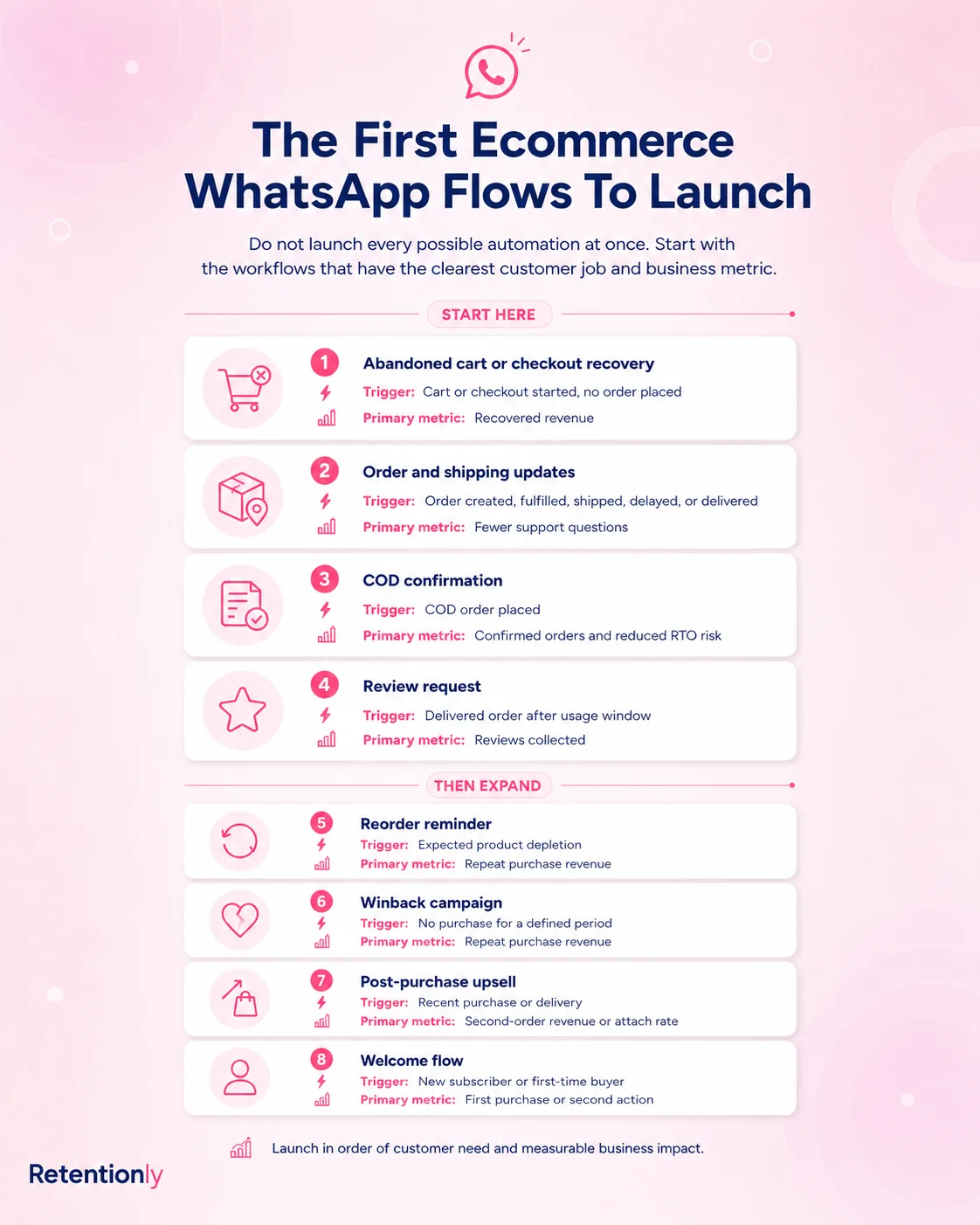
| Flow | Best food use | Trigger | Primary metric |
|---|---|---|---|
| Abandoned checkout | Recover carts where delivery, COD, or product fit may be unclear | Checkout started, no order placed | Recovered revenue |
| Order and delivery updates | Reduce "where is my order" questions and improve confidence | Order, fulfillment, shipping, out-for-delivery, delivery | Fewer support tickets and delivery confidence |
| Reorder reminder | Bring buyers back before a product runs out | Last purchase plus product consumption window | Repeat purchase revenue |
| Subscription or bundle nudge | Move repeat buyers into predictable ordering | Repeat order, bundle interest, product cycle | Subscription starts, bundle revenue |
| Review request | Ask after the customer has received and tried the product | Delivery plus product-specific delay | Reviews collected and review quality |
| Seasonal campaign | Promote gifting, limited batches, festival boxes, or party packs | Store event or calendar moment | Revenue per recipient and opt-outs |
| Winback | Bring inactive buyers back with a relevant reason | No order after expected cycle | Repeat purchase revenue |
Most food brands should start with the flows closest to operational trust: abandoned checkout, order updates, delivery clarity, and reorder reminders. Once those are stable, add bundles, subscriptions, seasonal campaigns, and VIP drops.
Segment By Consumption, Not Just Spend
Many food stores segment only by total spend or last order date. That helps, but it does not explain what the customer is likely to need next.
Better WhatsApp segments include:
| Segment | Good WhatsApp angle |
|---|---|
| Coffee or tea buyers | Refill reminder based on pack size and household usage |
| Snack buyers | Bundle, variety pack, or weekly restock prompt |
| Frozen or fresh food buyers | Delivery-window clarity, storage instructions, repeat order timing |
| Health food buyers | Ingredient education, subscription nudge, routine reminder |
| Gift hamper buyers | Occasion reminders, festive cutoff dates, repeat gifting |
| First-time buyers | Delivery confidence, product usage, review request |
| Repeat buyers | Reorder shortcut, bundle upgrade, subscription prompt |
| Lapsed buyers | New batch, seasonal flavor, replenishment prompt, or winback offer |
| COD customers | Order confirmation, address check, delivery readiness |
If a customer bought a 250g coffee bag, do not send the same reminder as someone who bought a monthly subscription box. If they ordered a Diwali hamper, do not treat that as a weekly pantry purchase. Food WhatsApp marketing gets stronger when the message follows the product's real buying cycle.
Flow 1: Abandoned Checkout With Delivery Confidence
Food abandoned checkout messages should remove practical hesitation. The shopper may be wondering about delivery timing, shipping cost, COD, storage, ingredients, allergens, cold-chain handling, freshness, or whether the order will arrive before an event.
Use a first reminder that brings the shopper back without sounding desperate.
| Component | Practical setup |
|---|---|
| Audience | Opted-in shoppers who started checkout but did not order |
| Timing | 30 to 60 minutes after checkout abandonment |
| Message job | Recover the saved checkout and answer delivery or product-fit concerns |
| Suppression | Stop after purchase, opt-out, support issue, product sellout, or final reminder |
| Metric | Recovered revenue, replies, conversion rate, opt-outs |
Example:
Hi [first_name], your [store_name] checkout is still saved. Complete it here: [checkout_link]. Reply if you want help with delivery date, ingredients, storage, or COD before ordering.
Start with confidence before discounts. For food, a clear delivery cutoff, freshness promise, or storage answer may recover better orders than a coupon sent too early.
For the full checkout workflow, read the Shopify Abandoned Checkout WhatsApp Guide.
Flow 2: Order Updates For Freshness And Trust
Food customers often care about order status more than customers buying non-perishable products. They want to know when the order is packed, dispatched, out for delivery, delayed, or delivered. If the product is fresh, frozen, fragile, or giftable, silence creates anxiety.
Use WhatsApp to make the order feel predictable.
| Update | Message job |
|---|---|
| Order confirmation | Confirm the order, payment, delivery address, and expected dispatch |
| Packed or prepared | Reassure the customer that the food is being prepared or packed |
| Shipped | Share tracking and expected delivery timing |
| Out for delivery | Tell the customer to keep someone available to receive it |
| Delivered | Confirm receipt and share storage or serving guidance |
| Delay | Explain the issue and offer support instead of hiding the problem |
Example:
Your [store_name] order is out for delivery today. Please keep someone available to receive it. If you need help with the address or timing, reply here.
For fresh, chilled, frozen, or fragile items, the delivery message can also include handling instructions:
Your [product_name] has been delivered. Please refrigerate it after opening and check the storage guide here: [guide_link]
For more structure, read the Shopify Order Updates WhatsApp Guide.
Flow 3: Reorder Reminders By Product Cycle
Reorder reminders are one of the strongest food WhatsApp use cases because the message can match a real need. The best reminder is not "buy again." It is "you may be running low."
Set timing by product and pack size:
| Product type | Better reminder timing |
|---|---|
| 7-day meal or snack pack | Day 5 to 7 |
| 250g coffee, tea, or pantry item | Day 12 to 20, depending on typical use |
| 500g or 1kg staple | Day 25 to 45, depending on household size |
| Monthly subscription box | A few days before renewal, with swap or pause options |
| Seasonal gift item | Before the next relevant occasion, not on a fixed refill cycle |
Example:
Running low on [product_name]? You can reorder your [store_name] favorite here in one tap: [reorder_link]
If the customer bought a mixed box, point to the same box or the best-selling variant. If they bought a flavor they disliked or returned, suppress the reminder. If they already reordered, stop the flow.
For message examples, read the WhatsApp Reorder Reminder Message Guide.
Flow 4: Subscriptions And Bundle Nudges
Food and beverage stores often have natural repeat behavior, but many customers do not subscribe on the first order. WhatsApp can help move proven buyers into easier repeat ordering.
Do this only after the customer has shown a pattern.
| Customer signal | Better WhatsApp angle |
|---|---|
| Second order of the same product | "Want this delivered regularly?" |
| Reorders every few weeks | Subscription with pause or skip control |
| Buys multiple flavors | Variety bundle or discovery pack |
| Buys for family or office | Larger pack, monthly bundle, or standing order |
| Buys around occasions | Gift box reminder and early cutoff alert |
Example:
Looks like [product_name] is becoming a regular pick. Want to save time with a monthly delivery? You can choose, pause, or skip here: [subscription_link]
The message should make control obvious. Food subscriptions can create support problems when customers feel locked in, receive too much stock, or cannot change a flavor. Keep the subscription pitch helpful and transparent.
Flow 5: Seasonal, Occasion, And Cutoff Campaigns
Food campaigns work when timing is clear. A broad "sale live" message is weaker than a specific reason to buy now: weekend gathering, festive gifting, fresh batch, school snack planning, office pantry restock, wedding favors, or shipping cutoff.
Better campaign segments:
| Campaign | Best audience |
|---|---|
| Fresh batch launch | Past buyers of that product or category |
| Festival hamper | Gift buyers, high-value buyers, customers who ordered last season |
| Weekend party pack | Local customers, snack buyers, repeat buyers |
| Coffee roast drop | Coffee buyers, subscribers, high-intent browsers |
| Limited flavor | Customers who bought adjacent flavors or joined early access |
| Delivery cutoff reminder | Customers browsing giftable or time-sensitive products |
Example:
[first_name], our [occasion_name] boxes close for delivery on [cutoff_date]. If you want yours delivered in time, order here: [collection_link]
The strongest food campaigns explain why the customer received the message. "You bought last year's hamper", "your favorite roast is back", or "delivery closes tonight" feels more relevant than a generic broadcast.
Flow 6: COD Confirmation And Delivery Readiness
For food stores that accept cash on delivery, WhatsApp can reduce fulfillment waste by confirming intent before dispatch.
COD confirmation is especially useful when products are perishable, delivery windows are tight, or failed delivery creates waste.
| Component | Practical setup |
|---|---|
| Audience | COD orders that need confirmation before packing or fulfillment |
| Trigger | New COD order placed in Shopify |
| Timing | Soon after order placement |
| Message job | Confirm the order, address, and readiness to receive |
| Suppression | Stop after confirmation, cancellation, opt-out, or support issue |
| Metric | Confirmed orders, cancellations caught early, RTO reduction |
Example:
Hi [first_name], please confirm your [store_name] COD order for [order_value]. Reply 1 to confirm or 2 if you need help with address, delivery time, or payment.
For perishable goods, do not pack or dispatch uncertain COD orders too aggressively. The WhatsApp flow should protect the customer experience and the store's margin.
For the full workflow, read the Shopify COD Confirmation WhatsApp Guide.
Flow 7: Product Education After Delivery
Food education can improve product experience and prepare the next purchase. This is especially useful for specialty products where customers may need serving, storage, pairing, brewing, heating, or usage guidance.
Useful education messages include:
| Product | Good follow-up |
|---|---|
| Coffee | Brewing guide, grind advice, storage tip |
| Tea | Steeping time, water temperature, flavor pairing |
| Frozen meals | Heating instructions and storage reminder |
| Sauces or condiments | Recipe ideas and pairing suggestions |
| Protein or health foods | Usage timing, serving size, ingredient context |
| Gift boxes | Serving suggestions and reorder link for the buyer |
Example:
Your [product_name] has arrived. For best taste, store it [storage_tip] and try this quick serving idea: [guide_link]
Do not hide a hard sell inside the first education message. The first job is product success. A later cross-sell can work when the pairing is obvious.
Flow 8: Reviews After The Customer Has Tried The Product
Food review requests need timing. Asking on delivery day may be too soon. Asking too late may miss the moment when the taste, packaging, freshness, and delivery experience are still clear.
Use timing by product type:
| Product type | Better review timing |
|---|---|
| Ready-to-eat snacks | 2 to 4 days after delivery |
| Coffee, tea, pantry, condiments | 5 to 10 days after delivery |
| Frozen foods or meal kits | After the expected first-use window |
| Gift hampers | Ask the buyer about packaging and delivery; ask recipient only if consent exists |
| Subscriptions | After the first box, then less often |
Example:
Hi [first_name], hope you enjoyed [product_name]. Could you leave a quick review for [store_name]? It helps other shoppers decide what to try next: [review_link]
Suppress refunds, delivery failures, damaged-product tickets, open complaints, and customers who already reviewed. If the buyer replies with a product issue, route the conversation to support before sending another review reminder.
For Shopify-specific setup, read the Shopify Review Request WhatsApp Flow Guide.
Flow 9: Cross-Sells That Match The Basket
Food cross-sells should feel like pairing help or pantry planning. Random product recommendations are easy to ignore.
Better recommendation logic:
| Purchase | Better recommendation |
|---|---|
| Coffee beans | Filter papers, brewing kit, matching roast, subscription |
| Tea | Sampler pack, honey, cookies, seasonal blend |
| Snacks | Variety box, party pack, family-size bundle |
| Sauce or condiment | Recipe kit, matching staple, larger jar |
| Health food | Routine bundle, monthly pack, complementary ingredient |
| Gift hamper | Add-on note, premium packaging, future occasion reminder |
Example:
Customers who order [product_name] often add [recommended_product] for [use_case]. You can build your bundle here: [bundle_link]
Keep the recommendation close to the original basket. If the buyer ordered spicy snacks, a complementary dip makes sense. An unrelated product launch does not.
For broader structure, read the Shopify Post Purchase Upsell WhatsApp Flow Guide.
Flow 10: Food Winback Without Random Discounts
Winback should follow the product cycle. A weekly snack buyer may be inactive after 21 days. A gift buyer may not be lapsed until the next occasion. A bulk pantry buyer may not need anything for weeks.
Useful winback segments:
| Segment | Better winback angle |
|---|---|
| Refill buyer overdue | One-tap reorder for the exact product |
| Snack buyer inactive | New flavor or bundle based on prior purchase |
| Coffee or tea buyer inactive | Fresh roast, seasonal blend, or subscription option |
| Gift buyer inactive | Upcoming occasion reminder |
| High-value buyer inactive | Early access to a limited batch or private bundle |
| Delivery issue customer | Support-first recovery message before any offer |
Example:
Hi [first_name], [product_name] is back in stock at [store_name]. If you want to restock, your reorder link is here: [reorder_link]
Avoid sending the same discount every month to customers who do not respond. If the customer ignores the sequence, widen the window, change the angle, or suppress them from promotional WhatsApp sends.
For campaign structure, read the WhatsApp Winback Campaigns for Shopify Guide.
Consent, Templates, And Support Handoff
Food brands should be careful with WhatsApp consent and support routing.
A checkout phone number is not automatically permission for promotional WhatsApp marketing. Your opt-in should say what the customer is signing up for, such as order updates, delivery alerts, reorder reminders, product tips, offers, or launches.
Business-initiated messages outside the customer service window may need approved templates. Build templates around real jobs:
| Template job | Example use |
|---|---|
| Cart recovery | Saved checkout with delivery or ingredient help |
| Order update | Confirmation, shipping, out-for-delivery, delivered |
| Reorder reminder | Product-specific refill nudge |
| Subscription prompt | Repeat buyer conversion into scheduled delivery |
| Review request | Ask after delivery and product trial |
| Seasonal campaign | Gift cutoff, fresh batch, weekend bundle |
| Winback | Category-specific return prompt |
Also define reply routing. If someone mentions damaged packaging, late delivery, melted product, allergy, ingredient concern, refund, wrong item, or quality issue, pause promotional flows and move the conversation to support.
That is practical, not just polite. Food purchases involve trust. A support-risk customer should not keep receiving promotional messages while an unresolved issue is open.
Frequency And Suppression Rules
WhatsApp frequency should be controlled across all food flows, not separately inside each campaign.
Use these suppression rules:
Stop abandoned checkout messages after purchase.
Pause promotional sends during an open delivery or quality issue.
Exclude refunds, cancellations, and damaged-product tickets from review requests.
Do not send reorder reminders after the customer already reordered.
Suppress customers who paused or skipped a subscription.
Exclude recent purchasers from broad discounts.
Limit promotional messages in a defined period.
Respect opt-outs before the next campaign send.
For food stores, frequency discipline is especially important because many products have natural buying cycles. Sending too early can feel wasteful. Sending too often can make customers mute the channel.
What To Measure
Do not judge every WhatsApp message by the same metric. A delivery update, reorder reminder, seasonal campaign, and COD confirmation each has a different job.
| Flow | Main metric | Secondary checks |
|---|---|---|
| Abandoned checkout | Recovered revenue | Replies, conversion rate, opt-outs |
| Order updates | Fewer support tickets | Delivery replies, complaint rate |
| Reorder reminders | Repeat purchase revenue | Days between orders, reorder conversion |
| Subscription nudges | Subscription starts | Pause, skip, cancellation replies |
| Seasonal campaigns | Revenue per recipient | Opt-outs, product sell-through |
| COD confirmation | Confirmed orders | Cancellations caught before dispatch |
| Reviews | Reviews collected | Reply sentiment, support issues |
| Winback | Repeat orders from inactive buyers | Discount dependence, opt-outs |
The most useful food WhatsApp dashboard connects message performance to Shopify outcomes: recovered carts, repeat orders, subscription starts, confirmed COD orders, product-level revenue, support workload, and opt-outs.
The Practical Launch Order
If you are starting from scratch, avoid launching every flow at once.
Use this order:
Order confirmation and delivery updates.
Abandoned checkout recovery.
Product-specific reorder reminders.
Review requests after delivery.
COD confirmation if relevant.
Subscription or bundle nudges for repeat buyers.
Seasonal campaigns and limited-batch alerts.
Winback for inactive customers.
This order protects trust first, then grows revenue. Once the channel is reliable, you can add richer segmentation, VIP campaigns, product education, and advanced repeat-purchase flows.
Where Retentionly Fits
Retentionly is built for Shopify WhatsApp retention automation, not generic bulk sending. That matters for food and beverage brands because the channel needs Shopify context: product purchased, pack size, checkout link, order status, delivery timing, purchase history, subscription behavior, review eligibility, and suppression rules.
With Retentionly, food Shopify teams can build flows for abandoned checkout, COD confirmation, order updates, review requests, reorder reminders, winback, upsells, and repeat purchase campaigns without turning WhatsApp into a manual follow-up spreadsheet.
The best use is simple: connect WhatsApp messages to the customer moment that actually matters. If a product is about to run out, send a reorder reminder. If a gift cutoff is near, message the right audience. If a delivery issue is open, stop selling and route the reply to support.
Food WhatsApp marketing works when timing, trust, and product context line up. Retentionly gives Shopify teams the automation layer to make that happen.
Install Free on Shopify and start with the flows closest to revenue: abandoned checkout, order updates, reorder reminders, and repeat purchase campaigns.