WhatsApp Chat Button Shopify Guide: Support Widget or Revenue Channel
TL;DRA WhatsApp chat button can be a useful first step for a Shopify store. It gives shoppers a fast way to ask about size, delivery, returns, product fit, discounts, or order status without searching for a contact form.
But a chat button is not the same as a WhatsApp retention strategy. It waits for the customer to start the conversation. It does not automatically recover abandoned checkouts, confirm COD orders, send tracking updates, collect reviews, or bring inactive customers back.
This guide explains when a WhatsApp chat button is enough, where to place it on a Shopify store, what to include in the prefilled message, and when to move from passive chat to Shopify-triggered WhatsApp automation.
Quick Verdict
Use a WhatsApp chat button when your main goal is contactability. Use WhatsApp automation when your main goal is revenue recovery, retention, or operational follow-up.
| Shopify need | Better fit | Why |
|---|---|---|
| Let shoppers ask product questions | WhatsApp chat button | The customer starts the conversation when they need help |
| Help visitors from a landing page | WhatsApp chat button | A prefilled message can preserve campaign context |
| Reduce simple support friction | WhatsApp chat button plus clear routing | Customers can reach the team quickly |
| Recover abandoned checkouts | WhatsApp automation | The flow must trigger even when the shopper does not ask for help |
| Confirm COD orders | WhatsApp automation | The store needs replies, tags, and fulfillment decisions |
| Send order and delivery updates | WhatsApp automation | Messages should follow Shopify order events |
| Request reviews or drive repeat purchases | WhatsApp automation | Timing depends on delivery, purchase history, and customer segment |
If you only need a button, Retentionly has a free WhatsApp chat button generator. If you need WhatsApp to work from Shopify customer events, use Retentionly to launch retention automations.
What A WhatsApp Chat Button Does On Shopify
A WhatsApp chat button is usually a floating storefront button, product-page block, or campaign-page link that opens a WhatsApp conversation with your business number. Most buttons use a wa.me link or app-provided widget. The message can be blank, or it can open with prefilled text such as:
Hi, I have a question about this product.
That prefilled text matters because it lowers the effort required to start the chat. For Shopify stores, it can also carry context. A product-page button can mention the product. A cart-page button can mention checkout help. A campaign landing page can mention the offer that brought the visitor there.
The button's job is simple: make it easy for a high-intent visitor to ask for help before they leave.
Where To Place The Button
Do not treat the WhatsApp button as a decoration that appears everywhere by default. Place it where a conversation can help the shopper decide, buy, or resolve a blocker.
| Store area | Why it works | Better prefilled message |
|---|---|---|
| Product pages | Shoppers have questions about fit, usage, delivery, or availability | "Hi, I have a question about this product." |
| Cart page | The customer is close to purchase but may need reassurance | "Hi, I need help completing my order." |
| Shipping or returns page | Visitors are looking for operational answers | "Hi, I have a question about shipping or returns." |
| Contact or support page | The customer is already looking for help | "Hi, I need help with my Shopify order." |
| Campaign landing pages | Paid or social traffic may need quick clarification | "Hi, I am interested in this offer." |
| High-consideration collections | Buyers may need recommendations before choosing | "Hi, can you help me choose the right product?" |
For product and cart pages, add as much context as your setup allows. A message that includes the product name or current page URL helps the team respond faster.
What To Configure Before Going Live
Most WhatsApp chat button setups look easy: choose a number, style the button, add a message, paste code or enable a Shopify app embed, and test the button.
The business setup matters more than the visual setup.
| Decision | What to check |
|---|---|
| WhatsApp number | Use a number the team can actually monitor during business hours |
| Ownership | Decide who replies: founder, support, sales, or shared inbox |
| Prefilled message | Make it specific enough to identify the customer's intent |
| Page placement | Avoid covering add-to-cart, checkout, cookie banners, or accessibility controls |
| Mobile behavior | Test bottom spacing on real mobile layouts |
| Reply expectations | Avoid implying instant support if the team cannot answer quickly |
| Tracking | Measure clicks, conversations started, and orders influenced where possible |
| Opt-in boundaries | Do not treat a support question as broad consent for future promotions |
The most common mistake is launching the button without an owner. A visible WhatsApp button can increase trust, but only if someone replies reliably and knows how to hand off sales, support, and order questions.
Chat Button Vs Live Chat Vs Automation
Shopify merchants often group several different products under "WhatsApp chat." The differences matter.
| Option | What starts the message? | Best for | Main limitation |
|---|---|---|---|
| WhatsApp chat button | Customer clicks a button | Product questions, support entry, campaign questions | Waits for the customer to act |
| Live chat or shared inbox | Customer starts a conversation, team manages replies | Multi-agent support, sales routing, manual conversations | Can become support-heavy without automation |
| WhatsApp chatbot | Customer asks a question or chooses a menu | FAQs, order lookup, guided support | Needs careful handoff when the answer is not simple |
| Shopify-triggered automation | Shopify event starts the message | Cart recovery, COD confirmation, order updates, reviews, winback, reorders | Needs consent, templates, timing, and stop rules |
A chat button is not bad. It is just passive. It depends on the shopper deciding to ask for help.
Automation is different. It starts from a customer moment your Shopify store already knows about: checkout abandoned, order created, package shipped, order delivered, customer inactive, product due for reorder, or customer eligible for an upsell.
When A Chat Button Is Enough
A WhatsApp chat button may be enough when the store is early, order volume is low, and the team mainly wants a direct support path.
It is a good fit when:
the store receives product questions before purchase
customers prefer WhatsApp over email or forms
the team can reply manually without losing track
the store does not yet have enough order volume for deeper automation
the goal is conversation access, not automated revenue recovery
the button is tied to a clear page, offer, or support path
For example, a boutique store with a small catalog may use a product-page WhatsApp button to answer fit questions. A local brand may use it to clarify delivery availability. A high-ticket store may use it to help shoppers compare options before checkout.
In those cases, the button is doing the right job.
When A Chat Button Is Not Enough
A chat button becomes weak when the workflow should not depend on the customer asking for help.
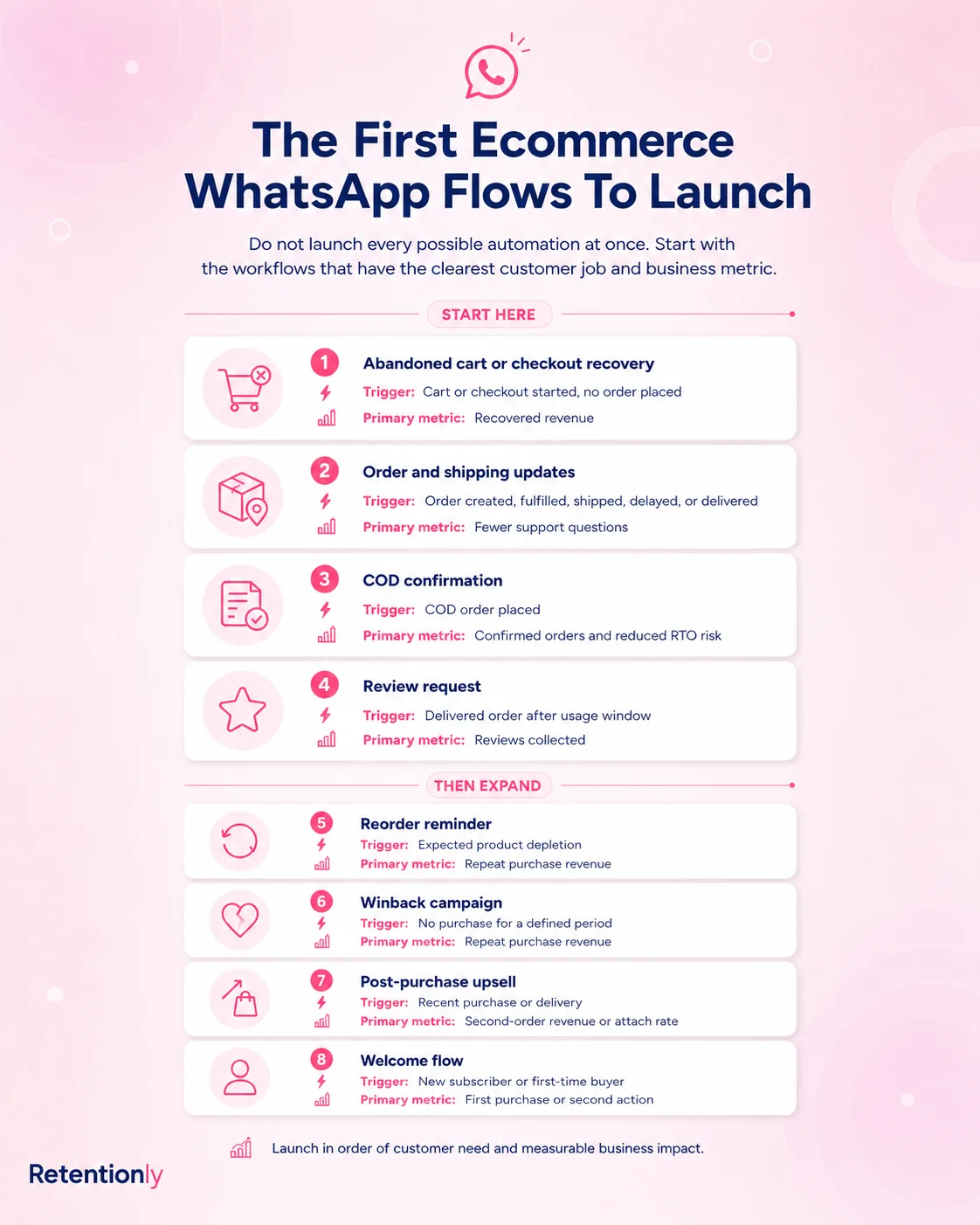
If a shopper abandons checkout, they may not return to click your WhatsApp button. If a COD order needs confirmation, the operations team should not wait for the customer to contact support. If an order ships, the customer should receive the tracking update without asking "where is my order?" If a product was delivered five days ago, the review request should not depend on the customer remembering to chat first.
That is where Shopify-triggered WhatsApp automation becomes more valuable.
| Revenue or retention job | Why passive chat is weak | Better automation |
|---|---|---|
| Abandoned checkout recovery | The shopper left before asking for help | Send a timed reminder with the saved checkout link |
| COD confirmation | Fulfillment needs a decision before shipping | Ask the customer to confirm or cancel the order |
| Order updates | Customers ask repetitive status questions | Send confirmation, shipping, and delivery messages |
| Review request | Happy customers rarely initiate review conversations | Ask after delivery when product experience is fresh |
| Winback | Inactive customers are not browsing the site | Send a segmented return message after inactivity |
| Reorder reminder | Customers may forget replenishment timing | Trigger based on product cycle and last purchase |
| Post-purchase upsell | The offer depends on what they bought | Recommend a relevant complement after purchase or delivery |
The rule is practical: use the button for customer-initiated help. Use automation for customer moments that should happen whether or not the customer opens chat.
A Shopify Chat Button Checklist
Before you install a WhatsApp chat button app or paste a widget into your theme, run through this checklist.
| Checklist item | Strong setup |
|---|---|
| Button visibility | Easy to find but not blocking checkout or add-to-cart |
| Mobile spacing | Does not cover sticky cart bars, coupon drawers, or support widgets |
| Message context | Prefilled text explains the customer's likely intent |
| Page context | Product name, collection, or page URL is included when possible |
| Reply owner | A named person or team handles the inbox |
| Business hours | Response expectations are clear |
| Support handoff | Complex cases can move to email, helpdesk, or order support |
| Sales handoff | Product questions can lead to checkout links or recommendations |
| Measurement | Clicks, chats, assisted conversions, and support outcomes are reviewed |
| Next step | High-volume questions become FAQ, chatbot, or automation opportunities |
The last point is important. A chat button can teach you what customers ask before buying. If the same question keeps appearing, fix the product page, add better shipping information, create a support answer, or automate the follow-up.
What To Measure
Do not judge the button only by whether it appears on the site. Measure whether it helps customers move forward.
Useful metrics include:
| Metric | What it tells you |
|---|---|
| Button click rate | Whether visitors notice and use the button |
| Conversation start rate | Whether clicks turn into actual WhatsApp messages |
| Response time | Whether the team can support the promise the button makes |
| Question category | Whether customers ask about product fit, delivery, returns, discounts, or order status |
| Assisted conversion | Whether chats help customers complete purchase |
| Support deflection | Whether WhatsApp reduces repetitive tickets or creates extra work |
| Automation opportunities | Which repeated questions or missed moments should become flows |
If many chats are about checkout hesitation, shipping cost, delivery timing, COD trust, or product availability, the button is revealing a revenue issue. That is useful, but the next step may be automation or better page content, not just more manual replies.
How Retentionly Fits
Retentionly is useful when WhatsApp should become more than a support entry point.
Use a simple button when your goal is manual conversation. Use Retentionly when your store wants WhatsApp flows tied to Shopify events:
abandoned checkout recovery
COD confirmation
order and shipping updates
review requests
winback campaigns
reorder reminders
post-purchase upsells
welcome flows and broadcasts
The difference is ownership. A chat button is owned by whoever answers incoming messages. A retention flow is owned by the Shopify event, timing, segment, message, stop rule, and metric.
That structure helps a founder, marketer, or ecommerce manager improve WhatsApp week by week instead of hoping shoppers click the button at the right time.
Final Recommendation
Add a WhatsApp chat button to your Shopify store if customers need an easy way to ask questions. Place it on high-intent pages, use helpful prefilled messages, test it on mobile, and make sure someone owns replies.
But do not expect the button to recover revenue by itself. It is a doorway, not the retention engine.
If you want the simple button first, use the free WhatsApp chat button generator. If you want abandoned checkout recovery, COD confirmation, order updates, reviews, winback, and repeat purchase flows, install Retentionly free on Shopify and launch the first automation around the customer moment that matters most.
Quick FAQs
What is a WhatsApp chat button for Shopify?
A WhatsApp chat button for Shopify is a storefront button or widget that opens a WhatsApp conversation with your business number. It helps shoppers ask questions from product pages, cart pages, support pages, and campaign pages.
Do I need a Shopify app to add a WhatsApp chat button?
Not always. Some merchants use a Shopify app or app embed. Others use a wa.me link, custom Liquid, or a copy-paste widget. Use the path that matches your theme, technical comfort, and tracking needs.
What should the prefilled WhatsApp message say?
Use a short message tied to the page. Product pages can say "Hi, I have a question about this product." Cart pages can say "Hi, I need help completing my order." Campaign pages can mention the offer.
Can a WhatsApp chat button recover abandoned carts?
Only indirectly. A shopper can click the button and ask for help, but the button will not automatically send a recovery message after checkout abandonment. For that, use Shopify-triggered WhatsApp automation.
When should I move from a chat button to Retentionly?
Move when WhatsApp needs to handle recurring Shopify workflows such as abandoned checkout recovery, COD confirmation, order updates, review requests, winback, reorders, and post-purchase upsells. Those workflows need triggers, timing, templates, stop rules, and measurement.