WhatsApp Business Cost Per Message: What Changes With the API
TL;DRWhatsApp Business cost per message is simple only if you are talking about the WhatsApp Business Platform. The free WhatsApp Business app does not have a normal per-message fee for manual chats, but API-backed messaging is billed differently: delivered template messages can create Meta charges, and the rate depends on message category and customer country.
For Shopify teams, that distinction matters. The real question is not "How much does one WhatsApp message cost?" It is "Which Shopify flows create billable messages, which messages are worth sending, and which software or provider fees sit on top of Meta's rate card?"
This guide explains the cost-per-message model without turning it into generic API theory. Use it to plan abandoned checkout reminders, COD confirmation, order updates, review requests, winback campaigns, and repeat purchase flows with clearer economics.
Quick Verdict
WhatsApp Business cost per message applies mainly when you use the WhatsApp Business Platform, often called the WhatsApp Business API. Businesses are charged for delivered template messages, and the amount depends on category and destination market.
Manual WhatsApp Business app conversations are different. If you are replying to customers from the app, you are not budgeting Meta template fees in the same way. If you want Shopify-triggered automations, approved outbound templates, reporting, and scale, you are moving into API-backed pricing.
For ecommerce, the practical answer is this:
| Message type | Ecommerce example | Cost planning note |
|---|---|---|
| Marketing template | Abandoned checkout reminder, winback offer, campaign broadcast | Usually the main cost line for retention and promotional flows |
| Utility template | Order confirmation, shipping update, payment update | Lower-intent operational messages, but still category and timing dependent |
| Authentication template | OTP, login code, account verification | Usually relevant to account access, not most Shopify retention flows |
| Service reply | Human or system reply after a customer messages you | Depends on the active Meta rules and timing window; verify before budgeting support at scale |
If your store wants WhatsApp to recover revenue, do not optimize only for the cheapest message. Optimize for the flow where the message cost is justified by recovered orders, reduced RTO, fewer support tickets, more reviews, or repeat purchases.
What "Cost Per Message" Means On WhatsApp Business
When people search for WhatsApp Business cost per message, they usually mix three different products into one question.
The WhatsApp Business app is the mobile app for small businesses. It is useful for a business profile, catalog, labels, quick replies, greeting messages, away messages, and manual customer conversations.
The WhatsApp Business Platform is the API-backed product used for automation, templates, integrations, and higher-volume business messaging. This is where delivered template messages create category-based message fees.
A WhatsApp provider, broad platform, or Shopify app adds the software layer. That layer can include a shared inbox, chatbots, campaign tools, AI agents, Shopify integration, analytics, templates, billing wallet, onboarding, or support.
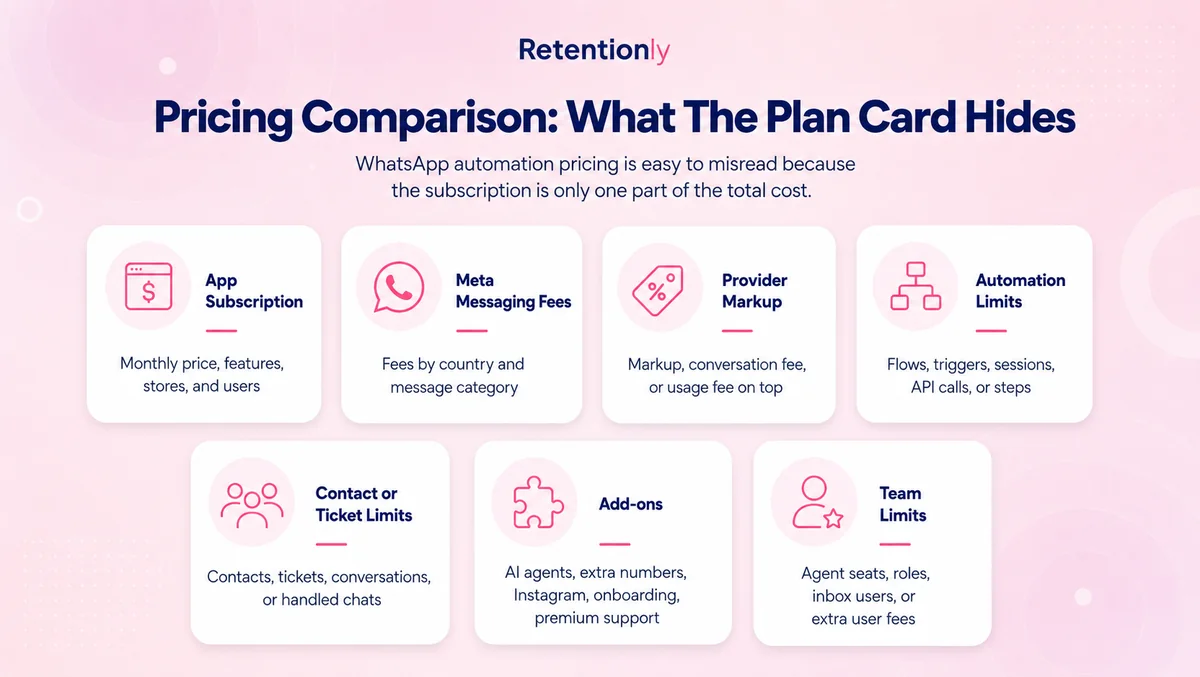
That means "cost per message" is only one part of the bill. A merchant may pay Meta message fees, provider charges, app subscription fees, add-ons, agent seats, flow limits, chatbot usage, or markup depending on the tool.
The Message Categories That Change The Price
Meta prices WhatsApp Business Platform messages by category and market. The category is not just an accounting label. It should match what the message is trying to do.
| Category | What it usually means | Shopify examples | Why it matters |
|---|---|---|---|
| Marketing | Promotional, re-engagement, or revenue-driving content | Abandoned checkout nudges, product offers, winback campaigns, reorder prompts | Often the most important category for revenue workflows |
| Utility | Transactional updates tied to a customer action | Order placed, payment update, shipping update, delivery notification | Useful for reducing support load and increasing confidence |
| Authentication | Verification and access messages | OTP, login verification, account recovery | Less common for most Shopify marketing teams |
| Service | Replies to customer-initiated conversations | Answering "Where is my order?", product questions, delivery questions | Important for support economics and handoff planning |
A common mistake is assuming every WhatsApp message costs the same. It does not. A shipping update, cart recovery message, support reply, and one-time password can sit in different pricing categories.
Another mistake is assuming the template name controls the category. Meta reviews templates by content and can classify or reclassify them. A promotional offer should not be treated as a utility message just because that would be cheaper.
Why Per-Message Thinking Can Mislead Ecommerce Teams
Cost per message is useful for budgeting, but it is a weak way to decide which WhatsApp flows to launch.
A cheap message can still be wasteful if it goes to the wrong segment. A more expensive marketing message can be profitable if it recovers a high-margin abandoned checkout. A support reply may look low-cost in isolation but become expensive if every automation creates unnecessary two-way chats.
Shopify teams should evaluate message cost by workflow:
| Workflow | Cost driver | Business outcome to compare |
|---|---|---|
| Abandoned checkout recovery | Marketing templates and sequence length | Recovered revenue and margin after discounts |
| COD confirmation | Confirmation templates and reply handling | Lower fake orders, fewer cancellations, reduced RTO |
| Order updates | Utility templates and order volume | Fewer WISMO tickets and stronger delivery confidence |
| Review requests | Request timing and delivered templates | More reviews, better product proof, repeat purchase lift |
| Winback | Segment size and offer frequency | Reorders from inactive customers |
| Reorder reminders | Purchase cycle timing and eligibility rules | Repeat purchases without broad discounting |
| Post-purchase upsell | Product affinity and message timing | Add-on revenue after recent purchase |
This is the better model: trigger, audience, message category, timing, fallback, stop rule, and metric. If a flow does not have a clear metric, reducing message cost will not fix it.
A Simple Shopify Cost Model
Use a monthly estimate before you launch or switch tools.
| Step | What to estimate | Example |
|---|---|---|
| 1. Destination markets | Where your customers' WhatsApp numbers are located | India, UAE, United States, United Kingdom |
| 2. Workflow volume | How many customers enter each flow | 8,000 abandoned checkouts, 12,000 orders, 3,000 winback candidates |
| 3. Message category | Marketing, utility, authentication, or service | Cart recovery is usually marketing; order updates are usually utility |
| 4. Delivered messages | Messages delivered, not only messages attempted | A two-step flow can double the billable delivered-message count |
| 5. Software fees | App plan, provider wallet, seats, add-ons, AI, automation limits | Subscription plus Meta fees, or provider fee plus markup |
| 6. Outcome value | Revenue, margin, support reduction, RTO reduction | Recovered revenue minus WhatsApp and discount costs |
The formula is straightforward:
| Cost layer | Formula |
|---|---|
| Meta message fees | Delivered messages x category rate for the recipient market |
| Provider or platform usage | Markup, wallet rules, per-number charges, conversation charges, or usage add-ons |
| Software subscription | Monthly app or platform plan |
| True workflow cost | Message fees + provider/software costs + discounts + setup time |
| Net impact | Incremental margin or savings minus true workflow cost |
Do this flow by flow. A blended WhatsApp average hides the reason your bill is rising.
For example, a store may send fewer winback messages than order updates, but winback can still become the bigger cost line if it uses marketing templates and targets a large inactive segment. The same store may send many order updates, but those messages may be easier to justify because they reduce "Where is my order?" tickets and build trust after purchase.
What Changes When You Move From The Business App To The API
The WhatsApp Business app is usually manual. A customer messages, your team replies, and the operating limit is team time.
The API changes the operating model. It lets your business send approved templates, automate messages from Shopify events, connect to software, handle larger volume, and measure delivery. That creates more power, but it also adds more cost layers.
| Need | Business app | API-backed setup |
|---|---|---|
| Manual customer replies | Strong fit | Supported through connected tools |
| Product catalog sharing | Strong fit for small teams | Platform-dependent |
| Abandoned checkout automation | Not native | Strong fit with Shopify integration |
| COD confirmation | Manual unless handled outside the app | Strong fit with templates and reply rules |
| Order and shipping updates | Manual | Strong fit with utility templates |
| Winback and reorder reminders | Manual and hard to scale | Strong fit with segmentation and templates |
| Revenue tracking | Not native | App or custom reporting needed |
| Cost model | Mostly team time and optional tools | Meta message fees plus software/provider costs |
That is why a Shopify store should not move to the API just because it wants WhatsApp. Move when the store needs automation, scale, template control, and reporting.
Provider Fees Can Matter As Much As Meta Fees
Meta message fees are only the base layer. Your total WhatsApp bill also depends on the provider or app you choose.
Some providers pass Meta fees through and charge a subscription or number fee. Some broad WhatsApp platforms add seats, inbox limits, AI usage, automation triggers, flow steps, prepaid wallet rules, custom flow fees, or markup. Some Shopify apps include revenue workflows in the app subscription and still pass Meta fees separately.
The important question is not whether a platform has a low advertised price. Ask what happens when your store adds more workflows.
| Pricing question | Why Shopify teams should ask it |
|---|---|
| Are Meta fees passed through or marked up? | Markup compounds as message volume grows |
| Are automations included? | Paying extra per flow can change the cost of expanding retention |
| Are seats or agents extra? | Support-heavy teams may outgrow low entry plans |
| Are broadcasts, campaigns, or segments limited? | Winback and promotional programs can hit plan limits |
| Is Shopify revenue reporting included? | Cost decisions need revenue attribution, not only delivery volume |
| Are AI replies charged separately? | AI can change support economics quickly |
For pricing research, compare the complete operating model: Meta fees, provider fees, app subscription, add-ons, implementation time, and workflow fit.
Where Retentionly Fits
Retentionly is built for Shopify and D2C teams that want WhatsApp to work as a retention channel, not as a broad messaging project.
The goal is to launch practical ecommerce flows: abandoned checkout recovery, COD confirmation, order updates, reviews, winback, reorder reminders, post-purchase upsells, and lifecycle campaigns.
Retentionly pricing is designed around that job:
| Plan | Price | Best for |
|---|---|---|
| Basic | $24/month | Core automations and early WhatsApp retention workflows |
| Growth | $49/month | Broadcasts and advanced automations, including winback workflows |
| Scale | $99/month | CRM features and multi-agent chat |
Meta message fees still apply when WhatsApp Business Platform messages are delivered. The useful difference is that Retentionly connects directly to Meta, does not add a markup on Meta fees, does not charge per-chat fees, and does not charge extra for added automations.
That matters when your store moves from one test to a retention program. You can start with abandoned checkout recovery, then add COD confirmation, order updates, reviews, winback, and repeat purchase flows without treating every new automation as a separate software purchase.
How To Lower Cost Without Weakening The Channel
The best WhatsApp teams do not simply send fewer messages. They send fewer low-intent messages and protect the workflows that create revenue or reduce support.
Start with suppression rules. Stop abandoned checkout messages after purchase. Stop winback messages after a customer orders. Avoid messaging customers who recently opted out, recently received another campaign, or are unlikely to have enough margin for the offer.
Use timing carefully. A cart recovery message sent too early can feel pushy. A reorder reminder sent too late may miss the buying window. A review request sent before delivery is not useful.
Keep templates category-appropriate. Transactional order updates should stay transactional. Promotional content belongs in marketing. Trying to force a sales message into a utility template creates compliance risk and can lead to reclassification.
Measure profit, not only delivery cost. A campaign that produces many cheap clicks but weak repeat revenue may be worse than a smaller segment with higher margin.
When A Broader WhatsApp Platform May Still Make Sense
A broad WhatsApp platform can be the better fit when WhatsApp is part of a larger support, sales, catalog, inbox, and CRM operation.
Choose that route when your team needs shared inbox workflows across many agents, advanced chatbot logic, multiple channels, sales pipelines, catalog selling, custom integrations, or a larger customer operations layer.
Just compare the full pricing structure before deciding. A broader platform can be valuable, but it may include product surface and add-ons that a Shopify retention team does not need yet.
If the job is mainly Shopify-triggered revenue automation, a focused app can be cleaner. If the job is full customer operations on WhatsApp, a broader platform may justify the additional complexity.
Final Recommendation
Treat WhatsApp Business cost per message as a budgeting input, not the whole decision.
First, decide which Shopify flows you want to run. Then map each flow to its likely category, estimated delivered messages, suppression rules, and expected revenue or savings. After that, compare software tools by whether they make those flows easy to launch and measure.
If you only need manual conversations, the WhatsApp Business app may be enough. If you need developer control, compare API providers by current Meta rate handling, support, throughput, and setup work. If you want WhatsApp to recover revenue from Shopify events, use a Shopify-first app built for retention workflows.
Retentionly is built for that path. Install Retentionly free on Shopify to launch WhatsApp retention automations with direct Meta fee handling and clear workflow ownership.
Quick FAQs
Does WhatsApp Business charge per message?
The WhatsApp Business app is available for manual business messaging without a normal Meta per-message template fee. The WhatsApp Business Platform/API uses message-based pricing for delivered business template messages, with rates based on category and recipient market.
What is the WhatsApp Business API cost per message?
It depends on the destination country and message category. Marketing, utility, authentication, and service messages can be treated differently under Meta's pricing rules, so always check the current Meta rate card for the market you send to.
Are abandoned cart WhatsApp messages marketing or utility?
Abandoned checkout and cart recovery reminders are usually marketing because they are designed to drive a purchase. That makes segmentation, timing, suppression, and recovered revenue especially important.
Why do different WhatsApp providers show different costs?
Providers package WhatsApp differently. Some pass through Meta fees with a subscription. Others add markup, wallet rules, seats, add-ons, flow limits, AI charges, or custom automation fees. Compare total workflow cost, not only the first listed plan.
What is the best way for Shopify stores to estimate WhatsApp message cost?
Estimate by workflow. For each flow, count eligible customers, likely delivered messages, message category, destination markets, software fees, and expected margin or savings. That gives a more useful answer than one blended cost per message.