WhatsApp Business API Software: Features Merchants Actually Need
TL;DRWhatsApp Business API software is the layer that turns WhatsApp infrastructure into usable business workflows. The API can deliver approved messages, receive replies, and connect systems. The software decides whether your team can actually launch abandoned checkout recovery, COD confirmation, order updates, review requests, winback campaigns, broadcasts, and support handoff without building everything manually.
For Shopify and D2C teams, that distinction matters. The best software is not always the platform with the longest feature list. It is the product that owns the workflows your store will run every week.
Quick Verdict
Choose WhatsApp Business API software by operating job, not only by API access.
| If your team needs... | Better-fit software category |
|---|---|
| Direct API access, custom routing, developer control, or agency implementation | API provider or BSP |
| Shared inbox, campaigns, chatbot builder, sales workflows, and broad WhatsApp operations | WhatsApp platform |
| Omnichannel support across WhatsApp, email, Instagram, Facebook, and live chat | Ecommerce helpdesk or CRM |
| Shopify-triggered retention flows and revenue reporting | Shopify WhatsApp automation app |
| Manual one-to-one conversations | WhatsApp Business app |
Most merchants searching for WhatsApp Business API software do not want to manage API endpoints. They want reliable WhatsApp messages tied to real customer moments. Start the buying process there.
What The Software Layer Should Own
The WhatsApp Business Platform gives businesses scalable messaging through templates, customer-service windows, webhooks, and approved phone numbers. Meta charges for delivered business messages based on the recipient market and message category, with categories such as marketing, utility, authentication, and service.
That platform layer is important, but it does not define your ecommerce workflow. A useful software product should help answer practical questions:
| Software responsibility | What to check | Why it matters |
|---|---|---|
| Setup | WABA, phone number, business verification, template submission, permissions | Poor setup blocks every campaign and automation |
| Template operations | Template category, approval status, edits, localization, examples | Revenue flows depend on approved reusable messages |
| Customer data | Shopify events, order history, segments, tags, products, opt-ins | Messages need store context to stay relevant |
| Automation builder | Trigger, delay, audience, message, stop rules, fallback | This is where WhatsApp becomes a retention channel |
| Campaign tools | Broadcasts, segmentation, scheduling, suppression, opt-outs | Useful for launches and offers when handled carefully |
| Reply handoff | Inbox, assignment, labels, saved replies, customer context | Automated messages create real conversations |
| Reporting | Delivered messages, replies, revenue, failed sends, opt-outs, conversion | The team needs to know which flows are worth scaling |
| Cost control | Meta fees, software plan, markup, seats, contacts, AI, add-ons | WhatsApp cost grows with volume and feature scope |
If a product only says it can "send WhatsApp messages," keep digging. The real question is whether it can own the work around the message.
The Main Types Of WhatsApp Business API Software
Different vendors sit at different layers of the stack. Comparing them as if they do the same job creates confusion.
| Software type | What it usually includes | Strong fit | Main tradeoff |
|---|---|---|---|
| API provider or BSP | API access, sender setup, hosting, delivery, billing, webhooks | Developer-led teams and custom systems | Your team still builds ecommerce flows |
| Broad WhatsApp platform | Inbox, campaigns, contact management, chatbots, automation, analytics | Teams running WhatsApp across sales, support, marketing, and operations | More setup surface if Shopify retention is the only job |
| Ecommerce helpdesk or CRM | Shared support workspace, routing, customer context, multiple channels, AI assist | Support-heavy brands that need WhatsApp inside a helpdesk | Retention automation may be one feature among many |
| Shopify automation app | Shopify triggers, lifecycle automations, templates, revenue reporting, reply handoff | Founders, marketers, ecommerce managers, and retention teams | Not meant to replace every broad support or developer API use case |
Wati, Zoko, Interakt, Dondy, and DelightChat all show how broad the category can be: Shopify app listings and product pages commonly mention abandoned cart recovery, campaigns, catalogs, inboxes, COD confirmation, order notifications, chatbots, AI, and support operations. That does not mean every store needs all of those features on day one.
Features Merchants Should Compare First
The cleanest comparison starts with the first five workflows your store wants live.
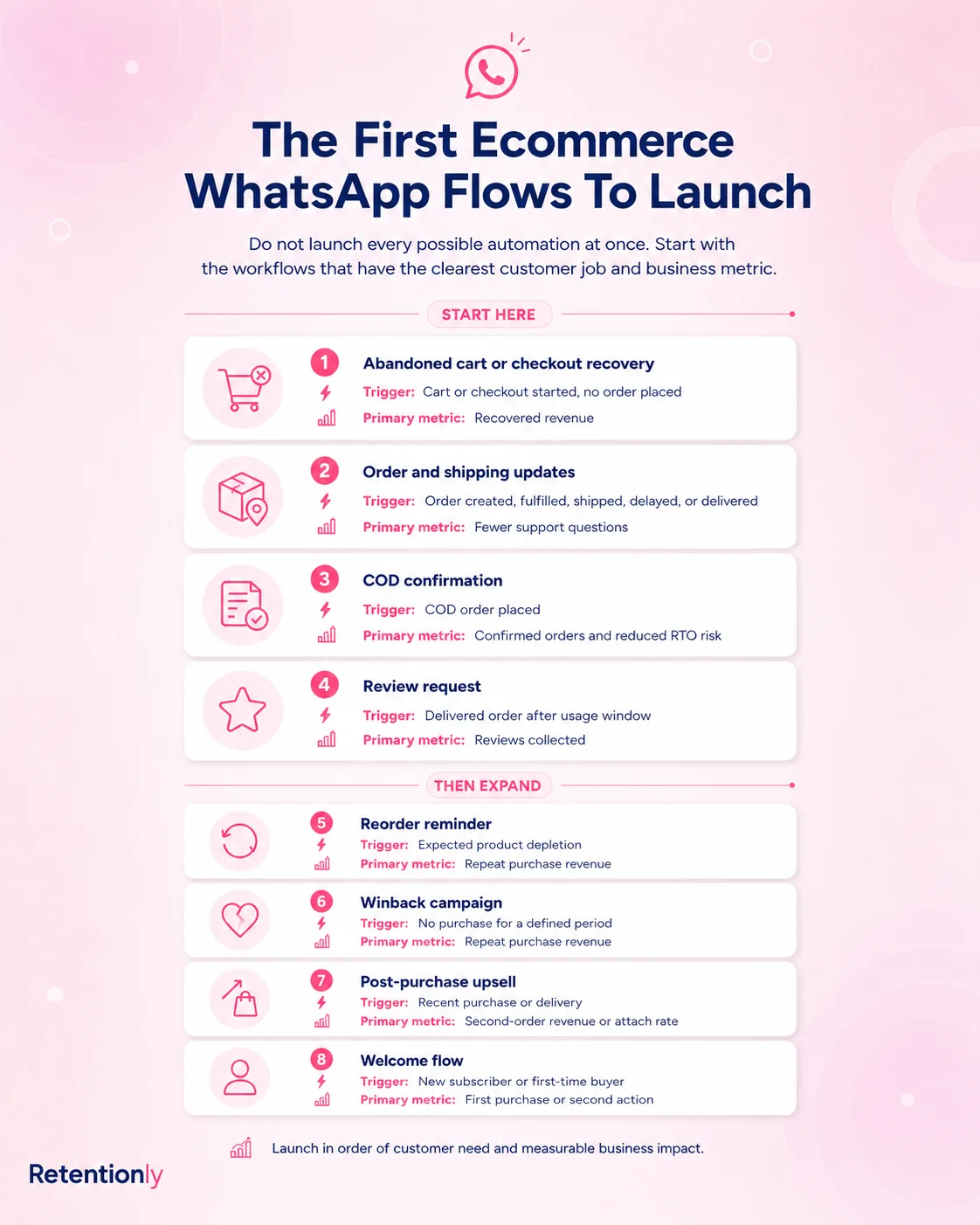
| Workflow | What the software must handle | Metric to watch |
|---|---|---|
| Abandoned checkout | Checkout trigger, cart link, delay, reminder copy, stop on purchase | Recovered revenue and conversion rate |
| COD confirmation | COD order trigger, confirm or cancel reply, fulfillment hold, no-response path | Confirmed orders, cancellations, RTO reduction |
| Order updates | Order confirmation, fulfillment, shipping, delivery, delay messages | Support tickets avoided and delivery confidence |
| Review requests | Delivery-based timing, review-app handoff, suppression, reminder logic | Review rate and review quality |
| Winback | Last purchase segment, offer logic, frequency cap, opt-out handling | Repeat purchase revenue |
| Reorder reminders | Product purchase cycle, timing rules, replenishment segment | Repeat order rate |
| Post-purchase upsell | Purchased product, complementary offer, timing, margin check | Upsell conversion and average order value |
| Broadcast campaigns | Segment, consent, campaign goal, schedule, reply owner | Revenue, replies, opt-outs, and unsubscribes |
These workflows reveal the product fit faster than a generic feature checklist. A platform can have a chatbot builder, shared inbox, AI agent, catalog sync, and broadcast tool, but still be the wrong first choice if your team mainly needs abandoned checkout, COD, reviews, and repeat purchases to work cleanly inside Shopify.
Pricing: Compare The Full Model
WhatsApp Business API software pricing is rarely one number. Budgeting should separate the layers.
| Cost layer | What to verify |
|---|---|
| Meta message fees | Delivered-message pricing by market and category |
| Software subscription | Monthly or annual plan, included features, and plan limits |
| Provider markup | Whether Meta fees are passed through or marked up |
| Seats and inbox users | Agent limits, extra user costs, and support workflow charges |
| Contacts or conversations | Contact tiers, chat limits, ticket limits, or fair-use rules |
| Automation limits | Flow limits, step limits, campaign credits, or paid workflow add-ons |
| AI and chatbot add-ons | AI replies, AI agents, training, chatbot builders, or premium automation |
| Implementation effort | Setup, migration, templates, testing, and team training |
This is where software categories diverge. A direct API provider may look inexpensive but require implementation work. A broad WhatsApp platform may include many capabilities but add cost through seats, add-ons, campaigns, AI, or support usage. A Shopify automation app may be easier to evaluate because the monthly software fee maps directly to store workflows.
Retentionly is priced as Shopify WhatsApp automation software:
| Retentionly plan | Price | Best for |
|---|---|---|
| Basic | $24/month | Basic automations and core features |
| Growth | $49/month | Broadcasts and advanced automations, including winback workflows |
| Scale | $99/month | CRM features and multi-agent chat |
Retentionly does not add a markup on Meta messaging fees, does not charge extra for added automations, and does not charge per chat. That makes the economics easier to understand as a store moves from one test flow to a full retention program.
When Broad WhatsApp Software Is Better
A broad WhatsApp platform can be the right choice when WhatsApp is a company-wide operating layer.
Choose that route when multiple teams need the same inbox, sales agents use catalogs every day, support needs routing and assignments, chatbots handle many pre-sale questions, or WhatsApp must connect with several non-Shopify systems.
In that case, the extra feature surface can be useful. A shared inbox, chatbot builder, catalog sync, AI assist, and campaign manager may be worth the setup effort because WhatsApp is not only a retention channel. It is part of the way the company sells and supports customers.
The buyer should still compare pricing carefully. More software surface can mean more limits, add-ons, team seats, usage tiers, and implementation decisions.
When Retentionly Is The Better Fit
Retentionly is the better fit when the goal is Shopify WhatsApp retention automation.
That means the team wants to launch practical flows tied to store events:
Recover abandoned checkouts.
Confirm COD orders before fulfillment.
Send order and shipping updates.
Request reviews after delivery.
Bring back lapsed customers.
Send reorder reminders.
Trigger post-purchase upsells.
Run segmented broadcasts without replacing lifecycle automation.
The advantage is focus. Retentionly is not trying to be a raw API provider or a full omnichannel helpdesk. It is built around the Shopify customer lifecycle, where the software should already understand the trigger, timing, message, fallback, and metric.
That is useful for founders, marketers, ecommerce managers, and retention teams that need revenue workflows live without turning WhatsApp into a custom technical project.
How To Evaluate A Shortlist
Once you have a shortlist, run each option through the same scenario instead of comparing abstract feature pages.
| Evaluation question | Strong answer looks like |
|---|---|
| Can we launch abandoned checkout recovery without custom development? | The tool has Shopify checkout triggers, cart links, timing rules, stop-on-purchase logic, and recovery reporting |
| Can we handle replies from automated messages? | The tool shows where replies go, who owns them, and what context the team sees |
| Can we control message frequency? | The tool supports segments, suppression, opt-outs, and sensible campaign rules |
| Can we see revenue impact? | Reporting connects sends and replies to recovered orders or repeat purchases |
| Can pricing scale without surprises? | The vendor explains Meta fees, software fees, markups, seats, contacts, add-ons, and limits |
| Can the team maintain it weekly? | The workflow owner can edit templates, check performance, and improve flows without engineering help |
The final question is the most important. If the people responsible for retention cannot maintain the software, the tool will become shelfware even if the API connection works.
Common Mistakes To Avoid
The first mistake is buying API access when the real need is workflow software. API access is valuable, but it does not automatically create cart recovery, COD confirmation, review collection, or winback flows.
The second mistake is buying the broadest platform because it feels safer. More features help when your team needs them. They slow you down when the first job is a small set of Shopify retention automations.
The third mistake is treating WhatsApp as a bulk sending channel. WhatsApp performs best when messages are tied to customer intent: an abandoned checkout, recent order, delivery event, product-use cycle, or lapsed customer segment.
The fourth mistake is ignoring replies. A recovery message can create a product question. A COD confirmation can create an address correction. A review request can create support feedback. Good software makes reply ownership obvious.
The fifth mistake is comparing only monthly plan prices. Meta fees, provider markup, seats, contacts, AI add-ons, automation limits, and implementation time all change the real cost.
Final Recommendation
If your team has developers and needs custom WhatsApp infrastructure, start with an API provider or BSP. If WhatsApp is central to sales, support, catalogs, and multi-team operations, compare broad WhatsApp platforms and helpdesks.
If your reason for buying WhatsApp Business API software is Shopify retention revenue, start with the workflows. The best first tests are abandoned checkout, COD confirmation, order updates, review requests, winback, reorder reminders, and post-purchase upsells.
Retentionly is built for that job: Shopify-triggered WhatsApp automations, clear retention workflows, reply handoff, and pricing that does not add markup on Meta messaging fees.
Quick FAQs
What is WhatsApp Business API software?
WhatsApp Business API software is the product layer that helps a business use the WhatsApp Business Platform. It can include setup, templates, campaigns, inboxes, automations, reporting, Shopify integration, and cost controls.
Do Shopify stores need a WhatsApp Business API provider or an app?
It depends on ownership. Developer-led teams may choose an API provider. Shopify teams that want abandoned checkout recovery, COD confirmation, order updates, reviews, winback, and repeat purchase flows usually benefit from an app-led automation layer.
What features matter most for ecommerce?
Prioritize Shopify triggers, approved templates, automation timing, segmentation, opt-out handling, reply handoff, revenue reporting, and transparent pricing. Chatbots, catalogs, AI, and shared inboxes can matter later depending on the team.
Is WhatsApp Business API software the same as the WhatsApp Business app?
No. The WhatsApp Business app is mainly for manual conversations. WhatsApp Business API software helps businesses send scalable template messages, automate workflows, connect store events, manage replies, and measure performance.
When should a merchant choose Retentionly?
Choose Retentionly when the main goal is Shopify WhatsApp retention automation rather than raw API access or broad omnichannel support. It is built around lifecycle flows such as cart recovery, COD confirmation, order updates, reviews, winback, upsells, and reorders.