WhatsApp Business API Shopify Guide for Store Owners
TL;DRThe WhatsApp Business API can sound like a technical project. For a Shopify store, the practical question is simpler: can WhatsApp send the right message when a customer abandons checkout, places an order, needs a delivery update, or is ready to buy again?
That is the useful way to think about the API. It is not the goal by itself. It is the infrastructure that lets a store send approved, automated, and trackable WhatsApp messages at scale.
This guide explains what Shopify merchants need to know before choosing an app, a WhatsApp provider, or a custom API setup.
What WhatsApp Business API Means For Shopify
WhatsApp Business API is the business messaging infrastructure behind scalable WhatsApp automation. Meta now calls the product the WhatsApp Business Platform, but many merchants and vendors still use the older "WhatsApp Business API" wording.
For Shopify teams, the API matters because it can support:
Automated messages triggered by Shopify events.
Approved message templates for business-initiated communication.
Order, checkout, customer, and fulfillment variables inside messages.
Two-way customer replies after an automation starts a conversation.
Higher-volume messaging than a manual WhatsApp Business App workflow.
Reporting around delivery, replies, opt-outs, revenue, and support impact.
The API is different from simply adding a WhatsApp chat button to your storefront. A chat button waits for the shopper to start a conversation. An API-backed automation can start from a Shopify event such as checkout abandonment, order creation, fulfillment, delivery, or customer inactivity.
WhatsApp Business App Vs WhatsApp Business API Vs Shopify App
The naming gets confusing because merchants hear three different things.
| Option | What it is | Best for | Main limitation |
|---|---|---|---|
| WhatsApp Business App | The free app used manually from a phone or desktop | Small teams handling manual chats | Not built for Shopify event automation |
| WhatsApp Business API or Platform | Meta's scalable business messaging infrastructure | Approved templates, automation, integrations, and high-volume messaging | Needs setup through a platform, app, provider, or developer |
| Shopify WhatsApp app | A Shopify app that connects store events to WhatsApp through the API or provider stack | Merchants who want faster launch and ecommerce workflows | Less custom than building directly on APIs |
Most Shopify stores do not need to start by hiring developers to build directly on the API. They need a reliable way to connect Shopify events to WhatsApp messages, handle templates, manage replies, and measure outcomes.
That is why an app-based path is usually the cleaner first step. You still get the benefit of API-backed messaging, but you do not have to own every technical detail from day one.
When A Shopify Store Actually Needs API-Backed WhatsApp
A store needs API-backed WhatsApp when WhatsApp becomes more than manual support.
You should evaluate an API-backed setup if you want to:
Recover abandoned checkouts automatically.
Confirm COD orders before fulfillment.
Send order, shipping, and delivery updates.
Ask for reviews after delivery.
Run winback, reorder, and post-purchase upsell flows.
Send approved campaigns to opted-in customers.
Let customers reply and route those replies to a team inbox.
Measure WhatsApp revenue and support impact by flow.
You may not need it yet if you only want a basic "Chat with us on WhatsApp" button and your team is comfortable replying manually.
The dividing line is automation. Once messages should be triggered by Shopify data, templates, timing, segments, and stop rules matter.
How The API Connects To Shopify Workflows
The most useful Shopify WhatsApp setup has six moving parts.
| Component | Shopify example | Why it matters |
|---|---|---|
| Trigger | Checkout abandoned, order placed, order fulfilled, order delivered | Starts the right flow from real store behavior |
| Audience | Opted-in customers with valid phone numbers | Keeps messaging compliant and relevant |
| Template | Approved WhatsApp message with variables | Allows business-initiated messages to send reliably |
| Timing | 45 minutes after checkout abandonment, 2 days after delivery | Controls customer experience and conversion |
| Stop rule | Stop after purchase, cancellation, opt-out, or reply | Prevents over-messaging |
| Metric | Recovered revenue, confirmation rate, support reduction, repeat purchase | Shows whether the flow is worth scaling |
If a vendor talks only about "API access" but cannot explain these workflow pieces, the setup may become technical without becoming useful.
For a broader automation sequence, read the Shopify WhatsApp Automation Guide. For setup-path detail, read the Shopify WhatsApp Integration Guide.
Message Categories Store Owners Should Understand
WhatsApp Business Platform pricing and template rules depend on message category. Shopify merchants do not need to memorize every rate card, but they do need to understand the operational difference.
| Category | Shopify examples | Practical note |
|---|---|---|
| Marketing | Abandoned checkout reminders, winback offers, product drops, promotional broadcasts | Use for revenue campaigns and reminders that include promotion or retargeting |
| Utility | Order confirmation, shipping update, delivery update, payment reminder tied to a customer action | Keep these non-promotional and specific to the customer's transaction |
| Authentication | One-time passcodes and account verification | Usually relevant for login, account security, or verification workflows |
| Service | Replies inside the customer service window after a user messages the business | Useful for support and follow-up conversations |
This matters because a store can accidentally make a message more expensive or harder to approve by mixing purposes. For example, an order update with a discount code may be treated differently from a clean delivery notification.
The safer approach is to design templates by flow. Keep order and delivery updates transactional. Keep promotions in marketing templates. Give every template a clear job.
What WhatsApp API Costs Include
There are usually two or three cost layers.
| Cost layer | What to check |
|---|---|
| App or platform subscription | Monthly plan, included features, automation limits, inbox seats, and support |
| Meta message fees | Delivered-message charges based on country and message category |
| Provider markup or usage fees | Whether the provider marks up Meta fees, charges per chat, adds platform fees, or bills add-ons |
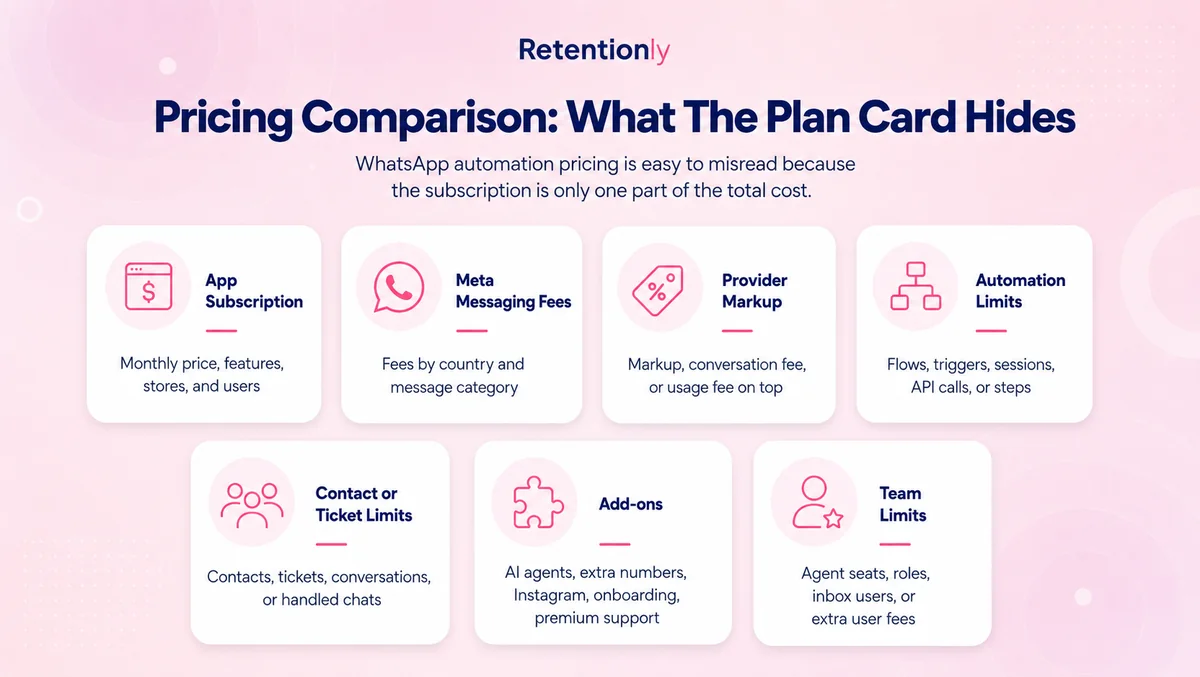
Do not estimate WhatsApp cost from total message volume alone. Estimate it by flow.
An abandoned checkout sequence, a shipping update, and a support reply do different jobs and may fall into different categories. A store sending mostly utility updates should think differently from a store sending frequent promotional campaigns.
The buying question is not "What is the cheapest WhatsApp API?" It is "Which setup gives us clear economics for the flows we will actually run?"
Templates Shopify Stores Should Prepare First
The first templates should match the first workflows. Do not create a large template library before you know what you will launch.
| Template | Flow | Useful variables |
|---|---|---|
| Abandoned checkout reminder | Recover checkout sessions | First name, product name, checkout link |
| COD confirmation | Confirm or cancel cash-on-delivery orders | First name, order number, order value |
| Order confirmation | Reassure customers after purchase | Order number, store name, support link |
| Shipping update | Reduce "where is my order?" tickets | Tracking link, courier, order number |
| Delivery follow-up | Start review, support, or next-step flow | Product name, delivery date, support link |
| Review request | Collect social proof after delivery | Product name, review link |
| Winback | Bring back inactive customers | Collection link, offer code, last purchase context |
| Reorder reminder | Drive repeat purchase for consumables | Product name, reorder link, expected refill timing |
Good templates are specific, short, and hard to misunderstand. They tell the customer why they are receiving the message and what action to take next.
Avoid stuffing every possible variable into the copy. If Shopify data is missing, the message should still make sense or the automation should not send.
Setup Paths For Shopify Merchants
There are three realistic paths.
| Setup path | Best when | What you own |
|---|---|---|
| Shopify WhatsApp app | You want retention flows live quickly | Choosing flows, approving templates, measuring results |
| WhatsApp platform or BSP | You want broader campaign, inbox, bot, or support operations | Platform configuration, template management, billing review |
| Custom API build | You have developers and unusual business rules | Webhooks, retries, opt-outs, attribution, billing, monitoring, and maintenance |
The custom API path can be powerful, but it is rarely the fastest way to prove WhatsApp revenue for a normal Shopify store.
Start with the outcome. If the outcome is abandoned checkout recovery, COD confirmation, order updates, reviews, winback, reorders, or post-purchase upsells, a Shopify-first app will usually get you to a measurable result faster.
If your WhatsApp program later needs custom routing, multiple systems, custom approval steps, or a deeper data stack, you can revisit direct API work with better evidence.
A Launch Checklist For WhatsApp API On Shopify
Use this checklist before sending your first automated messages.
Choose the first business outcome.
Confirm the WhatsApp sender and business profile.
Verify where customer WhatsApp consent is collected.
Connect Shopify events and confirm the needed fields sync.
Write one or two templates for the first flow.
Check the template category and remove mixed-purpose copy.
Define timing, audience, fallback, and stop rules.
Test with internal orders and test customers.
Assign reply ownership before launch.
Track revenue, replies, opt-outs, blocks, and support impact.
That order keeps the launch practical. The store is not "implementing WhatsApp API" in the abstract. It is launching one workflow with a clear commercial reason.
Questions To Ask Before Choosing A Provider
Use these questions when comparing WhatsApp API providers, Shopify apps, or broader WhatsApp platforms.
| Question | Why it matters |
|---|---|
| Does it connect directly to Shopify events? | Store data should trigger messages without manual export work |
| Which flows are built in? | Abandoned checkout, COD, order updates, reviews, winback, reorder, and upsell are different jobs |
| How are templates created and approved? | Template friction can delay launches |
| Are Meta fees passed through or marked up? | Message economics matter as volume grows |
| Are there per-chat, per-agent, or automation add-on fees? | A low headline plan can become harder to forecast |
| Can customers reply and reach a real team? | Automations often create conversations |
| What stops messages after purchase or opt-out? | Stop rules protect customer experience |
| Can reporting tie back to Shopify revenue? | Delivery data alone is not enough |
The best provider is not always the one with the longest feature list. It is the one that makes your first few Shopify workflows easy to launch, operate, and improve.
Common Mistakes To Avoid
The first mistake is treating API access as the finish line. API access only matters if it turns Shopify behavior into useful customer messages.
The second mistake is starting with broad promotional broadcasts. Broadcasts can work, but abandoned checkout, COD confirmation, and order updates are usually better first tests because the customer context is clearer.
The third mistake is mixing utility and promotional copy. If the message is an order update, keep it an order update. If it is a promotion, use a marketing template and measure it as a campaign.
The fourth mistake is ignoring replies. WhatsApp is conversational. If an automation invites a reply and nobody owns the thread, the workflow can damage trust.
The fifth mistake is comparing vendors only by monthly plan price. Compare subscription cost, Meta fees, markups, add-ons, seats, automation limits, reporting, and setup effort.
Where Retentionly Fits
Retentionly is built for Shopify and D2C teams that want WhatsApp automation tied to retention revenue, not a generic API project.
Use Retentionly when the first goal is to launch flows such as:
Abandoned checkout recovery.
COD confirmation.
Order, shipping, and delivery updates.
Review requests.
Winback campaigns.
Reorder reminders.
Post-purchase upsells.
Retentionly keeps the operating model focused: Shopify events, WhatsApp templates, practical timing, customer replies, and revenue-oriented reporting.
It also keeps pricing easier to reason about. Retentionly does not add a markup on Meta messaging fees, does not charge per chat, and does not charge extra for adding more automations.
Final Recommendation
If you are a Shopify store owner evaluating WhatsApp Business API, do not start with the API vendor question. Start with the first workflow.
If the first workflow is abandoned checkout recovery, COD confirmation, order updates, reviews, winback, reorders, or post-purchase upsells, you probably want an app-based setup before a custom API build.
If your team has unusual routing, deep system requirements, or in-house developers who will maintain the full stack, a direct API build can make sense later.
The practical path is to launch one measurable flow, learn from the economics, then expand.
Install Retentionly free on Shopify to connect WhatsApp with Shopify retention automations without turning the WhatsApp Business API into a custom infrastructure project.