WhatsApp Business API for Marketing: Campaigns, Opt-ins, and Templates
TL;DRWhatsApp Business API for marketing works best when the API is treated as the delivery layer, not the strategy. The real work is deciding who should receive a message, why they expect it, which template category fits, when the campaign should stop, and what Shopify outcome proves it worked.
That distinction matters because WhatsApp is personal. A store can use the API to send approved marketing templates, run lifecycle campaigns, follow up after click-to-WhatsApp ads, and re-engage lapsed customers. But if the team uses it like a bulk sender, opt-outs and poor quality signals can undo the channel quickly.
For Shopify and D2C teams, the better question is not "Can we send marketing messages on WhatsApp?" It is "Which customer moments deserve WhatsApp, and how do we keep each message useful enough to earn the next opt-in?"
What The API Changes For Marketing
The WhatsApp Business app is useful for manual conversations, a basic business profile, quick replies, and small-team support. The WhatsApp Business Platform, often called the WhatsApp Business API, is built for API-backed messaging, approved templates, integrations, automation, and campaign scale.
For marketing, the API gives a store more control over four things:
| Marketing layer | What the API helps with | What the API does not solve by itself |
|---|---|---|
| Audience | Sending to opted-in contacts and synced customer segments | Whether the audience actually expects that message |
| Templates | Using approved business-initiated message formats | Writing relevant copy that avoids rejection, opt-outs, or spam complaints |
| Automation | Triggering messages from events, time delays, or segments | Choosing the right flow logic, frequency, and exit rules |
| Measurement | Tracking delivery, replies, clicks, and orders | Knowing whether the campaign improved margin and customer experience |
The API makes marketing possible at scale. It does not remove the need for permission, relevance, and operational discipline.
The Campaign Architecture Shopify Teams Need
Before writing any WhatsApp marketing copy, define the campaign as a system.
| Decision | Good answer | Weak answer |
|---|---|---|
| Opt-in source | Checkout checkbox, signup popup, loyalty form, chat opt-in, or ad conversation with clear WhatsApp consent | "They gave us a phone number once" |
| Audience | A specific Shopify segment tied to behavior or purchase history | Every customer in the database |
| Message category | Marketing when the message promotes, re-engages, recommends, or asks for a new action | Calling a promotional message "utility" because it mentions an order |
| Send model | One-time campaign, triggered lifecycle automation, or post-purchase sequence | A manual blast whenever sales are slow |
| Timing | Based on checkout intent, delivery date, purchase cycle, stock status, or customer inactivity | Same-day repeat messages without context |
| Stop rule | Purchase, opt-out, reply, recent message, suppressing active complaints, or segment exit | No stop rule after the message sends |
| Reply owner | Inbox, automation, support agent, or sales owner | Nobody watches replies |
| Metric | Recovered orders, repeat purchases, review completions, reorder rate, or campaign revenue | Only delivered messages |
This is where many broad API guides stay too vague. They explain access, templates, and campaigns, but the merchant still has to decide how WhatsApp fits the store's lifecycle. Retentionly's view is simpler: start with customer behavior, then choose the WhatsApp message.
Marketing, Utility, And Service Messages Are Not The Same
WhatsApp separates business messaging into categories. For a Shopify marketer, the practical distinction is:
| Category | Use it for | Ecommerce examples |
|---|---|---|
| Marketing | Promotions, recommendations, abandoned cart nudges, re-engagement, loyalty offers, app or product actions | Price-drop alert, winback offer, product recommendation, early-access sale, abandoned cart reminder |
| Utility | Transactional updates tied to a customer action or request | Order confirmation, shipping update, delivery update, payment reminder, post-purchase feedback request |
| Service | Replies inside the customer-service window after the customer messages first | Product questions, size help, order questions, support handoff, assisted buying |
If a message contains an offer, discount, recommendation, upsell, or reactivation angle, assume it is marketing unless your provider and current Meta review say otherwise. Do not try to hide marketing copy inside a utility template. It can delay approval, create category problems, and make reporting harder.
For a deeper Shopify-specific template foundation, read WhatsApp Business API Templates Shopify Stores Should Start With.
Start With Opt-ins, Not Contact Lists
The first marketing asset is not the template. It is the opt-in.
A good opt-in tells customers what kind of WhatsApp messages they are agreeing to receive. A checkout opt-in for order updates is not the same as a loyalty opt-in for offers. A back-in-stock opt-in is not the same as permission for weekly promotional broadcasts.
Strong ecommerce opt-in sources include:
Checkout or customer-account consent for WhatsApp order and retention messages.
Storefront popups that promise a specific benefit, such as price-drop alerts or back-in-stock updates.
Loyalty or VIP signup forms that explain early access, reward reminders, and exclusive offers.
Click-to-WhatsApp ads where the first conversation sets the expectation for future follow-up.
Post-purchase prompts that invite customers to receive reorder reminders or product-use tips.
Keep the consent trail close to the campaign logic. Your team should know where the opt-in came from, what promise was made, when the customer subscribed, and how the customer can opt out.
For list-building specifics, use Collect Phone Numbers for WhatsApp Shopify Guide.
Campaigns That Fit The WhatsApp Business API
The best WhatsApp marketing campaigns are not generic newsletters. They are tied to customer intent, store events, or lifecycle timing.
| Campaign | Trigger or segment | Message angle | Stop rule | Metric |
|---|---|---|---|---|
| Abandoned cart | Checkout started but no order | Help the shopper finish the order, optionally with an offer | Order placed, opt-out, or support reply | Recovered revenue and conversion rate |
| Price drop | Customer opted into a product or collection alert | The watched item is now lower priced | Purchase, product unavailable, or campaign expiry | Orders from alert clicks |
| Back in stock | Customer requested a restock alert | The product is available again | Purchase, stock sold out, or recent send | Restock conversion rate |
| Winback | No purchase for a defined period | Relevant reason to return, not a random coupon | Purchase, reply, opt-out, or suppression window | Repeat purchase rate |
| Reorder reminder | Product replenishment window is approaching | Reminder to restock a consumable or repeat item | Reorder, skip, opt-out, or invalid product timing | Reorder revenue |
| Post-purchase upsell | Recent order matches a complementary product rule | Useful add-on or bundle after purchase | Upsell purchase, return/refund risk, or support issue | Incremental order value |
| Loyalty or VIP campaign | Loyalty member, VIP tier, or high-LTV segment | Early access, reward reminder, birthday offer, or member perk | Redemption, expiry, opt-out, or frequency cap | Redemption and retained revenue |
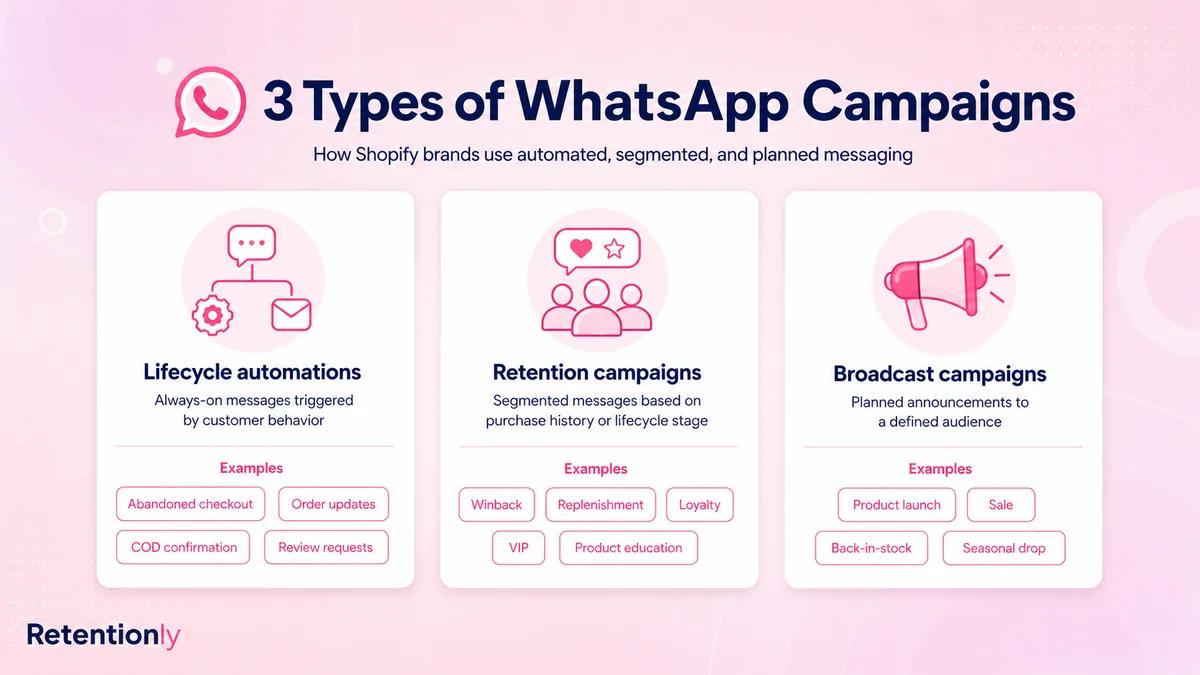
Notice the pattern: the campaign is defined by a customer state, not only by the message. This keeps WhatsApp from becoming a louder version of email.
One-Time Campaign Or Automation?
Not every marketing send should be an automation, and not every automation should be treated like a campaign blast.
Use a one-time campaign when the timing is shared by a segment. Examples include a seasonal sale for VIP customers, a product launch for an interested collection segment, or a limited-time restock announcement.
Use automation when the timing depends on each customer. Examples include abandoned checkout recovery, post-purchase upsells, review requests, reorder reminders, and winback sequences. The trigger, delay, exit rule, and message should adapt to the shopper's behavior.
| If the message depends on... | Use this model |
|---|---|
| A calendar event or sale window | One-time campaign |
| A customer action in Shopify | Triggered automation |
| A purchase-cycle interval | Lifecycle automation |
| A customer reply | Service workflow or human handoff |
| A product subscription, restock, or price alert | Event-based automation |
This is why API access alone is not enough. The same template can perform very differently depending on timing, segmentation, and stop behavior.
Template Examples To Adapt
These examples are intentionally short. They show the message logic, not final approved template copy. Review current WhatsApp rules and submit templates through your provider before launch.
Abandoned Cart Reminder
Hi [customer name], you left [product] in your cart at [store name]. Complete your order here: [checkout link]
Use when: the shopper clearly started checkout and has WhatsApp consent.
Avoid: fake urgency, repeated reminders, or discounts sent before you know whether they are needed.
Price Drop Alert
Good news, [customer name]. [product] is now available at [new price]. View it here: [product link]
Use when: the customer opted into product or offer alerts.
Avoid: sending price-drop messages to customers who never asked for offer updates.
Reorder Reminder
Hi [customer name], it may be time to restock [product] from your last order. Reorder here: [reorder link]
Use when: product consumption timing is predictable.
Avoid: sending too early, sending after a refund, or sending when the product is unavailable.
Winback Offer
Hi [customer name], we saved a return offer for your next order at [store name]. Use [code] before [expiry date]: [offer link]
Use when: the customer has not purchased for a defined period and has opted into offers.
Avoid: training every customer to wait for discounts.
For more message-copy-focused content, use the existing Abandoned Cart WhatsApp Message Examples for cart recovery copy and adapt the same timing, consent, and stop-rule thinking to other campaigns.
How To Avoid Spammy WhatsApp Marketing
Good WhatsApp marketing usually feels smaller than email marketing. The audience is narrower, the send is more contextual, and the message is easier to answer.
Use these rules before sending:
Send only to customers whose opt-in covers the message category.
Suppress customers who recently received another WhatsApp campaign.
Do not mix utility and promotional intent in the same template.
Make opt-out easy and honor it across every flow.
Keep the message useful without relying on artificial urgency.
Route replies to a real owner when the customer asks a question.
Track opt-outs, blocks, replies, clicks, conversions, and margin together.
The goal is not maximum reach. The goal is profitable, expected conversations that customers do not regret receiving.
What To Measure
Delivery and read rates are useful diagnostics, but they are not enough for a Shopify marketer. A campaign can be delivered and still be bad for retention if it creates opt-outs, support load, or discount dependency.
Measure the full loop:
| Metric | What it tells you |
|---|---|
| Opt-in source and growth | Whether the list is being built with clear expectations |
| Template approval and category | Whether the message matches platform rules and buyer intent |
| Delivery failures | Whether numbers, templates, or provider setup need cleanup |
| Replies | Whether customers are engaging or asking for help |
| Clicks | Whether the CTA and product context are relevant |
| Orders and revenue | Whether WhatsApp created commercial value |
| Opt-outs and blocks | Whether targeting, frequency, or message promise is wrong |
| Support handoffs | Whether marketing messages are creating customer questions |
| Margin after incentives | Whether discounts are buying revenue at a bad cost |
The most useful dashboard connects WhatsApp sends back to Shopify orders and customer segments. Without that link, teams overvalue message volume and undervalue flow quality.
Where Retentionly Fits
Retentionly is built for Shopify WhatsApp retention automation. That means the starting point is not a blank API campaign builder. The starting point is a store event or customer segment: abandoned checkout, COD confirmation, order update, review request, winback, reorder reminder, upsell, or broadcast.
That matters when marketing work needs clear ownership. A broad WhatsApp platform can be the right choice when the team wants a company-wide inbox, custom API operations, sales workflows, support automation, and cross-channel messaging. Retentionly is a cleaner fit when the priority is launching Shopify-triggered WhatsApp campaigns without turning every flow into a custom project.
Use Retentionly when you want:
Shopify events connected to WhatsApp retention workflows.
Approved template handling for revenue and lifecycle messages.
Stop rules tied to orders, replies, opt-outs, and customer state.
Campaigns that are measured by recovered and repeat revenue.
A setup path that keeps marketing focused on customer moments, not API plumbing.
Install Retentionly free on Shopify and start with one high-intent workflow. Once the first flow proves useful, expand into winback, reorders, upsells, reviews, and segmented retention campaigns.