WhatsApp Business API App: What to Look For Before Installing
TL;DRA WhatsApp Business API app should do more than connect a phone number to WhatsApp. For a growing Shopify store, the useful app is the one that turns API access into working store workflows: abandoned checkout recovery, COD confirmation, order updates, review requests, winback, reorders, post-purchase upsells, broadcasts, and reply handling.
That is the real pre-install question. Do not only ask whether the app uses the official WhatsApp API. Ask what the app will own after it is installed.
Quick Verdict
Choose a WhatsApp Business API app by operating job, not by the broadest feature list.
| If your store needs... | Better-fit route |
|---|---|
| A storefront WhatsApp button and simple manual conversations | Lightweight chat or contact app |
| Direct API access, custom routing, and developer control | API provider or BSP |
| Shared inbox, AI agents, catalogs, campaigns, and support workflows | Broad WhatsApp platform or helpdesk app |
| Shopify-triggered retention flows with clear revenue ownership | Shopify WhatsApp automation app |
| Manual one-to-one business chat only | WhatsApp Business app |
Most merchants searching for a WhatsApp Business API app are not trying to become API operators. They want an app that helps them launch useful WhatsApp flows without building templates, webhooks, timing rules, reporting, and support handoff from scratch.
What A WhatsApp Business API App Should Mean
The WhatsApp Business Platform gives businesses scalable messaging through approved templates, customer-service windows, webhooks, and business phone numbers. Meta pricing is based on delivered messages, recipient market, and message category, with categories such as marketing, utility, authentication, and service.
An app sits above that platform layer. Its job is to make the API usable for a merchant team.
| App responsibility | What to verify before installing | Why it matters |
|---|---|---|
| Setup path | WABA setup, phone number connection, business verification, permissions, onboarding | API setup issues delay every campaign and automation |
| Template handling | Template creation, category guidance, approval status, variables, edits, localization | Most proactive WhatsApp sends depend on approved templates |
| Shopify data | Checkout, order, fulfillment, delivery, customer, tag, product, and opt-in data | Messages need store context to stay relevant |
| Automation builder | Trigger, delay, segment, message, fallback, stop rule, and goal | This is where WhatsApp becomes a revenue workflow |
| Reply routing | Inbox, assignment, labels, customer context, and owner | Automated messages create real customer conversations |
| Reporting | Delivered messages, replies, recovered orders, revenue, opt-outs, failed sends | The team needs to know whether the flow is worth scaling |
| Cost control | Meta fees, app plan, markups, seats, contacts, chats, AI, credits, add-ons | The cheapest-looking app is not always the lowest-cost setup |
If an app mainly says it can "send WhatsApp messages," keep digging. The useful question is whether the app can own the work around the message.
The Pre-Install Checklist
Before installing a WhatsApp Business API app, run it through one concrete store scenario.
Use abandoned checkout recovery if you want the fastest revenue test. Use COD confirmation if RTO and fake orders are the bigger operational problem. Use order updates if support volume is the immediate pain.
| Question | Strong answer looks like |
|---|---|
| What triggers the message? | A real Shopify event such as checkout started, order created, fulfillment created, delivery completed, or customer segment entered |
| When does it send? | Clear timing controls, delays, business-hour logic where needed, and frequency caps |
| Who receives it? | Segments, exclusions, opt-in rules, suppression, and stop-on-purchase logic |
| What message is used? | Approved template support with variables and a clear category plan |
| What happens if the customer replies? | A known inbox, owner, label, and customer/order context |
| How does the flow stop? | Purchase, cancellation, delivery, opt-out, refund, support issue, or manual suppression |
| What does the team measure? | Recovered revenue, confirmation rate, support reduction, replies, conversion, and opt-outs |
| What does it cost at scale? | App plan plus Meta fees, markups, credits, users, conversations, contacts, AI, add-ons, and implementation time |
This checklist keeps the buying decision practical. A feature page can look impressive while still leaving your team to assemble the actual workflow.
Main Types Of WhatsApp Business API Apps
The app category is broad. Several products can claim WhatsApp API access while solving different jobs.
| App type | What it usually includes | Strong fit | Main tradeoff |
|---|---|---|---|
| Lightweight chat or cart app | WhatsApp button, basic abandoned cart reminders, simple templates, limited reporting | Stores that need a fast first WhatsApp touchpoint | May not cover the full retention lifecycle |
| Broad WhatsApp platform app | Inbox, broadcasts, campaigns, chatbots, AI, catalogs, segmentation, analytics | Teams using WhatsApp across sales, marketing, support, and operations | More setup surface and pricing variables |
| Helpdesk or CRM app | Omnichannel inbox, ticketing, routing, AI support, customer history, support analytics | Support-heavy brands that want WhatsApp inside service operations | Retention automation may be one module among many |
| Shopify retention automation app | Shopify events, lifecycle flows, templates, reply handoff, revenue reporting | Founders, marketers, ecommerce managers, and retention teams | Not meant to replace every broad support or developer API use case |
| Direct API provider route | API access, delivery, billing, webhooks, developer control | Technical teams building custom systems | Your team still builds the ecommerce workflow layer |
Wati, Zoko, Interakt, Dondy, DelightChat, and similar Shopify App Store listings show how much the category blends together: cart recovery, order updates, COD, broadcasts, shared inbox, AI agents, catalogs, support automation, and pricing add-ons often appear on the same page.
That does not make one model right for every store. It means the buyer needs to know which job they are actually hiring the app to do.
Pricing: Compare The Full App Model
WhatsApp Business API app pricing is rarely just the monthly subscription.
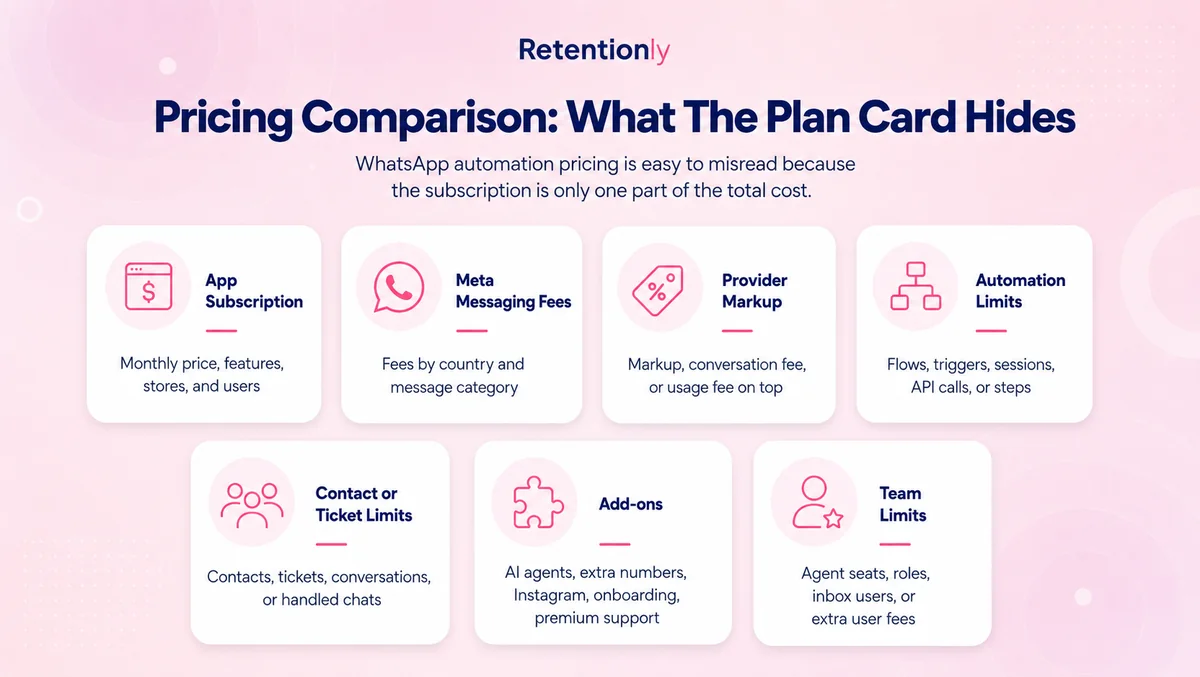
| Cost layer | What to check |
|---|---|
| Meta message fees | Delivered-message pricing by recipient market and template category |
| App subscription | Monthly or annual plan, included features, and plan gates |
| Provider markup | Whether Meta fees are passed through or marked up |
| Conversations or contacts | Included conversations, contact tiers, ticket limits, or fair-use caps |
| Seats and agents | Included users, extra agent costs, inbox limits, and team permissions |
| Automation limits | Flow limits, step limits, campaign credits, message credits, or paid workflow add-ons |
| AI add-ons | AI agent, chatbot, product recommendation, or training charges |
| Implementation effort | Setup, template approval, testing, migration, and team training |
Some apps are priced like broad platforms. Some are priced like helpdesks. Some look inexpensive until messages, conversations, agents, AI, or custom flows are added. Some are easier to evaluate because the app fee maps directly to Shopify workflows.
Retentionly is priced as Shopify WhatsApp automation software:
| Retentionly plan | Price | Best for |
|---|---|---|
| Basic | $24/month | Basic automations and core features |
| Growth | $49/month | Broadcasts and advanced automations, including winback workflows |
| Scale | $99/month | CRM features and multi-agent chat |
Retentionly does not add a markup on Meta messaging fees, does not charge extra for added automations, and does not charge per chat. That matters when a store moves from one test flow to a full retention program.
Workflows The App Should Support
The best way to evaluate a WhatsApp Business API app is to map it against the flows your store will run every week.
| Workflow | What the app must handle | What to measure |
|---|---|---|
| Abandoned checkout | Checkout trigger, cart link, delay, reminder sequence, stop on purchase | Recovered revenue and conversion rate |
| COD confirmation | COD order trigger, confirm/cancel reply, fulfillment hold, no-response path | Confirmed orders, cancellations, RTO reduction |
| Order updates | Order confirmation, fulfillment, shipping, delivery, and delay messages | Support tickets avoided and customer confidence |
| Review requests | Delivery-based timing, review-app handoff, suppression, and reminder logic | Review rate and review quality |
| Winback | Last purchase segment, offer logic, timing, frequency cap, opt-out handling | Repeat purchase revenue |
| Reorder reminders | Product purchase cycle, customer segment, timing rules | Repeat order rate |
| Post-purchase upsell | Purchased product, complementary offer, margin check, timing | Upsell conversion and average order value |
| Broadcast campaigns | Segment, consent, campaign goal, schedule, reply owner | Revenue, replies, opt-outs, and unsubscribes |
If an app can only handle one of these flows, it may still be useful. Just be clear about the role. A cart-recovery app should not be treated as a full lifecycle automation system unless it can support the lifecycle work.
Setup And Reply Handling Matter More Than They Look
WhatsApp automation creates replies. A cart recovery reminder can lead to a size question. A COD confirmation can reveal an address problem. A delivery update can trigger a complaint. A review request can turn into support feedback.
That is why reply handling belongs in the buying criteria, not after launch.
Ask where replies go, which team sees them, whether Shopify order context appears beside the conversation, how agents are assigned, and whether automated messages can be labeled by flow. If a customer replies to a winback message, support should know that the message came from a winback flow rather than a random inbound chat.
Setup also matters. Phone number ownership, business verification, template approval, permissions, opt-ins, and message categories are not side details. They decide whether the app can actually send the messages your store wants.
When A Broad WhatsApp App Is Better
A broad WhatsApp app can be the better choice when WhatsApp is a company-wide operating channel.
Choose that route when sales agents use WhatsApp all day, support needs omnichannel ticketing, catalogs are central to product discovery, AI agents answer many product questions, or marketing wants a shared campaign and inbox platform across WhatsApp, Instagram, SMS, and other channels.
In that case, a larger app surface can be worth the cost and setup. The buyer should still compare the pricing model carefully because broad apps often include variables such as seats, contacts, conversations, campaign credits, AI usage, custom flows, or support limits.
The key is fit. More features are useful when the team will operate them. They are distracting when the first job is a short list of Shopify retention flows.
When Retentionly Is The Better Fit
Retentionly is the better fit when the main reason for installing a WhatsApp Business API app is Shopify retention revenue.
That means the team wants to launch practical store-event workflows:
Recover abandoned checkouts.
Confirm COD orders before fulfillment.
Send order and shipping updates.
Request reviews after delivery.
Bring back lapsed customers.
Send reorder reminders.
Trigger post-purchase upsells.
Run segmented broadcasts without replacing lifecycle automation.
The advantage is focus. Retentionly is not trying to be a raw API provider, a generic CRM, or a full omnichannel helpdesk. It is built around the Shopify customer lifecycle, where the app should already understand the trigger, timing, segment, message, fallback, reply owner, and metric.
That makes it a cleaner fit for founders, marketers, ecommerce managers, and retention teams that need WhatsApp workflows live without turning the channel into a custom technical project.
Common Mistakes To Avoid
The first mistake is installing an app because it says "official API" without checking the workflow layer. Official access matters, but access alone does not create cart recovery, COD confirmation, reviews, or winback revenue.
The second mistake is comparing only plan prices. WhatsApp cost can include Meta fees, provider markup, conversations, contacts, agents, AI, automation credits, custom flows, implementation, and support.
The third mistake is choosing the broadest app because it feels safer. A broad platform is useful when the team needs sales, support, catalogs, AI, and inbox operations. It can be heavier than necessary when the goal is Shopify retention automation.
The fourth mistake is treating WhatsApp like a bulk sender. WhatsApp performs best when messages are tied to customer intent: an abandoned checkout, recent order, delivery event, product-use cycle, or lapsed customer segment.
The fifth mistake is ignoring who owns replies. Every useful automation should make the reply path obvious before it goes live.
Final Recommendation
If your team needs custom infrastructure, start with an API provider or BSP. If WhatsApp is a sales, support, catalog, AI, and campaign workspace, compare broad WhatsApp apps and helpdesks carefully.
If your store is installing a WhatsApp Business API app because you want Shopify retention revenue, start with the workflows. The strongest first use cases are abandoned checkout, COD confirmation, order updates, reviews, winback, reorder reminders, post-purchase upsells, and segmented broadcasts.
Retentionly is built for that job: Shopify-triggered WhatsApp automations, clear workflow ownership, reply handoff, revenue-focused use cases, and pricing that does not add markup on Meta messaging fees.
Quick FAQs
What is a WhatsApp Business API app?
A WhatsApp Business API app is software that helps a business use the WhatsApp Business Platform without building directly on the API. It can handle setup, templates, automations, campaigns, inboxes, Shopify events, reporting, and reply handoff.
Is a WhatsApp Business API app different from the WhatsApp Business app?
Yes. The WhatsApp Business app is mainly for manual one-to-one conversations. A WhatsApp Business API app helps businesses send scalable template messages, automate workflows, connect store events, manage replies, and measure performance.
What should Shopify stores check before installing?
Check Shopify triggers, template handling, opt-ins, automation timing, stop rules, reply routing, reporting, Meta fee handling, app pricing, seats, contacts, AI add-ons, and implementation effort.
Do I need an API provider if I use a Shopify WhatsApp app?
Not always as a separate buying decision. Many apps help merchants access the WhatsApp Business Platform through a productized setup. Developer-led teams may still choose a direct API provider when they need custom infrastructure and control.
When should a store choose Retentionly?
Choose Retentionly when the main goal is Shopify WhatsApp retention automation rather than raw API access or broad support operations. It is built around abandoned checkout recovery, COD confirmation, order updates, reviews, winback, upsells, reorders, and broadcasts.