Meta WhatsApp API Pricing: What Comes From Meta vs Your Provider
TL;DRMeta WhatsApp API pricing is only one part of your WhatsApp bill. Meta sets the base WhatsApp Business Platform message rates, but your actual monthly cost also depends on your provider, software platform, add-ons, automation needs, and the Shopify workflows you plan to run.
That is why two merchants can both ask for "Meta WhatsApp API pricing" and end up with different answers. One store may need direct API access and a developer-led setup. Another may need a broad WhatsApp inbox and campaign platform. A Shopify team focused on retention may need a simpler automation app that passes through Meta fees without turning every flow into custom infrastructure.
This guide separates what comes from Meta, what comes from your BSP or platform, and what Shopify stores should compare before choosing a WhatsApp automation setup.
Quick Verdict
Meta charges for delivered WhatsApp Business Platform messages based on recipient market and message category. That is the base layer.
Your provider or Business Solution Provider may add phone-number fees, API access fees, hosting fees, wallet requirements, support fees, or markup. That is the access layer.
Your WhatsApp software or Shopify app may add subscriptions, agents, automations, campaign limits, chatbots, AI usage, flow steps, or reporting. That is the workflow layer.
| Cost layer | Who controls it | What to compare |
|---|---|---|
| Meta message fees | Meta | Destination market, category, currency, delivered volume, volume tiers |
| BSP or API access | Provider | Phone-number fee, hosting, support, throughput, markup, prepaid balance |
| WhatsApp platform | Software vendor | Subscription, inbox seats, broadcasts, chatbots, AI, add-ons, usage limits |
| Shopify automation app | Shopify app vendor | Included flows, revenue tracking, setup effort, Meta fee handling |
If you only compare the Meta rate card, you may miss the bigger buying decision: who owns the workflows that actually create revenue?
How Meta WhatsApp API Pricing Works
Meta's WhatsApp Business Platform pricing is message based. Businesses are charged when WhatsApp delivers a business message to a user, not simply when the business attempts to send it.
The rate depends mainly on three things:
The market or region tied to the recipient's phone number.
The message category.
The currency and rate card that applies to your WhatsApp Business Account.
Meta's current categories are marketing, utility, authentication, and service. The category matters because an abandoned checkout reminder is not priced or treated the same way as an order update or a support reply.
Meta also publishes rate cards by market, currency, and category. That is useful for transparency, but it means there is no single global "Meta WhatsApp API price." A store sending to India, the UAE, the United Kingdom, North America, and Brazil needs to model those markets separately.
The Four Message Categories
For ecommerce teams, the categories are easiest to understand through workflows.
| Meta category | Ecommerce examples | Cost implication |
|---|---|---|
| Marketing | Abandoned checkout reminders, winback offers, product recommendations, launch campaigns | Usually the category to watch most closely because it is used for revenue campaigns |
| Utility | Order confirmations, shipping updates, delivery notifications, payment updates | Often lower-intent but high-volume; can be free when sent in response to users inside the right window |
| Authentication | OTPs, login verification, account verification | Relevant for login or verification use cases, less central for most Shopify retention flows |
| Service | Customer support replies inside the 24-hour customer service window | Used for inbound conversations and support handoff, not outbound lifecycle campaigns |
Two free windows are important. First, when a user messages your business, a 24-hour customer service window opens. Service replies inside that window are not charged by Meta. Meta also says utility messages sent in response to users are not charged.
Second, when a customer messages from a click-to-WhatsApp ad or a Facebook Page call-to-action button, Meta provides a 72-hour free entry point window across message categories.
Those windows can reduce costs, but they do not make outbound retention automation free. Cart recovery, winback, reorder reminders, review requests, and promotional broadcasts still need careful budgeting because they often rely on business-initiated templates.
What Meta Does Not Include
Meta's rate card does not tell you the full cost of using WhatsApp for Shopify.
It does not include the monthly fee for a provider that hosts your WhatsApp number. It does not include a broad WhatsApp platform subscription. It does not include inbox seats, add-ons, AI agents, chatbot sessions, flow steps, managed onboarding, custom development, or reporting work.
That is where pricing pages start to look different. A direct API provider may show a per-number monthly fee plus Meta messaging fees. A broad platform may show a software plan, wallet balance, message charges, add-ons, and team limits. A Shopify app may show an app subscription plus pass-through Meta message fees.
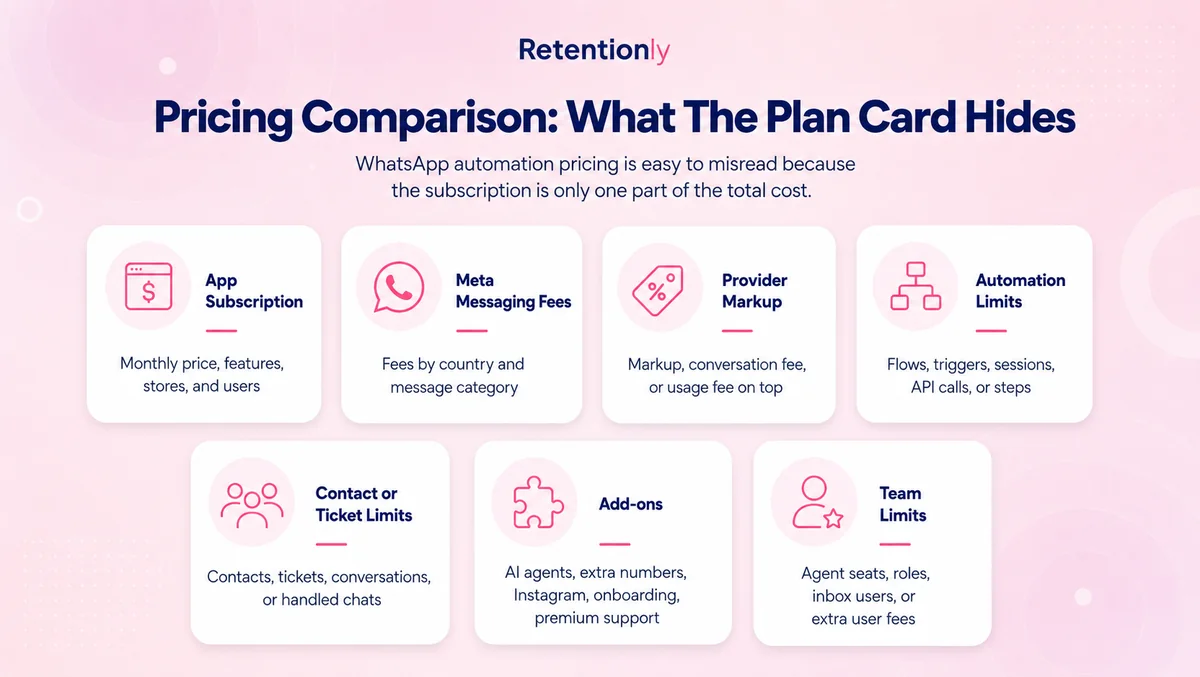
The buyer's job is to separate the base message fee from the access fee and the workflow fee.
Provider And Platform Pricing Examples
Use public pricing pages as model examples, not permanent price guarantees.
| Provider or platform type | Pricing model to watch | What it means for a Shopify team |
|---|---|---|
| Direct API/BSP access | Per-number or hosting fee plus Meta fees | Clean when you have developers and want control over API setup, templates, webhooks, and compliance |
| Broad WhatsApp platform | Subscription plus messaging fees, add-ons, users, chatbots, AI, campaign features, or wallet rules | Useful when WhatsApp is a sales, support, marketing, inbox, and operations layer |
| Ecommerce WhatsApp platform | Software plan plus WhatsApp rate-card handling, agents, flows, AI, and ecommerce features | Stronger fit when the team wants commerce workflows, but pricing can include several usage variables |
| Shopify retention app | App subscription plus Meta message fees | Stronger fit when the main job is Shopify-triggered retention automation and revenue tracking |
For example, 360dialog publicly frames its WhatsApp API plans around a per-number monthly fee plus Meta WhatsApp Messaging Fees. Wati describes pricing as subscription fee, messaging fee, and optional add-ons. Zoko's public pricing separates platform plans, conversations, agents, platform fees, flows, and AI agent charges. Interakt's Shopify listing shows monthly app pricing plus additional WhatsApp conversation charges, with features that span campaigns, cart reminders, COD confirmation, order updates, shared inbox, chatbot, AI, and Shopify workflow actions.
The pattern is the same: Meta sets the message-fee layer, but the vendor you choose determines the rest of the bill.
Direct API vs Broad Platform vs Retentionly
| Decision factor | Direct API or BSP | Broad WhatsApp platform | Retentionly |
|---|---|---|---|
| Meta fees | Usually separate or passed through | Usually separate, sometimes with vendor-specific handling | Direct Meta connection with no Retentionly markup |
| Monthly software cost | Provider or number fee, plus development cost | Subscription, seats, add-ons, campaign or AI costs | Basic $24/month, Growth $49/month, Scale $99/month |
| Shopify setup | Custom build or integration work | Available in some tools, often mixed with broader features | Built for Shopify retention workflows |
| Automation ownership | Your team builds logic and maintenance | Platform-dependent | Included for abandoned checkout, COD, order updates, reviews, winback, reorder, and upsell flows |
| Reporting | Custom or provider-dependent | Platform-dependent | Revenue-oriented Shopify workflow reporting |
| Best fit | Engineering-led teams needing API control | Teams using WhatsApp as a full sales/support operation | Shopify and D2C teams focused on retention revenue |
None of these paths is automatically wrong. A direct API setup can be the right call when your team needs custom infrastructure and has the developers to maintain it. A broad WhatsApp platform can be the right call when WhatsApp is a shared inbox, support channel, sales assistant, campaign tool, and AI layer.
Retentionly is the cleaner fit when the team wants WhatsApp to drive Shopify retention outcomes without owning an API build. The decision is less about who has the longest feature list and more about who owns the specific flows you will launch.
Build A 90-Day Shopify WhatsApp Cost Model
Before choosing a provider, model the first 90 days of messages. Do not start from an abstract monthly volume number. Start from flows.
| Workflow | First 90-day question | Cost-control rule |
|---|---|---|
| Abandoned checkout | How many checkout abandoners should receive WhatsApp reminders? | Cap reminders, stop after purchase, and suppress low-intent shoppers |
| COD confirmation | How many COD orders need confirmation before fulfillment? | Send one clear confirmation path and avoid repeated nudges |
| Order updates | Which events need WhatsApp instead of email or SMS? | Keep transactional messages specific and non-promotional |
| Review requests | Which delivered orders should receive a review ask? | Time messages after delivery and avoid repeat asks |
| Winback | Which inactive customers are profitable to re-engage? | Segment by purchase history, margin, and recency |
| Reorder reminders | Which products have a predictable replenishment cycle? | Trigger by likely need date, not a generic campaign calendar |
| Post-purchase upsell | Which products have a natural add-on or bundle? | Send only when the margin can justify the message cost |
Then estimate delivered templates by category and market. A store with a high-margin consumable product can often justify reorder reminders that a low-margin store should avoid. A COD-heavy store may care more about confirmation and RTO reduction than promotional winback. A global store should not use one country rate as its blended cost assumption.
The most useful number is not the lowest message fee. It is contribution margin after WhatsApp costs.
Where Retentionly Fits
Retentionly is built for Shopify and D2C teams that want WhatsApp automation for revenue workflows, not a raw API project.
Use Retentionly when your priority is:
Recovering abandoned checkouts.
Confirming COD orders before fulfillment.
Sending order and shipping updates.
Requesting reviews after delivery.
Winning back inactive customers.
Sending reorder reminders.
Running post-purchase upsell and lifecycle campaigns.
Retentionly pricing is simple: Basic at $24/month, Growth at $49/month, and Scale at $99/month. Meta message fees still apply, but Retentionly does not add a markup on Meta fees, does not charge extra for added automations, and does not charge per-chat fees.
If you want WhatsApp to become a Shopify retention channel, install Retentionly and launch the first flow that maps to a real revenue or cost problem.
Quick FAQs
Is Meta WhatsApp API pricing the same as WhatsApp Business API pricing?
Meta WhatsApp API pricing usually refers to the base WhatsApp Business Platform message fees set by Meta. WhatsApp Business API pricing often includes those Meta fees plus provider, BSP, platform, or app charges.
Does Meta charge per conversation or per message?
Meta's current public pricing describes a per-message model where businesses are charged when messages are delivered to users. The charge depends on recipient market and message category.
Are WhatsApp service messages free?
Meta says service messages are not charged, and the 24-hour customer service window lets businesses respond to user messages with service messages at no charge. Utility messages sent in response to users can also be free under Meta's current pricing rules.
Why does my provider's WhatsApp price differ from Meta's rate card?
Your provider may add phone-number hosting, API access, support, markup, subscriptions, add-ons, user seats, chatbot features, AI usage, or workflow limits. Compare the full bill, not only the Meta message rate.
What should Shopify stores compare before choosing a WhatsApp API setup?
Compare Meta fee handling, provider markup, Shopify trigger support, automation ownership, campaign limits, inbox seats, AI costs, reporting, setup effort, and whether the tool is built for retention workflows or broad WhatsApp operations.