HubSpot WhatsApp Automation for Ecommerce Teams
TL;DRHubSpot WhatsApp automation can make sense when WhatsApp should live inside a broader CRM, marketing, sales, or service system. If your team already uses HubSpot as the source of truth for contacts, deals, support conversations, and lifecycle campaigns, adding WhatsApp into that workspace can reduce channel switching.
For Shopify teams, the decision is more specific. The question is not only whether HubSpot can send automated WhatsApp messages. The question is whether your WhatsApp workflows should be owned by a CRM platform or by a Shopify-first retention automation layer that already understands carts, orders, payment methods, delivery timing, reviews, winback, reorders, and revenue attribution.
This guide explains when HubSpot WhatsApp automation is useful for ecommerce, where it can become too CRM-heavy for Shopify retention, and when Retentionly is the cleaner option.
Quick Verdict
Use HubSpot WhatsApp automation when WhatsApp is part of a broader customer operations system. Use Retentionly when WhatsApp is mainly a Shopify retention channel tied to store events and repeat revenue.
| If your main goal is... | Better fit | Why |
|---|---|---|
| Keep WhatsApp conversations in the same CRM inbox as other customer activity | HubSpot | The CRM context, shared inbox, and service workflow matter most |
| Trigger WhatsApp messages from broad lifecycle or sales workflows | HubSpot | The team already owns segmentation, deals, lists, and campaigns in HubSpot |
| Recover abandoned Shopify checkouts | Retentionly | The flow needs cart context, timing, stop rules, and recovered revenue tracking |
| Confirm COD orders before fulfillment | Retentionly | The flow needs payment method, order status, customer replies, and fulfillment decisions |
| Send order updates, delivery nudges, and review requests | Retentionly | The message should follow Shopify order and delivery events |
| Run winback, reorder, and post-purchase upsell flows | Retentionly | The logic depends on purchase history, timing, product context, and suppression rules |
| Build one central CRM for a larger sales, support, and marketing team | HubSpot | The CRM operating model matters more than one Shopify workflow |
The practical rule: if the workflow begins with a CRM segment, HubSpot may be the better owner. If it begins with a Shopify event, Retentionly is usually the simpler owner.
What HubSpot WhatsApp Automation Does Well
HubSpot is strongest when customer messaging should be connected to CRM records, shared inbox activity, contact properties, lists, service conversations, marketing workflows, and team handoffs.
That can be valuable for ecommerce teams with a heavier CRM motion. For example, a brand might use HubSpot to manage wholesale leads, high-value customer outreach, support tickets, post-purchase service follow-up, and lifecycle campaigns across several channels. In that environment, WhatsApp becomes another channel inside the customer platform.
HubSpot's public WhatsApp integration positioning emphasizes shared inbox management, CRM conversation tracking, automated messages triggered by customer actions, WhatsApp templates, conversation visibility, and messaging analytics. It also states that the feature requires Professional or Enterprise versions of Marketing Hub or Service Hub, along with a WhatsApp business account and phone number.
That is a real fit when:
your team already works from HubSpot every day
support and marketing need the same contact timeline
WhatsApp replies should be handled by CRM or service teams
customer segments are already built in HubSpot
the WhatsApp message is part of a broader customer journey, not only a Shopify event
For those teams, the advantage is operational continuity. WhatsApp does not become a separate tool the team has to check.
Where HubSpot Can Be Too Heavy For Shopify Retention
Shopify retention workflows are not only CRM messages. They are ecommerce flows tied to store state.
An abandoned checkout flow needs to know what the shopper left behind, when the checkout was abandoned, whether a purchase happened later, which link should be sent, which template is approved, whether the shopper is eligible, and how recovered revenue should be counted.
A COD confirmation flow needs the order value, payment method, customer reply, fulfillment status, cancellation path, and non-response fallback.
A review request needs delivery timing, the right review destination, and a support fallback if the customer replies with a complaint.
Those details are not impossible to coordinate in a CRM stack, but they can create extra mapping and maintenance work. The more Shopify-specific the workflow becomes, the more the team has to answer questions like:
| Workflow question | Why it matters |
|---|---|
| Which Shopify event starts the flow? | The trigger should reflect the actual cart, order, fulfillment, or delivery state |
| Which customer should be skipped? | Consent, opt-out, unresolved support issues, recent messages, and purchase state matter |
| What data should personalize the message? | Cart URL, product, order status, payment method, delivery state, and purchase history change the copy |
| What stops the flow? | Purchase, cancellation, opt-out, reply, support escalation, and fulfillment changes should suppress later messages |
| Where do replies go? | A WhatsApp reply may need support, marketing, or operations ownership |
| How is revenue measured? | Shopify teams need recovered carts, repeat orders, confirmations, reviews, and upsell revenue, not only message engagement |
If your team has to rebuild those rules across HubSpot, Shopify, a WhatsApp provider, templates, lists, and reporting, the CRM can become a control panel rather than the actual workflow owner.
Pricing And Operating Model: Compare The Whole Stack
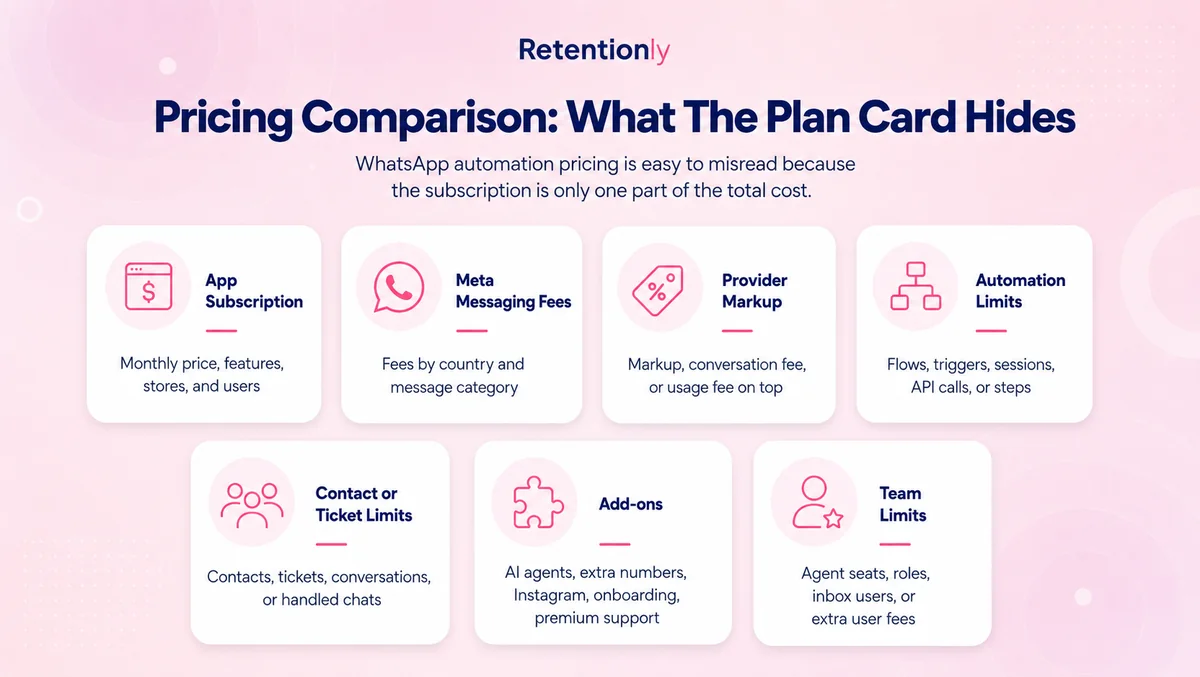
Do not compare HubSpot WhatsApp automation with Retentionly only by one monthly subscription number. They are different operating models.
HubSpot pricing depends on the hub, tier, seats, contacts, onboarding, and the plan capabilities your team needs. WhatsApp automation may also involve Meta message fees and the operational cost of managing templates, consent, replies, workflow QA, and reporting.
Retentionly should be compared as a Shopify WhatsApp retention app: the store installs it to launch ecommerce workflows, not to replace the whole CRM.
| Cost layer | HubSpot WhatsApp automation | Retentionly |
|---|---|---|
| Platform subscription | Tied to the HubSpot hub and tier required for the WhatsApp use case | Tied to the Shopify WhatsApp automation app |
| Team seats and access | Important if many marketing, sales, or service users need CRM access | Usually centered on the ecommerce team running retention workflows |
| Contact and list management | Strong fit when HubSpot owns customer segmentation | Shopify customer/order context is the core starting point |
| Meta message fees | Still need to be understood separately from software cost | Still need to be understood separately from software cost |
| Template operations | Managed as part of the broader WhatsApp setup | Managed around Shopify lifecycle use cases |
| Workflow maintenance | Depends on CRM workflows, integrations, properties, and Shopify data sync | Focused on Shopify-triggered retention flows |
| Reporting | CRM campaign and conversation analytics | Flow-level Shopify retention and revenue outcomes |
HubSpot can be worth it when the CRM is already central to the business. But if the team is buying WhatsApp mainly to recover carts, confirm orders, request reviews, and drive repeat purchases, paying for CRM breadth may be the wrong starting point.
Feature Comparison For Shopify Teams
The fairest comparison is not "HubSpot versus Retentionly" as broad software categories. HubSpot is a customer platform. Retentionly is a Shopify WhatsApp retention automation app.
The better comparison is which tool should own the WhatsApp jobs your ecommerce team actually needs.
| Capability | HubSpot fit | Retentionly fit |
|---|---|---|
| CRM contact timeline | Strong | Limited to retention workflow context |
| Shared inbox and service context | Strong | Useful when replies relate to automation outcomes |
| Broad marketing and sales workflows | Strong | Narrower, Shopify retention-focused |
| Shopify abandoned checkout recovery | Possible with the right setup and data | Core workflow |
| COD confirmation | Requires careful Shopify/order/reply coordination | Core workflow |
| Order and delivery updates | Possible when Shopify events are synced cleanly | Core lifecycle workflow |
| Review requests | Possible as part of post-purchase campaigns | Core post-purchase workflow |
| Winback and repeat purchase flows | Possible with purchase data and segments | Core retention workflow |
| Post-purchase upsell | Possible with product/order data | Core revenue expansion workflow |
| Revenue attribution by Shopify flow | Needs reporting design | Built around ecommerce outcomes |
| Best-fit team | CRM, lifecycle, service, and sales teams | Shopify founders, marketers, and ecommerce managers |
HubSpot wins when the team needs a centralized customer platform. Retentionly wins when the team needs Shopify WhatsApp workflows to be live, measurable, and easier to own.
The Shopify Workflows To Map Before Choosing
Before choosing HubSpot WhatsApp automation, write down the first three workflows you actually want to launch.
If the list looks like this, HubSpot may be a reasonable owner:
send WhatsApp follow-ups from CRM lifecycle stages
route customer replies into a service inbox
message leads after forms, demos, quotes, or sales conversations
keep customer communication history in one CRM timeline
coordinate WhatsApp with email, sales tasks, tickets, and service workflows
If the list looks like this, start with Retentionly:
recover abandoned Shopify checkouts
confirm COD orders before fulfillment
send order and delivery updates
request reviews after delivery
win back lapsed customers
remind customers to reorder consumable products
send post-purchase upsell messages based on what they bought
The difference is workflow ownership. HubSpot asks, "How does this customer fit into our CRM journey?" Retentionly asks, "What just happened in Shopify, and what WhatsApp flow should run next?"
When HubSpot Is Still The Better Fit
HubSpot is the better choice when your team already has a mature HubSpot setup and WhatsApp is one channel inside that operating system.
It can be especially sensible for brands with B2B ecommerce, wholesale accounts, sales-assisted buying, larger support teams, or a strong CRM-led lifecycle program. In those cases, keeping WhatsApp inside HubSpot can reduce fragmentation. The service team can see conversation history, marketers can work from CRM segments, and managers can monitor messaging alongside other channels.
HubSpot can also be useful when the main WhatsApp job is conversation management, not store-event automation. If customers frequently ask product, support, sales, or account questions on WhatsApp, the shared inbox and CRM context may matter more than having the fastest abandoned checkout flow.
When Retentionly Is The Better Fit
Retentionly is the better fit when the Shopify store wants WhatsApp to drive retention revenue without turning the project into a CRM implementation.
That means the first value should come from flows like abandoned checkout recovery, COD confirmation, order updates, review requests, winback, reorders, and post-purchase upsells. These are not abstract customer journeys. They are Shopify events with specific timing, templates, replies, stop rules, and metrics.
For a founder, marketer, or ecommerce manager, the advantage is focus. The team does not have to decide how to model every contact property, every CRM lifecycle stage, or every integration path before launching the first useful WhatsApp flows.
Final Recommendation
Choose HubSpot WhatsApp automation if WhatsApp belongs inside your CRM, service desk, sales process, and broader customer platform.
Choose Retentionly if WhatsApp should be a Shopify retention channel that recovers abandoned checkouts, confirms COD orders, sends order updates, requests reviews, wins back customers, and drives repeat purchases.
The deciding question is simple: is WhatsApp an extension of your CRM, or is it a revenue workflow triggered by Shopify?
If your answer is Shopify, install Retentionly and launch the first retention flows without building a heavy automation stack.
Quick FAQs
Can HubSpot send WhatsApp automation messages?
Yes. HubSpot publicly describes WhatsApp automation through workflows, templates, CRM personalization, shared inbox conversations, and messaging analytics. The fit depends on your HubSpot tier, setup, WhatsApp account, and whether the workflow should be CRM-led or Shopify-led.
Is HubSpot better than a Shopify WhatsApp app?
HubSpot is better when the team needs a broad CRM and service platform. A Shopify WhatsApp app is better when the main goal is to launch ecommerce retention workflows tied to carts, orders, delivery, reviews, winback, and repeat purchases.
Can I use HubSpot and Retentionly together?
Yes. Many teams use a CRM for broader customer management while using a Shopify-specific tool for store-event automation. The important part is deciding which system owns each workflow so customers do not receive duplicate or conflicting messages.
What should Shopify stores automate first on WhatsApp?
Start with high-intent lifecycle moments: abandoned checkout recovery, COD confirmation, order updates, review requests, winback, reorder reminders, and post-purchase upsells. These workflows are easier to measure than generic broadcast campaigns.
Does WhatsApp automation require opt-in?
Yes. Ecommerce teams should collect and respect WhatsApp consent, handle opt-outs, use approved templates where required, and avoid treating WhatsApp like a generic notification channel. Consent and suppression rules should be part of the workflow from day one.