Google Sheets WhatsApp Automation: When Spreadsheets Stop Working
TL;DRGoogle Sheets WhatsApp automation is attractive because the starting point feels familiar. Put contacts, numbers, message variables, order notes, or campaign rows in a spreadsheet, connect a WhatsApp sender, and trigger messages when a row is added or updated.
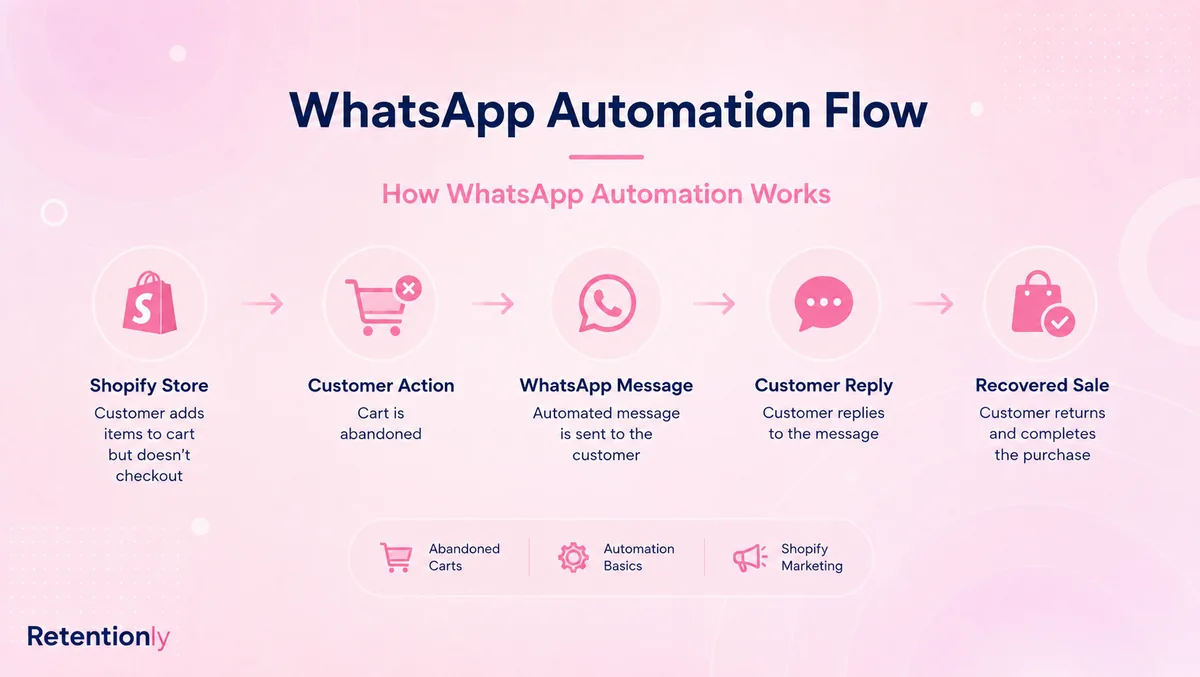
That can work for early lists, manual campaigns, lead follow-ups, and lightweight operations. The problem starts when the spreadsheet becomes the system of record for Shopify retention. Abandoned checkout recovery, COD confirmation, order updates, review requests, winback, reorders, and upsells need more than rows and columns. They need Shopify events, customer eligibility, approved templates, reply handling, stop rules, and revenue attribution.
This guide explains where Google Sheets WhatsApp automation helps, where it becomes fragile for ecommerce, and when a Shopify-first tool like Retentionly is the cleaner path.
Quick Verdict
Use Google Sheets when the workflow is simple, manual, or experimental. Use Retentionly when the workflow is tied to Shopify customer behavior and should run reliably without someone maintaining a spreadsheet every week.
| If your goal is... | Better starting point | Why |
|---|---|---|
| Send a one-off WhatsApp campaign from a small contact list | Google Sheets plus a WhatsApp sender | The sheet is easy to prepare, review, and edit |
| Test a simple follow-up before building a permanent flow | Google Sheets or a no-code connector | Low setup cost matters while the idea is still unproven |
| Log WhatsApp outreach attempts for internal review | Google Sheets | The sheet is useful as a record, not the workflow owner |
| Recover abandoned Shopify checkouts | Retentionly | The flow needs checkout links, timing, purchase stop rules, and revenue tracking |
| Confirm COD orders before fulfillment | Retentionly | The flow needs payment method, order status, replies, and fulfillment decisions |
| Send order, delivery, and review messages | Retentionly | The timing depends on Shopify and delivery events, not manual rows |
| Run winback, reorder, and upsell flows | Retentionly | The logic depends on purchase history, segments, timing, and suppression rules |
The key question is not "Can Google Sheets send WhatsApp messages?" The better question is "Should a spreadsheet own this customer workflow?"
What Google Sheets WhatsApp Automation Does Well
Google Sheets is useful when the team needs a simple operating table. It is easy to understand, easy to share, and easy to review before sending.
That makes it a reasonable fit for:
small contact lists where a marketer wants to check data before sending
lead follow-ups from forms, events, webinars, or offline sales
internal notifications and manual review queues
temporary campaigns with a clear owner
early experiments before a team knows whether a workflow is worth automating
logging campaign attempts, numbers verified, message status, and notes
Tools in this space usually offer some version of the same promise: select rows, map columns to template variables, send WhatsApp messages, and sometimes trigger a campaign when a new row is added or an existing column changes.
That is useful as long as the sheet is a staging area. It becomes risky when the sheet becomes the retention engine.
Where Spreadsheets Break For Shopify Retention
Shopify retention workflows are event-driven. A useful WhatsApp message usually starts because something happened in the store: a checkout was abandoned, an order was placed, a COD order needs confirmation, a shipment moved, a delivery happened, or a customer has not purchased again.
A spreadsheet does not naturally know all of that state. The team has to import it, map it, update it, clean it, and keep it synchronized.
| Workflow need | Why it matters | What often breaks in a sheet-led setup |
|---|---|---|
| Fresh Shopify data | Messages need cart, order, product, customer, and delivery context | The sheet is stale, incomplete, duplicated, or manually exported |
| Consent and suppression | WhatsApp should respect opt-ins, opt-outs, and recent message history | A row can be sent even when the customer should be skipped |
| Approved templates | Many outbound WhatsApp messages need approved templates | Template names, variables, and row columns drift out of sync |
| Timing | Cart recovery, reviews, and reorders need the right delay | A row update fires too early, too late, or more than once |
| Stop rules | Flows should stop after purchase, cancellation, reply, opt-out, or escalation | The sheet does not automatically know when the customer state changed |
| Reply handling | Customers reply with questions, objections, cancellations, and support issues | Replies land outside the sheet and do not update the flow |
| Attribution | Shopify teams need recovered revenue and lifecycle outcomes | Reporting stays spread across sheets, provider logs, and Shopify |
The problem is not Google Sheets itself. The problem is asking a spreadsheet to behave like a Shopify retention automation system.
The Shopify Workflows To Compare Before Building A Sheet Automation
Before building Google Sheets WhatsApp automation, write down the exact workflow your store wants to launch. Then decide whether the sheet is a temporary helper or the actual owner.
| Workflow | What the flow needs | Google Sheets fit | Retentionly fit |
|---|---|---|---|
| Abandoned checkout recovery | Checkout URL, product context, timing, follow-up, stop on purchase, recovered revenue | Useful for a manual test, fragile as an always-on flow | Core workflow |
| COD confirmation | Payment method, order value, confirm/cancel replies, fulfillment hold, non-response fallback | Hard to maintain because replies must affect operations | Core workflow |
| Order updates | Order status, fulfillment, tracking link, delivery timing, support fallback | Works only if data is imported cleanly and kept current | Core lifecycle workflow |
| Review requests | Delivery timing, review link, support fallback for unhappy customers | Possible for one-off batches, weak for ongoing timing | Core post-purchase workflow |
| Winback | Last purchase date, customer segment, offer, frequency cap, opt-out handling | Possible with manual exports and careful filters | Growth retention workflow |
| Reorder reminders | Product cycle, purchase history, quantity, timing, stop on recent purchase | Usually too stateful for a simple sheet | Repeat purchase workflow |
| Post-purchase upsell | Purchased product, complementary offer, timing, suppression | Possible for simple campaigns, harder to automate cleanly | Post-purchase revenue workflow |
If the workflow is customer-facing, revenue-sensitive, and tied to Shopify state, the sheet should not be the main automation layer.
A Practical Google Sheets Setup Checklist
If you still want to use a sheet-led setup, define the rules before sending.
| Decision | What to write down |
|---|---|
| Source of data | Whether rows come from Shopify export, form submission, CRM, connector, app, or manual entry |
| Trigger | New row, updated column, scheduled send, manual selection, or filtered condition |
| Customer eligibility | Consent, country, opt-out, order status, previous messages, and suppression rules |
| Template | Approved WhatsApp template name, variable mapping, language, and owner |
| Personalization | Which columns are safe to use and what happens when they are blank |
| Timing | Immediate, delayed, scheduled, or based on another customer event |
| Stop rule | Purchase completed, order canceled, customer replied, opt-out, or row archived |
| Error handling | Duplicate rows, bad phone numbers, missing variables, failed sends, and retries |
| Measurement | Recovered orders, replies, opt-outs, confirmed COD orders, reviews, and repeat purchases |
This checklist is where many sheet automations reveal their real cost. If the table becomes long, the team is not just sending from Google Sheets. It is rebuilding a workflow system around Google Sheets.
When Google Sheets Is Still The Better Fit
Google Sheets is still useful when the team wants visibility and control more than full automation.
Use it when a human should review the data before sending, when the contact list is small, when the campaign is temporary, or when the message does not need to respond to changing Shopify state.
For example, a founder might use a sheet to follow up with a handful of wholesale leads. A support team might keep a manual escalation list. A marketer might test a simple campaign for a small segment before turning it into a recurring flow. An operations team might log WhatsApp outreach attempts after another system sends the actual message.
In those cases, the spreadsheet is a workspace. It is not pretending to own lifecycle automation.
When Retentionly Is The Better Fit
Retentionly is the better fit when WhatsApp should become a Shopify retention channel.
That means the store wants workflows such as:
abandoned checkout recovery
COD confirmation
order and shipping updates
review requests
winback campaigns
reorder reminders
post-purchase upsells
welcome flows and segmented retention campaigns
These workflows need Shopify context from the beginning. They also need discipline: who should receive the message, when it should send, what should stop it, where replies should go, and which metric proves it worked.
Retentionly is built around that job. It connects WhatsApp automation to Shopify and D2C retention moments instead of making the merchant maintain rows, formulas, triggers, and provider logs.
Final Recommendation
Google Sheets WhatsApp automation is useful when the job is simple: prepare a list, send a small campaign, test an idea, or log outreach.
It is the wrong center of gravity when WhatsApp should recover abandoned checkouts, confirm COD orders, send order updates, request reviews, win back customers, or drive repeat purchases. Those workflows need Shopify events, customer state, templates, replies, stop rules, and revenue measurement.
If the message starts from a spreadsheet row, Google Sheets may be enough. If the message starts from a Shopify customer moment, use Retentionly.
Quick FAQs
Can Google Sheets automate WhatsApp messages?
Yes. Google Sheets can be connected to WhatsApp senders, provider extensions, or no-code automation tools to send messages from rows, updated columns, scheduled campaigns, or selected contact lists. The exact setup depends on the WhatsApp provider and template rules.
Is Google Sheets good for Shopify WhatsApp automation?
Google Sheets is useful for simple tests, manual campaigns, and internal tracking. For ongoing Shopify retention workflows such as abandoned checkout recovery, COD confirmation, order updates, reviews, winback, and reorders, a Shopify-first automation app is usually cleaner.
What is the biggest risk with Google Sheets WhatsApp automation?
The biggest risk is stale or incomplete customer state. A sheet may not know that a customer purchased, opted out, replied, canceled, or moved to a different segment unless another system updates it accurately.
When should I move from Google Sheets to Retentionly?
Move when the workflow needs Shopify events, timing, stop rules, reply handling, approved templates, and revenue tracking. Those are signs that the spreadsheet has become a fragile workaround rather than a useful staging area.
Can I still use Google Sheets with Retentionly?
Yes. Google Sheets can still be useful for planning campaigns, reviewing lists, or analyzing exports. Retentionly should own the customer-facing Shopify WhatsApp flows that need to run reliably.